




180 ·GitHub
Что это?
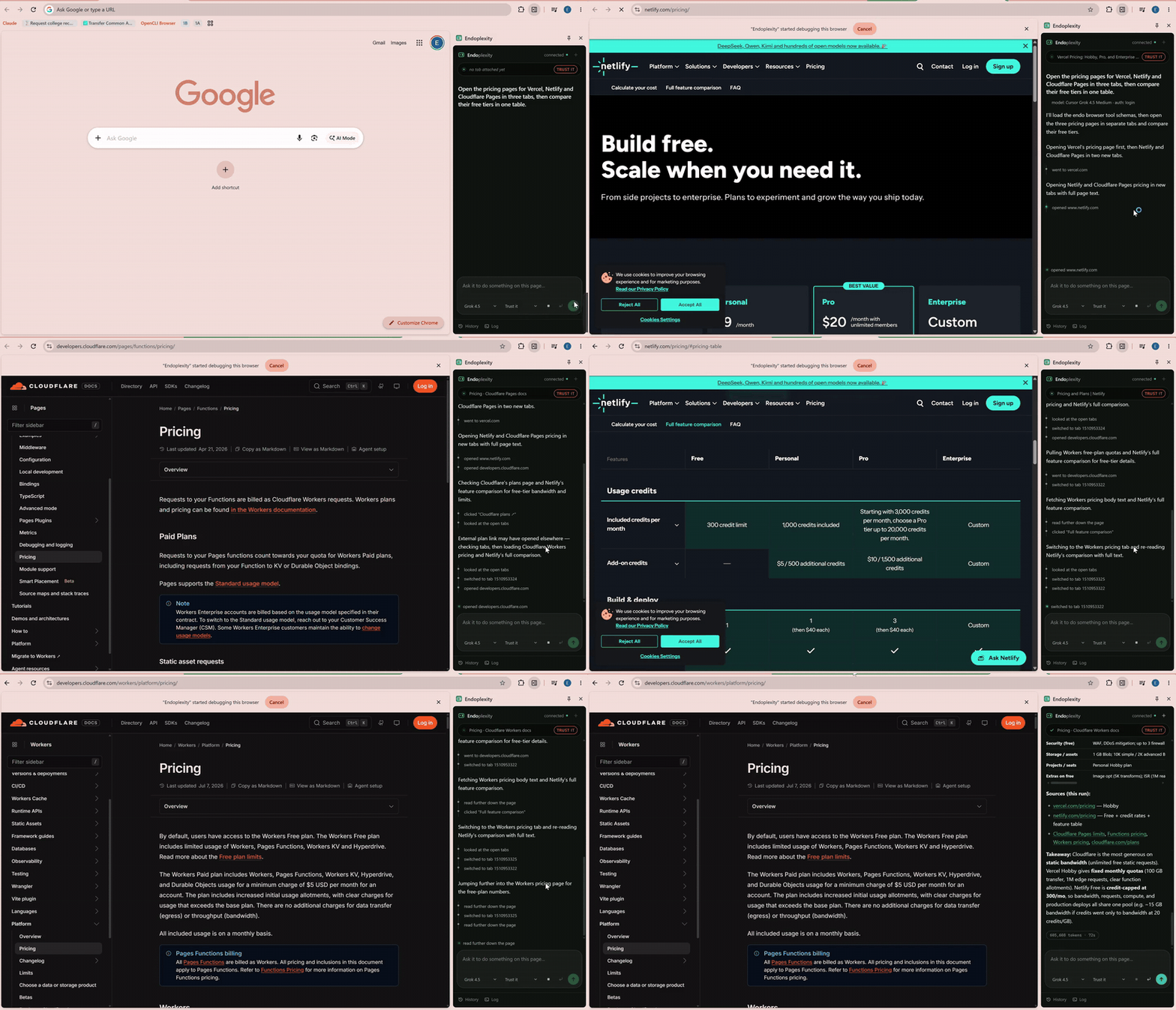
 Endoplexity — расширение с боковой панелью для Chrome, которое позволяет существующей подписке Claude или Cursor управлять вашим настоящим браузером — кликать, печатать, заполнять формы, переключать вкладки — через уже авторизованный CLI claude или cursor-agent, вместо отдельного тарифицируемого API-ключа.
Endoplexity — расширение с боковой панелью для Chrome, которое позволяет существующей подписке Claude или Cursor управлять вашим настоящим браузером — кликать, печатать, заполнять формы, переключать вкладки — через уже авторизованный CLI claude или cursor-agent, вместо отдельного тарифицируемого API-ключа.Это браузерное расширение, приложение или что-то иное?Это две части, работающие вместе: расширение с боковой панелью Chrome, которое читает и обрабатывает страницу, на которую вы смотрите, и локальный мост/сервер инструментов на Node, который общается с вашим CLI claude или cursor-agent по MCP. Облачного сервиса или отдельного бэкенда нет.
Это две части, работающие вместе: расширение с боковой панелью Chrome, которое читает и обрабатывает страницу, на которую вы смотрите, и локальный мост/сервер инструментов на Node, который общается с вашим CLI claude или cursor-agent по MCP. Облачного сервиса или отдельного бэкенда нет.Как его запустить?Склонируйте репозиторий и запустите скрипт настройки, чтобы стартовал мост (он автоматически запускается при входе в Windows), затем откройте chrome://extensions, включите режим разработчика и выберите 'Load unpacked', указав папку extension/ из репозитория.
Склонируйте репозиторий и запустите скрипт настройки, чтобы стартовал мост (он автоматически запускается при входе в Windows), затем откройте chrome://extensions, включите режим разработчика и выберите 'Load unpacked', указав папку extension/ из репозитория.Нужен ли API-ключ Anthropic для использования?Нет — он переиспользует CLI claude или cursor-agent, в котором вы уже вошли с реальной подпиской (достаточно Claude Pro). Нужно лишь установить Node 24+ и Chrome 114+.
Нет — он переиспользует CLI claude или cursor-agent, в котором вы уже вошли с реальной подпиской (достаточно Claude Pro). Нужно лишь установить Node 24+ и Chrome 114+.Какие сейчас известны ограничения?Проект на версии v0.0.1 и ориентирован на Windows — на macOS и Linux мост можно запустить через npm start, но автозапуска пока нет. Кроме того, он не может управлять страницами chrome:// и Web Store, реальные ATS-комбобоксы требуют обходного приёма «клик, затем клик» вместо инструмента select, а длинные навигационные сессии могут оставлять посторонний шум от мёртвых iframe-сессий.
Проект на версии v0.0.1 и ориентирован на Windows — на macOS и Linux мост можно запустить через npm start, но автозапуска пока нет. Кроме того, он не может управлять страницами chrome:// и Web Store, реальные ATS-комбобоксы требуют обходного приёма «клик, затем клик» вместо инструмента select, а длинные навигационные сессии могут оставлять посторонний шум от мёртвых iframe-сессий.Будет ли он одинаково работать на macOS или Linux, или это чисто инструмент для Windows?Сам мост переносим и запускается где угодно через npm start, но удобный установщик автозапуска одной командой сейчас нацелен только на папку автозагрузки Windows.
Сам мост переносим и запускается где угодно через npm start, но удобный установщик автозапуска одной командой сейчас нацелен только на папку автозагрузки Windows.Уходят ли с моего компьютера мои данные просмотра или файлы?Нет — мост привязывается только к 127.0.0.1 (loopback), но никогда к публичному интерфейсу, а вложения и файлы сессий внесены в gitignore и хранятся локально; по замыслу с вашей машины ничего не уходит.
Нет — мост привязывается только к 127.0.0.1 (loopback), но никогда к публичному интерфейсу, а вложения и файлы сессий внесены в gitignore и хранятся локально; по замыслу с вашей машины ничего не уходит.Как шлюз подтверждений решает, что блокировать?Он сверяет видимую надпись нажатого элемента с коротким списком английских слов вроде 'submit', 'pay', 'delete' и 'confirm', прежде чем пропустить необратимое действие. Это эвристика по надписям, а не настоящее понимание страницы, поэтому кнопки только с иконками или необычные формулировки (например, 'Finish') могут проскочить мимо — именно для такого случая существует режим наблюдения.
Он сверяет видимую надпись нажатого элемента с коротким списком английских слов вроде 'submit', 'pay', 'delete' и 'confirm', прежде чем пропустить необратимое действие. Это эвристика по надписям, а не настоящее понимание страницы, поэтому кнопки только с иконками или необычные формулировки (например, 'Finish') могут проскочить мимо — именно для такого случая существует режим наблюдения.Сколько реально стоит выполнение задачи?Пример отклика на вакансию, выполненного агентом, обошёлся в эквиваленте $0.0959 расхода API на 112 тыс. токенов и 10 ходов за 42 секунды — но поскольку это уже покрыто подпиской Claude или Cursor, дополнительно платить нечего.
Пример отклика на вакансию, выполненного агентом, обошёлся в эквиваленте $0.0959 расхода API на 112 тыс. токенов и 10 ходов за 42 секунды — но поскольку это уже покрыто подпиской Claude или Cursor, дополнительно платить нечего.Может ли он читать и заполнять приложенные файлы?Да, перетащите файл в композер, и агент сможет прочитать его как текст (PDF, DOCX, XLSX, PPTX, CSV, JSON, Markdown и т.д.) через инструмент readfile или вставить его в поле формы через upload; вложения хранятся локально и переживают перезапуски.
Да, перетащите файл в композер, и агент сможет прочитать его как текст (PDF, DOCX, XLSX, PPTX, CSV, JSON, Markdown и т.д.) через инструмент readfile или вставить его в поле формы через upload; вложения хранятся локально и переживают перезапуски.Зачем создавать это вместо ещё одного проекта браузерного агента?Большинство опенсорсных браузерных агентов требуют отдельного тарифицируемого API-ключа и берут плату за каждый клик. Endoplexity вместо этого переиспользует цикл вызова инструментов агента, за который вы уже платите в Claude или Cursor, добавляя лишь недостающие части: настоящее управление браузером на базе CDP и панель для наблюдения за его работой.
Большинство опенсорсных браузерных агентов требуют отдельного тарифицируемого API-ключа и берут плату за каждый клик. Endoplexity вместо этого переиспользует цикл вызова инструментов агента, за который вы уже платите в Claude или Cursor, добавляя лишь недостающие части: настоящее управление браузером на базе CDP и панель для наблюдения за его работой.What are similar projects?bb-browser, XActions, mcp-chrome, BrowserOS, browser-harness, evenfire, holaOS, headroom
bb-browser, XActions, mcp-chrome, BrowserOS, browser-harness, evenfire, holaOS, headroomWhich topics is it in?cdp, chrome, chrome-extension, browser-extension, browser-automation, model-context-protocol, cursor, mcp-server, claude, ai-agent, privacy, mcp
cdp, chrome, chrome-extension, browser-extension, browser-automation, model-context-protocol, cursor, mcp-server, claude, ai-agent, privacy, mcp