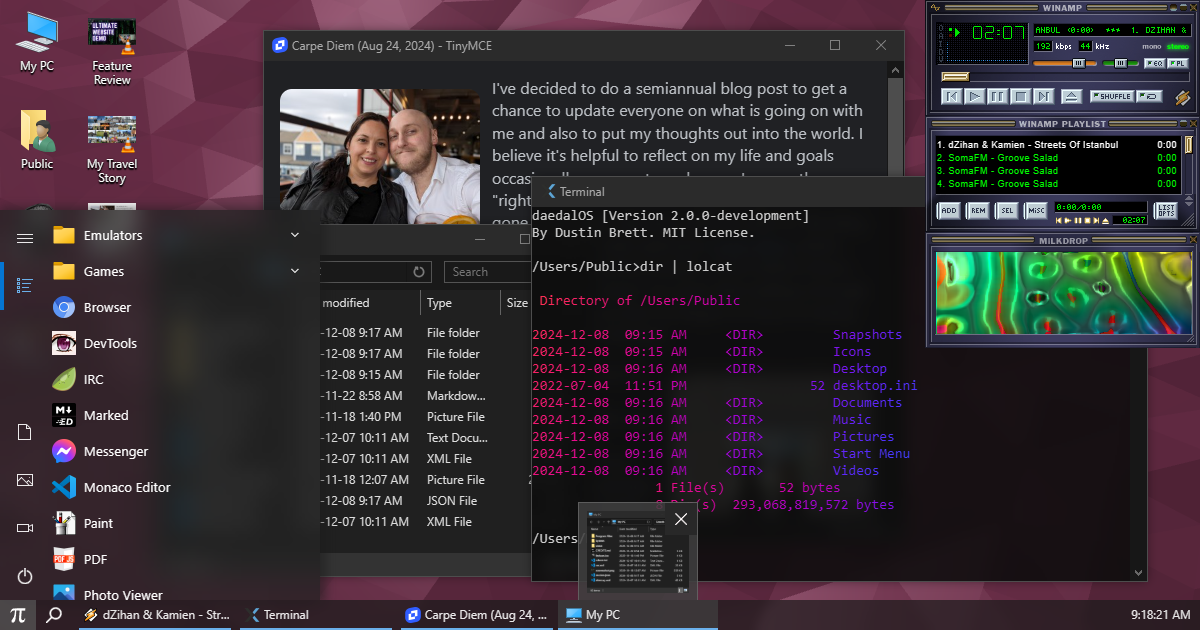

What is this?
 daedalOS is a full desktop environment that runs entirely in your browser, complete with a file explorer, draggable/resizable windows, a taskbar, a start menu, and dozens of built-in apps, emulators, and games.
daedalOS is a full desktop environment that runs entirely in your browser, complete with a file explorer, draggable/resizable windows, a taskbar, a start menu, and dozens of built-in apps, emulators, and games.Is this an operating system I install, or just a web app that looks like one?It's a web app (built with Next.js) that simulates an OS-style desktop inside a browser tab, backed by a virtual file system — nothing gets installed on your actual computer.
It's a web app (built with Next.js) that simulates an OS-style desktop inside a browser tab, backed by a virtual file system — nothing gets installed on your actual computer.How do I try it or run it myself?You can open the live demo in any browser, or clone the repo and run it locally with Node.js and Yarn, or build and run it with Docker ('docker:build' / 'docker:run' scripts are included).
You can open the live demo in any browser, or clone the repo and run it locally with Node.js and Yarn, or build and run it with Docker ('docker:build' / 'docker:run' scripts are included).Do I need Node.js or Yarn to use it?Only if you want to self-host or develop it — the hosted demo just needs a browser. For local setup you need Node.js and Yarn, and there's a known 'yarn install' gotcha fixed by setting NODE_OPTIONS=--openssl-legacy-provider.
Only if you want to self-host or develop it — the hosted demo just needs a browser. For local setup you need Node.js and Yarn, and there's a known 'yarn install' gotcha fixed by setting NODE_OPTIONS=--openssl-legacy-provider.Can it run any Windows program, including 64-bit apps?No — the built-in BoxedWine app only emulates 16-bit and 32-bit Windows applications, not 64-bit ones.
No — the built-in BoxedWine app only emulates 16-bit and 32-bit Windows applications, not 64-bit ones.Where does my data go when I use the file system or create files?Everything persists locally in your browser's IndexedDB storage — there's no account system or server-side storage described.
Everything persists locally in your browser's IndexedDB storage — there's no account system or server-side storage described.What AI features are built into daedalOS?The taskbar includes an AI Chat Agent (using the Prompt API and WebLLM) with summarization and image generation, plus a Stable Diffusion app that creates 512x512 images locally via WebSD.
The taskbar includes an AI Chat Agent (using the Prompt API and WebLLM) with summarization and image generation, plus a Stable Diffusion app that creates 512x512 images locally via WebSD.Can I play classic Windows/DOS apps and console games in it?Yes — BoxedWine runs 16/32-bit Windows apps, js-dos emulates DOS programs with automatic save states, and EmulatorJS plays dozens of console ROM formats like NES, SNES, Game Boy, and N64.
Yes — BoxedWine runs 16/32-bit Windows apps, js-dos emulates DOS programs with automatic save states, and EmulatorJS plays dozens of console ROM formats like NES, SNES, Game Boy, and N64.Is there a built-in code editor?Yes, it ships with both Monaco Editor and Vim, supporting all file types, Prettier formatting, and saving via CTRL+S.
Yes, it ships with both Monaco Editor and Vim, supporting all file types, Prettier formatting, and saving via CTRL+S.What chat apps does it include?An IRC client connects over WebSockets, and a Messenger app does encrypted direct messaging over the Nostr protocol (NIP-04) with automatic key creation.
An IRC client connects over WebSockets, and a Messenger app does encrypted direct messaging over the Nostr protocol (NIP-04) with automatic key creation.What are similar projects?puter, ra2, ps2-web-recomp, serenity, chinese-dos-games, Stronghold-Protocol, zfile, convert
puter, ra2, ps2-web-recomp, serenity, chinese-dos-games, Stronghold-Protocol, zfile, convertWhich topics is it in?nostr, desktop-environment, os, x86, file-manager, video-player, stable-diffusion, retrogaming, emulator, image-editing, vim, canvas
nostr, desktop-environment, os, x86, file-manager, video-player, stable-diffusion, retrogaming, emulator, image-editing, vim, canvas