CodexMonitor

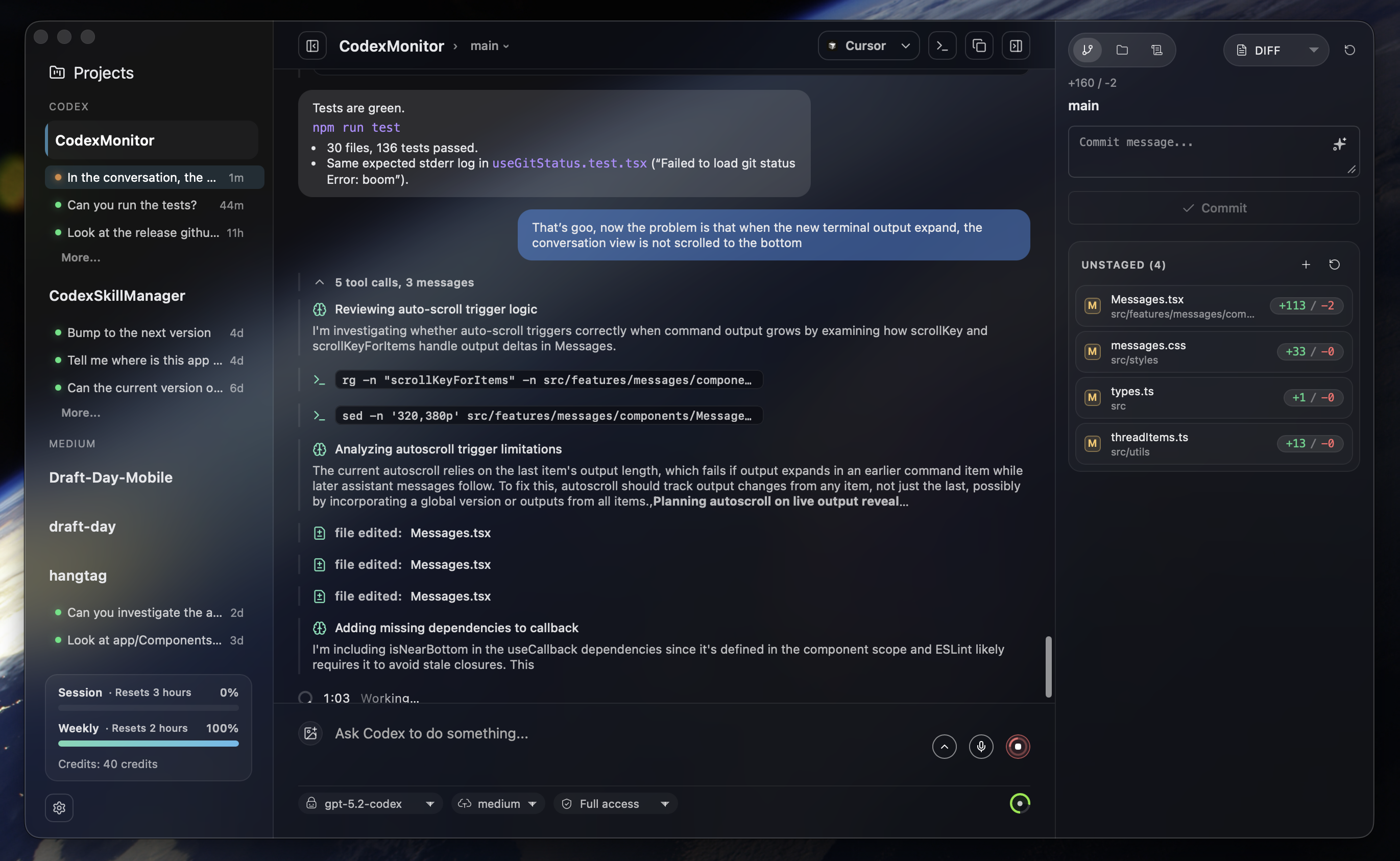
CodexMonitor is a Tauri app for orchestrating multiple Codex agents across local workspaces. It provides a sidebar to manage projects, a home screen for quick actions, and a conversation view backed by the Codex app-server protocol.
Features
Workspaces & Threads
- Add and persist workspaces, group/sort them, and jump into recent agent activity from the home dashboard.
- Spawn one
codex app-server per workspace, resume threads, and track unread/running state.
- Worktree and clone agents for isolated work; worktrees live under the app data directory (legacy
.codex-worktrees supported).
- Thread management: pin/rename/archive/copy, per-thread drafts, and stop/interrupt in-flight turns.
- Optional remote backend (daemon) mode for running Codex on another machine.
- Remote setup helpers for self-hosted connectivity (Tailscale detection/host bootstrap for TCP mode).
Composer & Agent Controls
- Compose with image attachments (picker, drag/drop, paste) and configurable follow-up behavior (
Queue vs Steer while a run is active).
- Use
Shift+Cmd+Enter (macOS) or Shift+Ctrl+Enter (Windows/Linux) to send the opposite follow-up action for a single message.
- Autocomplete for skills (
$), prompts (/prompts:), reviews (/review), and file paths (@).
- Model picker, collaboration modes (when enabled), reasoning effort, access mode, and context usage ring.
- Dictation with hold-to-talk shortcuts and live waveform (Whisper).
- Render reasoning/tool/diff items and handle approval prompts.
Git & GitHub
- Diff stats, staged/unstaged file diffs, revert/stage controls, and commit log.
- Branch list with checkout/create plus upstream ahead/behind counts.
- GitHub Issues and Pull Requests via
gh (lists, diffs, comments) and open commits/PRs in the browser.
- PR composer: "Ask PR" to send PR context into a new agent thread.
Files & Prompts
- File tree with search, file-type icons, and Reveal in Finder/Explorer.
- Prompt library for global/workspace prompts: create/edit/delete/move and run in current or new threads.
UI & Experience
- Resizable sidebar/right/plan/terminal/debug panels with persisted sizes.
- Responsive layouts (desktop/tablet/phone) with tabbed navigation.
- Sidebar usage and credits meter for account rate limits plus a home usage snapshot.
- Terminal dock with multiple tabs for background commands (experimental).
- In-app updates with toast-driven download/install, debug panel copy/clear, sound notifications, plus platform-specific window effects (macOS overlay title bar + vibrancy) and a reduced transparency toggle.
Requirements
- Node.js + npm
- Rust toolchain (stable)
- CMake (required for native dependencies; dictation/Whisper uses it)
- LLVM/Clang (required on Windows to build dictation dependencies via bindgen)
- Codex CLI installed and available as
codex in PATH (or configure a custom Codex binary in app/workspace settings)
- Git CLI (used for worktree operations)
- GitHub CLI (
gh) for GitHub Issues/PR integrations (optional)
If you hit native build errors, run:
npm run doctor
Getting Started
Install dependencies:
npm install
Run in dev mode:
npm run tauri:dev
iOS Support (WIP)
iOS support is currently in progress.
- Current status: mobile layout runs, remote backend flow is wired, and iOS defaults to remote backend mode.
- Current limits: terminal and dictation remain unavailable on mobile builds.
- Desktop behavior is unchanged: macOS/Linux/Windows remain local-first unless remote mode is explicitly selected.
iOS + Tailscale Setup (TCP)
Use this when connecting the iOS app to a desktop-hosted daemon over your Tailscale tailnet.
Canonical runbook: docs/mobile-ios-tailscale-blueprint.md.
- Install and sign in to Tailscale on both desktop and iPhone (same tailnet).
- On desktop CodexMonitor, open
Settings > Server.
- Set a
Remote backend token.
- Start the desktop daemon with
Start daemon (in Mobile access daemon).
- In
Tailscale helper, use Detect Tailscale and note the suggested host (for example your-mac.your-tailnet.ts.net:4732).
- On iOS CodexMonitor, open
Settings > Server.
- Enter the desktop Tailscale host and the same token.
- Tap
Connect & test and confirm it succeeds.
Notes:
- The desktop daemon must stay running while iOS is connected.
- If the test fails, confirm both devices are online in Tailscale and that host/token match desktop settings.
Headless Daemon Management (No Desktop UI)
Use the standalone daemon control CLI when you want iOS remote mode without keeping the desktop app open.
Build binaries:
cd src-tauri
cargo build --bin codex_monitor_daemon --bin codex_monitor_daemonctl
Examples:
# Show current daemon status
./target/debug/codex_monitor_daemonctl status

# Start daemon using host/token from settings.json
./target/debug/codex_monitor_daemonctl start

# Stop daemon
./target/debug/codex_monitor_daemonctl stop

# Print equivalent daemon start command
./target/debug/codex_monitor_daemonctl command-preview
Useful overrides:
--data-dir <path>: app data dir containing settings.json / workspaces.json--listen <addr>: bind address override--token <token>: token override--daemon-path <path>: explicit codex-monitor-daemon binary path--json: machine-readable output
iOS Prerequisites
- Xcode + Command Line Tools installed.
- Rust iOS targets installed:
rustup target add aarch64-apple-ios aarch64-apple-ios-sim
# Optional (Intel Mac simulator builds):
rustup target add x86_64-apple-ios
- Apple signing configured (development team).
- Set
bundle.iOS.developmentTeam and identifier in src-tauri/tauri.ios.local.conf.json (preferred for local machine setup), or
- set values in
src-tauri/tauri.ios.conf.json, or
- pass
--team <TEAM_ID> to the device script.
build_run_ios*.sh and release_testflight_ios.sh automatically merge src-tauri/tauri.ios.local.conf.json when present.
Run on iOS Simulator
./scripts/build_run_ios.sh
Options:
--simulator "<name>" to target a specific simulator.--target aarch64-sim|x86_64-sim to override architecture.--skip-build to reuse the current app bundle.--no-clean to preserve src-tauri/gen/apple/build between builds.
Run on USB Device
List discoverable devices:
./scripts/build_run_ios_device.sh --list-devices
Build, install, and launch on a specific device:
./scripts/build_run_ios_device.sh --device "<device name or identifier>" --team <TEAM_ID>
Additional options:
--target aarch64 to override architecture.--skip-build to reuse the current app bundle.--bundle-id <id> to launch a non-default bundle identifier.
First-time device setup usually requires:
- iPhone unlocked and trusted with this Mac.
- Developer Mode enabled on iPhone.
- Pairing/signing approved in Xcode at least once.
If signing is not ready yet, open Xcode from the script flow:
./scripts/build_run_ios_device.sh --open-xcode
iOS TestFlight Release (Scripted)
Use the end-to-end script to archive, upload, configure compliance, assign beta group, and submit for beta review.
./scripts/release_testflight_ios.sh
The script auto-loads release metadata from .testflight.local.env (gitignored).
For new setups, copy .testflight.local.env.example to .testflight.local.env and fill values.
Release Build
Build the production Tauri bundle:
npm run tauri:build
Artifacts will be in src-tauri/target/release/bundle/ (platform-specific subfolders).
Windows (opt-in)
Windows builds are opt-in and use a separate Tauri config file to avoid macOS-only window effects.
npm run tauri:build:win
Artifacts will be in:
src-tauri/target/release/bundle/nsis/ (installer exe)src-tauri/target/release/bundle/msi/ (msi)
Note: building from source on Windows requires LLVM/Clang (for bindgen / libclang) in addition to CMake.
Type Checking
Run the TypeScript checker (no emit):
npm run typecheck
Note: npm run build also runs tsc before bundling the frontend.
Validation
Recommended validation commands:
npm run lint
npm run test
npm run typecheck
cd src-tauri && cargo check
Codebase Navigation
For task-oriented file lookup ("if you need X, edit Y"), use:
Project Structure
src/
  features/         feature-sliced UI + hooks
  features/app/bootstrap/      app bootstrap orchestration
  features/app/orchestration/  app layout/thread/workspace orchestration
  features/threads/hooks/threadReducer/  thread reducer slices
  services/         Tauri IPC wrapper
  styles/           split CSS by area
  types.ts          shared types
src-tauri/
  src/lib.rs        Tauri app backend command registry
  src/bin/codex_monitor_daemon.rs  remote daemon JSON-RPC process
  src/bin/codex_monitor_daemon/rpc/  daemon RPC domain handlers
  src/shared/       shared backend core used by app + daemon
  src/shared/git_ui_core/      git/github shared core modules
  src/shared/workspaces_core/  workspace/worktree shared core modules
  src/workspaces/   workspace/worktree adapters
  src/codex/        codex app-server adapters
  src/files/        file adapters
  tauri.conf.json   window configuration
Notes
- Workspaces persist to
workspaces.json under the app data directory.
- App settings persist to
settings.json under the app data directory (theme, backend mode/provider, remote endpoints/tokens, Codex path, default access mode, UI scale, follow-up message behavior).
- Feature settings are supported in the UI and synced to
$CODEX_HOME/config.toml (or ~/.codex/config.toml) on load/save. Stable: Collaboration modes (features.collaboration_modes), personality (personality), and Background terminal (features.unified_exec). Experimental: Apps (features.apps). Steering capability still follows Codex features.steer, but follow-up default behavior is controlled in Settings → Composer.
- On launch and on window focus, the app reconnects and refreshes thread lists for each workspace.
- Threads are restored by filtering
thread/list results using the workspace cwd.
- Selecting a thread always calls
thread/resume to refresh messages from disk.
- CLI sessions appear if their
cwd matches the workspace path; they are not live-streamed unless resumed.
- The app uses
codex app-server over stdio; see src-tauri/src/lib.rs and src-tauri/src/codex/.
- The remote daemon entrypoint is
src-tauri/src/bin/codex_monitor_daemon.rs; RPC routing lives in src-tauri/src/bin/codex_monitor_daemon/rpc.rs and domain handlers in src-tauri/src/bin/codex_monitor_daemon/rpc/.
- Shared domain logic lives in
src-tauri/src/shared/ (notably src-tauri/src/shared/git_ui_core/ and src-tauri/src/shared/workspaces_core/).
- Codex home resolves from workspace settings (if set), then legacy
.codexmonitor/, then $CODEX_HOME/~/.codex.
- Worktree agents live under the app data directory (
worktrees/<workspace-id>); legacy .codex-worktrees/ paths remain supported, and the app no longer edits repo .gitignore files.
- UI state (panel sizes, reduced transparency toggle, recent thread activity) is stored in
localStorage.
- Custom prompts load from
$CODEX_HOME/prompts (or ~/.codex/prompts) with optional frontmatter description/argument hints.
Tauri IPC Surface
Frontend calls live in src/services/tauri.ts and map to commands in src-tauri/src/lib.rs. The current surface includes:
- Settings/config/files:
get_app_settings, update_app_settings, get_codex_config_path, get_config_model, file_read, file_write, codex_doctor, menu_set_accelerators.
- Workspaces/worktrees:
list_workspaces, is_workspace_path_dir, add_workspace, add_clone, add_worktree, worktree_setup_status, worktree_setup_mark_ran, rename_worktree, rename_worktree_upstream, apply_worktree_changes, update_workspace_settings, remove_workspace, remove_worktree, connect_workspace, list_workspace_files, read_workspace_file, open_workspace_in, get_open_app_icon.
- Threads/turns/reviews:
start_thread, fork_thread, compact_thread, list_threads, resume_thread, archive_thread, set_thread_name, send_user_message, turn_interrupt, respond_to_server_request, start_review, remember_approval_rule, get_commit_message_prompt, generate_commit_message, generate_run_metadata.
- Account/models/collaboration:
model_list, account_rate_limits, account_read, skills_list, apps_list, collaboration_mode_list, codex_login, codex_login_cancel, list_mcp_server_status.
- Git/GitHub:
get_git_status, list_git_roots, get_git_diffs, get_git_log, get_git_commit_diff, get_git_remote, stage_git_file, stage_git_all, unstage_git_file, revert_git_file, revert_git_all, commit_git, push_git, pull_git, fetch_git, sync_git, list_git_branches, checkout_git_branch, create_git_branch, get_github_issues, get_github_pull_requests, get_github_pull_request_diff, get_github_pull_request_comments.
- Prompts:
prompts_list, prompts_create, prompts_update, prompts_delete, prompts_move, prompts_workspace_dir, prompts_global_dir.
- Terminal/dictation/notifications/usage:
terminal_open, terminal_write, terminal_resize, terminal_close, dictation_model_status, dictation_download_model, dictation_cancel_download, dictation_remove_model, dictation_request_permission, dictation_start, dictation_stop, dictation_cancel, send_notification_fallback, is_macos_debug_build, local_usage_snapshot.
- Remote backend helpers:
tailscale_status, tailscale_daemon_command_preview, tailscale_daemon_start, tailscale_daemon_stop, tailscale_daemon_status.

 CodexMonitor — десктопное приложение на Tauri для оркестрации и мониторинга нескольких агентов OpenAI Codex в локальных рабочих пространствах, с сайдбаром проектов, домашним дашбордом и видом бесед, построенным на протоколе Codex app-server.