We are launching the Cherry Studio Developer Co-creation Program to foster a healthy and positive-feedback loop within the open-source ecosystem. We believe that great software is built collaboratively, and every merged pull request breathes new life into the project.
We sincerely invite you to join our ranks of contributors and shape the future of Cherry Studio with us.
Contributor Rewards Program
To give back to our core contributors and create a virtuous cycle, we have established the following long-term incentive plan.
The inaugural tracking period for this program will be Q3 2025 (July, August, September). Rewards for this cycle will be distributed on October 1st.
Within any tracking period (e.g., July 1st to September 30th for the first cycle), any developer who contributes more than 30 meaningful commits to any of Cherry Studio's open-source projects on GitHub will be eligible for the following benefits:
Cursor Subscription Sponsorship: Receive a $70 USD credit or reimbursement for your Cursor subscription, making AI your most efficient coding partner.
Unlimited Model Access: Get unlimited API calls for the DeepSeek and Qwen models.
Cutting-Edge Tech Access: Enjoy occasional perks, including API access to models like Claude, Gemini, and OpenAI, keeping you at the forefront of technology.
Growing Together & Future Plans
A vibrant community is the driving force behind any sustainable open-source project. As Cherry Studio grows, so will our rewards program. We are committed to continuously aligning our benefits with the best-in-class tools and resources in the industry. This ensures our core contributors receive meaningful support, creating a positive cycle where developers, the community, and the project grow together.
Moving forward, the project will also embrace an increasingly open stance to give back to the entire open-source community.
How to Get Started?
We look forward to your first Pull Request!
You can start by exploring our repositories, picking up a good first issue, or proposing your own enhancements. Every commit is a testament to the spirit of open source.
Thank you for your interest and contributions.
Let's build together.
🏢 Enterprise Edition
Building on the Community Edition, we are proud to introduce Cherry Studio Enterprise Edition—a privately-deployable AI productivity and management platform designed for modern teams and enterprises.
The Enterprise Edition addresses core challenges in team collaboration by centralizing the management of AI resources, knowledge, and data. It empowers organizations to enhance efficiency, foster innovation, and ensure compliance, all while maintaining 100% control over their data in a secure environment.
Core Advantages
Unified Model Management: Centrally integrate and manage various cloud-based LLMs (e.g., OpenAI, Anthropic, Google Gemini) and locally deployed private models. Employees can use them out-of-the-box without individual configuration.
Enterprise-Grade Knowledge Base: Build, manage, and share team-wide knowledge bases. Ensures knowledge retention and consistency, enabling team members to interact with AI based on unified and accurate information.
Fine-Grained Access Control: Easily manage employee accounts and assign role-based permissions for different models, knowledge bases, and features through a unified admin backend.
Fully Private Deployment: Deploy the entire backend service on your on-premises servers or private cloud, ensuring your data remains 100% private and under your control to meet the strictest security and compliance standards.
Reliable Backend Services: Provides stable API services and enterprise-grade data backup and recovery mechanisms to ensure business continuity.
● Centralized Model Access ● Employee Management ● Shared Knowledge Base ● Access Control ● Data Backup
Server
—
✅ Dedicated Private Deployment
Get the Enterprise Edition
We believe the Enterprise Edition will become your team's AI productivity engine. If you are interested in Cherry Studio Enterprise Edition and would like to learn more, request a quote, or schedule a demo, please feel free to contact us.
new-api: The next-generation LLM gateway and AI asset management system supports multiple languages.
one-api: LLM API management and distribution system supporting mainstream models like OpenAI, Azure, and Anthropic. Features a unified API interface, suitable for key management and secondary distribution.
Poe: Poe gives you access to the best AI, all in one place. Explore GPT-5, Claude Opus 4.1, DeepSeek-R1, Veo 3, ElevenLabs, and millions of others.
ublacklist: Blocks specific sites from appearing in Google search results
🚀 Contributors
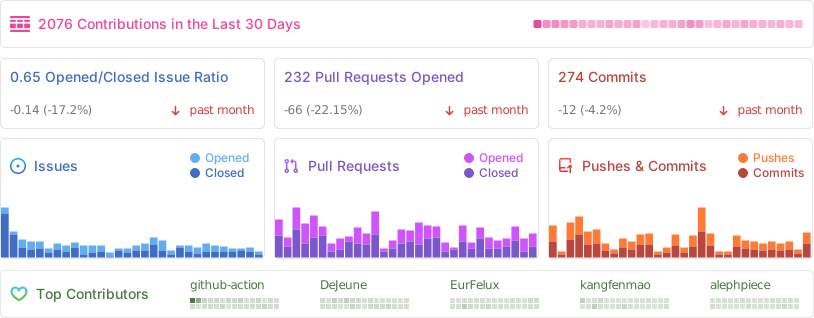
📊 GitHub Stats
⭐️ Star History
📜 License
The Cherry Studio Community Edition is governed by the standard GNU Affero General Public License v3.0 (AGPL-3.0), available at https://www.gnu.org/licenses/agpl-3.0.html.
Use of the Cherry Studio Community Edition for commercial purposes is permitted, subject to full compliance with the terms and conditions of the AGPL-3.0 license.
Should you require a commercial license that provides an exemption from the AGPL-3.0 requirements, please contact us at [email protected].
cherry-studio (CherryHQ/cherry-studio)
Choose a tag and it will appear here. With no tags selected, all catalog projects are shown.
Searching Database…
Choose a tag and it will appear here. With no tags selected, all catalog projects are shown.














 Cherry Studio 是一款桌面端 AI 客户端,可以在一个应用里与多家 LLM 服务商(OpenAI、Gemini、Anthropic、Claude、Perplexity、Poe)聊天,也可以通过 Ollama 或 LM Studio 运行本地模型,另外还提供 300 多个现成的助手,并支持 MCP 服务器。