


chatgpt-web README

The project's README from github.com/Chanzhaoyu/chatgpt-web. As one markdown file: README.md.

ChatGPT Web

Disclaimer: This project is only published on GitHub, based on the MIT license, free and for open source learning usage. And there will be no any form of account selling, paid service, discussion group, discussion group and other behaviors. Beware of being deceived.

中文

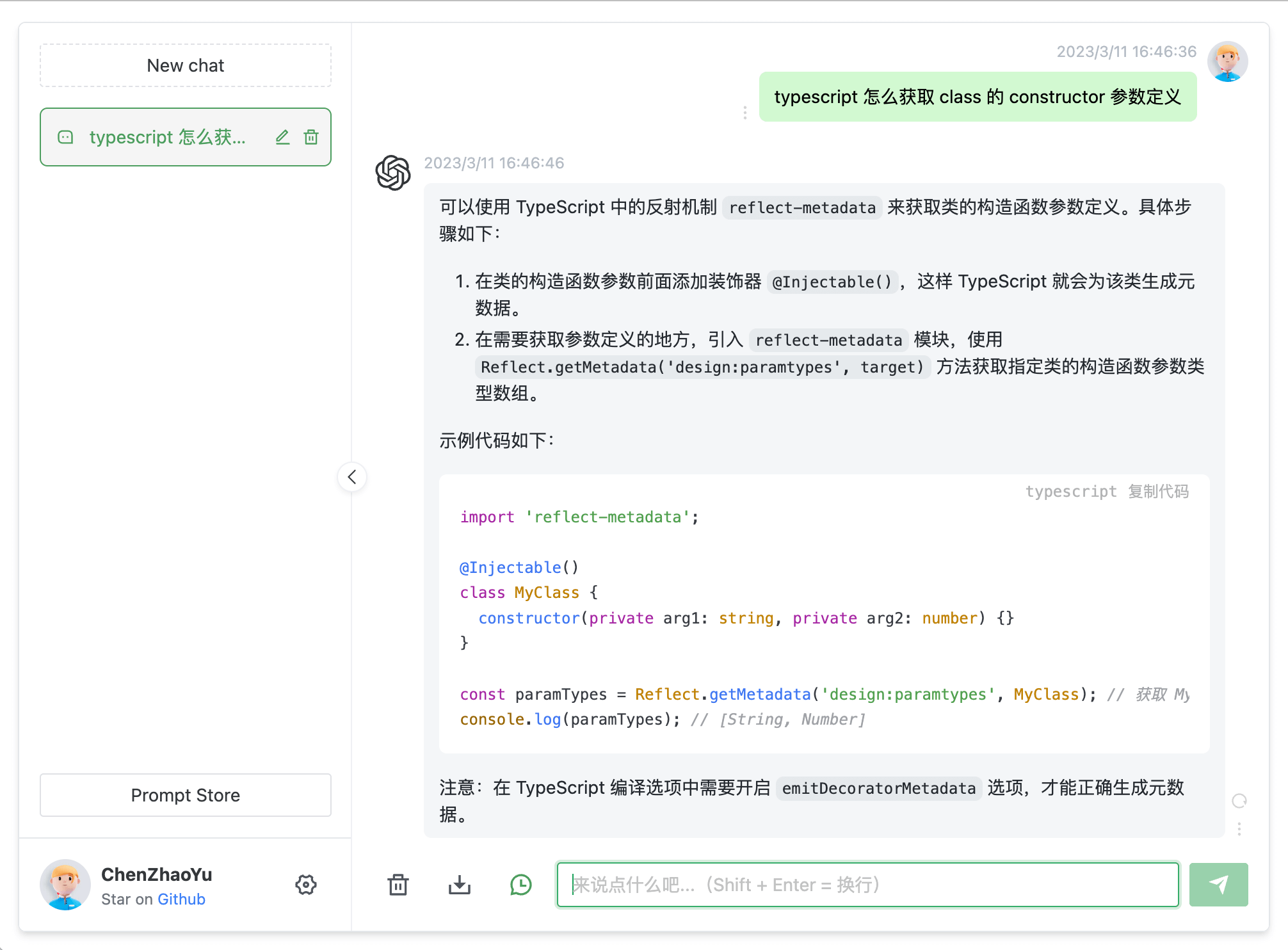
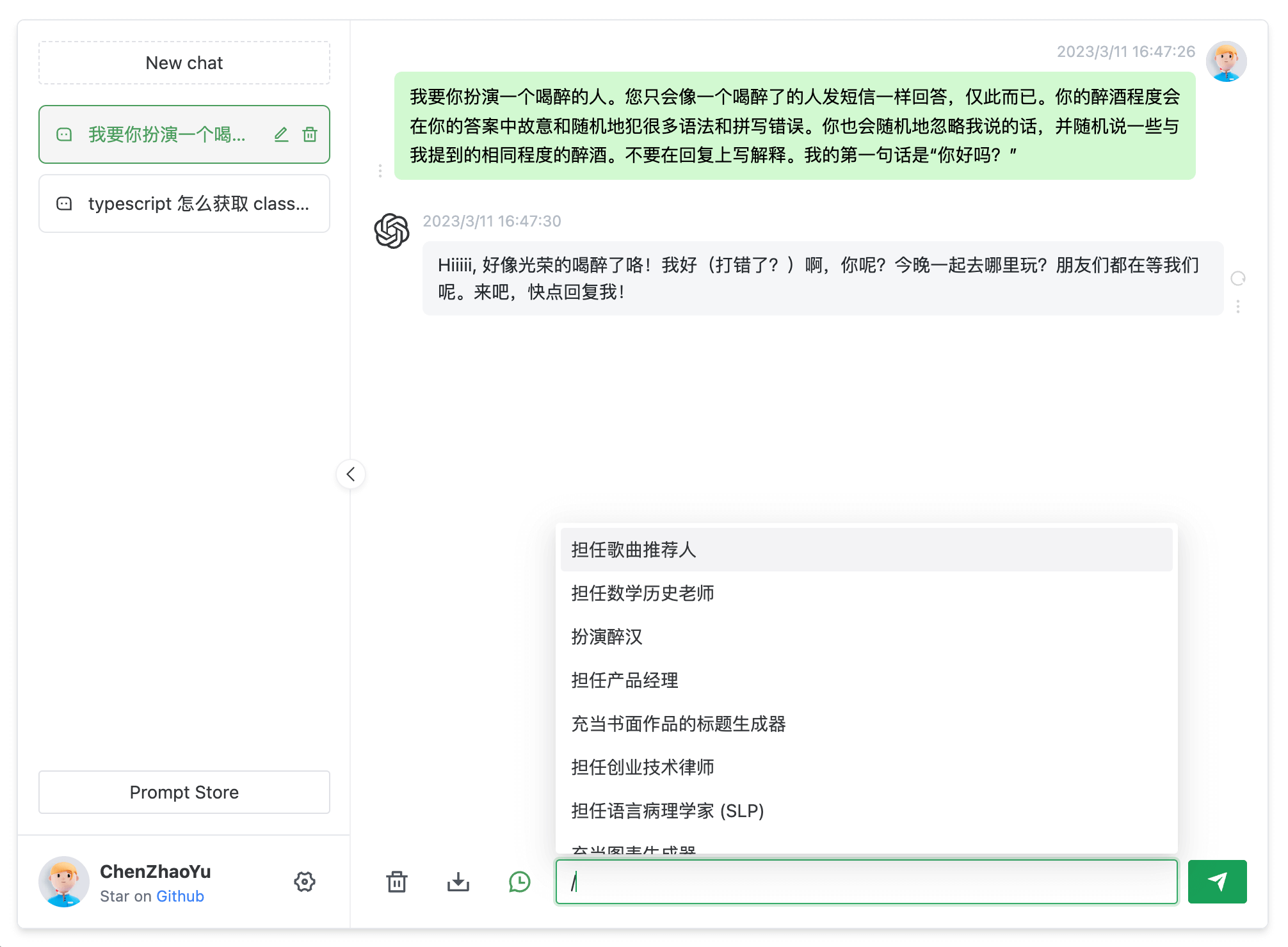
cover cover2

Introduction

Supports dual models and provides two unofficial ChatGPT API methods

Method Free? Reliability Quality
ChatGPTAPI(gpt-3.5-turbo-0301) No Reliable Relatively stupid
ChatGPTUnofficialProxyAPI(web accessToken) Yes Relatively unreliable Smart

Comparison:

  1. ChatGPTAPI uses gpt-3.5-turbo through OpenAI official API to call ChatGPT
  2. ChatGPTUnofficialProxyAPI uses unofficial proxy server to access ChatGPT's backend API, bypass Cloudflare (dependent on third-party servers, and has rate limits)

Warnings:

  1. You should first use the API method
  2. When using the API, if the network is not working, it is blocked in China, you need to build your own proxy, never use someone else's public proxy, which is dangerous.
  3. When using the accessToken method, the reverse proxy will expose your access token to third parties. This should not have any adverse effects, but please consider the risks before using this method.
  4. When using accessToken, whether you are a domestic or foreign machine, proxies will be used. The default proxy is pengzhile's https://ai.fakeopen.com/api/conversation. This is not a backdoor or monitoring unless you have the ability to flip over CF verification yourself. Use beforehand acknowledge. Community Proxy (Note: Only these two are recommended, other third-party sources, please identify for yourself)
  5. When publishing the project to public network, you should set the AUTH_SECRET_KEY variable to add your password access, you should also modify the title in index. html to prevent it from being searched by keywords.

Switching methods:

  1. Enter the service/.env.example file, copy the contents to the service/.env file
  2. To use OpenAI API Key, fill in the OPENAI_API_KEY field (get apiKey)
  3. To use Web API, fill in the OPENAI_ACCESS_TOKEN field (get accessToken)
  4. OpenAI API Key takes precedence when both exist

Environment variables:

See all parameter variables here

Roadmap

[✓] Dual models

[✓] Multi-session storage and context logic

[✓] Formatting and beautification of code and other message types

[✓] Access control

[✓] Data import/export

[✓] Save messages as local images

[✓] Multilingual interface

[✓] Interface themes

[✗] More...

Prerequisites

Node

node requires version ^16 || ^18 || ^19 (node >= 14 needs fetch polyfill installation), use nvm to manage multiple local node versions

node -v

PNPM

If you haven't installed pnpm

npm install pnpm -g

Filling in the Key

Get Openai Api Key or accessToken and fill in the local environment variables Go to Introduction

# service/.env file

# OpenAI API Key - https://platform.openai.com/overview
OPENAI_API_KEY=

# change this to an `accessToken` extracted from the ChatGPT site's `https://chat.openai.com/api/auth/session` response
OPENAI_ACCESS_TOKEN=

Install Dependencies

For the convenience of "backend developers" to understand the burden, the front-end "workspace" mode is not adopted, but separate folders are used to store them. If you only need to do secondary development of the front-end page, delete the service folder.

Backend

Enter the folder /service and run the following commands

pnpm install

Frontend

Run the following commands at the root directory

pnpm bootstrap

Run in Test Environment

Backend Service

Enter the folder /service and run the following commands

pnpm start

Frontend Webpage

Run the following commands at the root directory

pnpm dev

Environment Variables

API available:

ACCESS_TOKEN available:

Common:

Packaging

Use Docker

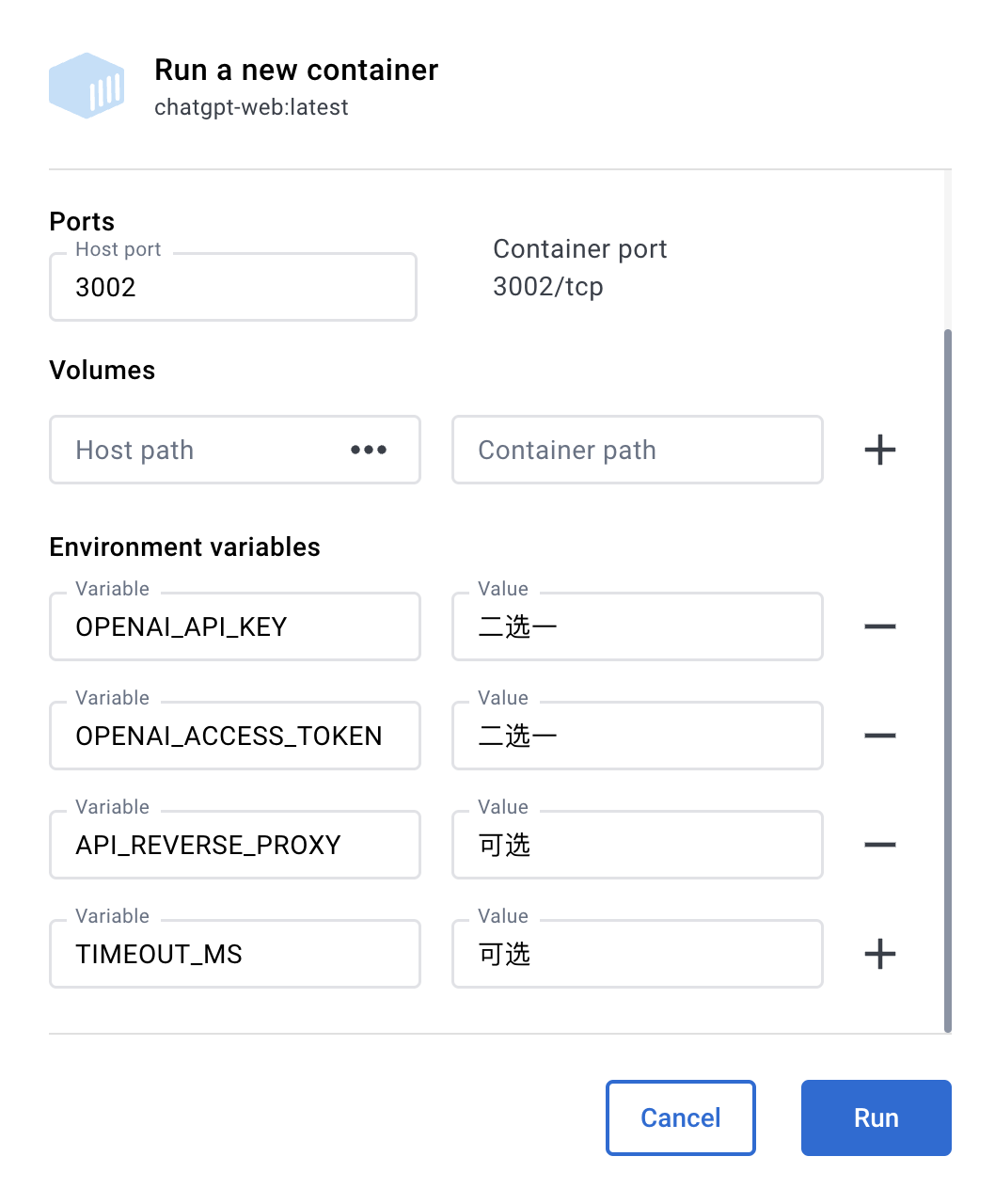
Docker Parameter Examples

docker

Docker build & Run

docker build -t chatgpt-web .

# Foreground running
docker run --name chatgpt-web --rm -it -p 127.0.0.1:3002:3002 --env OPENAI_API_KEY=your_api_key chatgpt-web

# Background running
docker run --name chatgpt-web -d -p 127.0.0.1:3002:3002 --env OPENAI_API_KEY=your_api_key chatgpt-web

# Run address
http://localhost:3002/

Docker compose

Hub address

version: '3'

services:
  app:
    image: chenzhaoyu94/chatgpt-web # always use latest, pull the tag image again to update
    ports:
      - 127.0.0.1:3002:3002
    environment:
      # choose one
      OPENAI_API_KEY: sk-xxx
      # choose one
      OPENAI_ACCESS_TOKEN: xxx
      # API interface address, optional, available when OPENAI_API_KEY is set
      OPENAI_API_BASE_URL: xxx
      # API model, optional, available when OPENAI_API_KEY is set, https://platform.openai.com/docs/models
      # gpt-4, gpt-4o, gpt-4o-mini, gpt-4-turbo, gpt-4-turbo-preview, gpt-4-0125-preview, gpt-4-1106-preview, gpt-4-0314, gpt-4-0613, gpt-4-32k, gpt-4-32k-0314, gpt-4-32k-0613, gpt-3.5-turbo-16k, gpt-3.5-turbo-16k-0613, gpt-3.5-turbo, gpt-3.5-turbo-0301, gpt-3.5-turbo-0613, text-davinci-003, text-davinci-002, code-davinci-002
      OPENAI_API_MODEL: xxx
      # reverse proxy, optional
      API_REVERSE_PROXY: xxx
      # access permission key, optional
      AUTH_SECRET_KEY: xxx
      # maximum number of requests per hour, optional, unlimited by default
      MAX_REQUEST_PER_HOUR: 0
      # timeout, unit milliseconds, optional
      TIMEOUT_MS: 60000
      # Socks proxy, optional, take effect with SOCKS_PROXY_PORT
      SOCKS_PROXY_HOST: xxx
      # Socks proxy port, optional, take effect with SOCKS_PROXY_HOST
      SOCKS_PROXY_PORT: xxx
      # HTTPS proxy, optional, support http,https,socks5
      HTTPS_PROXY: http://xxx:7890

Prevent Crawlers

nginx

Fill in the following configuration in the nginx configuration file to prevent crawlers. You can refer to the docker-compose/nginx/nginx.conf file to add anti-crawler methods

    # Prevent crawlers
    if ($http_user_agent ~* "360Spider|JikeSpider|Spider|spider|bot|Bot|2345Explorer|curl|wget|webZIP|qihoobot|Baiduspider|Googlebot|Googlebot-Mobile|Googlebot-Image|Mediapartners-Google|Adsbot-Google|Feedfetcher-Google|Yahoo! Slurp|Yahoo! Slurp China|YoudaoBot|Sosospider|Sogou spider|Sogou web spider|MSNBot|ia_archiver|Tomato Bot|NSPlayer|bingbot")
    {
      return 403;
    }

Deploy with Railway

Deploy on Railway

Railway Environment Variables

Environment variable name Required Remarks
PORT Required Default 3002
AUTH_SECRET_KEY Optional Access permission key
MAX_REQUEST_PER_HOUR Optional Maximum number of requests per hour, optional, unlimited by default
TIMEOUT_MS Optional Timeout, unit milliseconds
OPENAI_API_KEY OpenAI API choose one apiKey required for OpenAI API (get apiKey)
OPENAI_ACCESS_TOKEN Web API choose one accessToken required for Web API (get accessToken)
OPENAI_API_BASE_URL Optional, available when OpenAI API API interface address
OPENAI_API_MODEL Optional, available when OpenAI API API model
API_REVERSE_PROXY Optional, available when Web API Web API reverse proxy address Details
SOCKS_PROXY_HOST Optional, take effect with SOCKS_PROXY_PORT Socks proxy
SOCKS_PROXY_PORT Optional, take effect with SOCKS_PROXY_HOST Socks proxy port
SOCKS_PROXY_USERNAME Optional, take effect with SOCKS_PROXY_HOST Socks proxy username
SOCKS_PROXY_PASSWORD Optional, take effect with SOCKS_PROXY_HOST Socks proxy password
HTTPS_PROXY Optional HTTPS proxy, support http,https, socks5
ALL_PROXY Optional All proxies, support http,https, socks5

Note: Modifying environment variables on Railway will re-Deploy

Deploy with Sealos

Environment variables are consistent with Docker environment variables

Package Manually

Backend Service

If you don't need the node interface of this project, you can omit the following operations

Copy the service folder to the server where you have the node service environment.

# Install
pnpm install

# Pack
pnpm build

# Run
pnpm prod

PS: It is also okay to run pnpm start directly on the server without packing

Frontend Webpage

  1. Modify the VITE_GLOB_API_URL field in the .env file at the root directory to your actual backend interface address

  2. Run the following commands at the root directory, then copy the files in the dist folder to the root directory of your website service

[Reference](https://cn.vitejs.dev/guide/static -deploy.html#building-the-app)

pnpm build

FAQ

Q: Why does Git commit always report errors?

A: Because there is a commit message verification, please follow the Commit Guide

Q: Where to change the request interface if only the front-end page is used?

A: The VITE_GLOB_API_URL field in the .env file at the root directory.

Q: All files explode red when saving?

A: vscode please install the recommended plug-ins for the project, or manually install the Eslint plug-in.

Q: No typewriter effect on the front end?

A: One possible reason is that after Nginx reverse proxy, buffer is turned on, then Nginx will try to buffer some data from the backend before sending it to the browser. Please try adding proxy_buffering off; after the reverse proxy parameter, then reload Nginx. Other web server configurations are similar.

Contributing

Please read the Contributing Guide before contributing

Thanks to everyone who has contributed!

Acknowledgements

Thanks to JetBrains SoftWare for providing free Open Source license for this project.

Sponsors

If you find this project helpful and can afford it, you can give me a little support. Anyway, thanks for your support~

WeChat

WeChat Pay

Alipay

Alipay

License

MIT © [ChenZhaoYu]

chatgpt-web (Chanzhaoyu/chatgpt-web)

express
Searching Database…

31.4K ·GitHub
archived
What is this?A self-hosted ChatGPT demo web page built with Express and Vue3: a browser chat UI you connect to ChatGPT either through the official OpenAI API or through an unofficial web accessToken proxy.
Is this something I install, or code I have to deploy myself?Source code you host yourself — a Vue3 frontend plus an Express (Node) backend in the /service folder. You can run it from source, build it with Docker, or deploy it to Railway or Sealos.
How do I get it running?Install Node 16/18/19 and pnpm, copy service/.env.example to service/.env, fill in OPENAIAPIKEY or OPENAIACCESSTOKEN, then run the backend in /service and the frontend at the repo root — or use docker compose.
Do I need a paid OpenAI API key, or will my ChatGPT account work?One of two credentials: an OpenAI API key (paid) or a ChatGPT web accessToken (free but unofficial). If both are set, the API key takes precedence. Source runs also need Node 16/18/19 and pnpm.
How risky is the free accessToken route?Somewhat: it routes through a third-party reverse proxy to bypass Cloudflare, is less reliable and rate-limited, and that proxy sees your access token. The README advises trying the official API method first.
Do I have to run my own server, or is there an easier way to deploy it?It runs anywhere Node or Docker does, typically a Linux server or your own machine, and the README also documents one-click deploys to Railway and Sealos. Users just open the page in a browser.
I want to host this for a group — what should I lock down before going public?Set the AUTHSECRETKEY variable so the instance asks for a password, optionally cap requests with MAXREQUESTPERHOUR, and change the page title so search engines can't index it.
Is it actually free to use?Yes — MIT-licensed and free. The disclaimer stresses it exists for open-source learning, that no official accounts or paid services are sold, and warns against scams impersonating the project.
What is the actual difference between the two connection methods?ChatGPTAPI calls gpt-3.5-turbo through the official OpenAI API — reliable but paid, and the README calls its quality 'relatively stupid'. ChatGPTUnofficialProxyAPI reuses your ChatGPT web accessToken via a community reverse proxy — free and smarter, but unstable and rate-limited.
Is the project still actively developed?No — the GitHub repository is archived, so it's read-only and won't receive updates. The feature set described in the README (dual models, multi-session context, code formatting, access control, import/export, themes, multilingual UI) is what you get.
What does the chat interface itself do?Multi-session storage with context, markdown and code formatting via highlight.js, KaTeX and mermaid rendering, saving messages as local images, data import/export, interface themes, and a multilingual UI.
I'm in a region where OpenAI is blocked — will it still work?Only through a proxy you control: the backend supports http, https and socks5 proxies via the HTTPSPROXY or ALLPROXY variables, plus SOCKS host/port settings. The README warns to never use strangers' public proxies, and the accessToken mode depends on a community reverse proxy.
Creator
Chanzhaoyu
Size
6.1 MB
Stars
31.4K
Age
3y
Commits · 90 Days