
shim README

README проекта с github.com/Balanov/shim. Одним файлом markdown: README.md.

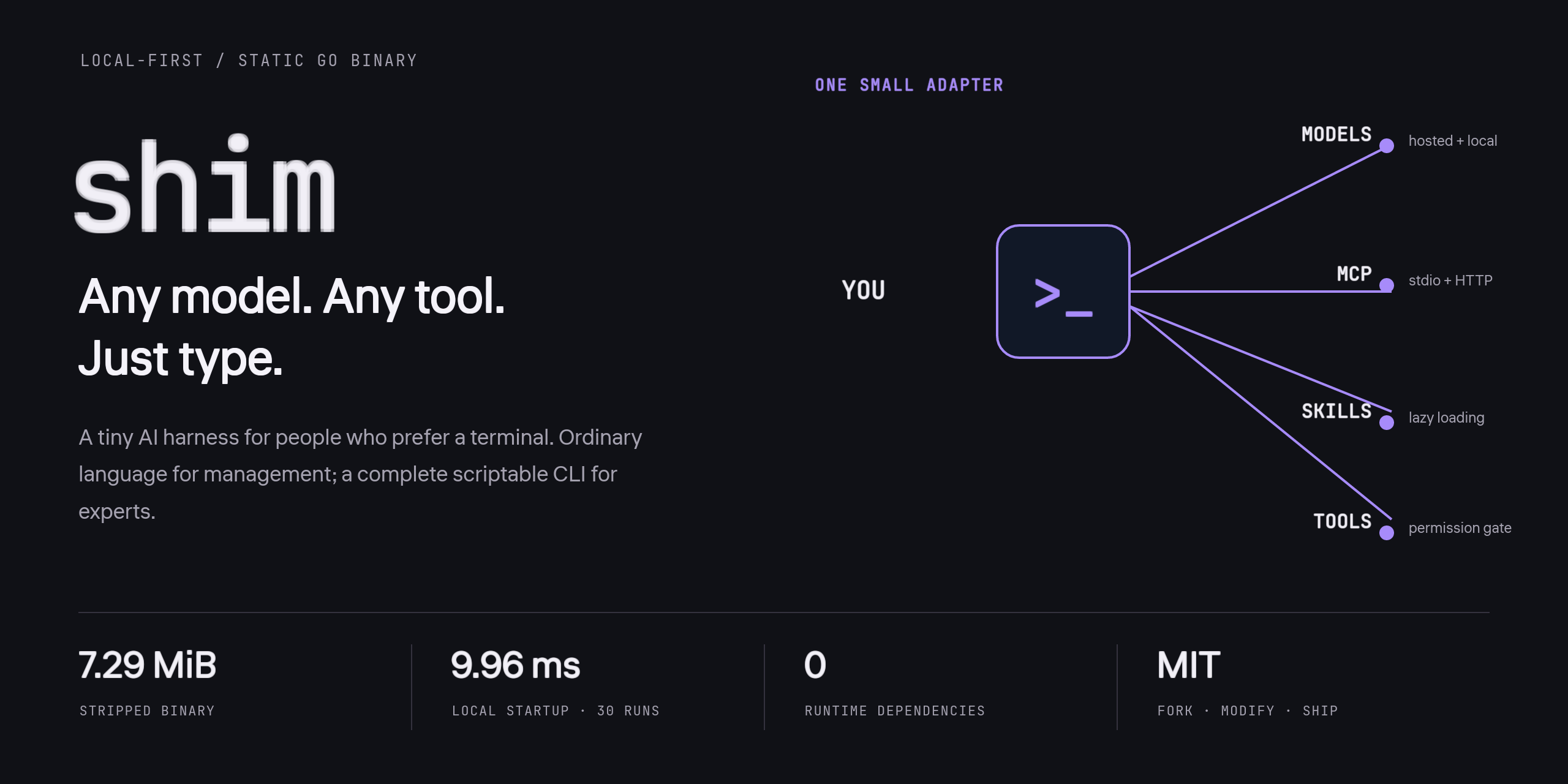
SHIM — any model, any tool, just type. One small adapter between the terminal, models, MCP, Skills and tools.

A tiny, local-first AI harness for people who prefer a terminal.

One static binary. Zero dependencies. No TUI. No telemetry. MIT.

Install · Two ways to use it · Architecture · Permissions · Website · Русский

CI Latest release MIT license Go 1.25+

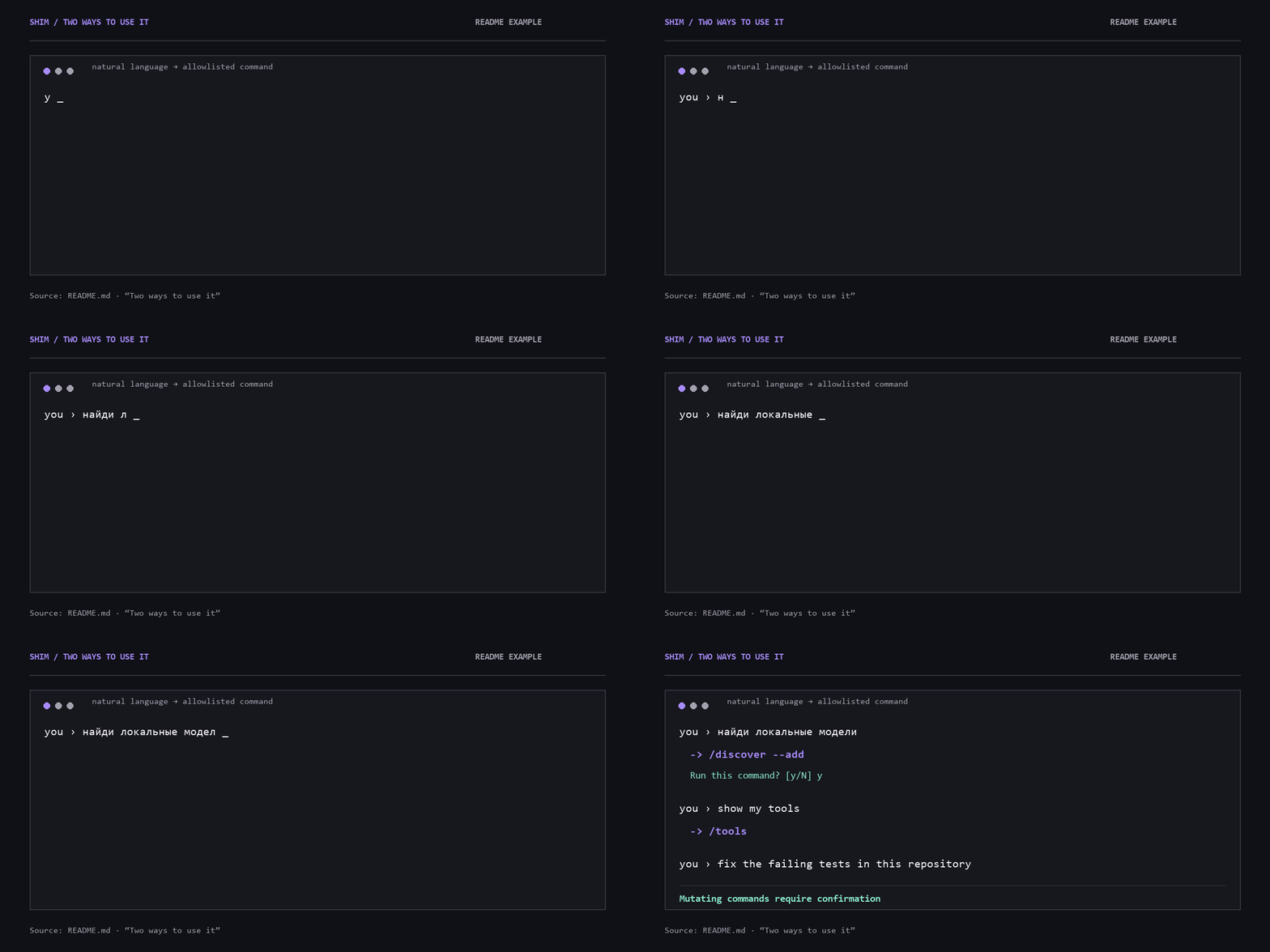
SHIM documented CLI example: a Russian request becomes an allowlisted discovery command, followed by confirmation and a tools command

The documented CLI flow from “Two ways to use it”. Natural language becomes an allowlisted command; mutating commands require confirmation.

Why Shim?

Model-agnostic coding agents are everywhere. Setting them up is still too hard: provider IDs, API endpoints, MCP JSON, skills directories, and a new interface for every tool.

Shim is the small adapter between you and all of that.

Measured on the maintainer's Windows machine for v0.1.0: 7.29 MiB stripped binary and 9.96 ms median process startup for shim --version over 30 runs. This is a local measurement, not a cross-platform performance guarantee.

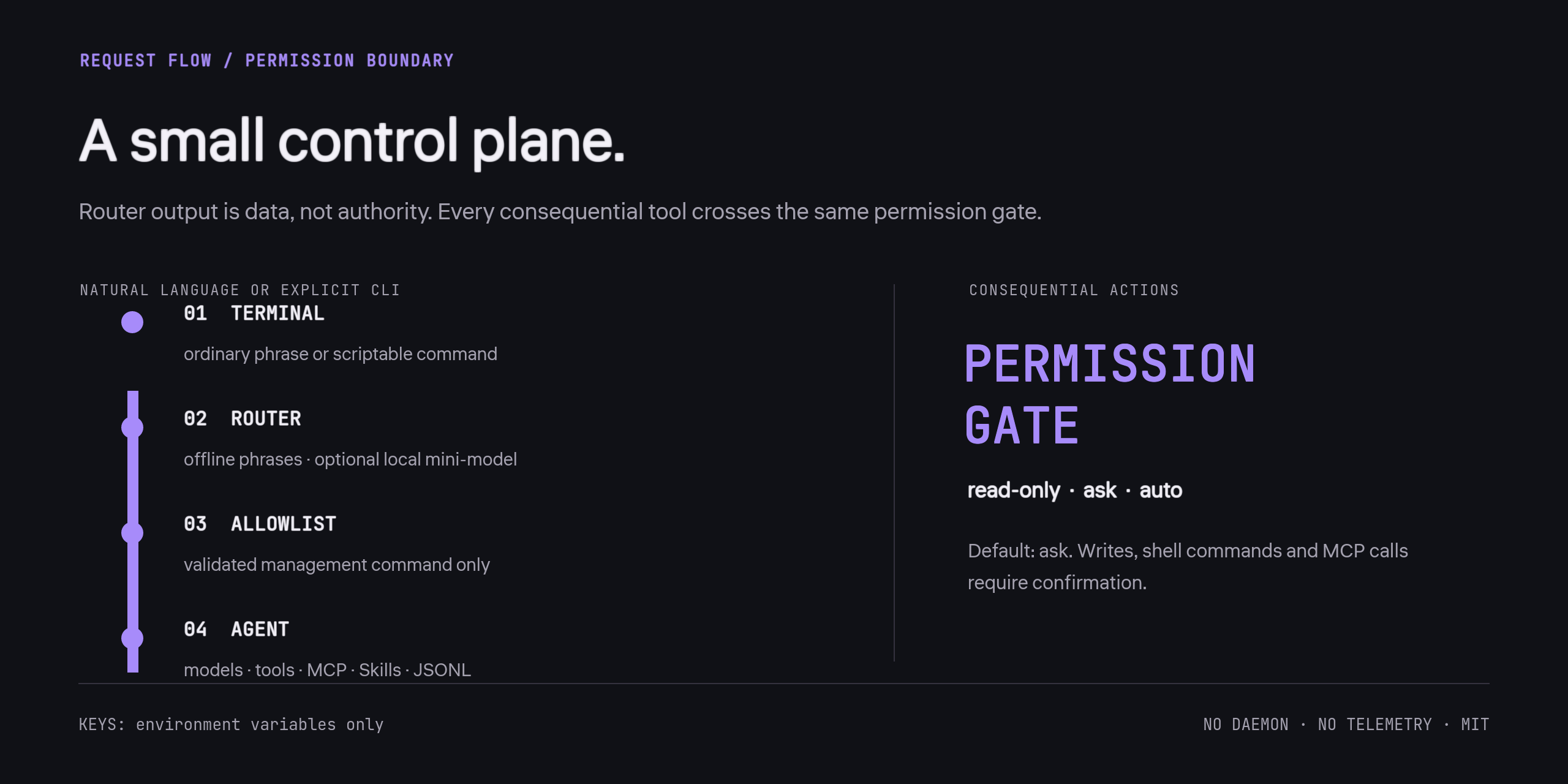
SHIM request flow from terminal through router and allowlist to the agent, with a separate permission gate for consequential actions

Router output is data, not authority. Every consequential tool crosses the same permission gate. Full architecture and invariants.

Install

Download

Get a static binary for Windows, macOS, or Linux from Releases, put it on your PATH, then run:

shim setup
shim

On PowerShell, use .\shim.exe when running the binary from the current directory.

With Go

Go 1.25+:

go install github.com/Balanov/shim/cmd/[email protected]
shim setup

From source

git clone https://github.com/Balanov/shim.git
cd shim
go test ./...
go build -trimpath -ldflags="-s -w" -o shim ./cmd/shim
./shim setup

Windows also has scripts/build.ps1; Unix has scripts/build.sh.

Two ways to use it

Just talk

you › найди локальные модели
↳ /discover --add
Run this command? [y/N] y

you › show my tools
↳ /tools

you › fix the failing tests in this repository

Shim has deterministic offline phrases for common English and Russian management commands. For other languages, assign a local model as the router:

shim router use ollama/qwen3:4b

The router sees non-command chat text so it can distinguish configuration requests from agent tasks. Use a loopback model if you want that step to stay on your machine. No model weights are bundled or silently downloaded; that would defeat the tiny-binary goal. Your primary model handles ordinary conversation in whatever language it supports.

Use the complete CLI

# Local models: discover and configure all running servers
shim model discover --add

# Hosted models
shim model add openrouter anthropic/claude-sonnet-4.5 --name claude --use
shim model add openai gpt-5 --name gpt --use
shim model add huggingface org/model --name hf --use

# Any OpenAI-compatible endpoint
shim model add custom my-model --name mine \
  --base-url http://127.0.0.1:8000/v1 --use

# One-shot agent run
shim run --read-only "explain this repository"
shim run --yes --verbose "fix the tests and verify the result"

# Interactive terminal
shim

Run shim help for the full command surface.

Model providers

Preset Adapter Credential environment variable
ollama OpenAI-compatible None
lmstudio OpenAI-compatible None
llamacpp OpenAI-compatible None
openai OpenAI-compatible OPENAI_API_KEY
openrouter OpenAI-compatible OPENROUTER_API_KEY
anthropic Anthropic Messages ANTHROPIC_API_KEY
gemini Gemini OpenAI-compatible endpoint GEMINI_API_KEY
github GitHub Models GITHUB_TOKEN
huggingface Hugging Face router HF_TOKEN
custom OpenAI-compatible or Anthropic Optional, configurable

“Any model” means any model exposed through a supported HTTP API. GGUF and other local weights run through Ollama, LM Studio, llama.cpp, or another compatible inference server; Shim is the harness, not an inference engine.

PowerShell example:

$env:OPENROUTER_API_KEY = "..."
shim model add openrouter your/model --name main --use
shim model test main

For persistent environment variables, use your OS or shell's standard secret/configuration mechanism. Do not put keys in the project config.

Skills

Shim discovers SKILL.md in:

Only names and descriptions enter the system prompt. Full instructions load on demand through load_skill.

shim skill add owner/repository
shim skill add https://github.com/owner/repository
shim skill add ./local/skill-or-collection
shim skill list
shim skill show name
shim skill remove name

Skills are untrusted instructions. Review them before use, especially when they request shell or network access.

MCP

# Stdio server
shim mcp add filesystem npx -y @modelcontextprotocol/server-filesystem .
shim mcp tools filesystem
shim mcp call filesystem list_allowed_directories '{}'

# Streamable HTTP server
shim mcp add internal https://mcp.example.com/mcp

shim mcp list
shim mcp remove filesystem

MCP tools are namespaced as mcp_<server>_<tool> and require confirmation in the default ask mode. HTTP headers and stdio environment variables can be added to the JSON config. Values support ${ENV_VAR} expansion, so secrets can stay in the environment rather than in files.

Permissions and safety

Default mode is ask:

shim permissions read-only  # no writes, shell, or MCP
shim permissions ask        # confirm consequential actions
shim permissions auto       # allow the agent to act without prompts

For one run, prefer --read-only or --yes over changing the global default.

Shim is not an OS sandbox. Shell commands and MCP servers run with your user's permissions. Workspace path checks do not contain a malicious process. Use a container, VM, or OS sandbox for untrusted workloads. Treat model output, repository text, skills, and MCP responses as untrusted data.

Sessions and configuration

shim session list
shim session new
shim run --resume SESSION_ID "continue"
shim status
shim doctor
shim config path
shim config show

Config is at the OS user-config location in shim/config.json; override it with SHIM_CONFIG or --config. Sessions are append-only JSONL next to it. Network traffic occurs only for explicit model calls, skill downloads, local discovery, and the MCP servers you configure.

What Shim deliberately is not

Project Strength Shim's different bet
OpenCode Full-featured provider-agnostic terminal workspace No TUI/server surface; conversational setup and a tiny static binary
Pi Minimal, extensible coding-agent toolkit Zero runtime dependencies and an allowlisted natural-language control layer
Goose Broad MCP-powered automation ecosystem A smaller local-first control plane with no daemon or desktop app
Aider Git-native pair programming General agent harness with MCP, lazy skills, and conversational management

Shim does not try to beat foundation-model vendors at their own agent UI. It makes heterogeneous models and tools easy to wire together and easy to fork.

Development

go test ./...
go vet ./...
go fmt ./...

The codebase uses only the Go standard library. See Architecture, Contributing, and Security. Русское введение: README_RU.md.

Roadmap

License

MIT. Fork it, modify it, embed it, ship it.

shim (Balanov/shim)

Ищем в базе…

193 ·GitHub
Что это?Крошечная локальная обвязка для работы с ИИ-моделями, рассчитанная в первую очередь на тех, кто предпочитает терминал. Поставляется одним статическим бинарным файлом без зависимостей, не содержит TUI и телеметрии, и позволяет связать любую модель, MCP-серверы и Agent Skills через CLI с командами на естественном языке.
Это модель или то, что подключается к моделям?Это обвязка, а не модель и не движок инференса. Она подключается к любой модели, доступной через поддерживаемый HTTP API, а веса в формате GGUF работают через Ollama, LM Studio, llama.cpp или другой совместимый сервер.
Как быстрее всего это установить?Скачайте статический бинарный файл для Windows, macOS или Linux из Releases и поместите его в PATH, либо соберите из исходников с Go 1.25+ или с помощью прилагаемых скриптов. Затем выполните shim help, чтобы увидеть полный список команд.
Безопасно ли позволять ему выполнять shell-команды и работать с MCP-серверами?Само по себе — нет. Shell-команды и MCP-серверы выполняются с правами вашего пользователя, поэтому для недоверенных задач используйте контейнер или виртуальную машину. Режим ask по умолчанию требует подтверждения для записи, shell-команд и вызовов MCP.
Оно что-нибудь отправляет разработчикам или куда-то передаёт мои сессии?Нет, телеметрии нет. Сетевой трафик возникает только при вызовах моделей, загрузке навыков, локальном обнаружении и работе настроенных вами MCP-серверов. Сессии хранятся на диске в формате JSONL рядом с конфигурацией.
Можно ли сделать форк и встроить это в свой продукт?Да. Это бесплатно и распространяется по лицензии MIT, так что можно сделать форк, изменить, встроить и выпустить в своём продукте.
Как навыки загружаются в сессию?В системный промпт попадают только имена и описания. Полные инструкции SKILL.md загружаются по запросу через loadskill из .shim/skills, .agents/skills, .claude/skills или глобальной папки навыков.
Чем это отличается от OpenCode, Goose или Aider?В отличие от OpenCode, здесь нет TUI и сервера. В отличие от Goose, нет демона и десктопного приложения. В отличие от Aider, добавлены MCP, отложенная загрузка навыков и управление через разговор.
Что ещё запланировано?Потоковый вывод токенов и отмена, профили песочницы на уровне ОС, помощники OAuth для удалённых MCP, сжатие контекста, более развитый экспорт сессий, а также больше языковых пакетов и тестов провайдеров.
Какие есть похожие проекты?crush, uncut, tau, Baize, claw-code, OpenHarness, Axl, headroom
Автор
Balanov
Размер
0.9 MB
Звёзды
193
Возраст
16 д
Коммиты · 90 дней