






recall README

The project's README from github.com/AsherJN/recall. As one markdown file: README.md.

Recall

Play Overwatch on your Mac.

Recall is a free, open-source app for playing Overwatch on Apple Silicon.

Download Recall for Mac, free

M1 or newer · macOS 26.5 or later · Notarized by Apple

Made by Josh · Support the project

+70%

average FPS

5×

higher 1% lows

95%

fewer stutters

Up to 16×

more mouse updates

Compared with CrossOver on the same 14-inch MacBook Pro (M1 Pro, 16 GB), in the same custom match. Mouse: up to 2,000 updates a second in Recall, 120 in CrossOver.

https://github.com/user-attachments/assets/c0f5cac1-67fb-4b75-8bf9-06ccf402ae42

CrossOver 26.3 and Recall, with live FPS from Apple's Metal Performance HUD. Custom game 929PJ, created by u/Working_Dealer_5102.

Recall offers the most optimized and seamless Overwatch experience on Apple Silicon. It sets everything up for you, so you sign in to Battle.net, install Overwatch and press Play, the same as on a PC. The game runs locally on your Mac, with no Windows installation, CrossOver license or Terminal commands.

Why Recall

Recall vs. CrossOver

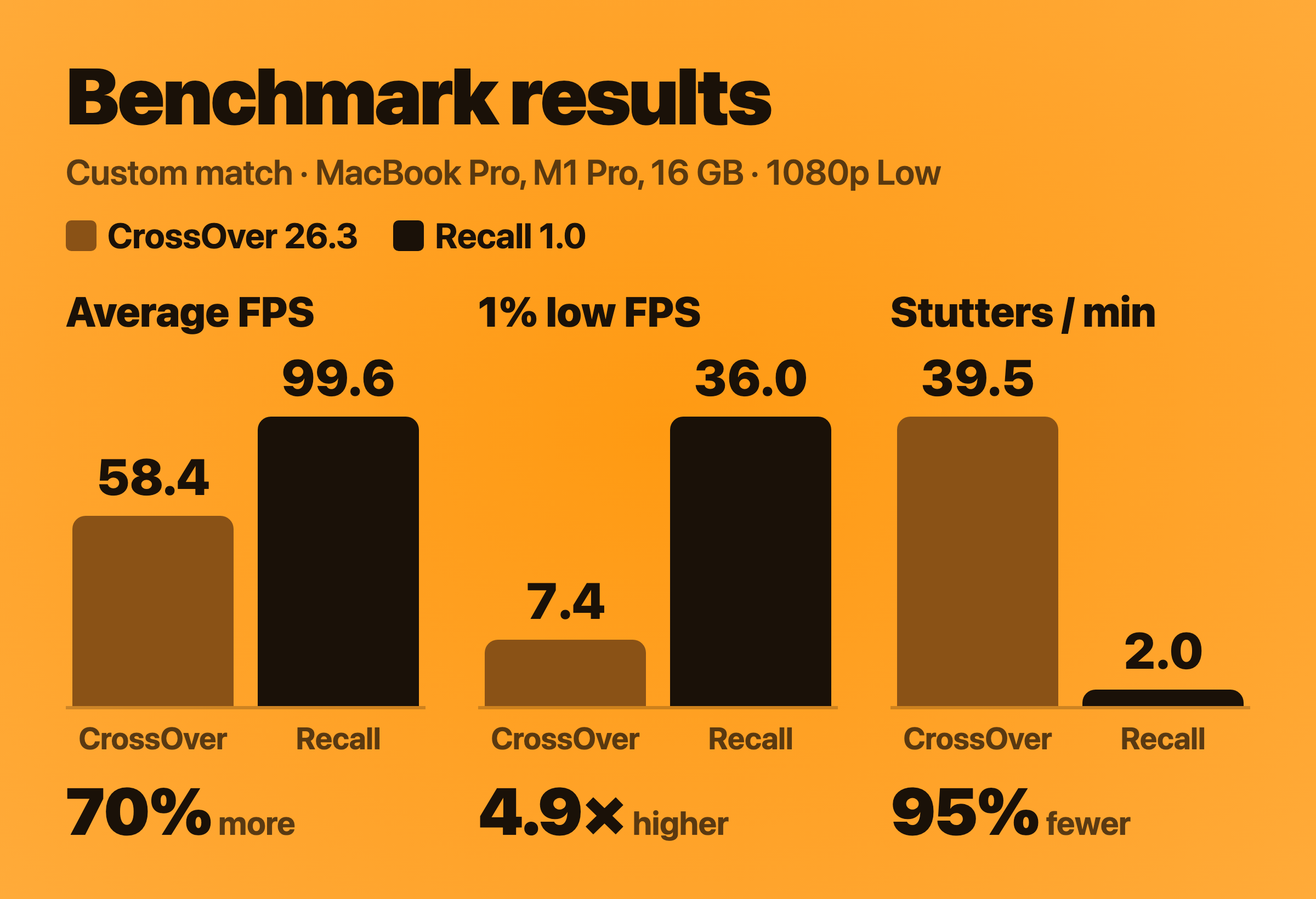
CrossOver is the most popular way to play Windows games on a Mac, so it's the comparison that matters. I played the same scenes in CrossOver 26.3 and in Recall on my 14-inch MacBook Pro (M1 Pro, 16 GB), with the same game settings, and recorded every frame each app put on screen.

Custom match on a 14-inch MacBook Pro with M1 Pro and 16 GB. Average FPS: CrossOver 58.4, Recall 99.6. 1% low FPS: CrossOver 7.4, Recall 36.0. Stutters per minute: CrossOver 39.5, Recall 2.0.

CrossOver Recall Difference
Custom match
Average FPS 58.4 99.6 +70%
1% low FPS 7.4 36.0 4.9× higher
Stutters per minute 39.5 2.0 95% fewer
Practice Range
Average FPS 84.0 120.7 +44%
1% low FPS 26.2 55.2 2.1× higher
Stutters per minute 4.2 0.5 88% fewer

1% low FPS is the frame rate during the slowest 1% of frames: the dips you feel in a fight. A stutter is a frame that took longer than 50 ms. Both apps ran Overwatch fullscreen at 1920 × 1080 on the Low preset, with V-Sync off and Dynamic Render Scale off, on macOS 26.6.2; CrossOver used its default graphics setting, D3DMetal. Each run measured about two minutes of gameplay, with loading screens and menus removed. The full results and method are in the performance notes.

Curious how Recall gets these results? See how Recall runs faster.

Your aim. Overwatch is decided by flicks and tracking, so how the mouse reaches the game matters as much as frame rate. CrossOver waits for macOS to update the pointer, 120 times a second, and drops a little of your movement each time the game snaps its hidden cursor back to the center. Recall reads the mouse directly, up to 2,000 times a second, the way native Mac games do, so none of your movement is lost and it reaches the game with less delay. How each one handles the mouse.

Price. CrossOver costs $74 with a year of updates, or $494 for life. Recall is free.

CrossOver is the right tool if you play many Windows games. If Overwatch is your game, Recall is built for it.

Prices as listed by CodeWeavers in October 2026.

Get started

  1. Download Recall, open the disk image and drag Recall to Applications.
  2. Open Recall and follow the setup steps. It prepares everything and opens Battle.net.
  3. Sign in to Battle.net, install Overwatch and press Play.
You need
Mac Apple Silicon: M1 or newer. Intel Macs aren't supported.
macOS macOS Tahoe 26.5 or later
Memory 16 GB recommended
Storage 85–95 GB free, on your Mac or an external SSD
Also A free Blizzard account, an internet connection, and Rosetta (Recall checks for it during setup)

The installation guide has more detail, including installing the game on an external drive.

Prefer Homebrew? See installing with Homebrew.

Why I built Recall

Josh Nelson

I'm Josh, a UCSB Master of Technology Management graduate who loves building tech products. I've been part of the PC Overwatch community for more than four years, and I've always wanted to take the game with me on my MacBook when I travel.

Mac gaming has had a rough reputation for a long time, and for years it was deserved. Apple Silicon changed that. These Macs are remarkably powerful, Apple is finally investing in games, and I'd love to see more developers build for the people already using them. Overwatch is the one I most want to see.

I built Recall to make playing it on a Mac easier while we wait. My hope is that Blizzard eventually brings Overwatch to the Mac natively, and that projects like this help show the interest is there. In the meantime, I hope you enjoy :)

Josh

If you'd like to support my work, you can try Mosaic News, my free news app designed to be the most transparent, customizable, and privacy focused way to follow the news.

You can also support me by helping fuel my caffeine addiction and/or starring this repository which helps other Mac players find Recall.

Try Mosaic News Buy me a coffee on Ko-fi Josh on LinkedIn

Questions

Is it really free?

Yes. There's no price, trial, subscription, ad or Recall account, and the code is open source. Overwatch is free to play, so a Blizzard account is all you need. If Recall saves you the cost of other software and you'd like to say thanks, you can buy me a coffee or try Mosaic News :)

Do I need CrossOver, Windows or Boot Camp?

No. Recall includes everything it needs to run Overwatch on your Mac. You don't need to buy CrossOver or install Windows, and Boot Camp doesn't exist on Apple Silicon Macs.

Is it safe for my Blizzard account?

You sign in to Battle.net itself, and Recall never asks for your password. Recall doesn't modify Overwatch's game files, inject code into the game or read its memory. It runs the same Windows game Battle.net installs, through Wine, the technology CrossOver is built on. Blizzard doesn't officially support playing Overwatch on a Mac, with Recall or with anything else.

Why do my first matches stutter a little?

The first time you play, the game prepares its shaders, the small programs your Mac's graphics chip uses to draw each scene. This causes brief stutters in your first few matches and settles down the more you play.

To get ahead of it, play Workshop code 929PJ from Custom Games before you queue and let it run for 5 to 10 minutes.

Can I use an external monitor?

Yes. Set it as your main display in macOS System Settings, then choose its resolution in Overwatch's Video settings; Recall keeps it. See the display setup instructions.

Can I install the game on an external drive?

Yes. Choose an external SSD during setup and keep it connected while you play. The installation guide covers supported formats and setup.

What happens when Overwatch or macOS updates?

Overwatch updates through Battle.net, as usual. If a Blizzard or macOS update needs a fix on the Mac side, it arrives as a Recall update. Recall checks for new versions when it opens and lets you choose when to install them. The shaders Recall has learned carry over through updates, so you don't start from scratch.

How do I uninstall it?

Choose Settings › Uninstall Recall. It moves Recall and the game installation it manages to the Trash. Your Blizzard account is unaffected. See uninstalling for details. If you installed Recall with Homebrew, run brew uninstall --zap --cask recall instead.

Help and contributions

Report a bug · Share how it runs on your Mac · Suggest an idea

For troubleshooting and privacy information, see Support and privacy. Remove account names and personal file paths before sharing a report.

Interested in the code? Start with the architecture and build instructions.

Recall uses Wine from CodeWeavers' published CrossOver sources, DXMT by Feifan He through NerRobDog's fork, and Soju's runtime build recipe. Recall's original code is licensed under Apache 2.0; dependencies and patches keep their own licenses. See the third-party notices.

Recall is an independent community project, not affiliated with or endorsed by Blizzard Entertainment, Apple or CodeWeavers. Overwatch, Mac, CrossOver and other product names are trademarks of their respective owners.

recall (AsherJN/recall)

wine
Searching Database…

253 ·GitHub
What is this?Recall is a free, open-source macOS app that lets you play Overwatch on Apple Silicon Macs, using Wine and a custom Metal translation layer instead of CrossOver or Windows.
How do I get it running?Download Recall, open the disk image and drag it to Applications, then open Recall and follow the setup steps, which prepare everything and open Battle.net so you can sign in and install Overwatch.
Do I need CrossOver, Windows or Boot Camp?No. Recall includes everything it needs to run Overwatch on your Mac, so you don't need to buy CrossOver or install Windows, and Boot Camp doesn't exist on Apple Silicon Macs.
Why do my first matches stutter?The game has to compile its graphics shaders the first time you play, which causes brief stutters that settle down the more you play; you can warm them up early with the Workshop code 929PJ in Custom Games.
Does it work on Intel Macs too?No, only Apple Silicon Macs (M1 or newer) running macOS Tahoe 26.5 or later are supported; Intel Macs aren't.
Is it safe for my Blizzard account?You sign in directly to Battle.net and Recall never asks for your password; it doesn't modify Overwatch's game files, inject code, or read its memory, though Blizzard doesn't officially support Mac play.
How much faster is Recall than CrossOver for Overwatch?In the author's custom match test, Recall averaged 99.6 FPS versus CrossOver's 58.4 FPS (+70%), with 95% fewer stutters per minute and up to 16x higher mouse polling, because Recall reads the mouse directly up to 2,000 times a second instead of CrossOver's 120.
Can I install Overwatch on an external drive?Yes, you can choose an external SSD during setup; the app needs 85-95GB free, either on the Mac itself or an external SSD kept connected while playing.
How do I uninstall Recall?Use Settings > Uninstall Recall to move both the app and the game it manages to the Trash without affecting your Blizzard account; if installed via Homebrew, run 'brew uninstall --zap --cask recall' instead.
Why did Josh build Recall instead of just using CrossOver?As a longtime PC Overwatch player, he wanted a free, purpose-built way to play on his MacBook that outperforms CrossOver's generic Windows compatibility layer, hoping it shows Blizzard there's demand for a native Mac client.
Creator
AsherJN
Size
7.9 MB
Stars
253
Age
15d
Commits · 90 Days