Install Linux next to Windows without a USB stick.
What it is
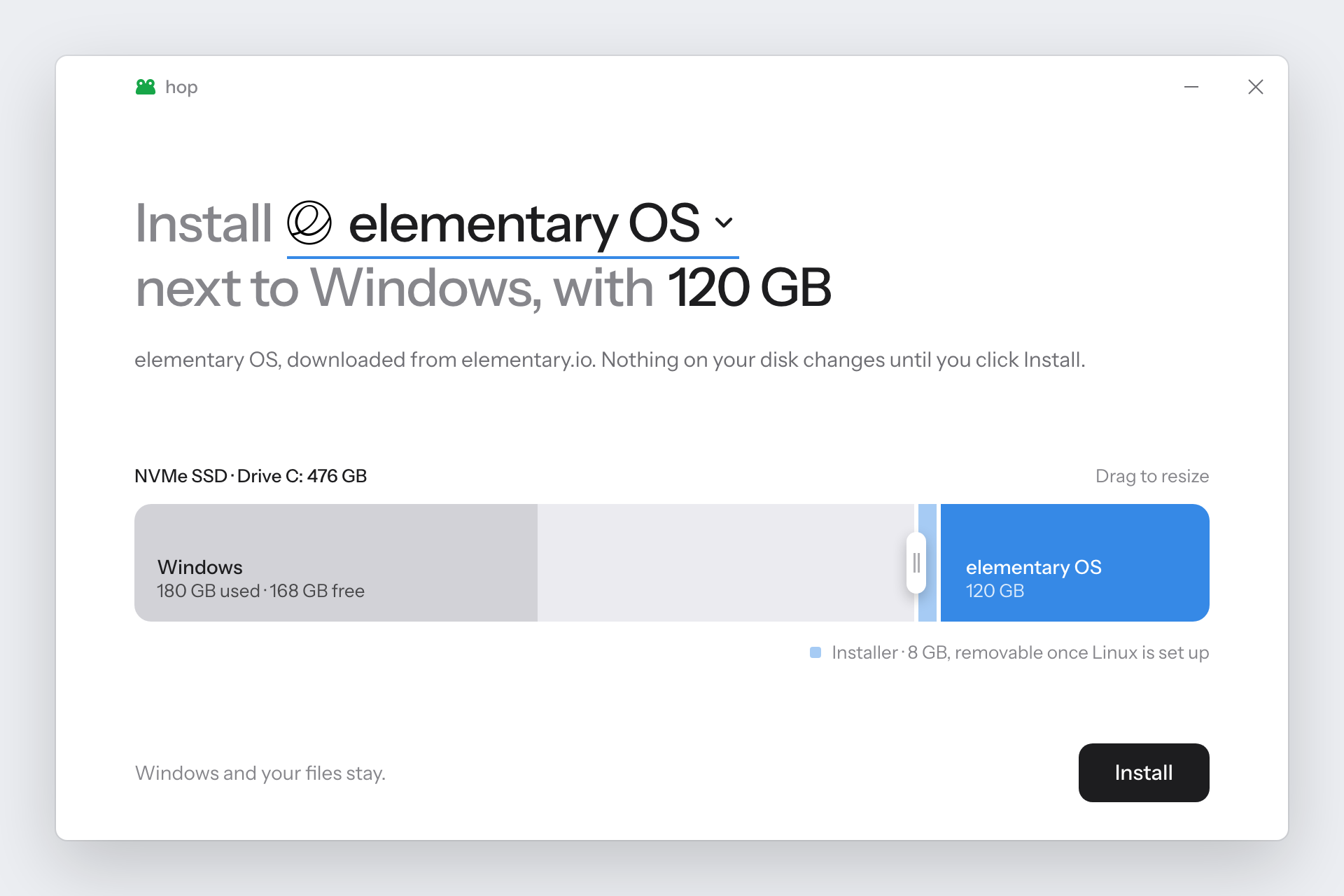
hop is a single Windows app that installs Linux alongside Windows. Pick a system, choose a drive, drag
to choose how much space it gets, and click Install. There's no USB stick to find and nothing to install
first.
What it does
Downloads from official sources. It gets the ISO from the project's own server and verifies its
checksum where the project publishes one. You can also use an ISO you already have.
Makes room safely. It checks your PC first, and nothing on the disk changes until those checks pass.
Goes where there's room. Shrink C: or another drive, use free space, or use a second disk inside the
PC. If C: is full, hop suggests a drive that isn't, and the download can go elsewhere too.
Tells you what to click. It lists the exact choices to make in the Linux installer.
Gets you unstuck. If the PC goes back to Windows, reopening hop explains why and can restart into the BIOS.
Cleans up after itself. Undo gives the space back to the drive it came from, and it can also remove
another Linux already on the drive.
Can replace Windows entirely, for Ubuntu, Zorin OS, Debian and Arch. It's a separate choice with its own warning, and you have to
type ERASE. hop only makes the installer, which copies itself to memory so it can erase the disk it started
from when you tell it to. It needs more memory than the ISO's size, and it's only offered for systems where
hop has seen it erase a disk and start again afterwards.
Systems: elementary OS, Ubuntu and its flavours (Budgie, Xubuntu, Lubuntu, Cinnamon, Unity, Edubuntu,
Studio), Linux Mint, Pop!_OS, Zorin OS, Debian, Fedora Workstation, Ultramarine, CachyOS, Arch Linux and Omarchy.
Other Ubuntu-based ISOs should work too, if you choose the file yourself. Kubuntu isn't
supported, because its ISO has a file too big for FAT32. CachyOS, Arch, Omarchy and Pop!_OS need Secure Boot off.
Omarchy also needs BitLocker fully off on its disk, not paused, and hop refuses until it is. hop won't turn it off for you.
Needs: Windows 10 (1803 or newer) or 11, on a UEFI PC with a GPT disk, which is nearly every PC sold with
them. Linux has to go on a disk inside the PC, not a USB drive.
How it works
A USB installer is just a FAT32 drive with the ISO's files on it. hop makes the same thing on your
internal disk:
Before   [ EFI ][ C: Windows                              ][ Recovery ]
After    [ EFI ][ C: Windows       ][ Installer ][ Linux  ][ Recovery ]
Download and check the ISO, and confirm it's a system hop can install.
Make room after the drive you chose, using free space first and shrinking the drive only if needed.
Copy the ISO's files onto a small FAT32 partition, and check each one.
Add a startup entry with the ISO's signed boot loader, for the next restart only.
Restart. The Linux installer opens and installs into the space hop made.
Download hop.exe from Releases and run it. Windows asks for administrator access, and
SmartScreen may warn because hop isn't code-signed yet: click More info → Run anyway.
You need the .NET SDK, on any OS. The result is bin/Release/hop.exe.
dotnet build -c Release
See Contributing to help, or to add a Linux system.
License
MIT. Instrument Sans is under the SIL Open Font License. Linux logos belong to their projects
and are listed in SOURCES.md. hop isn't affiliated with any of them.
hop (Arjun-Ingole/hop)
Choose a tag and it will appear here. With no tags selected, all catalog projects are shown.
Searching Database…
Choose a tag and it will appear here. With no tags selected, all catalog projects are shown.
hop is a single Windows app that installs Linux alongside Windows. Pick a system, choose a drive, drag to choose how much space it gets, and click Install. There's no USB stick to find and nothing to install first.