SoulMatrix


A premium, local-first interactive live-reading matrix dashboard and pop-out Script Board for Destiny Matrix (Soul Blueprint) analysis. Engineered with real-time multi-screen offline synchronization and dual-DOB compatibility engines.
Designed and engineered by Ahmad Hassan (B-Ted). Built to bridge spiritual numerology with premium human-centric design and technology.
Overview
SoulMatrix is a high-performance interactive tool designed for numerologists, spiritual consultants, and live-stream presenters (specifically optimized for OBS, TikTok Live, and dual-monitor configurations).
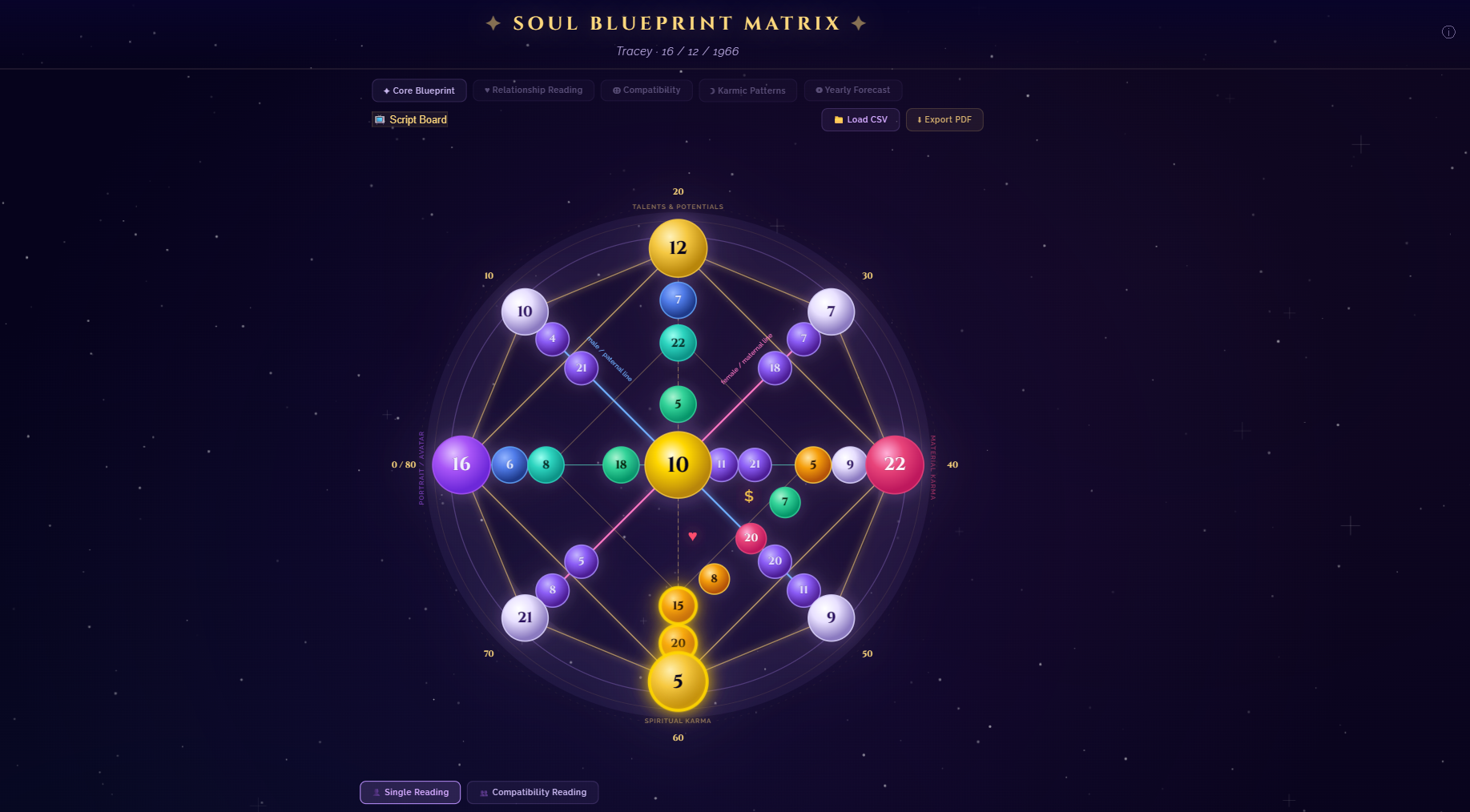
It calculates a client's Destiny Matrix octagram using their birth date, plots it onto a modernized interactive SVG chart, and dynamically renders detailed script interpretations loaded directly from a customizable Excel master database. To support live streaming, a secondary Script Board window communicates offline in real-time, allowing presenters to display interpretation details on a private screen while displaying the interactive matrix chart to their audience.
Visual Modernization (Before vs After)
SoulMatrix features a refined UI refresh designed to captivate clients during live sessions. Hover effects, glowing neon states, and color-coded zone divisions provide instant clarity:
| Muted Gradients & Low Contrast (Original) |
Vibrant Gradients & Glowing Outlines (Modernized) |
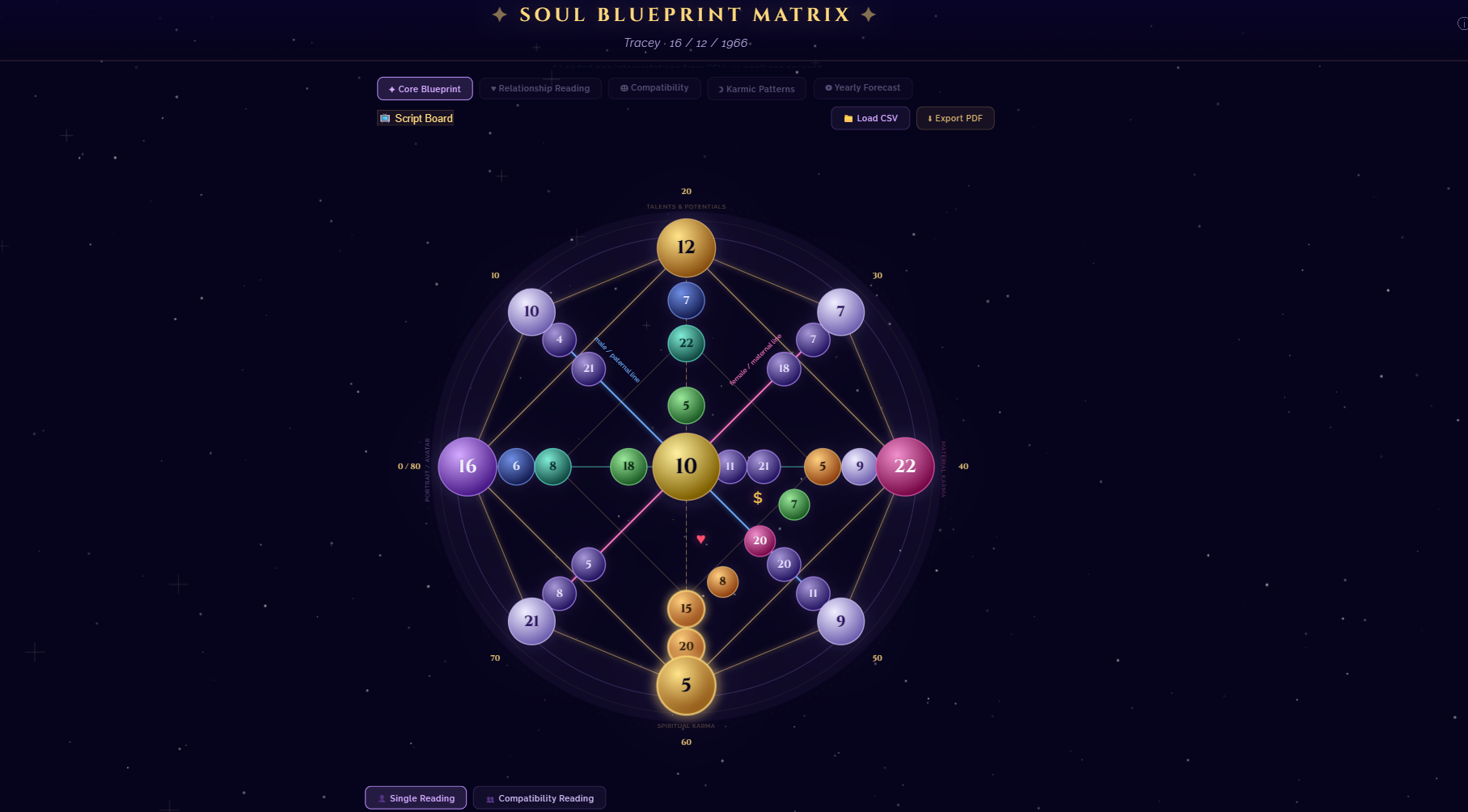 |
|
Key Features
- ** Single & Couples Compatibility Mode**: Calculates combined matrix nodes by adding corresponding coordinates and reducing them (modulo-22 Major Arcana reduction). Renders specialized compatibility tabs (
General, Love Dynamics, Relationship Karma, and Shared Finance) to show relationship dynamics.
- ** Outer Ring Age Timeline**: Displays decadic life milestone labels (
0/80 to 70) concentrically, along with 56 intermediate age timeline nodes mapped dynamically along the perimeter lines of the octagram SVG, each clickable and fully integrated into the database forecast readings.
- ** Pop-out Script Board**: A secondary control window featuring offline, real-time, bidirectional sync. Selecting a node or active program on one screen updates the active selection on the other instantly.
- ** Dynamic Excel Sync Engine**: Maintain your entire interpretation library—including custom categories or 3-number combinations—within Excel. Run the compiler tool to sync changes instantly.
- ** Font Zoom Controller**: Fine-tune script board text sizing (Small, Medium, Large, Extra Large) for optimal readability. User preferences are persisted locally in the browser.
Architecture Overview
The system operates local-first and zero-dependency, ensuring maximum reliability and privacy during live sessions.
graph TD
    classDef file fill:#2e2a3a,stroke:#d4af6e,stroke-width:1.5px,color:#eae6f0;
    classDef script fill:#1e2638,stroke:#b088f0,stroke-width:1.5px,color:#eae6f0;
    classDef ui fill:#1b3233,stroke:#5cdec8,stroke-width:1.5px,color:#eae6f0;

    xlsx[Master Spreadsheet<br>interpretations.xlsx]:::file -->|Edit database| bat_sync(run_update.bat):::script
    bat_sync -->|Executes compiler| py_sync[update_interpretations.py / ps1]:::script
    py_sync -->|Generates backup & compiles| csv_db[interpretations.csv]:::file
    csv_db -->|Loaded via fetch / FileReader| main_app[soul_matrix.html Dashboard]:::ui
    main_app <-->|Offline BroadcastChannel Sync| script_board[script_board.html Script Board]:::ui
System Workflow
This diagram outlines the complete workflow loop, from database maintenance to rendering and live presenting:
sequenceDiagram
    autonumber
    actor Presenter as Ahmad Hassan (B-Ted) / Presenter
    participant Excel as Master Excel (data/interpretations.xlsx)
    participant SyncTool as Sync Engine (tools/update_interpretations.py)
    participant Dashboard as Main Dashboard (src/soul_matrix.html)
    participant ScriptBoard as Script Board (src/script_board.html)

    Note over Presenter,Excel: Step 1: Database Maintenance
    Presenter->>Excel: Updates interpretation text / adds new modules
    Presenter->>SyncTool: Runs run_update.bat
    SyncTool->>SyncTool: Backs up CSV and parses Excel sheets
    SyncTool-->>Presenter: Displays successful compilation count

    Note over Presenter,Dashboard: Step 2: Session Launch
    Presenter->>Dashboard: Double-clicks run_locally.bat (Starts HTTP Server)
    Dashboard->>Dashboard: Reads interpretations.csv and populates memory
    Presenter->>Dashboard: Enters Client Date of Birth and clicks "Calculate"

    Note over Dashboard,ScriptBoard: Step 3: Dual Screen Presenting
    Presenter->>Dashboard: Clicks "Script Board" button (Opens pop-out window)
    ScriptBoard->>Dashboard: Requests active session synchronization
    Dashboard-->>ScriptBoard: Broadcasts calculated nodes & database configurations
    Presenter->>Dashboard: Clicks interactive SVG Node (e.g. Node E)
    Dashboard->>ScriptBoard: Broadcasts selected position 'E' (via BroadcastChannel)
    ScriptBoard->>ScriptBoard: Scrolls to and highlights Node E interpretations
Repository Structure
The layout separates core runtime assets, Excel data configurations, and build/sync scripts:
SoulMatrix/
├── data/
│   ├── interpretations.xlsx      ← Excel Master Database (edit this!)
│   ├── interpretations.csv       ← Compiled LIVE CSV database mapping (loaded by web page)
│   └── interpretations_deep.csv  ← Compiled Deep Dive CSV database mapping
├── docs/
│   └── images/                   ← UI comparison screenshots and visual assets
├── src/
│   ├── soul_matrix.html          ← Interactive matrix chart dashboard (Presenter display)
│   ├── script_board.html         ← Pop-out private reader/presenter Script Board
│   ├── css/                      ← Modular CSS Design System
│   │   ├── main.css              ← Core CSS tokens, typography, and base layout
│   │   ├── matrix_chart.css      ← SVG Matrix chart styling and glow keyframes
│   │   └── panels.css            ← Side panel, tabs, and card UI styles
│   ├── js/                       ← Modular Engine Modules
│   │   ├── config.js             ← Matrix metadata, position dictionaries, module titles
│   │   ├── calc_engine.js        ← Arcanum reduction math, single & couple matrix engines
│   │   ├── db_sync.js            ← CSV parsing, Dual DB loader, BroadcastChannel sync
│   │   ├── programs_engine.js    ← 3-Node triplet program detector & active dashboard
│   │   ├── pdf_exporter.js       ← Warm client report generator & PDF printer
│   │   └── ui_controller.js      ← UI panel switcher, node listeners, outer age timeline SVG
│   ├── server.py                 ← Python local HTTP server
│   └── server.ps1                ← PowerShell local HTTP server (automated fallback)
├── tools/
│   ├── update_interpretations.py ← Excel-to-CSV compilation sync engine (Python)
│   ├── update_interpretations.ps1 ← Excel-to-CSV compilation sync engine (PowerShell fallback)
│   ├── package_release.py       ← Versioned release zip packager
│   └── backups/                  ← Automatically generated CSV backup files
├── run_locally.bat               ← Launcher script to host application locally
├── run_update.bat                ← Shortcut batch script to compile Excel edits
├── build_release.bat             ← Release packaging batch launcher
├── README.md                     ← Main documentation file
├── CHANGELOG.md                  ← Release version and feature update history
├── HOW-TO-UPDATE.md              ← Detailed Excel mapping guide
└── TODO.md                       ← Comprehensive completed feature & task roadmap
Data Flow & Calculation Pipeline
The core engine maps birth dates to the matrix structure and reduces them using base-22 Major Arcana reduction math:
graph LR
    classDef input fill:#222,stroke:#ffffd9,color:#eee;
    classDef math fill:#332211,stroke:#d4af6e,color:#eee;
    classDef output fill:#112233,stroke:#5cdec8,color:#eee;

    DOB1[Partner 1 DOB]:::input --> Engine[Calculation Engine]:::math
    DOB2[Partner 2 DOB]:::input --> Engine
    Engine --> Arcana[Arcana-22 Reduction Math]:::math
    Arcana --> Output[Summed Compatibility Nodes]:::math
    Output --> SVG[Plot interactive SVG Coordinates]:::output
    Output --> Table[Generate Chakra Health Matrix]:::output
    Output --> Prog[Filter Active 3-Number Programs]:::output
Click to view Arcana-22 Math & Summation Formulas
Arcana-22 Reduction Math
All numerical nodes in the Destiny Matrix are mathematically reduced to a value between 1 and 22 (corresponding to the Major Arcana):
$$\text{reduced}(n) = \begin{cases} n, & \text{if } n \le 22 \ \text{sum of digits of } n, & \text{if } n > 22 \end{cases}$$
If the sum of digits is still greater than 22, the reduction formula is applied recursively until the value falls within the $[1, 22]$ range.
Compatibility Coordinate Summation
For Couples Compatibility Mode, nodes for each partner are summed and reduced:
$$\text{Node}{\text{compatibility}} = \text{reduced}(\text{Node}{\text{PartnerA}} + \text{Node}_{\text{PartnerB}})$$
Derived purposes (Personal, Social, and Spiritual) and the combined Chakra energy table are calculated dynamically using these compatibility coordinates.
Request Lifecycle & Sync Mechanics
When a presenter interacts with a node, the application triggers a real-time event pipeline:
stateDiagram-v2
    [*] --> NodeClicked: Presenter clicks SVG Node (e.g. Node A)
    NodeClicked --> HighlightUI: Main dashboard outlines Node A and opens sliding drawer
    HighlightUI --> BroadcastEvent: Dashboard posts 'select_position' event to BroadcastChannel
    BroadcastEvent --> ReceiveEvent: Script Board listener catches message
    ReceiveEvent --> SyncScriptBoard: Script Board highlights Node A in sidebar and scrolls to text card
    SyncScriptBoard --> [*]
Tech Stack
- Frontend: HTML5, Vanilla CSS3 (custom variables, keyframe animations, responsive grid), Vanilla JavaScript (ES6+).
- Synchronization: HTML5
BroadcastChannel API (for zero-latency offline cross-window messaging).
- Database Parsing: HTML5
FileReader and local storage caching for offline file imports.
- Sync Engine: Python 3 with the
openpyxl library (or native Windows PowerShell + COM Automation fallback for zero-dependency local environments).
Quick Start
Launch the Server:
Open the Pop-out Script Board:
- Click ** Script Board** on the main navigation bar.
- Drag script_board.html to your second monitor or capture it as an overlay inside OBS.
Modify Interpretations:
Internal Module Structure
The sync engine handles data separation based on worksheet origins:
- Master_Database Sheet: Processes single-DOB reading nodes. Sections are mapped to standard tabs (
Core, Love, Karma, Money, Purpose, Forecast).
- Compatibility Sheet: Processes dual-DOB relationship nodes. Sections are automatically prefixed with
compat_ to construct distinct tabs (General, Love Dynamics, Relationship Karma, Shared Finance).
- 3-Number Combination Programs: Matches numeric groupings (e.g.
15-20-5 for position M-N-D). Renders active programs prominently inside the calculations section and sidebar.
Build & Deployment Pipeline
To package clean production bundles for end-users, follow the packaging workflow:
graph TD
    classDef run fill:#252a36,stroke:#b088f0,color:#fff;
    classDef file fill:#183233,stroke:#5cdec8,color:#fff;

    Start[Start Build Script]:::run --> Clean[Delete previous .zip release]:::run
    Clean --> Copy[Copy directories: src/, data/, tools/, batch files]:::run
    Copy --> Exclude[Filter out temporary backup csv files & .git folder]:::run
    Exclude --> Compress[Zip remaining structures into releases/SoulMatrix.zip]:::file
Contribution Guidelines
New enhancements and optimizations are welcomed to make the tool more versatile for presenters.
- Fork the repository.
- Create a clean feature branch (
feature/your-addition).
- Keep code comments minimal and document technical logic inside documentation files.
- Verify changes by executing run_update.bat to confirm no compiler regressions are introduced.
- Submit a Pull Request.
SoulMatrix is dedicated to the study of self-discovery and destiny calculation. Developed with precision by Ahmad Hassan (B-Ted).

 SoulMatrix 是一款本地优先的实时解读仪表盘,用于 Destiny Matrix(Soul Blueprint)数字命理。它根据来访者的出生日期计算其矩阵八角星,以可交互的 SVG 图表呈现,并从 Excel 数据库中加载详细解读,供现场或直播咨询时使用。