

hermes-gadget-sdk README

The project's README from github.com/Adolanium/hermes-gadget-sdk. As one markdown file: README.md.

Hermes Gadget logo

Hermes Gadget

Hold a button. Ask Hermes. Hear the answer.
A small device for your own Hermes Agent, with its tools, memory, and skills.

Set up a board · Try the simulator · Read the docs

The round simulator display, ready for a question
The desktop simulator runs the same device core. No board needed to try it.

Choose your starting point

I have a board I want to try it first I want to build with it
Open the browser installer Start the desktop simulator Explore the SDK
Install over USB, connect Wi-Fi, and pair with your Hermes. Try a scripted demo, then connect your own Hermes. Add a board, device actions, sensors, or your own face.
Chrome or Edge, a USB data cable, 2.4 GHz Wi-Fi, and Hermes. No firmware toolchain. Python 3.10+, CMake 3.16+, and a C++17 compiler. Start with the development guide and tests.

What you can do

Your Hermes does the thinking. Real conversations need Hermes Agent and the Gadget plugin. Voice also needs speech recognition and text-to-speech configured. The demo server gives scripted replies. Follow Connect Hermes when you are ready.

Supported hardware

Board How you talk Audio
Waveshare ESP32-S3-LCD-1.54 Hold BOOT Onboard microphones and speaker
Waveshare ESP32-S3-Touch-AMOLED-1.75 Hold the screen Onboard microphones; speaker output
Waveshare ESP32-S3-Touch-AMOLED-1.75C Hold the screen Onboard microphones and speaker; experimental
Espressif ESP32-S3-BOX-3 Hold the screen or BOOT Onboard microphones and speaker; experimental
M5Stack CoreS3 Hold the screen Onboard audio and battery management; experimental
ESP32-S3 breadboard build Hold TALK Wire the microphone and optional speaker

Check the exact model and connections in the hardware guide. Other boards need a port.

Raspberry Pi 4 and 5 have an experimental Linux client for 64-bit Raspberry Pi OS Lite Trixie. Add USB audio, GPIO controls, or a display as needed. ARM64 release packages include the native core and a service installer.

These ports build in CI. Physical verification reports are not yet recorded; treat them as experimental until the hardware verification table links a report for your revision.

Try the demo from a checkout

Already have Python, CMake, and a compiler? Start here.

In your activated environment at the repository root:

python -m pip install -e ".[dev]"
hermes-gadget build-sim --test
hermes-gadget devserver --pairing

In a second terminal with the same environment activated:

hermes-gadget sim --url ws://127.0.0.1:8765/gadget --board sim-466x466-round

Type approve <CODE> in the first terminal, using the code on the device. Type a message in the simulator to receive a streamed echo. The desktop guide covers platform-specific prerequisites and live audio.

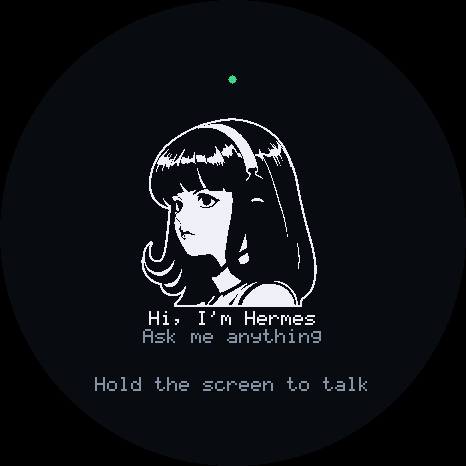
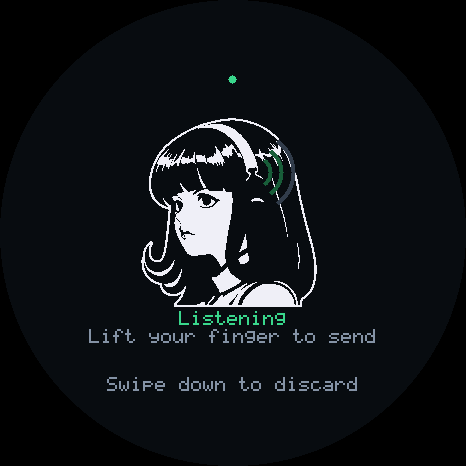
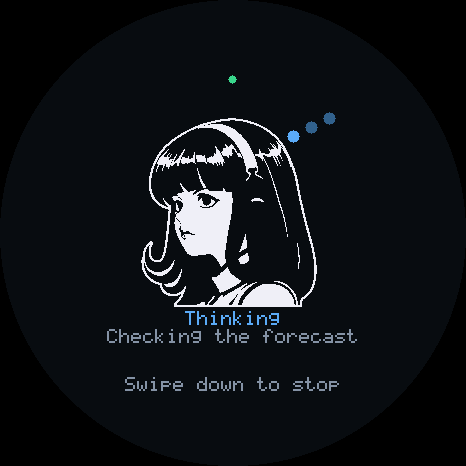
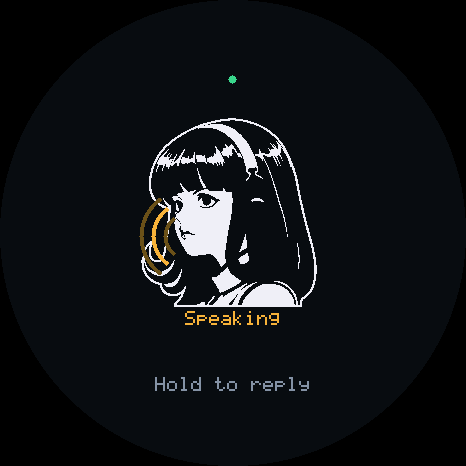
On the screen

Ready Listening Thinking Speaking

These images show the simulator's device display. The simulator guide covers its desktop controls, board profiles, and scripted runs.

Find the right guide

Use a gadget Build with the SDK
Choose a starting point Development and tests
Set up a board Add a board, actions, or sensors
Try the simulator Customize the face
Run a Linux gadget Hardware verification
Connect Hermes Architecture
Talk, type, and interrupt Protocol
Change Wi-Fi or update firmware Hermes integration reference
Troubleshooting Hardware and wiring

Project status

Releases include prebuilt firmware for the profiles listed in that release. Newly merged profiles need a source build until the next release. After the first USB flash, hermes gadget update installs new firmware over the air. A build that cannot reach Hermes rolls itself back.

The simulator and firmware share a portable C++17 core. CI tests the core, Python tools, installer, and plugin against a real Hermes gateway, and builds every supported board. The development guide describes the test suites and pinned Hermes version.

After installing firmware, you can configure Wi-Fi from your phone through the gadget's temporary network. USB setup remains available. Wake-word activation is not included.

The Home Assistant and MQTT examples expose a configured lamp and temperature sensor through a Linux gadget. They include pairing instructions, fixed action targets, asynchronous completion and local integration tests.

CI Hermes integration

Contributing

Bug reports from real boards, new boards, fixes, and docs are welcome. Read CONTRIBUTING.md. Report security problems privately through SECURITY.md.

Affiliation and trademarks

Hermes Gadget is an independent, community-made project. It is not affiliated with, endorsed by, sponsored by or supported by Nous Research.

"Hermes", "Hermes Agent", "Nous Research" and the Hermes Agent mascot (the girl with the headphones, sometimes called "Nous Girl") are trademarks or brand assets of Nous Research. They appear here only to describe compatibility with Hermes Agent.

License

Project code and documentation are licensed under the MIT license.

Third-party dependencies, adapted drivers, and artwork retain their respective licenses. See Third-party licenses and attribution and NOTICE for details.

The MIT license grants no rights to Nous Research's names or marks.

hermes-gadget-sdk (Adolanium/hermes-gadget-sdk)

Searching Database…

这是什么?Hermes Gadget SDK 让你构建语音和文本硬件设备(ESP32 开发板、树莓派 Linux 客户端或桌面模拟器),并连接到你自己的 Hermes Agent:按住按钮问它问题,然后听到或看到回复。
怎么让一个设备跑起来?如果你已有开发板,就通过基于浏览器的安装器(Chrome 或 Edge)用 USB 刷写它,并用 Wi-Fi 配对;没有硬件想体验的话,可以检出代码后用 Python、CMake 和 C++ 编译器运行桌面模拟器。
在我的电脑上构建或模拟它需要什么?运行模拟器和 SDK 开发需要 Python 3.10+、CMake 3.16+ 和 C++17 编译器;刷写实体开发板只需要基于 Chromium 的浏览器、一根 USB 数据线和 2.4 GHz Wi-Fi。
它开箱就能连接真正的 Hermes Agent 吗?不能完全做到:真正的对话需要 Hermes Agent 加上 Gadget 插件,语音还需要配置好语音识别和文本转语音;没有这些,演示服务器只会给出脚本化的回复,而且完全不包含唤醒词激活功能。
实际支持哪些开发板和平台?固件面向微雪(Waveshare)的多款 ESP32-S3 开发板、乐鑫 ESP32-S3-BOX-3 和 M5Stack CoreS3(大多仍属实验性),另外还有一个实验性的 64 位 Linux 客户端,支持运行 Raspberry Pi OS Lite 的树莓派 4/5;其他开发板需要新的移植。
MIT 许可证足够复用这里的一切吗?项目自身的代码和文档采用 MIT 许可证,但第三方依赖、经过改写的驱动和美术素材保留各自的许可证,而且 MIT 不授予对 Nous Research 的“Hermes”名称或吉祥物的任何权利。
固件可以不用 USB 重新刷写就更新吗?可以,首次 USB 刷写之后,你可以运行“hermes gadget update”通过空中推送新固件,无法连接 Hermes 的构建会自动回滚。
设备能控制智能家居吗?仓库包含 Home Assistant 和 MQTT 示例,通过一个 Linux 设备暴露已配置的灯和温度传感器,并附有配对说明和本地集成测试。
设备屏幕上实际显示什么?屏幕会在“就绪”“聆听”“思考”“说话”几种状态之间循环显示,让你在它说话时能看到设备正在做什么。
Creator
Adolanium
Size
1.8 MB
Stars
403
Age
15d
Commits · 90 Days