


GitHub520 README

The project's README from github.com/521xueweihan/GitHub520. As one markdown file: README.md.

GitHub520

Featured|HelloGitHub
😘 让你“爱”上 GitHub,解决访问时图裂、加载慢的问题。

💰服务器将于 2026-12-31 到期,续费需要 831 元/年 点击扫码赞助,感谢🙏

一、介绍

对 GitHub 说"爱"太难了:访问慢、图片加载不出来。

本项目无需安装任何程序,仅需 5 分钟。

通过修改本地 hosts 文件,试图解决:

让你"爱"上 GitHub。

注: 本项目还处于测试阶段,仅在本机测试通过,如有问题欢迎提 issues

二、使用方法

下面的地址无需访问 GitHub 即可获取到最新的 hosts 内容:

2.1 手动方式

2.1.1 复制下面的内容

# GitHub520 Host Start
140.82.112.25                 alive.github.com
20.205.243.168                api.github.com
140.82.112.21                 api.individual.githubcopilot.com
185.199.111.133               avatars.githubusercontent.com
185.199.111.133               avatars0.githubusercontent.com
185.199.111.133               avatars1.githubusercontent.com
185.199.111.133               avatars2.githubusercontent.com
185.199.111.133               avatars3.githubusercontent.com
185.199.111.133               avatars4.githubusercontent.com
185.199.111.133               avatars5.githubusercontent.com
185.199.111.133               camo.githubusercontent.com
140.82.114.21                 central.github.com
185.199.111.133               cloud.githubusercontent.com
20.205.243.165                codeload.github.com
140.82.112.22                 collector.github.com
185.199.111.133               desktop.githubusercontent.com
185.199.111.133               favicons.githubusercontent.com
243.185.187.39                gist.github.com
16.15.252.227                 github-cloud.s3.amazonaws.com
16.15.191.47                  github-com.s3.amazonaws.com
52.216.219.169                github-production-release-asset-2e65be.s3.amazonaws.com
54.231.197.169                github-production-repository-file-5c1aeb.s3.amazonaws.com
52.216.204.123                github-production-user-asset-6210df.s3.amazonaws.com
192.0.66.2                    github.blog
20.205.243.166                github.com
140.82.113.17                 github.community
185.199.108.215               github.githubassets.com
108.160.169.171               github.global.ssl.fastly.net
185.199.110.153               github.io
185.199.111.133               github.map.fastly.net
185.199.110.153               githubstatus.com
140.82.113.26                 live.github.com
185.199.111.133               media.githubusercontent.com
185.199.111.133               objects.githubusercontent.com
13.107.42.16                  pipelines.actions.githubusercontent.com
185.199.111.133               raw.githubusercontent.com
185.199.111.133               user-images.githubusercontent.com
150.171.110.102               vscode.dev
140.82.114.22                 education.github.com
185.199.111.133               private-user-images.githubusercontent.com


# Update time: 2026-09-13T08:47:59+08:00
# Update url: https://raw.hellogithub.com/hosts
# Star me: https://github.com/521xueweihan/GitHub520
# GitHub520 Host End

该内容会自动定时更新, 数据更新时间:2026-09-13T08:47:59+08:00

2.1.2 修改 hosts 文件

hosts 文件在每个系统的位置不一,详情如下:

修改方法,把第一步的内容复制到文本末尾:

  1. Windows 使用记事本。
  2. Linux、Mac 使用 Root 权限:sudo vi /etc/hosts。
  3. iPhone、iPad 须越狱、Android 必须要 root。

2.1.3 激活生效

大部分情况下是直接生效,如未生效可尝试下面的办法,刷新 DNS:

  1. Windows:在 CMD 窗口输入:ipconfig /flushdns

  2. Linux 命令:sudo nscd restart,如报错则须安装:sudo apt install nscd 或 sudo /etc/init.d/nscd restart

  3. Mac 命令:sudo killall -HUP mDNSResponder

Tips: 上述方法无效可以尝试重启机器。

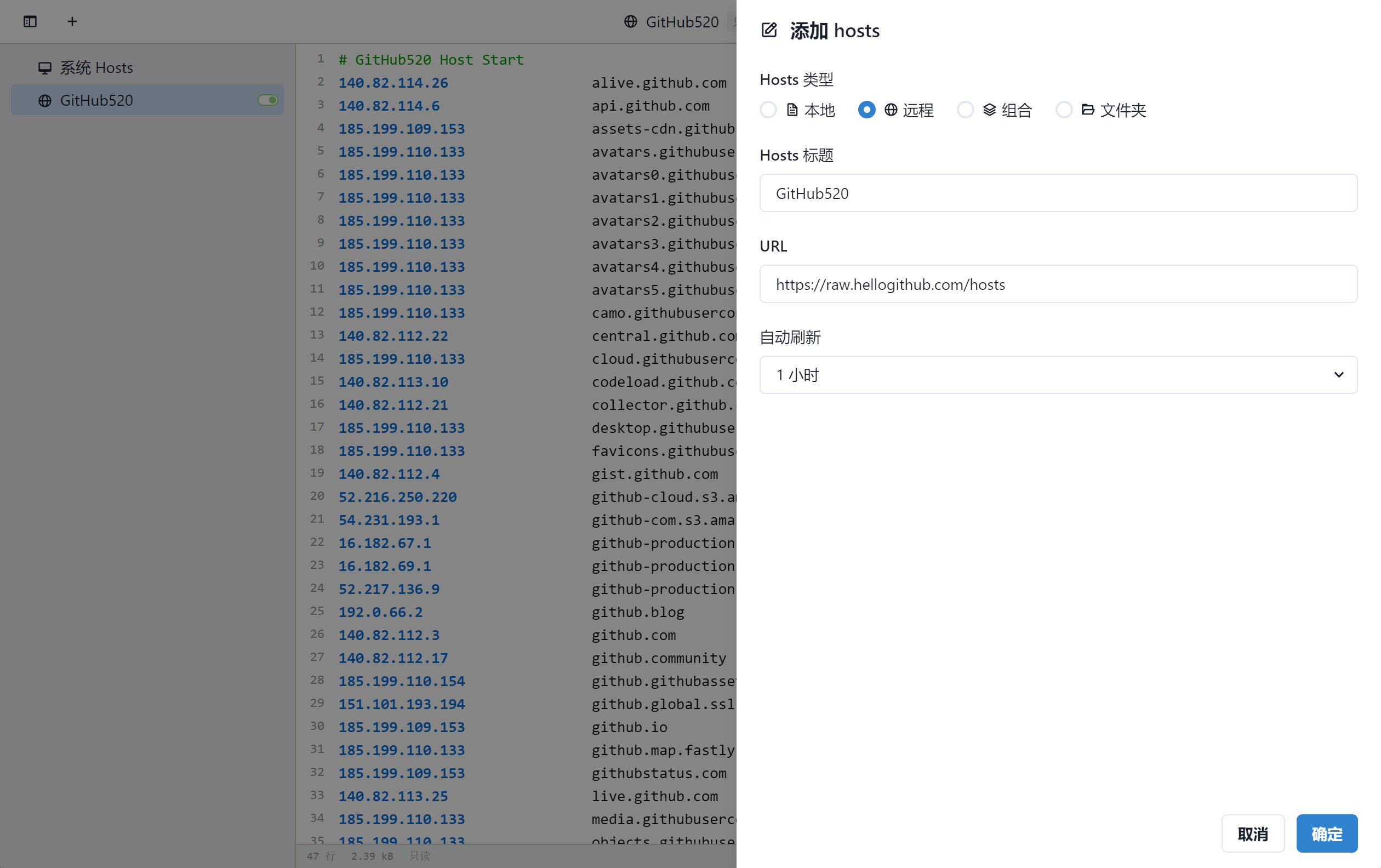
2.2 自动方式(SwitchHosts)

Tip:推荐 SwitchHosts 工具管理 hosts

以 SwitchHosts 为例,看一下怎么使用的,配置参考下面:

如图:

这样每次 hosts 有更新都能及时进行更新,免去手动更新。

2.3 一行命令

Windows

使用命令需要安装git bash 复制以下命令保存到本地命名为fetch_github_hosts

_hosts=$(mktemp /tmp/hostsXXX)
hosts=/c/Windows/System32/drivers/etc/hosts
remote=https://raw.hellogithub.com/hosts
reg='/# GitHub520 Host Start/,/# Github520 Host End/d'

sed "$reg" $hosts > "$_hosts"
curl "$remote" >> "$_hosts"
cat "$_hosts" > "$hosts"

rm "$_hosts"

在CMD中执行以下命令,执行前需要替换git-bash.exe和fetch_github_hosts为你本地的路径,注意前者为windows路径格式后者为shell路径格式

"C:\Program Files\Git\git-bash.exe" -c "/c/Users/XXX/fetch_github_hosts"

可以将上述命令添加到windows的task schedular(任务计划程序)中以定时执行

GNU(Ubuntu/CentOS/Fedora)

sudo sh -c 'sed -i "/# GitHub520 Host Start/Q" /etc/hosts && curl https://raw.hellogithub.com/hosts >> /etc/hosts'

BSD/macOS

sudo sed -i "" "/# GitHub520 Host Start/,/# Github520 Host End/d" /etc/hosts && curl https://raw.hellogithub.com/hosts | sudo tee -a /etc/hosts

将上面的命令添加到 cron,可定时执行。使用前确保 GitHub520 内容在该文件最后部分。

在 Docker 中运行,若遇到 Device or resource busy 错误,可使用以下命令执行

cp /etc/hosts ~/hosts.new && sed -i "/# GitHub520 Host Start/Q" ~/hosts.new && curl https://raw.hellogithub.com/hosts >> ~/hosts.new && cp -f ~/hosts.new /etc/hosts

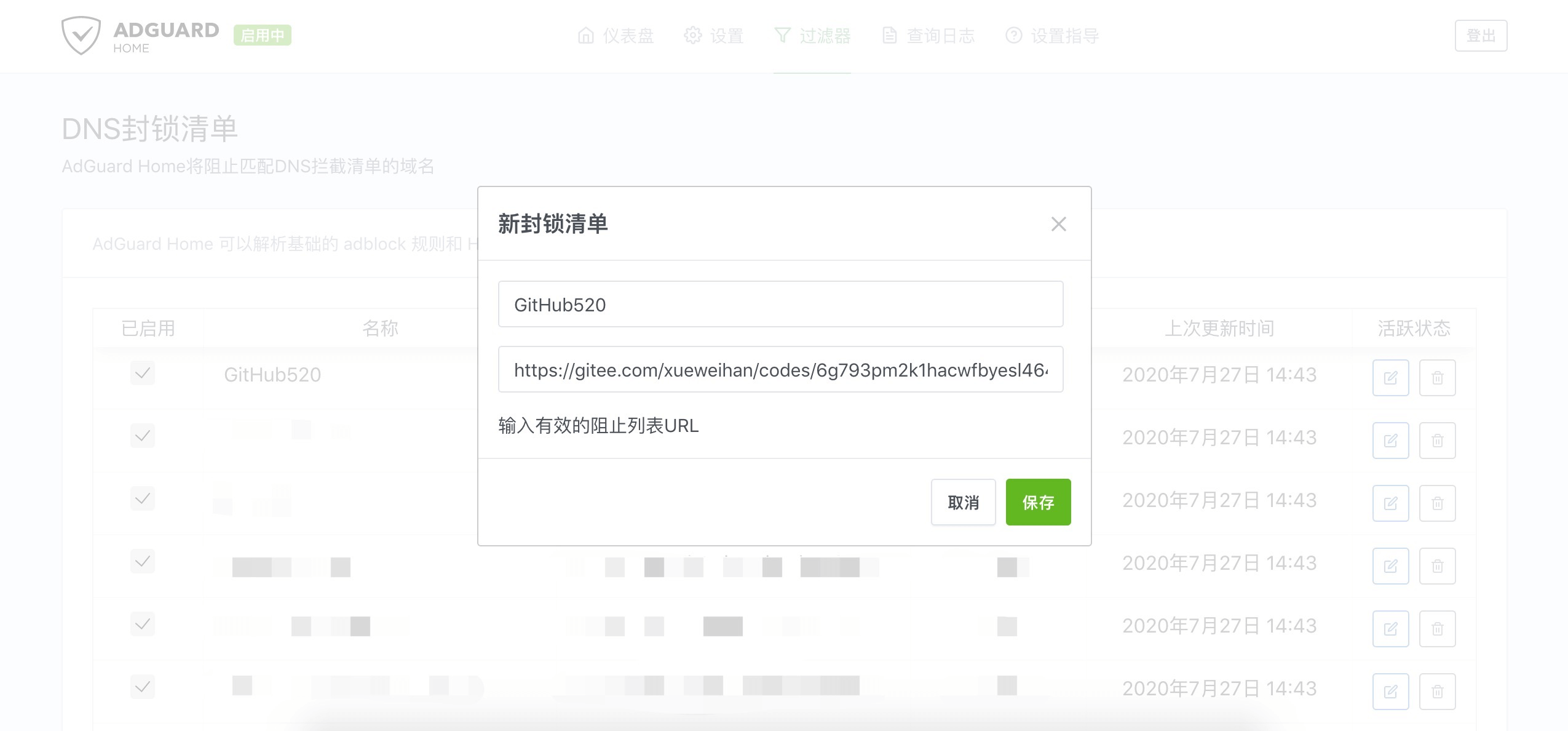
2.4 AdGuard 用户(自动方式)

在 过滤器>DNS 封锁清单>添加阻止列表>添加一个自定义列表,配置如下:

如图:

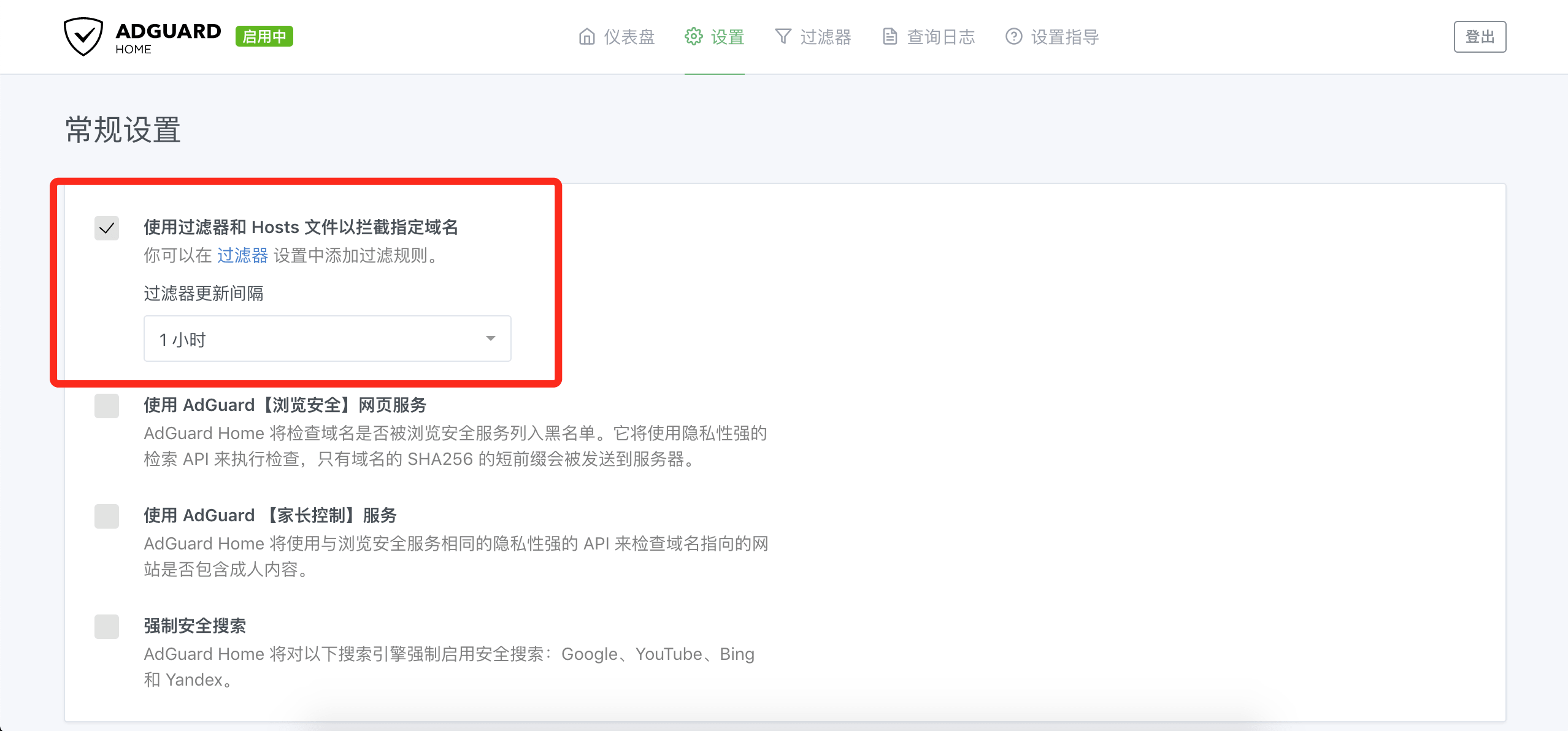
更新间隔在 设置 > 常规设置 > 过滤器更新间隔(设置一小时一次即可),记得勾选上 使用过滤器和 Hosts 文件以拦截指定域名

Tip:不要添加在 DNS 允许清单 内,只能添加在 DNS 封锁清单 才管用。 另外,AdGuard for Mac、AdGuard for Windows、AdGuard for Android、AdGuard for IOS 等等 AdGuard 家族软件 添加方法均类似。

三、效果对比

之前的样子:

修改完 hosts 的样子:

TODO

声明

知识共享许可协议
本作品采用 署名-非商业性使用-禁止演绎 4.0 国际 进行许可。

GitHub520 (521xueweihan/GitHub520)

Searching Database…

这是什么?GitHub520 会发布一份保持最新的 hosts 文件,把 GitHub 的域名映射到速度快、可正常访问的 IP 上,解决许多用户浏览 GitHub 时遇到的图片加载失败和页面打开缓慢的问题。无需安装任何软件,只需更新系统的 hosts 配置即可。
我需要安装应用,还是只需编辑文件?无需安装任何东西。项目只是提供一份持续更新的 hosts 内容(纯文本或 JSON 格式),你可以自己复制粘贴到系统的 hosts 文件中,也可以交给 SwitchHosts、AdGuard 之类的 hosts 同步工具,自动定时刷新。
我该怎么让它运行起来?从项目托管的文件或 JSON 中复制当前的 hosts 内容,打开系统的 hosts 文件(不同操作系统位置不同),把内容粘贴到末尾并保存,然后刷新 DNS(Windows 上运行 'ipconfig /flushdns',Mac 上运行 'killall -HUP mDNSResponder'),让修改立即生效。
编辑 hosts 文件需要 root 或管理员权限吗?需要。Windows 只需要记事本,但 Linux 和 macOS 编辑 /etc/hosts 需要 sudo 或 root 权限;在移动设备上,则需要越狱的 iPhone/iPad 或已获取 root 权限的安卓设备,才能访问 hosts 文件。
这个项目可以用于正式环境,还是仍在实验阶段?作者明确表示这是测试阶段的项目,只在自己的机器上验证过,因此效果可能因人而异。如果遇到问题,欢迎提交 issue 反馈。
到底哪些人需要这个?经常遇到 GitHub 页面加载缓慢或仓库图片无法显示的用户都适合使用,尤其是网络受限或拥堵的用户。把 hosts 配置指向本项目维护的更优 IP,会有所帮助。
SwitchHosts 是什么?为什么推荐它?SwitchHosts 是一款 hosts 管理应用,可以将项目的远程 hosts 地址添加为“Remote”条目,并设置每小时自动刷新,这样你就不必再手动复制粘贴更新了。
hosts 列表多久更新一次?是不是每次都会变?仓库通过定时运行的 CI 工作流(GitHub520.yml)刷新 IP,且只有在内容确实发生变化时才会写入新版本,避免了客户端轮询文件时的无谓更新。
能不能用一条命令自动更新 hosts,而不用手动编辑?可以。README 提供了适用于 Windows(通过 git-bash 配合任务计划程序)、Linux 以及 macOS/BSD 的一行 shell 命令,它们使用 sed 和 curl 从 /etc/hosts 中删除旧的 GitHub520 配置块,再追加最新的内容,适合用于定时任务(cron)。
这个项目能和 AdGuard 之类的广告拦截或 DNS 工具配合使用吗?可以。AdGuard 用户可以把项目的 hosts 地址添加为 DNS 拦截列表(而非允许列表)中的自定义条目,并将过滤器更新间隔设为每小时一次。同样的方法也适用于 AdGuard 的 Mac、Windows、安卓和 iOS 版本。
Size
17.2 MB
Stars
30K
Updated
CommitOct 18
Age
6y
Commits · 90 Days