
qrypt is a cloud disk aggregation mounting tool that supports end-to-end encryption, content rapid upload, and unifies S3, WebDAV, and other types of storage into a local file system.
qrypt (yinzhenyu-su/qrypt)
Searching Database…
The project's README from github.com/yinzhenyu-su/qrypt. As one markdown file: README.md.


qrypt turns your cloud drives into one encrypted local folder — mount it, open it, use it like any other drive.
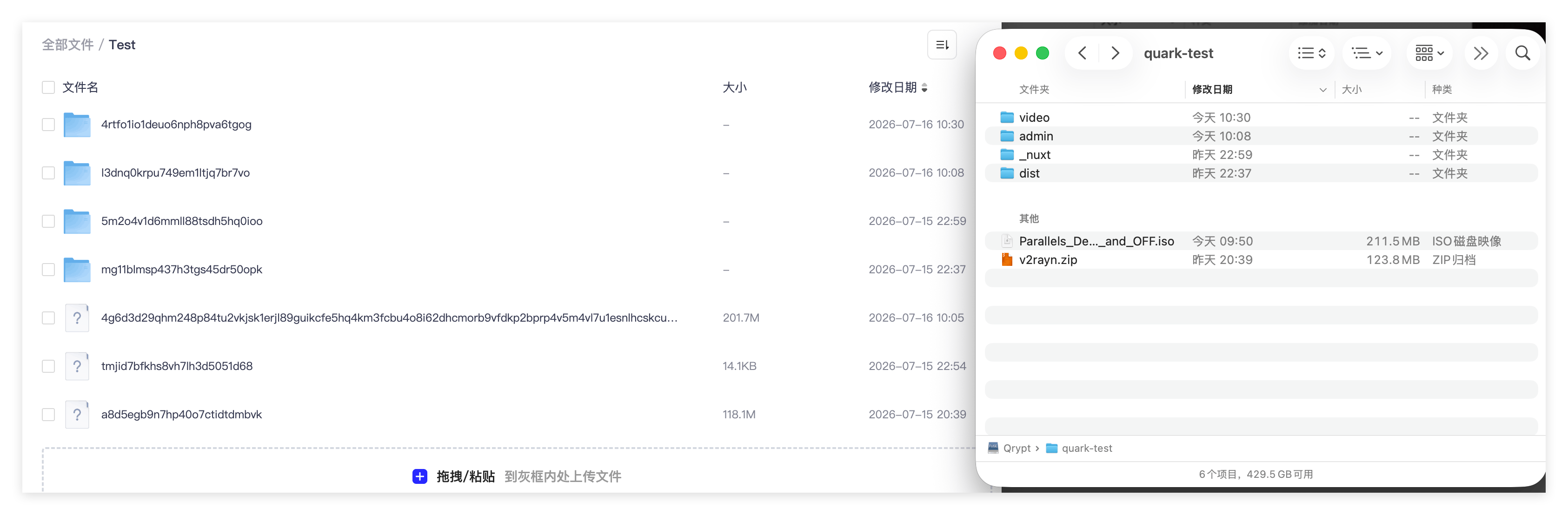
qrypt maps your cloud drives into a single encrypted local folder. Once mounted, you can browse and edit files as if they were on a local disk.
qrypt fs reads and writes remote files directly, useful in scripts and on serversLinux / macOS
curl -fsSL https://github.com/yinzhenyu-su/qrypt/releases/latest/download/install.sh | sh
Windows (run in any terminal; no need to open PowerShell first)
powershell -c "irm https://github.com/yinzhenyu-su/qrypt/releases/latest/download/install.ps1|iex"
The installer picks the right build for your system and needs no administrator
rights. Open a new terminal afterwards and run qrypt version to confirm.
Update or remove qrypt later with qrypt upgrade and qrypt uninstall (see the
quickstart).
The example below uses a local directory, so no cloud account is required. It covers configuration, upload, read, and encryption.
version = "1"

[mount]
mount_point = "~/Qrypt"

[[mounts]]
name = "local"
type = "localfs"

[mounts.params]
root_path = "/tmp/qrypt-data"

[mounts.encryption]
password = "my-password"
filename_encryption = "standard"
filename_encoding = "base32"
mkdir -p /tmp/qrypt-data
echo "hello qrypt" > /tmp/hello.txt

qrypt fs list /
qrypt fs put /tmp/hello.txt /local/hello.txt
qrypt fs cat /local/hello.txt
The last command prints hello qrypt.
ls /tmp/qrypt-data
The filename is now an obfuscated string such as
b4l6gr1s6t1q0tas6dl0q0mb0s62kbj0, and the file content is encrypted as well.
qrypt mount
Open ~/Qrypt in your file manager and use it like any other folder: drag files
in, open them, delete them.
Only
mountneeds FUSE: install macFUSE on macOS or WinFsp on Windows. Thefscommands do not need it.
Detailed walkthrough (including Windows notes) → Quickstart
| Dependency | macOS | Linux | Windows |
|---|---|---|---|
| FUSE | macFUSE | libfuse3 / fuse3 | WinFsp |
| Go (source build only) | 1.27+ | 1.27+ | 1.27+ |
Config files are discovered automatically: ./qrypt.toml,
~/.qrypt/qrypt.toml, then $XDG_CONFIG_HOME/qrypt/qrypt.toml on Unix or
%AppData%\qrypt\qrypt.toml on Windows. You can skip --config when the file
is at one of these paths (see CLI Reference).
Requires Go 1.27+ and FUSE headers (libfuse3-dev on Linux, macFUSE on macOS).
Linux builds use FUSE3 by default; mounting also requires the fuse3 runtime and
/dev/fuse. Legacy FUSE2 builds can be produced with -tags fuse2.
git clone https://github.com/yinzhenyu-su/qrypt.git
cd qrypt
go build ./cmd/qrypt
MIT
qrypt is a cloud disk aggregation mounting tool that supports end-to-end encryption, content rapid upload, and unifies S3, WebDAV, and other types of storage into a local file system.