
467 ·GitHub
What is this?
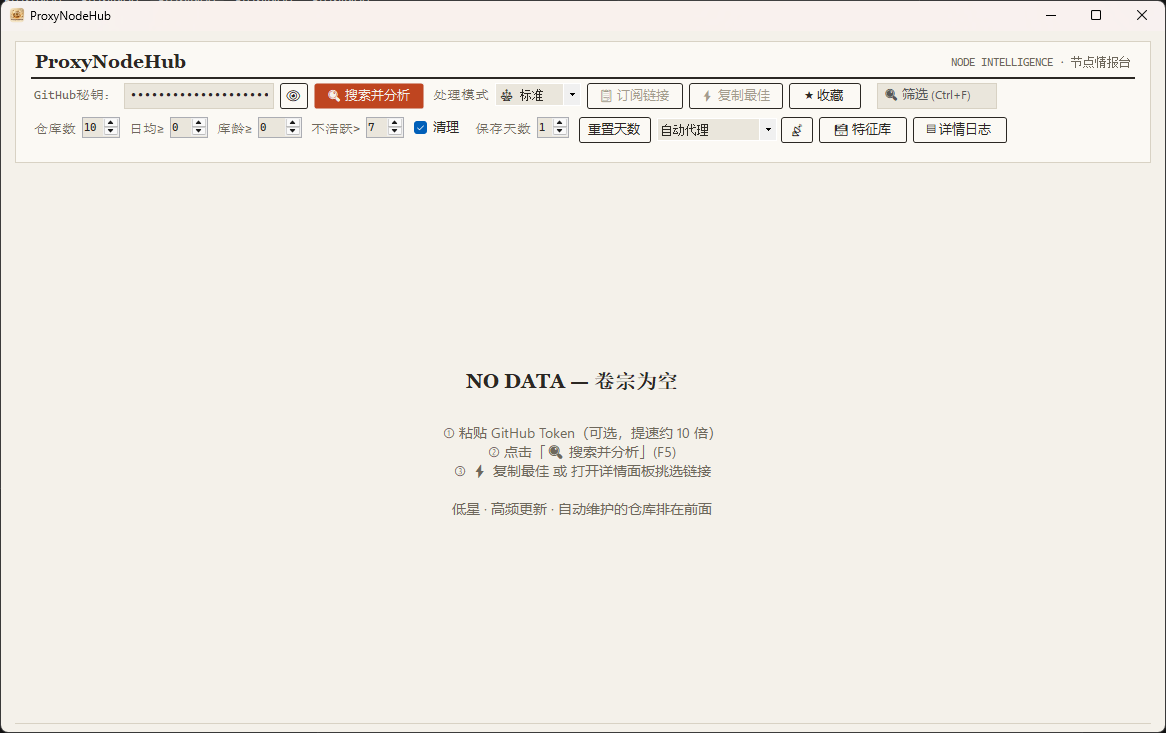
 ProxyNodeHub is a Windows desktop tool that scans GitHub for active free proxy node repositories, scores their activity, deduplicates the nodes it finds, and outputs a ready-to-use subscription link with one click.
ProxyNodeHub is a Windows desktop tool that scans GitHub for active free proxy node repositories, scores their activity, deduplicates the nodes it finds, and outputs a ready-to-use subscription link with one click.Is this a command-line tool or a graphical desktop app?It's a Windows desktop GUI application built with C# WinForms on .NET 8, not a CLI tool or a web service.
It's a Windows desktop GUI application built with C# WinForms on .NET 8, not a CLI tool or a web service.How do I get it running?Download a build from the Releases page — pick the self-contained .zip if you have no .NET installed, or the framework-dependent one otherwise — unzip it anywhere, run ProxyNodeHub.exe, then press F5 (or click 'Search and Analyze') to start.
Download a build from the Releases page — pick the self-contained .zip if you have no .NET installed, or the framework-dependent one otherwise — unzip it anywhere, run ProxyNodeHub.exe, then press F5 (or click 'Search and Analyze') to start.Do I need .NET installed, or a GitHub API key?The self-contained build needs nothing extra, while the framework-dependent build requires the .NET 8 Desktop Runtime on Windows 10+ x64. A GitHub token is optional but recommended, since it raises the search API limit from 60 to 5000 requests per hour.
The self-contained build needs nothing extra, while the framework-dependent build requires the .NET 8 Desktop Runtime on Windows 10+ x64. A GitHub token is optional but recommended, since it raises the search API limit from 60 to 5000 requests per hour.Any install pitfalls I should know about?The self-contained build can't be trimmed because WinForms doesn't support PublishTrimmed, so it stays around 65MB; the app is Windows-only (x64) with no macOS or Linux builds.
The self-contained build can't be trimmed because WinForms doesn't support PublishTrimmed, so it stays around 65MB; the app is Windows-only (x64) with no macOS or Linux builds.Where does my GitHub token get stored?If you enter a GitHub token, it is encrypted and stored per-user through the Windows Credential Manager rather than in plain text.
If you enter a GitHub token, it is encrypted and stored per-user through the Windows Credential Manager rather than in plain text.How does the activity scoring work?Each candidate repository is scored on a 100-point scale combining commit frequency, commit evenness, signs of automation, and how 'hidden' (low-traffic) the repo is, favoring quietly maintained repos that tend to have less overloaded nodes.
Each candidate repository is scored on a 100-point scale combining commit frequency, commit evenness, signs of automation, and how 'hidden' (low-traffic) the repo is, favoring quietly maintained repos that tend to have less overloaded nodes.How does node deduplication work?Nodes pulled from different repositories are deduplicated using 'server:port' as the key before being merged into the final exported subscription link.
Nodes pulled from different repositories are deduplicated using 'server:port' as the key before being merged into the final exported subscription link.What are the four processing modes?You can choose between Fast, Standard, Deep, and Compatible modes, each running with its own level of search concurrency.
You can choose between Fast, Standard, Deep, and Compatible modes, each running with its own level of search concurrency.How does the six-layer detection engine find subscription links?It cascades through signature-library learning, hardcoded path mappings, file-tree filtering, common-path probing, README parsing, and a fallback candidate list to locate usable subscription files inside a repo.
It cascades through signature-library learning, hardcoded path mappings, file-tree filtering, common-path probing, README parsing, and a fallback candidate list to locate usable subscription files inside a repo.What are similar projects?quiver-launcher, netch, IntentRoute-AI, BibaYanji, CircuitLordVRModInstaller, douyin-favorite-MyLike, SteamTools, RunCat365
quiver-launcher, netch, IntentRoute-AI, BibaYanji, CircuitLordVRModInstaller, douyin-favorite-MyLike, SteamTools, RunCat365Which topics is it in?deduplication, github-api, subscription, cache, logging, censorship-circumvention, dotnet, c#, csharp, github, windows-app, proxy
deduplication, github-api, subscription, cache, logging, censorship-circumvention, dotnet, c#, csharp, github, windows-app, proxy