
264 ·GitHub
What is this?
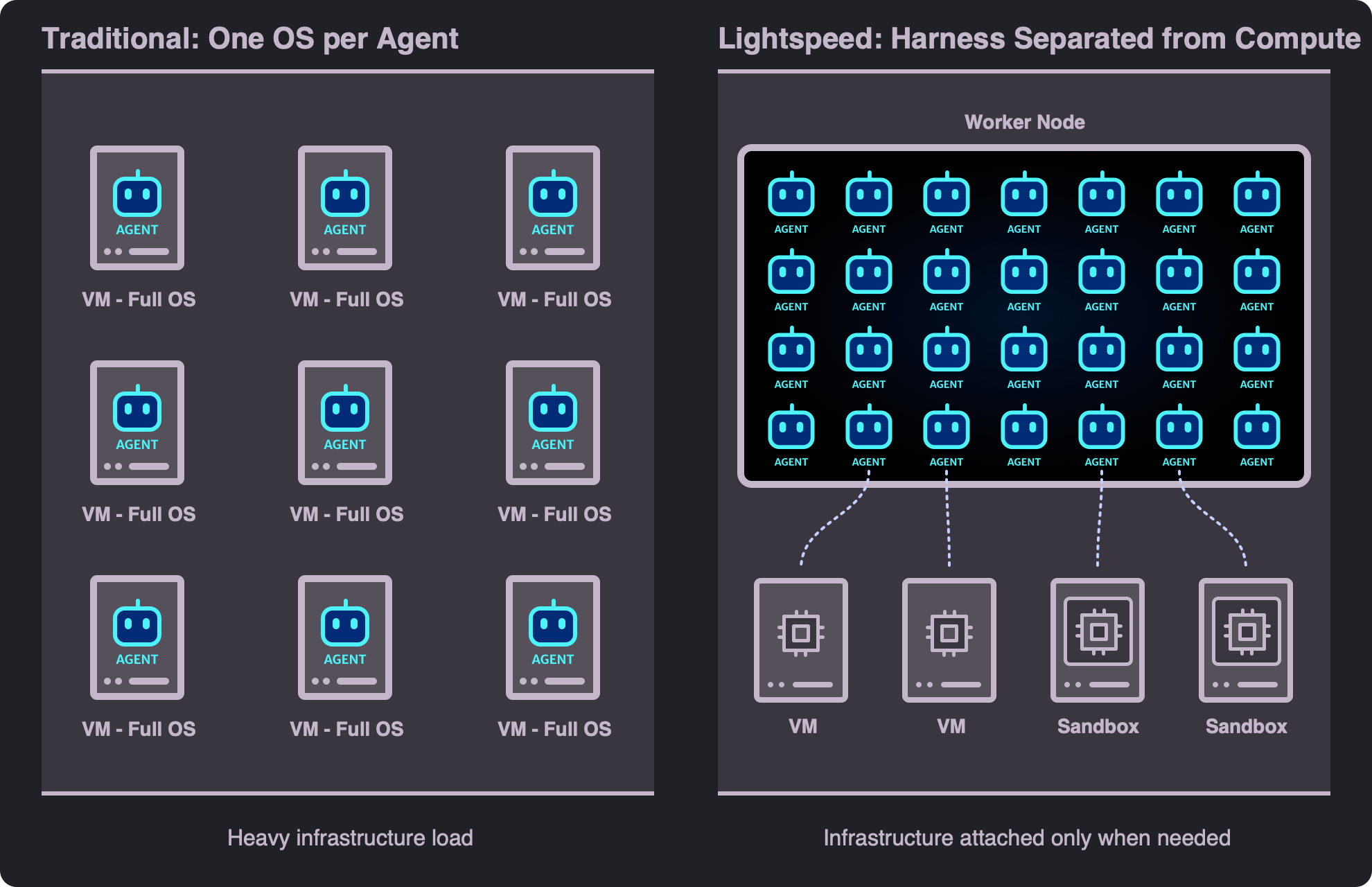
 Lightspeed is open-source infrastructure for running fleets of AI agents as durable workflows: agent sessions survive restarts, can run for weeks to months, and stay cheap when idle, borrowing a real machine only when a task needs one.
Lightspeed is open-source infrastructure for running fleets of AI agents as durable workflows: agent sessions survive restarts, can run for weeks to months, and stay cheap when idle, borrowing a real machine only when a task needs one.Is it a library I embed in my app, or a service I deploy and use?A full self-hosted product, not a library: a Rust core runs on Temporal, production data lives in Postgres (with optional S3), and there is a TypeScript and React frontend you drive through the UI or a JSON-RPC API.
A full self-hosted product, not a library: a Rust core runs on Temporal, production data lives in Postgres (with optional S3), and there is a TypeScript and React frontend you drive through the UI or a JSON-RPC API.How do I get a local instance running?Install Rust with edition 2024 support, Node.js 24+, and Docker with Compose, then run the launcher: it installs dependencies, starts the local infrastructure and app processes, applies migrations, and prints a development sign-in ([email protected]). Set your LLM API keys in the UI or via environment variables.
Install Rust with edition 2024 support, Node.js 24+, and Docker with Compose, then run the launcher: it installs dependencies, starts the local infrastructure and app processes, applies migrations, and prints a development sign-in ([email protected]). Set your LLM API keys in the UI or via environment variables.Which LLM providers and keys do I need?OpenAI and Anthropic work out of the box — set the keys in the UI or via environment variables. OpenAI-compatible servers like OpenRouter, DeepSeek, vLLM, and Ollama are also supported, each with its own endpoint and credential, plus automatic prompt caching.
OpenAI and Anthropic work out of the box — set the keys in the UI or via environment variables. OpenAI-compatible servers like OpenRouter, DeepSeek, vLLM, and Ollama are also supported, each with its own endpoint and credential, plus automatic prompt caching.Do agents get a real shell and filesystem out of the box?No — without a machine attached, agents work through a virtual file system and provider-hosted web access. Shells, code execution, and full filesystems only exist on attached environments: an existing machine, an Incus-provisioned VM, or any host running the lightspeed-envd daemon.
No — without a machine attached, agents work through a virtual file system and provider-hosted web access. Shells, code execution, and full filesystems only exist on attached environments: an existing machine, an Incus-provisioned VM, or any host running the lightspeed-envd daemon.What do people actually build with it?Long-lived agent fleets: personal assistants for thousands of users without an idle VM per user, autonomous software factories that build and critique features for weeks, on-call ops agents that investigate alerts, and research agents supervising long-running experiments.
Long-lived agent fleets: personal assistants for thousands of users without an idle VM per user, autonomous software factories that build and critique features for weeks, on-call ops agents that investigate alerts, and research agents supervising long-running experiments.Can I run it as one self-hosted deployment for many users?Yes — it is built for that: isolate tenants in universes on a single deployment or run dedicated per-tenant ones, and one backend binary can run every role in a single process or scale roles independently across Temporal workers.
Yes — it is built for that: isolate tenants in universes on a single deployment or run dedicated per-tenant ones, and one backend binary can run every role in a single process or scale roles independently across Temporal workers.How are my API keys and secrets handled?Credentials are encrypted at rest with automatic OAuth token refresh, and environments or jobs receive secrets via credential injection without exposing them to the model. Deployments are multi-tenant by default, isolated in universes.
Credentials are encrypted at rest with automatic OAuth token refresh, and environments or jobs receive secrets via credential injection without exposing them to the model. Deployments are multi-tenant by default, isolated in universes.Can sessions really run for months and survive restarts?Yes — sessions last weeks to months and survive restarts. While a run is active you can cancel or steer it or queue the next message, and sessions can be forked or cloned to branch off stored history.
Yes — sessions last weeks to months and survive restarts. While a run is active you can cancel or steer it or queue the next message, and sessions can be forked or cloned to branch off stored history.Does it support MCP servers and sub-agents?Both. MCP connects local or remote servers with API keys or OAuth, with tool calls handled by the model provider or by Lightspeed itself, including progressive discovery through tool search. Sub-agents let an agent delegate to supervised children with configurable profiles and limits.
Both. MCP connects local or remote servers with API keys or OAuth, with tool calls handled by the model provider or by Lightspeed itself, including progressive discovery through tool search. Sub-agents let an agent delegate to supervised children with configurable profiles and limits.Can bots act on their own, without a human prompting them?Yes — bots are always-on agents that wake up for scheduled tasks, incoming webhooks, data changes, or chat messages. They can manage their own schedules, webhooks, and pollers, coordinate with other bots, and you can chat with them via Telegram and WhatsApp.
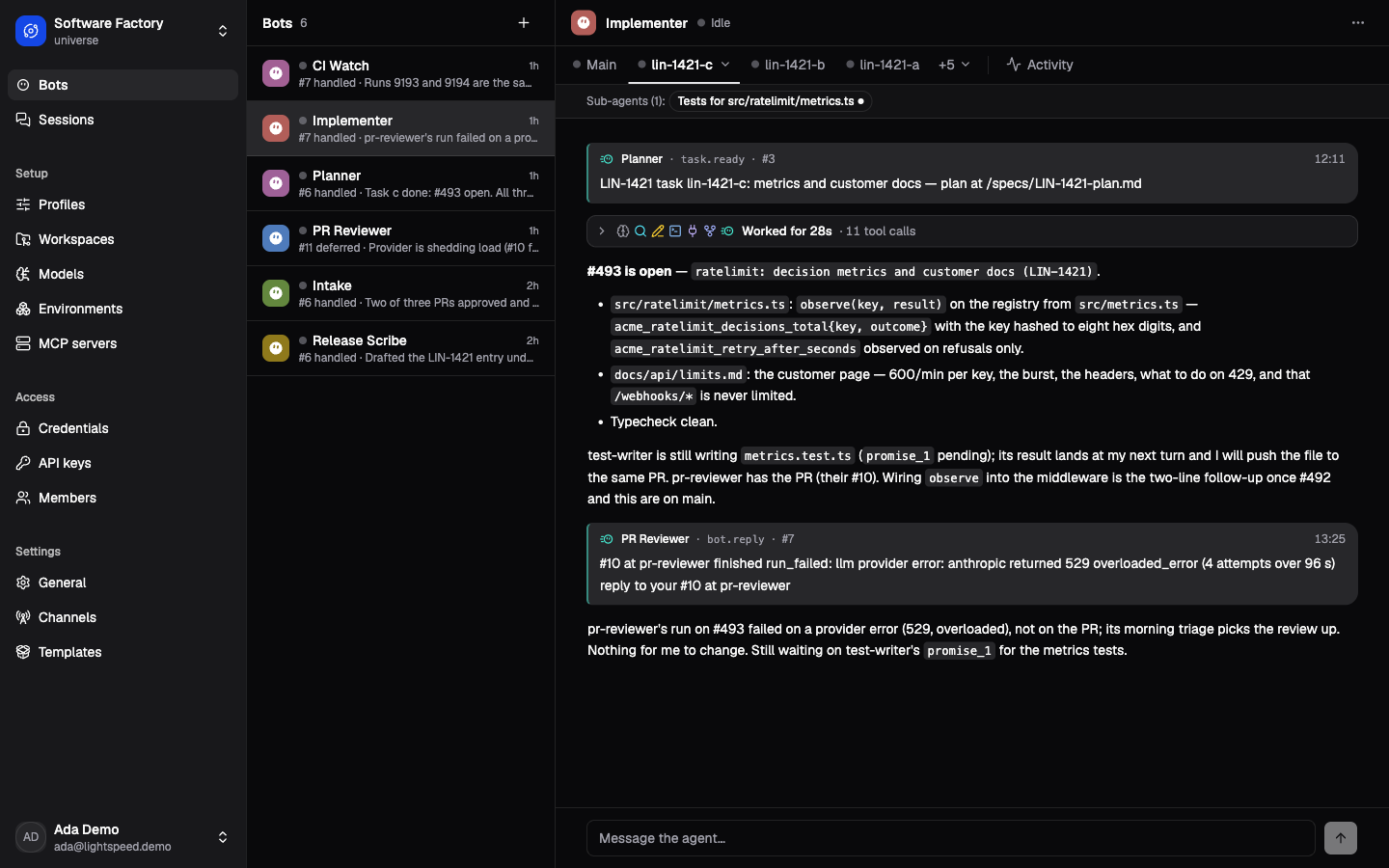
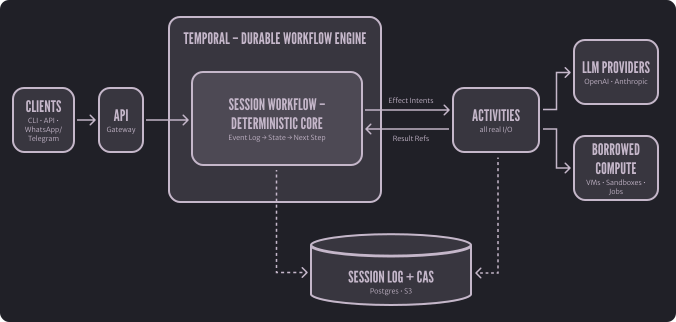
Yes — bots are always-on agents that wake up for scheduled tasks, incoming webhooks, data changes, or chat messages. They can manage their own schedules, webhooks, and pollers, coordinate with other bots, and you can chat with them via Telegram and WhatsApp.Why is the deterministic, event-sourced core a big deal?The core replays the session log to decide each next step and performs no I/O itself, which is exactly what makes it fit a durable workflow engine like Temporal. Large payloads go to content-addressed storage, keeping workflow histories small.
The core replays the session log to decide each next step and performs no I/O itself, which is exactly what makes it fit a durable workflow engine like Temporal. Large payloads go to content-addressed storage, keeping workflow histories small.What are similar projects?evenfire, hermes-agent, hive, ruflo, brigade, DeskcommCRM, openfang, ARTEX
evenfire, hermes-agent, hive, ruflo, brigade, DeskcommCRM, openfang, ARTEXWhich topics is it in?event-sourcing, durable-execution, rust-lang, whatsapp, vps, bot, s3, agent-harness, telegram, autonomous-agents, workflow, agent-orchestration
event-sourcing, durable-execution, rust-lang, whatsapp, vps, bot, s3, agent-harness, telegram, autonomous-agents, workflow, agent-orchestration