# Agentero (poco-ai/Agentero)
> A desktop research workspace that puts your PDFs, Markdown notes and an AI agent in one place, so papers, notes and model conversations stay connected.
- GitHub: https://github.com/poco-ai/Agentero
- GitHub.Locker page: https://github.locker/poco-ai/Agentero
- Stars: 1.6K
- Language: TypeScript
- License: MIT
- Last push: 2026-11-06
## Questions and answers
Written by GitHub.Locker from the README and the repository; check the README below for details.
**Is it meant to replace Zotero?**
No. It is designed to work alongside Zotero, and you can import a whole Zotero library with tags, notes and attachments kept.
**How do I get it running?**
Download a prebuilt installer for macOS, Windows or Linux from agentero.app or GitHub Releases. Homebrew is also listed for macOS.
**Do I need my own AI agent or API key?**
It connects to a local agent over the ACP protocol, such as Claude Code, OpenCode, Codex or a local model. A built-in translation channel is included, and you can add your own API key (BYOK) for translation.
**Any install pitfalls?**
On Linux you need Ubuntu 22.04 or newer with webkit2gtk 4.1. The README points to a separate install guide for the other dependencies.
**What makes the PDF reading different from a normal reader?**
It extracts formulas, algorithm pseudocode and tables into structured Markdown and LaTeX. The agent then works from that clean text instead of guessing from the two-column layout of the PDF.
**Can an agent in another app use my library?**
Yes. Agentero can run as an MCP server, so clients such as ChatGPT Web or Claude Desktop can search your local literature and use it as context.
**Can I automate imports from a script?**
There is a headless CLI for batch imports, metadata extraction and writing notes. It also supports BibTeX and BibLaTeX export.
**Why did the author build this instead of using Zotero plus plugins?**
The author found that papers, notes and model chats were scattered across Zotero, Obsidian and browser tabs, and that PDFs are hard for models to parse. Agentero keeps these in one local place and tries to close that gap.
---
## README (checked against GitHub 2026-11-07)
Source: https://github.com/poco-ai/Agentero/blob/main/README.md

为人与 Agent 协作而生的一站式科研工作台
保留人类舒适的 PDF 阅读习惯,为模型提供纯净的结构化上下文;文献、笔记与交互记录统一沉淀于本地。




中文 | English
如果本项目对你有帮助,请在右上角**给个 star** 吧!

---
## 背景与设计初衷
Zotero 是学术管理领域非常优秀的软件。它功能成熟、生态稳定,帮助许多科研人员建立了最初的文献归档体系。
但在当下日常科研与深度使用各类 Agent 时,传统的文献工具链暴露出一些断点:
* **上下文严重分散**:论文存储在 Zotero,笔记记在 Obsidian,与模型的推导和分析留在各个网页对话框中。三者数据彼此隔离,当需要 Agent 结合某篇具体论文与历史笔记进行深入推导时,用户必须反复手动复制粘贴。
* **文献格式对模型不友好**:人类习惯阅读排版良好的 PDF 文件;但对于模型而言,直接解析双栏排版、跨页表格、复杂数学公式和交叉引用的成本极高,极易产生识别错误与幻觉。结构化 Markdown 与 LaTeX 才是模型容易准确理解的格式。
* **维护成本较高**:AI 伴读、全文翻译、笔记同步等高频需求,往往需要安装和调试多个社区插件,配置门槛高且在版本升级时容易出现兼容性问题。
* **批量自动化能力有限**:通过 Deep Research 或自动化检索工具发现的大量文献,目前仍需人工在浏览器中逐篇点击保存,难以顺畅衔接批量研究流。
**Agentero 并非旨在替代 Zotero,而是探索一种人与 Agent 协同处理科研上下文的新方式**:
* **人类负责**:提出研究问题、进行学术价值判断、深度研读与核心结论推导;
* **Agent 负责**:批量检索筛选、元数据抓取、图表与公式提取、引用关系梳理及基础总结。
---
## 核心功能
### 1. 结构化阅读与笔记系统
* **PDF 阅读与批注**:提供大纲导航、整页与宽度自适应、平滑划词、高亮批注与全文检索。
* **图表与公式提取**:自动解析论文中的数学公式、算法伪代码及表格,生成结构化 Markdown 与 LaTeX 内容,确保 Agent 调用时上下文准确无误。
* **双向链接笔记**:内置所见即所得 Markdown 编辑器,支持 `[[双链]]` 引用语法、`/` 快捷指令与 LaTeX 实时渲染,笔记与文献建立原生关联。
* **多模式翻译服务**:支持划词翻译、按页对照翻译与全文翻译,内置可用翻译通道,并支持配置自定义 API Key(BYOK)。

分屏阅读与分析:左侧高亮批注,右侧本地 Agent 基于准确的结构化上下文进行答疑与推导

划词翻译与实时记录:阅读过程中提取的要点可直接沉淀至本地 Markdown 笔记
---
### 2. 开放的 Agent 协议与自动化接口
* **基于 ACP 协议连接本地 Agent**:底层遵循 Agent Client Protocol,支持连接各类本地运行的 Agent(如 Claude Code、OpenCode、Codex 或本地模型),不绑定特定厂商,上下文完全保留在本地。
* **内置 MCP (Model Context Protocol)**:可作为 MCP Server 运行,允许 ChatGPT Web、Claude Desktop 等外部客户端直接检索并调用本地文献库作为上下文。
* **极客 CLI 支持**:内置无头命令行工具,支持通过脚本实现批量导入文献、提取元数据与写入笔记等自动化工作流。

内置 MCP 协议服务,支持将本地文献库无缝接入各类外部 AI 客户端
---
### 3. 学术雷达与文献发现
* **多渠道抓取**:内置集成 [Cool Papers](https://papers.cool/) 与魔搭社区,支持在软件内直接浏览并一键归档文献;支持学术 RSS 订阅。
* **个性化推荐**:基于本地已有文献库的内容特征,自动推荐每日 arXiv 的相关最新论文。
* **引用关系自动梳理**:自动解析文献末尾的参考文献列表,支持一键批量抓取入库;支持获取出版商元数据并追踪后续被引动态。

应用内直接浏览 Cool Papers 热门论文并一键导入本地知识库
---
### 4. 兼容 Zotero 生态与本地透明存储
* **Zotero 书库无缝迁移**:支持一键导入整个 Zotero 数据库,保留已有标签、笔记与附件;兼容 Zotero 浏览器扩展直接保存网页论文;支持导出 BibTeX / BibLaTeX。
* **本地文件夹透明管理**:不使用私有数据库或散列混淆目录,所有文献与笔记均以标准文件(PDF、Markdown)保存在本地规范文件夹中,可自由使用外部编辑器读取。
* **多端同步与远程访问**:支持与 S3 兼容的云存储服务进行同步;支持通过 SSH 隧道访问部署在远程服务器上的文献库。
---
## 界面与功能预览
点击展开:查看更多界面截图(RSS 订阅、技能扩展、Agent 配置、S3 云同步、主题风格)
#### 1. 学术 RSS 订阅
追踪关注的学术博客、实验室主页与前沿动态:

#### 2. Agent 技能(Skill)扩展
浏览并安装社区提供的科研技能,扩展论文精读与写作分析能力:

#### 3. Agent 与连接配置
通过 ACP 协议管理、升级和切换本地 Agent:

#### 4. S3 兼容云存储同步
配置私有或商业 S3 存储,实现多设备间知识库同步:

#### 5. 多套界面主题
支持亮色/暗色及多种配色风格,支持自适应系统外观设置:

---
## 快速开始
### 桌面客户端安装 (macOS / Windows / Linux)
可前往 **[官网 agentero.app](https://agentero.app/)** 或 **[GitHub Releases](https://github.com/poco-ai/agentero/releases)** 下载适用于各平台的预编译安装包。
#### macOS (Homebrew)
```bash
brew tap poco-ai/agentero
brew install --cask agentero
```
> **Linux 用户须知**:系统环境要求 Ubuntu 22.04+(依赖 `webkit2gtk 4.1`),详细依赖说明请参考 [安装文档](docs/usage/getting-started.md)。
---
### 命令行工具 (CLI)
如需在终端或通过脚本自动化管理文献:
```bash
brew tap poco-ai/agentero
brew install agentero
# 查看常用命令与参数
agentero --help
```
---
### 在更多地方使用 Agentero
- **DeepSeek Harness (dsh) 插件**:在 [DeepSeek Harness](https://github.com/deepseek-ai/deepseek-harness) 中也能直接使用 Agentero 的文献库、笔记与 PDF 阅读器。执行 `dsh plugin --profile web add @poco-ai/agentero-dsh` 安装,详见 [agentero-dsh-plugin](https://github.com/poco-ai/agentero-dsh-plugin)。
---
## 致谢与社区
* 感谢 [LinuxDo](https://linux.do/) 与 [ModelScope 魔搭社区](https://modelscope.cn/) 成员在项目早期测试阶段提供的建议与反馈。
* 感谢 [AtomGit](https://gitcode.com/poco-ai/Agentero) 提供的国内镜像支持。
### 用户交流群

扫码加入微信群:使用心得、问题反馈与版本预告。二维码 7 天内有效,过期请在 Issue 留言。
如果 Agentero 对你的日常学术研究有所帮助,欢迎在 GitHub 上为本项目点亮一个 **⭐ Star**。
感谢所有贡献者!

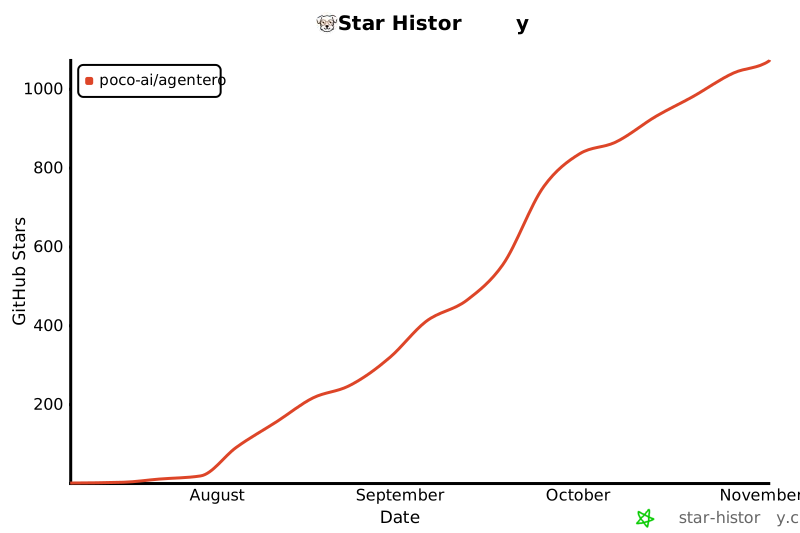
## Star History
[](https://www.star-history.com/?type=date&repos=poco-ai%2Fagentero)
## 开源许可证
本项目基于 [MIT License](LICENSE) 协议开源。第三方组件与许可证清单见 [.github/THIRD_PARTY_NOTICES.md](.github/THIRD_PARTY_NOTICES.md)。