



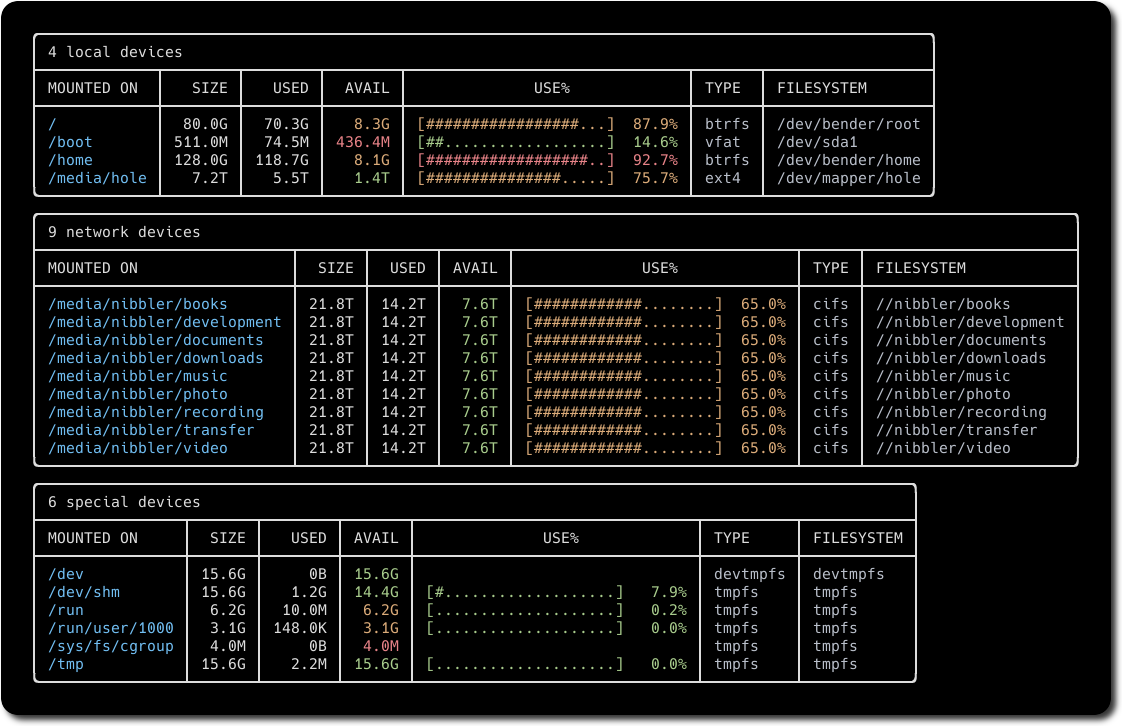
What is this?
 duf is a terminal utility for checking disk usage and free space — a user-friendly, better-looking alternative to df for Linux, BSD, macOS and Windows.
duf is a terminal utility for checking disk usage and free space — a user-friendly, better-looking alternative to df for Linux, BSD, macOS and Windows.How is it different from just using df?Same job, friendlier output: colorful tables that adjust to your terminal's theme and width, with grouping, filtering, sorting and JSON output built in.
Same job, friendlier output: colorful tables that adjust to your terminal's theme and width, with grouping, filtering, sorting and JSON output built in.Do I need Go or anything else installed first?Not for packages or prebuilt binaries. You only need a working Go environment — version 1.23 or higher — if you want to compile duf from source.
Not for packages or prebuilt binaries. You only need a working Go environment — version 1.23 or higher — if you want to compile duf from source.Are there any gotchas after installing?oh-my-zsh defines its own duf alias that shadows the real tool — run unalias duf before first use on those setups.
oh-my-zsh defines its own duf alias that shadows the real tool — run unalias duf before first use on those setups.Is this for sysadmins, or can a regular user pick it up?Anyone who checks disk space from a terminal. It is deliberately user-friendly: color-coded output, device grouping and sorting out of the box.
Anyone who checks disk space from a terminal. It is deliberately user-friendly: color-coded output, device grouping and sorting out of the box.How do I use it once it's installed?Just run duf with no arguments to list your devices and mount points. Pass paths (duf /home) to show specific ones, or duf --all to include pseudo, duplicate and inaccessible file systems. duf --json gives script-friendly output.
Just run duf with no arguments to list your devices and mount points. Pass paths (duf /home) to show specific ones, or duf --all to include pseudo, duplicate and inaccessible file systems. duf --json gives script-friendly output.Can I filter what it shows?Yes — duf --only and --hide select table types (local, network, fuse, special, loops, binds), --only-fs and --hide-fs filter filesystem types like tmpfs or vfat, and --only-mp / --hide-mp filter mount points. Quoted wildcards like '/sys/' work too.
Yes — duf --only and --hide select table types (local, network, fuse, special, loops, binds), --only-fs and --hide-fs filter filesystem types like tmpfs or vfat, and --only-mp / --hide-mp filter mount points. Quoted wildcards like '/sys/' work too.Can I sort the output or choose which columns appear?Yes: duf --sort size sorts by keys such as size, used, usage, type or inodes, and duf --output mountpoint,size,usage picks the columns. duf --inodes switches to inode usage instead of block usage.
Yes: duf --sort size sorts by keys such as size, used, usage, type or inodes, and duf --output mountpoint,size,usage picks the columns. duf --inodes switches to inode usage instead of block usage.What do the colors in the output mean?The availability and usage columns are highlighted green, yellow or red depending on how full a device is. You can set custom thresholds with flags like --avail-threshold=10G,1G or --usage-threshold=0.5,0.9.
The availability and usage columns are highlighted green, yellow or red depending on how full a device is. You can set custom thresholds with flags like --avail-threshold=10G,1G or --usage-threshold=0.5,0.9.Which topics is it in?disk-space, disk-usage, openbsd, system, filesystem, freebsd, tui, sysadmin, monitoring, utility, hacktoberfest, go
disk-space, disk-usage, openbsd, system, filesystem, freebsd, tui, sysadmin, monitoring, utility, hacktoberfest, go