

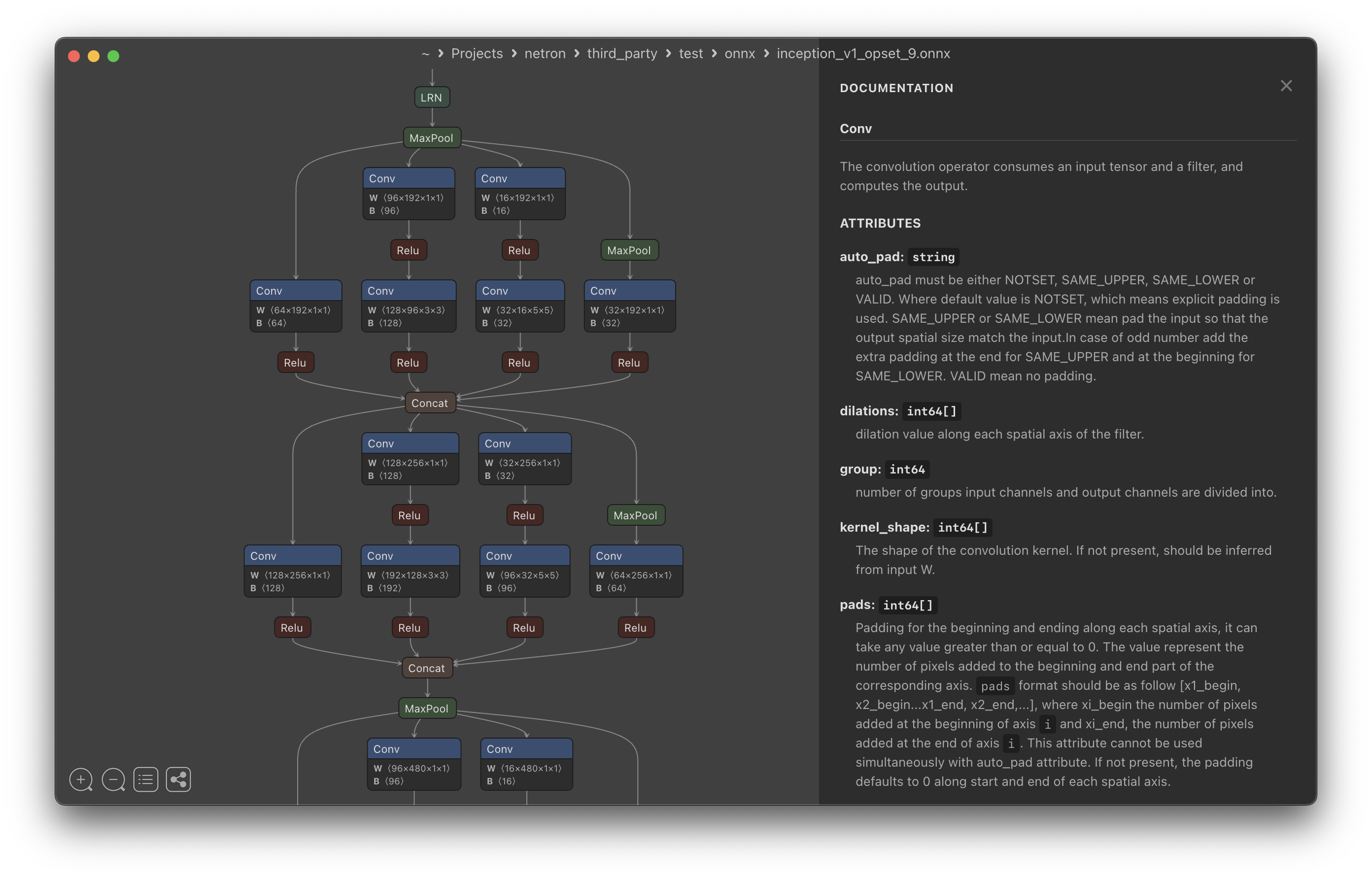
What is this?
 Netron is a viewer for neural network, deep learning and machine learning models that lets you open a model file and visually inspect its graph, layers and weights.
Netron is a viewer for neural network, deep learning and machine learning models that lets you open a model file and visually inspect its graph, layers and weights.Is it a desktop app or a browser tool?Both: it ships as a native desktop app for macOS, Linux and Windows, plus a browser version you can use without installing anything, and a Python package that launches a local viewer.
Both: it ships as a native desktop app for macOS, Linux and Windows, plus a browser version you can use without installing anything, and a Python package that launches a local viewer.How do I install and open a model?Install via the macOS .dmg or 'brew install --cask netron', Linux .deb/.rpm, Windows .exe or 'winget install -s winget netron', or 'pip install netron' then run 'netron [FILE]'; you can also just open the browser version and drag a model file in.
Install via the macOS .dmg or 'brew install --cask netron', Linux .deb/.rpm, Windows .exe or 'winget install -s winget netron', or 'pip install netron' then run 'netron [FILE]'; you can also just open the browser version and drag a model file in.Do I need Python or Homebrew first?No, they're optional: Homebrew and pip are just two of several alternative install methods, you can equally grab a prebuilt installer or use the browser version with no dependencies.
No, they're optional: Homebrew and pip are just two of several alternative install methods, you can equally grab a prebuilt installer or use the browser version with no dependencies.Does it support every model format fully?Core formats like ONNX, TensorFlow Lite, PyTorch, TensorFlow, Core ML, Keras and Darknet are fully supported, but formats like MLIR, JAX, GGUF, RKNN, ncnn, MNN, PaddlePaddle and scikit-learn are only experimentally supported.
Core formats like ONNX, TensorFlow Lite, PyTorch, TensorFlow, Core ML, Keras and Darknet are fully supported, but formats like MLIR, JAX, GGUF, RKNN, ncnn, MNN, PaddlePaddle and scikit-learn are only experimentally supported.Who is this useful for?Anyone working with trained ML/DL models who wants to understand a model's architecture, layers and tensors without writing code.
Anyone working with trained ML/DL models who wants to understand a model's architecture, layers and tensors without writing code.Which model formats does Netron fully support?ONNX, TensorFlow Lite, PyTorch, torch.export, ExecuTorch, TorchScript, TensorFlow, Core ML, OpenVINO, Keras, Caffe, Darknet, Safetensors and NumPy.
ONNX, TensorFlow Lite, PyTorch, torch.export, ExecuTorch, TorchScript, TensorFlow, Core ML, OpenVINO, Keras, Caffe, Darknet, Safetensors and NumPy.Can I try it without installing anything?Yes, the README links sample model files (ONNX, TorchScript, TensorFlow Lite, Keras, MLIR, Core ML, Darknet) that open directly in the browser version.
Yes, the README links sample model files (ONNX, TorchScript, TensorFlow Lite, Keras, MLIR, Core ML, Darknet) that open directly in the browser version.Is this a code library I import into my project?No, it is a standalone viewer app/tool rather than a library you integrate into code; you run it and point it at a model file to inspect.
No, it is a standalone viewer app/tool rather than a library you integrate into code; you run it and point it at a model file to inspect.What are similar projects?ludwig, onnx, horovod, deeplearning4j, DeepLearning, 100-Days-Of-ML-Code, machine-learning-zoomcamp, tutorials
ludwig, onnx, horovod, deeplearning4j, DeepLearning, 100-Days-Of-ML-Code, machine-learning-zoomcamp, tutorialsWhich topics is it in?coreml, machinelearning, deeplearning, keras, model, ml, numpy, onnx, tensorflow, visualization, neural-network, pytorch
coreml, machinelearning, deeplearning, keras, model, ml, numpy, onnx, tensorflow, visualization, neural-network, pytorch