Professional Account Management & Protocol Proxy System for AI Services (v4.9.8)
Antigravity Tools is an all-in-one desktop application designed for developers and AI enthusiasts. It perfectly combines multi-account management, protocol conversion, and smart request scheduling to provide you with a stable, high-speed, and low-cost Local AI Relay Station.
By leveraging this app, you can transform common Web Sessions (Google/Anthropic) into standardized API interfaces, completely eliminating the protocol gap between different providers.
| Sponsor |
Description |
 |
Thanks to PackyCode for sponsoring this project! PackyCode is a reliable and efficient API relay service provider, offering relays for various services such as Claude Code, Codex, and Gemini. PackyCode provides a special offer for users of this project: Register using this link and enter the "Ctrler" coupon code when topping up to enjoy a 10% discount. |
 |
Thanks to APIKEY.FUN for sponsoring this project! APIKEY.FUN is a professional enterprise-grade AI relay station, dedicated to providing stable, efficient, and low-cost AI model API access services for enterprise and individual developers. The platform supports mainstream popular models such as Claude, OpenAI, and Gemini, with prices as low as 7% of the official original price. Register through this exclusive link for this project to enjoy an exclusive offer of up to permanent 5% off on top-ups. |
 |
Thanks to Claude API for supporting this project! claudeapi.com is a Claude API relay station built on official and AWS channels, focused exclusively on Claude, delivering high stability and low latency with full support for Claude Code. Exclusive offer: register via this exclusive link to get free trial credits — zero setup, get started instantly; enjoy an extra 5% off when you top up (Contact Support). |
 |
Thanks to AICodeMirror for sponsoring this project! AICodeMirror provides official high-stability relay services for Claude Code / Codex / Gemini CLI, supporting enterprise-grade concurrency, fast invoicing, and 24/7 dedicated technical support. Claude Code / Codex / Gemini official channels at 38% / 2% / 9% of original price, with extra discounts on top-ups! AICodeMirror offers special benefits for Antigravity-Manager users: register via this link to enjoy 20% off your first top-up, and enterprise customers can get up to 25% off! |
☕ Support
If you find this project helpful, feel free to buy me a coffee!

| Alipay |
WeChat Pay |
Buy Me a Coffee |
 |
 |
 |
🚀 Recommended Projects
If you like this project, you might also be interested in:
- Antigravity-Tools-LS: A Language Server Protocol (LSP) designed for AI protocols, providing you with smarter code completion, diagnostics, and protocol debugging experiences.
🌟 Detailed Feature Matrix
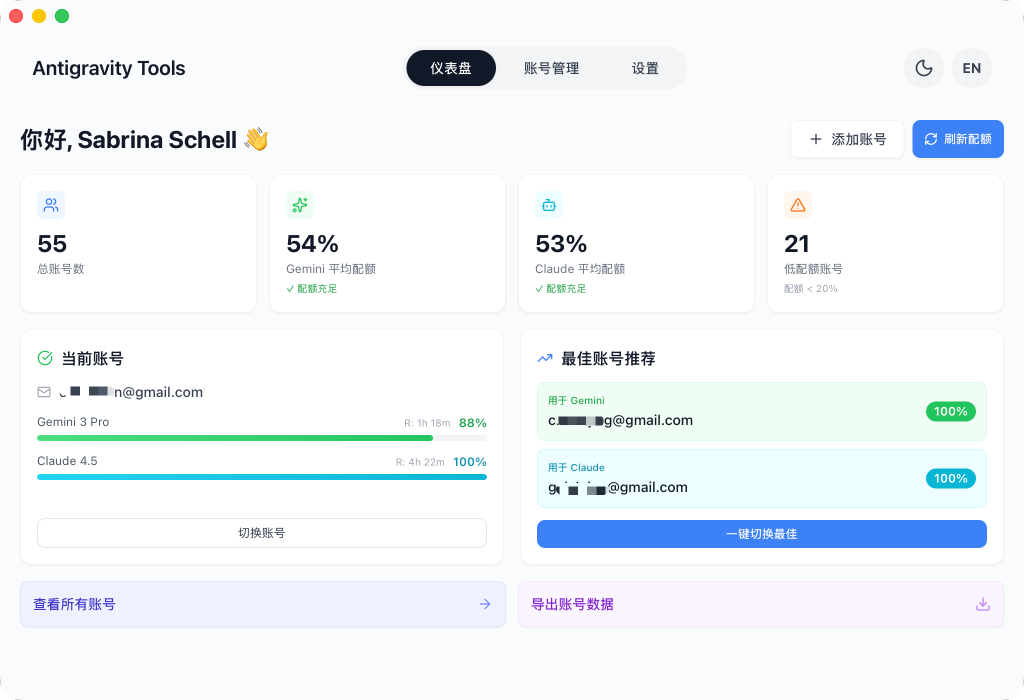
1. 🎛️ Smart Account Dashboard
- Global Real-time Monitoring: Instant insight into the health of all accounts, including average remaining quotas for Gemini Pro, Gemini Flash, Claude, and Gemini Image generation.
- Smart Recommendation: The system uses a real-time algorithm to filter and recommend the "Best Account" based on quota redundancy, supporting one-click switching.
- Active Account Snapshot: Visually displays the specific quota percentage and the last synchronization time of the currently active account.
2. 🔐 Powerful Account Management
- OAuth 2.0 Authorization (Auto/Manual): Pre-generates a copyable authorization URL so you can finish auth in any browser; after the callback, the app auto-completes and saves the account (use “I already authorized, continue” if needed).
- Multi-dimensional Import: Supports single token entry, JSON batch import, and automatic hot migration from V1 legacy databases.
- Gateway-level Views: Supports switching between "List" and "Grid" views. Provides 403 Forbidden detection, automatically marking and skipping accounts with permission anomalies.
3. 🔌 Protocol Conversion & Relay (API Proxy)
- Multi-Protocol Adaptation (Multi-Sink):
- OpenAI Format: Provides
/v1/chat/completions endpoint, compatible with 99% of existing AI apps.
- Anthropic Format: Provides native
/v1/messages interface, supporting all features of Claude Code CLI (e.g., chain-of-thought, system prompts).
- Gemini Format: Supports direct calls from official Google AI SDKs.
- Smart Self-healing: When a request encounters
429 (Too Many Requests) or 401 (Expired), the backend triggers millisecond-level automatic retry and silent rotation, ensuring business continuity.
4. 🔀 Model Router Center
- Series-based Mapping: Classify complex original model IDs into "Series Groups" (e.g., routing all GPT-4 requests uniformly to
gemini-3-pro-high).
- Expert Redirection: Supports custom regex-level model mapping for precise control over every request's landing model.
- Tiered Routing [New]: Automatically prioritizes models based on account tiers (Ultra/Pro/Free) and reset frequencies to ensure stability for high-volume users.
- Silent Background Downgrading [New]: Intelligently identifies background tasks (e.g., Claude CLI title generation) and reroutes them to Flash models to preserve premium quota.
5. 🎨 Multimodal & Imagen 3 Support
- Advanced Image Control: Supports precise control over image generation tasks via OpenAI
size (e.g., 1024x1024, 16:9) parameters or model name suffixes.
- Enhanced Payload Support: The backend supports payloads up to 100MB (configurable), more than enough for 4K HD image recognition and processing.
📸 GUI Overview
|
|
Dashboard |
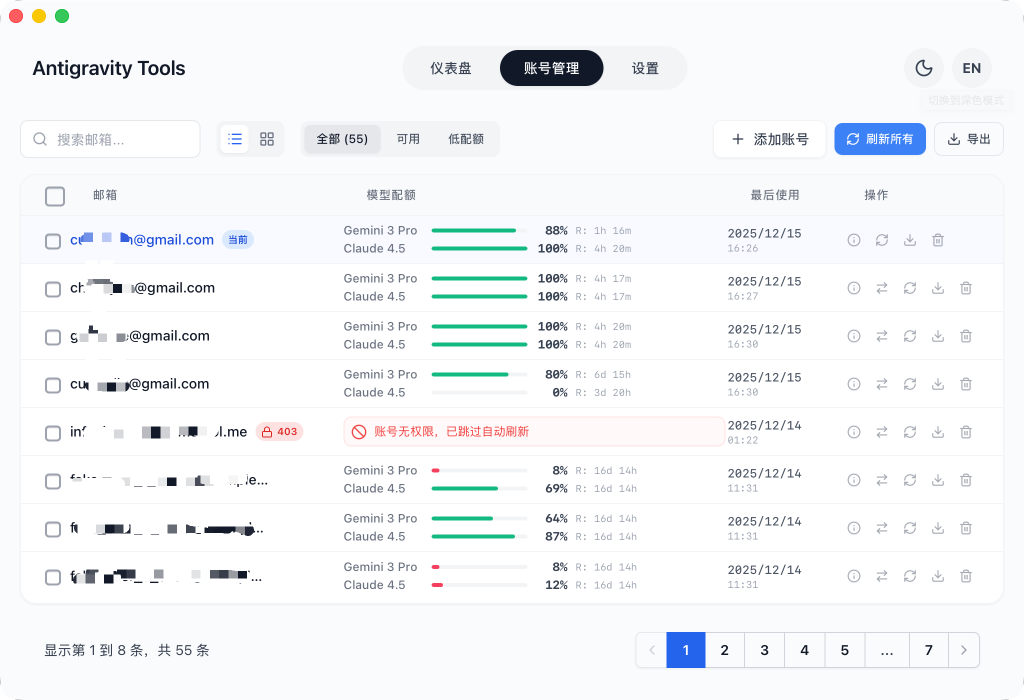
Account List |
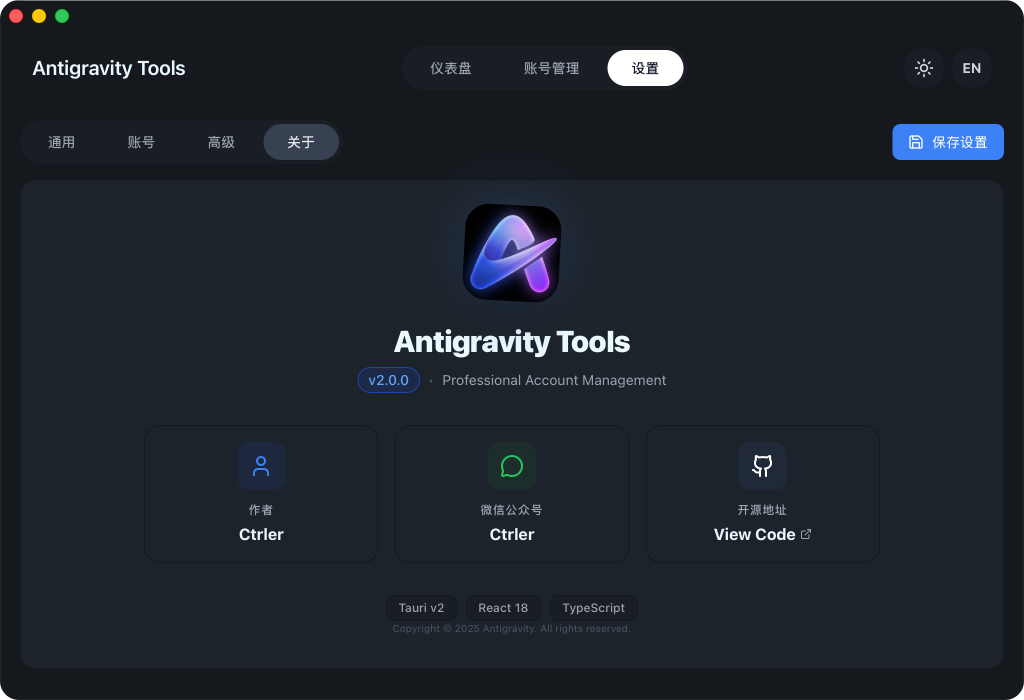
About Page |
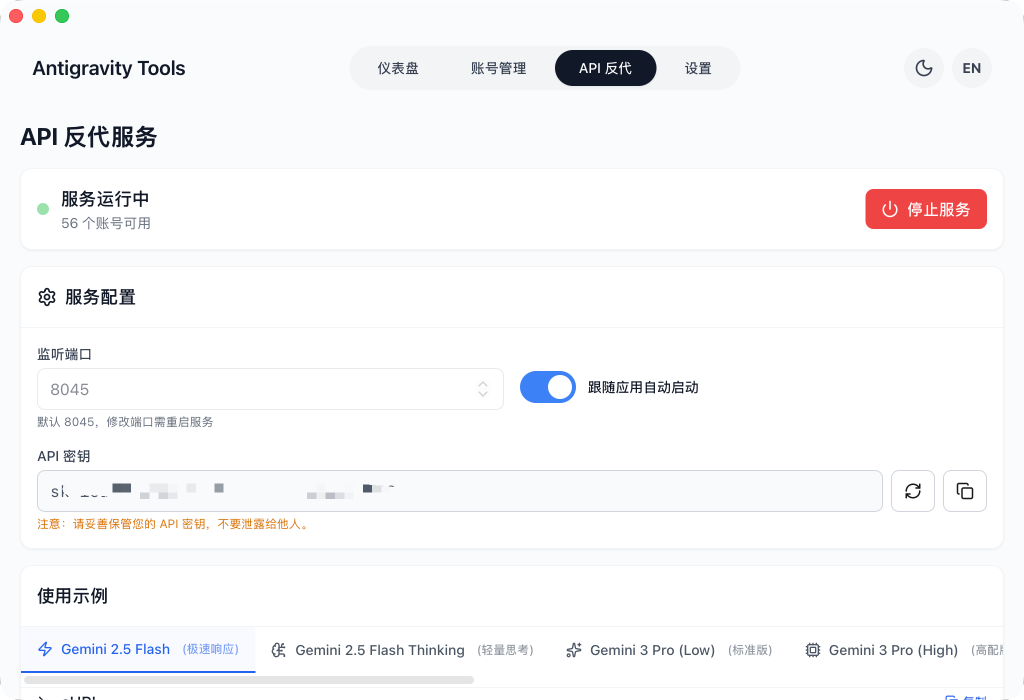
API Proxy |
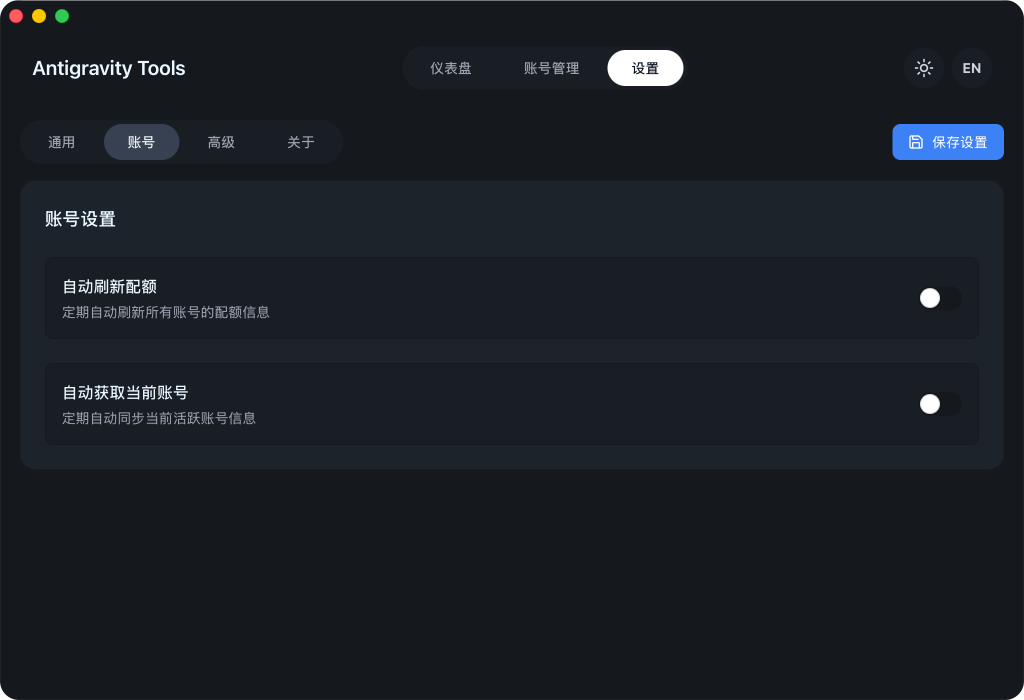
Settings |
|
💡 Usage Examples
|
|
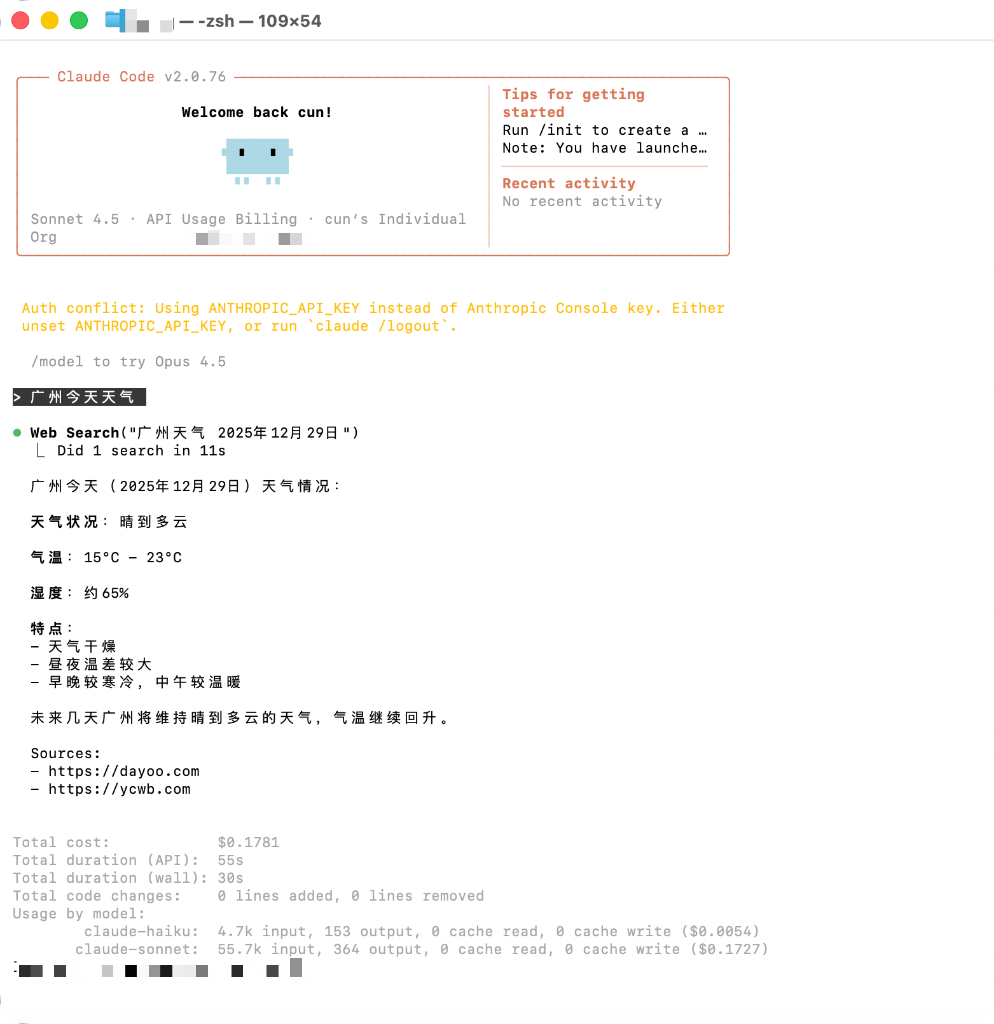
Claude Code Web Search |
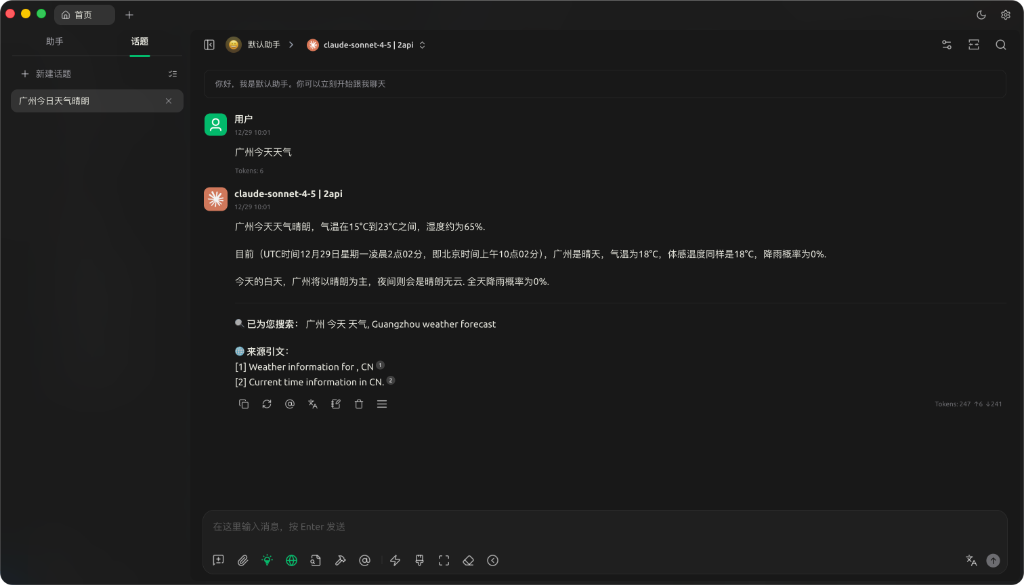
Cherry Studio Integration |
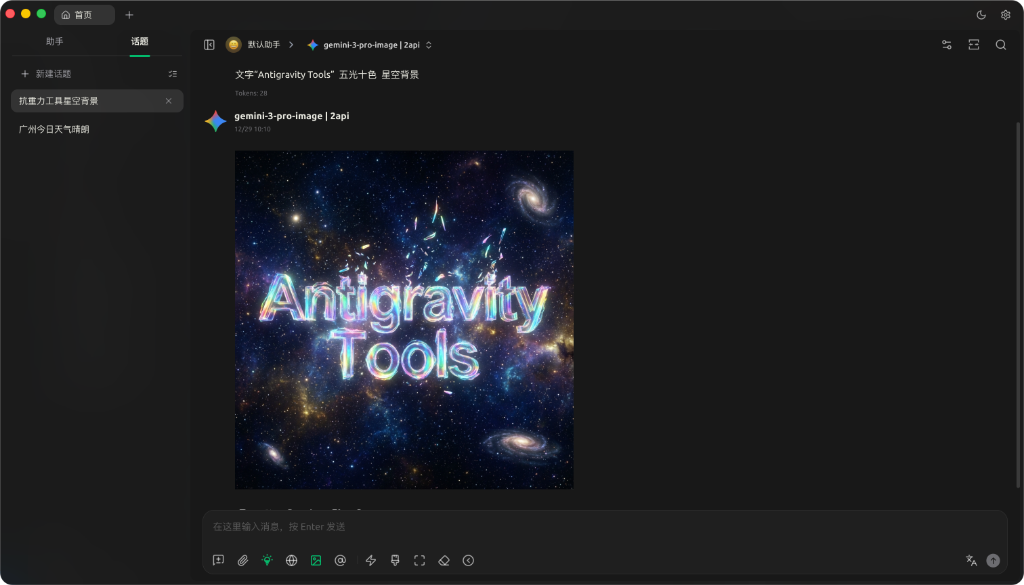
Imagen 3 Advanced Drawing |
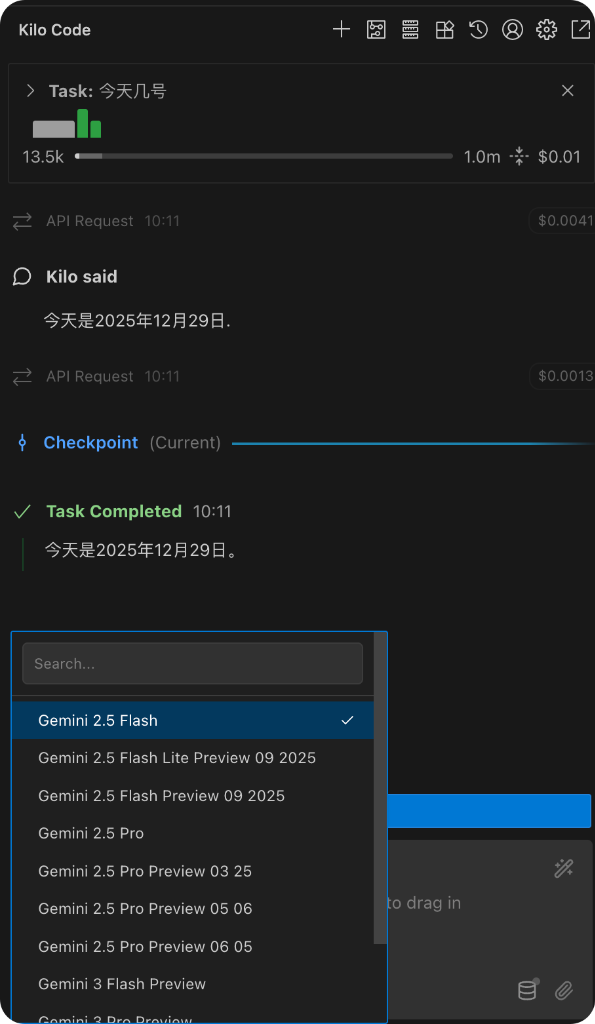
Kilo Code Integration |
🏗️ Architecture
graph TD
    Client([External Apps: Claude Code/NextChat]) -->|OpenAI/Anthropic| Gateway[Antigravity Axum Server]
    Gateway --> Middleware[Middleware: Auth/Rate Limit/Logs]
    Middleware --> Router[Model Router: ID Mapping]
    Router --> Dispatcher[Dispatcher: Rotation/Weights]
    Dispatcher --> Mapper[Request Mapper]
    Mapper --> Upstream[Upstream: Google/Anthropic API]
    Upstream --> ResponseMapper[Response Mapper]
    ResponseMapper --> Client
📥 Installation
Option A: Terminal Installation (Recommended)
Automatically detects your OS, architecture, and package manager — one command to download and install.
Linux / macOS:
curl -fsSL https://raw.githubusercontent.com/lbjlaq/Antigravity-Manager/main/install.sh | bash
Windows (PowerShell):
irm https://raw.githubusercontent.com/lbjlaq/Antigravity-Manager/main/install.ps1 | iex
Supported formats: Linux (.deb / .rpm / .AppImage) | macOS (.dmg) | Windows (NSIS .exe)
Advanced usage: Install a specific version curl -fsSL https://raw.githubusercontent.com/lbjlaq/Antigravity-Manager/main/install.sh | bash -s -- --version 4.6.8, dry-run mode curl -fsSL https://raw.githubusercontent.com/lbjlaq/Antigravity-Manager/main/install.sh | bash -s -- --dry-run
macOS - Homebrew
If you have Homebrew installed, you can also install via:
# 1. Tap the repository
brew tap lbjlaq/antigravity-manager https://github.com/lbjlaq/Antigravity-Manager

# 2. Install the app
brew install --cask antigravity-tools
Arch Linux
You can choose to install via the one-click script or Homebrew:
Option 1: One-click script (Recommended)
curl -sSL https://raw.githubusercontent.com/lbjlaq/Antigravity-Manager/main/deploy/arch/install.sh | bash
Option 2: via Homebrew (If you have Linuxbrew installed)
brew tap lbjlaq/antigravity-manager https://github.com/lbjlaq/Antigravity-Manager
brew install --cask antigravity-tools
Other Linux Distributions
The AppImage will be automatically symlinked to your binary path with executable permissions.
Option B: Manual Download
Download from GitHub Releases:
- macOS:
.dmg (Universal, Apple Silicon & Intel)
- Windows:
.msi or portable .zip
- Linux:
.deb or AppImage
Option C: Docker Deployment (Recommended for NAS/Servers)
If you prefer running in a containerized environment, we provide a native Docker image. This image supports the v4.0.3 Native Headless architecture, automatically hosts frontend static resources, and allows for direct browser-based management.
Option 1: Direct Run (Recommended)
- API_KEY: Required. Used for AI request authentication.
- WEB_PASSWORD: Optional. Used for Web UI login. Defaults to API_KEY if NOT set.
docker run -d --name antigravity-manager \
  -p 8045:8045 \
  -e API_KEY=sk-your-api-key \
  -e WEB_PASSWORD=your-login-password \
  -e ABV_MAX_BODY_SIZE=104857600 \
  -v ~/.antigravity_tools:/root/.antigravity_tools \
  lbjlaq/antigravity-manager:latest

# Forgot keys? Run `docker logs antigravity-manager` or `grep -E '"api_key"|"admin_password"' ~/.antigravity_tools/gui_config.json`
[!TIP]
🧪 Pulling Beta / Preview Images:
To test the latest Beta pre-release features, specify the corresponding Beta version tag (pre-releases are published independently and will never overwrite the latest stable tag):
# Pull a specific Beta pre-release version (check Docker Hub for all tags)
docker pull lbjlaq/antigravity-manager:v4.8.2-beta.0

# Run Beta container
docker run -d --name antigravity-manager-beta \
  -p 8045:8045 \
  -e API_KEY=sk-your-api-key \
  -e WEB_PASSWORD=your-login-password \
  -e ABV_MAX_BODY_SIZE=104857600 \
  -v ~/.antigravity_tools:/root/.antigravity_tools \
  lbjlaq/antigravity-manager:v4.8.2-beta.0
View all published Beta tags on Docker Hub Tags. If you wish to run the unreleased bleeding-edge beta branch directly, build locally: docker build -t lbjlaq/antigravity-manager:beta -f docker/Dockerfile ..
🔐 Authentication Scenarios
- Scenario A: Only
API_KEY is set
- Web Login: Use
API_KEY to access the dashboard.
- API Calls: Use
API_KEY for AI request authentication.
- Scenario B: Both
API_KEY and WEB_PASSWORD are set (Recommended)
- Web Login: Must use
WEB_PASSWORD. Using API Key will be rejected (more secure).
- API Calls: Continue to use
API_KEY. This allows you to share the API Key with team members while keeping the password for administrative access only.
🆙 Upgrade Guide for Older Versions
If you are upgrading from v4.0.1 or earlier, your installation won't have a WEB_PASSWORD set by default. You can add one using any of these methods:
- Web UI (Recommended): Log in using your existing
API_KEY, go to the API Proxy Settings page, find the Web UI Management Password section below the API Key, set your new password, and save.
- Environment Variable (Docker): Stop the old container and start the new one with the added parameter
-e WEB_PASSWORD=your_new_password. Note: Environment variables have the highest priority and will override any changes in the UI.
- Config File (Persistent): Directly edit
~/.antigravity_tools/gui_config.json and add/modify "admin_password": "your_new_password" inside the proxy object.
- Note:
WEB_PASSWORD is the environment variable name, while admin_password is the JSON key in the config file.
[!TIP]
Priority Logic:
- Environment Variable (
WEB_PASSWORD) has the highest priority. If set, the application will always use it and ignore values in the configuration file.
- Configuration File (
gui_config.json) is used for persistent storage. When you change the password via Web UI and save, it is written here.
- Fallback: If neither is set, it falls back to
API_KEY; if even API_KEY is missing, a random one is generated.
Option 2: Use Docker Compose
- Enter the
docker directory and start the service:
cd docker
docker compose up -d
Log rotation: Compose limits JSON logs to 100m per file and keeps 3 files by default to prevent unbounded growth.
Access URL: http://localhost:8045 (Admin Console) | http://localhost:8045/v1 (API Base)
System Requirements:
- RAM: 1GB recommended (minimum 256MB).
- Persistence: Mount
/root/.antigravity_tools to persist your data.
- Architecture: Supports x86_64 and ARM64.
See: Docker Deployment Guide (docker)
🛠️ Troubleshooting - Click to expand
macOS says "App is damaged"?
Due to macOS security gatekeeper, non-App Store apps might show this. You can fix it with:
- Terminal Command (Recommended):
sudo xattr -rd com.apple.quarantine "/Applications/Antigravity Tools.app"
- Homebrew Installation Advantage:
When installing via Homebrew (
brew install --cask antigravity-tools), quarantine attributes are automatically cleared upon installation for an out-of-the-box experience.
Linux window is black or empty?
On niri, Hyprland, Sway, and similar compositors, older builds forced GDK_BACKEND=x11 whenever DISPLAY was set, and WebKit then drew a black window. Update to a build that includes this fix, or launch once with:
env WEBKIT_DISABLE_DMABUF_RENDERER=1 ANTIGRAVITY_FORCE_WAYLAND=1 antigravity-tools
ANTIGRAVITY_FORCE_WAYLAND=1: keep native Wayland (do not force X11)ANTIGRAVITY_FORCE_X11=1: force X11 if you still need itWEBKIT_DISABLE_DMABUF_RENDERER=1: disable the WebKit DMA-BUF renderer
🔌 Quick Integration Examples
🔐 OAuth Authorization Flow (Add Account)
- Go to
Accounts → Add Account → OAuth.
- The dialog pre-generates an authorization URL before you click any button. Click the URL to copy it to the system clipboard, then open it in the browser you prefer and complete authorization.
- After consent, the browser opens a local callback page and shows “✅ Authorized successfully!”.
- The app automatically continues the flow and saves the account; if it doesn’t, click “I already authorized, continue” to finish manually.
Note: the auth URL contains a one-time local callback port. Always use the latest URL shown in the dialog. If the app isn’t running or the dialog is closed during auth, the browser may show localhost refused connection.
How to use with JeikCode? (Recommended)
JeikCode is a modern terminal AI Coding Agent crafted by the core maintainer of this project, featuring native deep integration with Antigravity-Manager, delivering 95%+ KV-Cache hit rate and seamless reasoning level control.
- One-Click Sync via GUI (Recommended):
- Launch Antigravity-Manager and ensure the API Proxy service is running.
- Switch to the
>_ Agent Tools One-Click Configuration tab.
- Locate the JeikCode card, choose your desired default model (e.g.
gemini-3.8-flash-high), and click 🔄 Sync Now.
- Simply run
jeikcode in your terminal for the TUI, and type /webui to instantly launch the modern WebUI in your browser for a richer visual coding experience out of the box!
- Temporary Environment Variables:
export ANTHROPIC_BASE_URL="http://127.0.0.1:8045"
export ANTHROPIC_API_KEY="sk-antigravity"
jeikcode --model claude-sonnet-4-6
For complete manual configuration and tuning, see the JeikCode Integration Guide.
How to use with Claude Code CLI?
Recommended Client Versions:
- Stable Production Recommendation:
Claude Code v2.1.28x (more permissive stream termination verification, highest resilience under network jitter);
- Latest Versions Support:
Claude Code v2.1.293 ~ v2.1.295 (requires deploying the gateway version with stream hang prevention and keepalive optimizations, see Diagnosis Guide).
Install recommended stable version: npm install -g @anthropic-ai/[email protected]
- Start Antigravity service in the "API Proxy" tab.
- In your terminal:
export ANTHROPIC_API_KEY="sk-antigravity"
export ANTHROPIC_BASE_URL="http://127.0.0.1:8045"
claude
How to use with OpenCode?
- Go to API Proxy → External Providers → click the OpenCode Sync card.
- Click Sync to generate
~/.config/opencode/opencode.json:
- Creates a dedicated provider
antigravity-manager (does not overwrite google/anthropic providers)
- Optional: Check Sync accounts to export
antigravity-accounts.json (plugin-compatible v3 format) for the OpenCode plugin
- Click Clear Config to remove Manager configuration and clean up legacy entries; click Restore to revert from backup.
- On Windows, the path is
C:\Users\<User>\.config\opencode\ (same ~/.config/opencode rule).
Quick verification commands:
# Test antigravity-manager provider (supports --variant)
opencode run "test" --model antigravity-manager/claude-sonnet-4-5-thinking --variant high

# If opencode-antigravity-auth is installed, verify google provider still works independently
opencode run "test" --model google/antigravity-claude-sonnet-4-5-thinking --variant max
How to use in Python?
import openai

client = openai.OpenAI(
    api_key="sk-antigravity",
    base_url="http://127.0.0.1:8045/v1"
)

response = client.chat.completions.create(
    model="gemini-3-flash",
    messages=[{"role": "user", "content": "Hello, please introduce yourself"}]
)
print(response.choices[0].message.content)
How to use with Kilo Code?
- Protocol Selection: We recommend using the Gemini protocol.
- Base URL: Set it to
http://127.0.0.1:8045.
- Note:
- OpenAI Protocol Limitation: When using OpenAI mode, Kilo Code's request path will append
/v1/chat/completions/responses, a non-standard path that will return 404 from Antigravity. Make sure to enter the Base URL and select Gemini mode.
- Model Mapping: Model names in Kilo Code may differ from Antigravity's defaults. If you encounter connection issues, set up custom mappings on the "Model Mapping" page and check the log files for debugging.
How to use Image Generation (Imagen 3)?
Method 1: OpenAI Images API (Recommended)
import openai

client = openai.OpenAI(
    api_key="sk-antigravity",
    base_url="http://127.0.0.1:8045/v1"
)

# Generate image
response = client.images.generate(
    model="gemini-3-pro-image",
    prompt="A futuristic cyberpunk city with neon lights",
    size="1920x1080",      # Supports any WIDTHxHEIGHT format, auto-calculates aspect ratio
    quality="hd",          # "standard" | "hd" | "medium"
    n=1,
    response_format="b64_json"
)

# Save image
import base64
image_data = base64.b64decode(response.data[0].b64_json)
with open("output.png", "wb") as f:
    f.write(image_data)
Supported parameters:
size: Any WIDTHxHEIGHT format (e.g. 1280x720, 1024x1024, 1920x1080), auto-calculates and maps to standard aspect ratios (21:9, 16:9, 9:16, 4:3, 3:4, 1:1)quality:
"hd" → 4K resolution (high quality)"medium" → 2K resolution (medium quality)"standard" → Default resolution (standard quality)
n: Number of images to generate (1-10)response_format: "b64_json" or "url" (Data URI)
🎨 Expand to view more image generation methods & parameter mapping rules (Chat API / Model Suffix / Cherry Studio)
Method 2: Chat API + Parameters (✨ New)
All protocols (OpenAI, Claude) Chat APIs now support direct size and quality parameters:
# OpenAI Chat API
response = client.chat.completions.create(
    model="gemini-3-pro-image",
    size="1920x1080",      # ✅ Supports any WIDTHxHEIGHT format
    quality="hd",          # ✅ "standard" | "hd" | "medium"
    messages=[{"role": "user", "content": "A futuristic city"}]
)
# Claude Messages API
curl -X POST http://127.0.0.1:8045/v1/messages \
  -H "Content-Type: application/json" \
  -H "x-api-key: sk-antigravity" \
  -d '{
    "model": "gemini-3-pro-image",
    "size": "1280x720",
    "quality": "hd",
    "messages": [{"role": "user", "content": "A cute cat"}]
  }'
Parameter priority: imageSize parameter > quality parameter > model suffix
✨ New imageSize parameter support:
In addition to the quality parameter, you can now also use Gemini's native imageSize parameter:
# Using imageSize parameter (highest priority)
response = client.chat.completions.create(
    model="gemini-3-pro-image",
    size="16:9",           # Aspect ratio
    imageSize="4K",        # ✨ Direct resolution: "1K" | "2K" | "4K"
    messages=[{"role": "user", "content": "A futuristic city"}]
)
# Claude Messages API also supports imageSize
curl -X POST http://127.0.0.1:8045/v1/messages \
  -H "Content-Type: application/json" \
  -H "x-api-key: sk-antigravity" \
  -d '{
    "model": "gemini-3-pro-image",
    "size": "1280x720",
    "imageSize": "4K",
    "messages": [{"role": "user", "content": "A cute cat"}]
  }'
Parameter descriptions:
imageSize: Direct resolution specification ("1K" / "2K" / "4K")quality: Infers resolution from quality level ("standard" → 1K, "medium" → 2K, "hd" → 4K)- Priority: If both
imageSize and quality are specified, the system prioritizes imageSize
Method 3: Chat API + Model Suffix
response = client.chat.completions.create(
    model="gemini-3-pro-image-16-9-4k",  # Format: gemini-3-pro-image-[ratio]-[quality]
    messages=[{"role": "user", "content": "A futuristic city"}]
)
Model suffix explanation:
- Aspect ratio:
-16-9, -9-16, -4-3, -3-4, -21-9, -1-1
- Quality:
-4k (4K), -2k (2K), no suffix (standard)
- Example:
gemini-3-pro-image-16-9-4k → 16:9 ratio + 4K resolution
Method 4: Cherry Studio & Other Client Settings
In clients that support OpenAI protocol (e.g., Cherry Studio), you can configure image generation parameters via the Model Settings page:
- Enter Model Settings: Select the
gemini-3-pro-image model
- Configure Parameters:
- Size: Enter any
WIDTHxHEIGHT format (e.g. 1920x1080, 1024x1024)
- Quality: Choose
standard / hd / medium
- Number: Set the number of images (1-10)
- Send Request: Simply type your image description in the chat dialog
Parameter mapping rules:
size: "1920x1080" → Auto-calculated as 16:9 aspect ratioquality: "hd" → Mapped to 4K resolutionquality: "medium" → Mapped to 2K resolution
📝 Changelog
Latest version v4.9.8 (2026-10-17): Automatic seamless hot-switch for Antigravity Classic upon quota depletion or threshold breach with streamlined dual-pool cards (Ref #3509); native evolution supporting Antigravity CLI (agy) with automatic shell wrapper injection, thinking effort disassembly, and independent 3-client active account detection with contextual badges (Ref #3686, Ref #3630); comprehensive 403 error body capture and action URL extraction (captcha verification/appeal) with closed-loop self-healing recovery (Ref #3630, Ref #3684); Claude Code 2.1.301 protocol alignment with anti-WAF identity sanitization, full-link request-id injection, and Claude 5 model family integration (PR #3689, Ref #3684, Ref #3686); active reference tracking in JSON Schema recursive flattening to eliminate exponential replication and Linux VPS OOM (SIGKILL 137) crashes, array schema normalization with terminal ARRAY items guards to prevent Gemini 400 errors, adaptive first-chunk Peek timeout extension to 60s/90s/120s for reasoning models, zero-downtime atomic pool reload eliminating 503 errors, and anti-regression rate limit protection (PR #3694, Fixes #3690, Ref #3682, Ref #3693); complete removal of 100% 429-yielding Prod endpoints, relaxed streaming first-chunk watchdog to 120s baseline, multi-turn role preservation for Responses array inputs, and elimination of 0ms optimistic reset storms (PR #3691, PR #3672, PR #3687, PR #3685, Fixes #3506, Ref #3525); traffic monitor inspector overhaul with Postman-style single-tab view, structured vs raw code views, key-value headers tables with Bearer masking, standard dual-link HAR 1.2 export, and 12-language localization coverage (thanks to @cubelikeplayDaniel, @EricZhou05, @blackdm666, @jeikl).
👉 View Full Changelog → CHANGELOG_EN.md
👥 Contributors - Click to expand










Special thanks to all developers who have contributed to this project.
🤝 Special Thanks - Click to expand
This project has referenced or learned from the ideas or code of the following excellent open-source projects during its development (in no particular order):
- License: CC BY-NC-SA 4.0. Strictly for non-commercial use.
- Security: All account data is encrypted and stored locally in a SQLite database. Data never leaves your device unless sync is enabled.
If you find this tool helpful, please give it a ⭐️ on GitHub!
Copyright © 2024-2026 Antigravity Team.





 Antigravity-Manager is a desktop app for managing and one-click switching between multiple Antigravity-style AI accounts (Gemini, Claude, Codex), and it also runs a local proxy that turns those web-session accounts into standard OpenAI/Anthropic/Gemini API endpoints.