


6.2K ·GitHub
What is this?
 An open-source AI agent for mathematical modeling competitions: it analyzes the problem, builds the model, writes and debugs the code, and produces a formatted paper ready for submission.
An open-source AI agent for mathematical modeling competitions: it analyzes the problem, builds the model, writes and debugs the code, and produces a formatted paper ready for submission.Is it a desktop app, a web service, or a set of AI skills?Three forms in one project: a desktop app with Claude Code and all its skills bundled (the recommended way), a self-hosted web UI you deploy via Docker or locally, and a pure skills package you drive from a harness like Claude Code.
Three forms in one project: a desktop app with Claude Code and all its skills bundled (the recommended way), a self-hosted web UI you deploy via Docker or locally, and a pure skills package you drive from a harness like Claude Code.What's the easiest way to get it running?Download a desktop installer from GitHub Releases (arm64 or x64 .dmg for macOS, x64 .exe for 64-bit Windows), install it and enter one model API key. For the web version the README calls Docker the simplest route: start the services, open the web UI and set your API key in the sidebar.
Download a desktop installer from GitHub Releases (arm64 or x64 .dmg for macOS, x64 .exe for 64-bit Windows), install it and enter one model API key. For the web version the README calls Docker the simplest route: start the services, open the web UI and set your API key in the sidebar.Do I need Python, Node.js or Redis installed for the desktop version?No — the desktop build ships everything and only asks for a model API key. Python, Node.js and Redis are required only if you deploy the web version yourself on your machine.
No — the desktop build ships everything and only asks for a model API key. Python, Node.js and Redis are required only if you deploy the web version yourself on your machine.Is the paper it generates actually ready to submit to a competition?It compiles and self-checks the paper, but the author is blunt: AI output is for reference only, and winning a national contest with it as-is is currently impossible. The project is experimental, with frequent changes and known bugs.
It compiles and self-checks the paper, but the author is blunt: AI output is for reference only, and winning a national contest with it as-is is currently impossible. The project is experimental, with frequent changes and known bugs.Who is this built for?Students and teams entering mathematical modeling competitions — the author's stated goal is to compress the usual 3-day contest effort into about an hour.
Students and teams entering mathematical modeling competitions — the author's stated goal is to compress the usual 3-day contest effort into about an hour.Does the desktop app work on both Mac and Windows?Yes — native builds for macOS (Apple Silicon and Intel, signed, notarized, auto-updating) and 64-bit Windows. The Windows installer is unsigned, so SmartScreen may warn on first run; on Linux you would use the Docker/web version instead.
Yes — native builds for macOS (Apple Silicon and Intel, signed, notarized, auto-updating) and 64-bit Windows. The Windows installer is unsigned, so SmartScreen may warn on first run; on Linux you would use the Docker/web version instead.Which competitions do the built-in paper templates cover?17 Typst templates for major Chinese and international contests — CUMCM (国赛), Huashu Cup, Huawei Cup, MCM/ICM and more. The right template is matched to the competition automatically, and the output is a polished, submission-ready PDF.
17 Typst templates for major Chinese and international contests — CUMCM (国赛), Huashu Cup, Huawei Cup, MCM/ICM and more. The right template is matched to the competition automatically, and the output is a polished, submission-ready PDF.How does it keep the final paper free of silly errors?A 9-step acceptance pipeline checks text leakage, numerical consistency, Typst compilation and PDF visuals. On top of that sits four-layer fault tolerance: limited retries, fallback hand-off to backup models, evaluator shadow mode and feedback reruns.
A 9-step acceptance pipeline checks text leakage, numerical consistency, Typst compilation and PDF visuals. On top of that sits four-layer fault tolerance: limited retries, fallback hand-off to backup models, evaluator shadow mode and feedback reruns.Why is it built as skills rather than its own agent framework?The author open-sourced a custom multi-agent math modeling project two years ago, but now believes agent products should ride on harnesses like Claude Code. So the project was distilled into pure skills with no harness layer, and only the skills layer will get future updates.
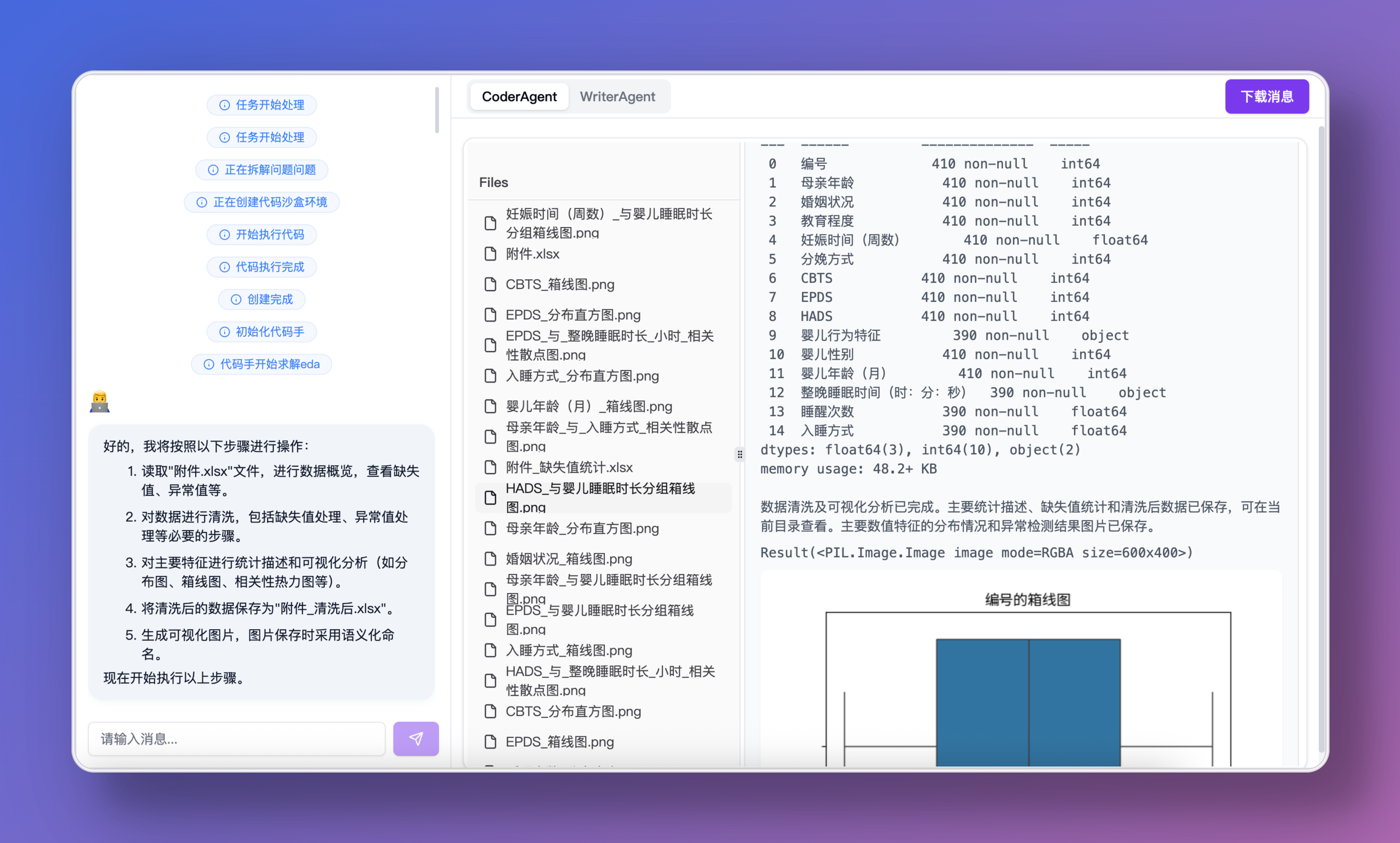
The author open-sourced a custom multi-agent math modeling project two years ago, but now believes agent products should ride on harnesses like Claude Code. So the project was distilled into pure skills with no harness layer, and only the skills layer will get future updates.Does it run the whole competition workflow by itself?Yes — analysis, modeling, coding, plotting and paper typesetting chain together automatically, and it can assign a different LLM to each agent via litellm. HIL checkpoints (confirm / edit / regenerate / ask / skip / abort), Tavily web search and a ChromaDB + Rerank knowledge base are optional toggles, off by default.
Yes — analysis, modeling, coding, plotting and paper typesetting chain together automatically, and it can assign a different LLM to each agent via litellm. HIL checkpoints (confirm / edit / regenerate / ask / skip / abort), Tavily web search and a ChromaDB + Rerank knowledge base are optional toggles, off by default.What are similar projects?EvoQuant, Octop, modex-mh-agent, JeecgBoot, hive, ai-agent-book, opensquilla, LazyMind
EvoQuant, Octop, modex-mh-agent, JeecgBoot, hive, ai-agent-book, opensquilla, LazyMindWhich topics is it in?fault-tolerance, academic-writing, tex, web-search, math, jupyter, human-in-the-loop, code-generation, knowledge-base, pdf, rag, skills
fault-tolerance, academic-writing, tex, web-search, math, jupyter, human-in-the-loop, code-generation, knowledge-base, pdf, rag, skills