848 ·GitHub
What is this?
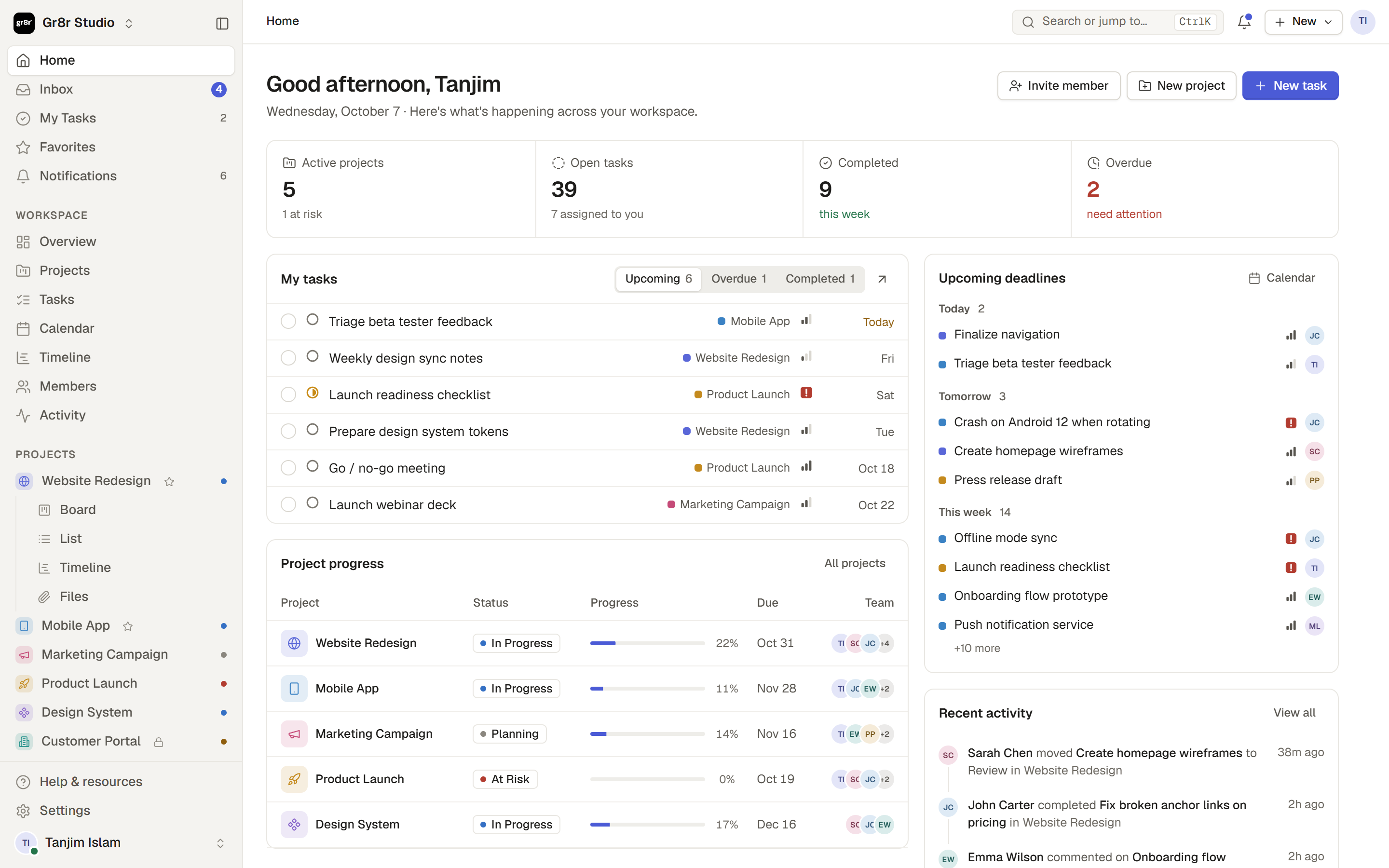
 Gr8r Studio is a calm, structured project management workspace with a home dashboard, inbox, my tasks, projects with board, list, table, calendar, timeline and files views, plus members, teams, activity and settings.
Gr8r Studio is a calm, structured project management workspace with a home dashboard, inbox, my tasks, projects with board, list, table, calendar, timeline and files views, plus members, teams, activity and settings.Is this built on a UI framework like React or Vue, or something lighter?It is built with plain JavaScript ES modules and CSS, bundled by Vite. There is no UI framework (no React/Vue) and no runtime dependency at all.
It is built with plain JavaScript ES modules and CSS, bundled by Vite. There is no UI framework (no React/Vue) and no runtime dependency at all.How do I get it running locally?You need Node.js 18 or newer (the project's .nvmrc pins version 22), then run the Vite dev/build scripts to work on or produce the app.
You need Node.js 18 or newer (the project's .nvmrc pins version 22), then run the Vite dev/build scripts to work on or produce the app.Do I need any npm packages or just Node?Just Node.js for the Vite build tooling - the app itself ships with no runtime dependencies and no UI framework.
Just Node.js for the Vite build tooling - the app itself ships with no runtime dependencies and no UI framework.Does it have its own backend or database?Not Stated In README - the README only describes the frontend architecture (core/data, ui/shell/pages, actions layers) and how the Vercel deploy serves the built dist/ folder; no server or database is mentioned.
Not Stated In README - the README only describes the frontend architecture (core/data, ui/shell/pages, actions layers) and how the Vercel deploy serves the built dist/ folder; no server or database is mentioned.Where does this actually run - do I open it in a browser?Yes, it's a browser-based single-page app; vercel.json builds it with Vite and serves the resulting dist/ folder.
Yes, it's a browser-based single-page app; vercel.json builds it with Vite and serves the resulting dist/ folder.How does rendering and state management work internally?Each page or view is a function that returns an HTML string built from a shared store (S). render() rebuilds the shell while preserving focus and scroll position, and actions mutate state through a shared action table (A) that modules register themselves to on load.
Each page or view is a function that returns an HTML string built from a shared store (S). render() rebuilds the shell while preserving focus and scroll position, and actions mutate state through a shared action table (A) that modules register themselves to on load.How are clicks and inputs wired up without a framework?Elements declare a data-a attribute naming an action, and actions/events.js delegates clicks to the matching handler on the shared action table; inputs use data-in and blur handlers use data-blur.
Elements declare a data-a attribute naming an action, and actions/events.js delegates clicks to the matching handler on the shared action table; inputs use data-in and blur handlers use data-blur.How are icons handled?You call ic(name) with any Lucide icon name, and a virtual:icons Vite plugin bundles only the icons actually referenced in the source, keeping the bundle lean.
You call ic(name) with any Lucide icon name, and a virtual:icons Vite plugin bundles only the icons actually referenced in the source, keeping the bundle lean.Is there CI checking code quality?Yes, every push and pull request runs lint, a format check and a production build via a GitHub Actions workflow (.github/workflows/ci.yml).
Yes, every push and pull request runs lint, a format check and a production build via a GitHub Actions workflow (.github/workflows/ci.yml).What are similar projects?openproject, wekan, planka, everything, plane, leantime, blueprint, focalboard
openproject, wekan, planka, everything, plane, leantime, blueprint, focalboardWhich topics is it in?timeline, table, single-page-app, esm, kanban, calendar, project-management, vanilla-javascript, task-management, icons, vercel, ci-cd
timeline, table, single-page-app, esm, kanban, calendar, project-management, vanilla-javascript, task-management, icons, vercel, ci-cd