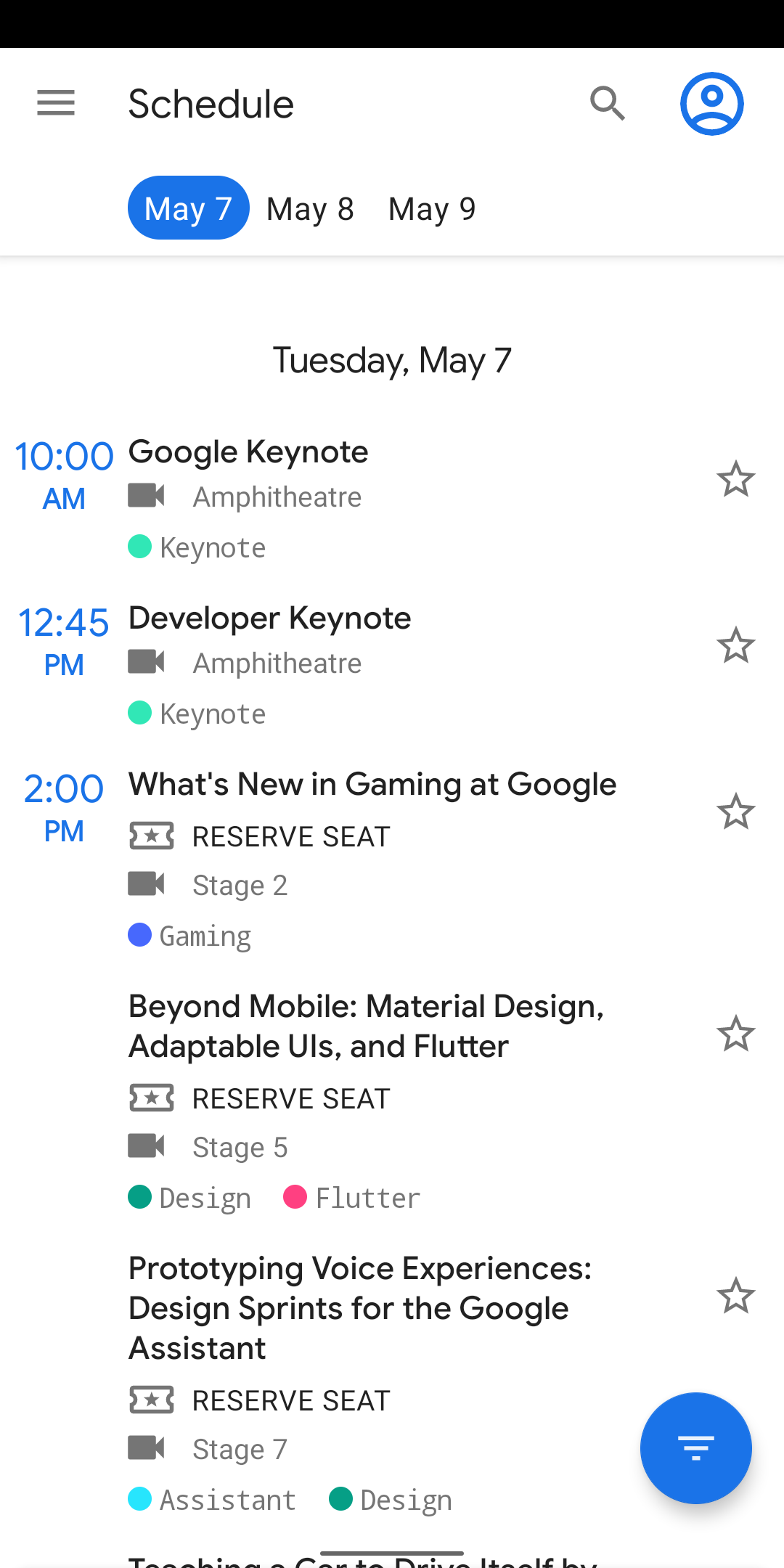
What is this?
 The official Android companion app for the Google I/O developer conference: sessions, codelabs, a venue map, and a personal schedule for attendees. The code was open-sourced and the repository was archived in 2023.
The official Android companion app for the Google I/O developer conference: sessions, codelabs, a venue map, and a personal schedule for attendees. The code was open-sourced and the repository was archived in 2023.Is this the app attendees actually used, or just a code sample?Both. It guided I/O visitors for ten years, and Google kept the code public as a real-world sample of Android development. It is written entirely in Kotlin, with all build scripts in the Kotlin DSL.
Both. It guided I/O visitors for ten years, and Google kept the code public as a real-world sample of Android development. It is written entirely in Kotlin, with all build scripts in the Kotlin DSL.How do I get it running?Clone the repo and open it in Android Studio via 'Import Project', or build from the command line with gradlew build. You need Android Studio Arctic Fox or newer.
Clone the repo and open it in Android Studio via 'Import Project', or build from the command line with gradlew build. You need Android Studio Arctic Fox or newer.Do I need Firebase API keys to build and run it?Not to try it: a staging build variant replaces Firebase-dependent modules at compile time, so the app builds and runs without API keys. Full behavior like reservations relies on Firebase services.
Not to try it: a staging build variant replaces Firebase-dependent modules at compile time, so the app builds and runs without API keys. Full behavior like reservations relies on Firebase services.Is the app still maintained and usable today?No. Google archived the repository in 2023, and the app has been untouched since 2019, still carrying that year's conference data. Google points developers to the 'Now in Android' sample instead.
No. Google archived the repository in 2023, and the app has been untouched since 2019, still carrying that year's conference data. Google points developers to the 'Now in Android' sample instead.What happens to my starred events if I lose connection?They still work: user data like starred and reserved events lives in Cloud Firestore with a local cache for offline use, while conference data is fetched once and kept in memory.
They still work: user data like starred and reserved events lives in Cloud Firestore with a local cache for offline use, while conference data is fetched once and kept in memory.What can attendees actually do in the app?It lists all conference events — sessions, office hours, app reviews, codelabs — filterable by event type and topic (Android, Firebase, etc.). Users can star events, reserve seats to guarantee them, and get a venue map, info pages, and a time-relevant Home feed during the conference.
It lists all conference events — sessions, office hours, app reviews, codelabs — filterable by event type and topic (Android, Firebase, etc.). Users can star events, reserve seats to guarantee them, and get a venue map, info pages, and a time-relevant Home feed during the conference.What architecture patterns does it showcase?It follows Google's Guide to App Architecture: logic lives in ViewModels, data is observed with Kotlin Flows, a repository layer hides the data sources, and a lightweight domain layer runs business logic off the UI thread. Hilt handles dependency injection, and Room with FTS4 powers full-text search over sessions, speakers, and codelabs.
It follows Google's Guide to App Architecture: logic lives in ViewModels, data is observed with Kotlin Flows, a repository layer hides the data sources, and a lightweight domain layer runs business logic off the UI thread. Hilt handles dependency injection, and Room with FTS4 powers full-text search over sessions, speakers, and codelabs.How is the codebase tested?UI tests use Espresso, unit tests use JUnit4 with Mockito where needed, and Jetpack Benchmark measures critical startup paths like bootstrap data parsing, reporting results in the Android Studio console.
UI tests use Espresso, unit tests use JUnit4 with Mockito where needed, and Jetpack Benchmark measures critical startup paths like bootstrap data parsing, reporting results in the Android Studio console.Why did Google stop updating it?Google I/O 2020 was canceled and 2021 went online-only, so the companion app had no event to serve and wasn't updated after the 2019 edition. The team kept modernizing the code — Kotlin Flows, DataStore, large-screen support — before archiving it in favor of 'Now in Android'.
Google I/O 2020 was canceled and 2021 went online-only, so the companion app had no event to serve and wasn't updated after the 2019 edition. The team kept modernizing the code — Kotlin Flows, DataStore, large-screen support — before archiving it in favor of 'Now in Android'.What are similar projects?compose-samples, nowinandroid, plaid, architecture-samples, MVPArms, LastWave-Native, sunflower, coil
compose-samples, nowinandroid, plaid, architecture-samples, MVPArms, LastWave-Native, sunflower, coilWhich topics is it in?kotlin-coroutines, coroutines, sample-app, androidx, gradle, jetpack-compose, android-development, architecture, android-app, google, kotlin, mobile-app
kotlin-coroutines, coroutines, sample-app, androidx, gradle, jetpack-compose, android-development, architecture, android-app, google, kotlin, mobile-app