
Let AI assistants and test suites use real phones like a human.
English •
中文文档 •
Workflow Showcase •
Quick Start •
MCP for IDEs •
Benchmarks •
Discord Community





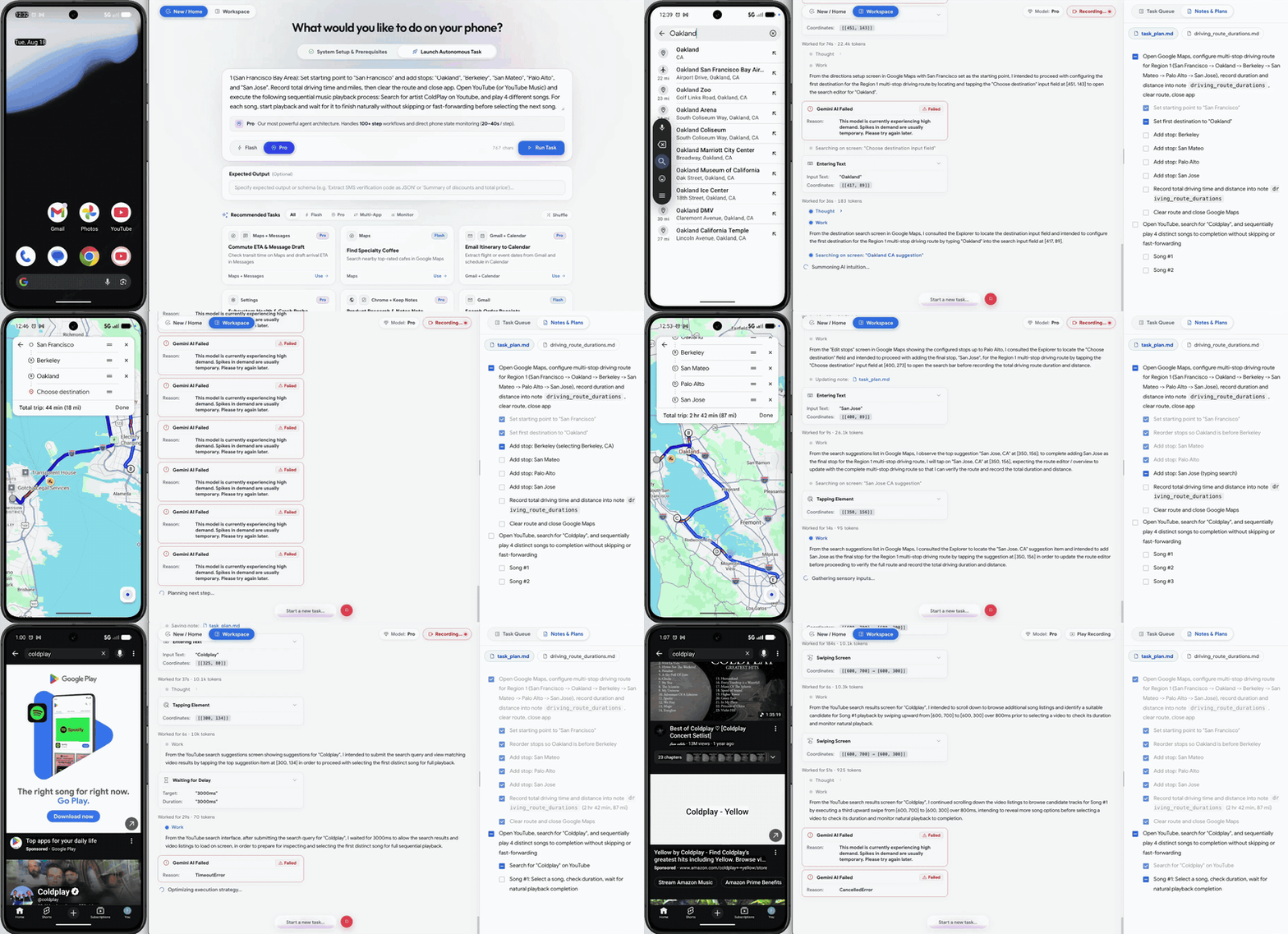
Live Demo: Setup driving routes and calculate total durations in Google Maps, then open YouTube to play a Coldplay song.
Key Highlights
- Cross-App Automation: Executes testing workflows and everyday tasks on Android from natural language instructions.
- Multimodal Targeting: Uses element indices when available, with coordinate and visual locating fallbacks for custom interfaces.
- IDE Diagnostics: Model Context Protocol (MCP) integration lets Antigravity, Claude Code, and Windsurf drive test devices and collect Logcat output and screenshots.
- Flash Execution: A reactive observe-and-act loop with asynchronous history summaries, typically 3–5s per step.
- Pro Exploration: Checks targets before individual actions and returns blocked actions to the Operator for recovery. Supports long-running exploratory and stability tests.
- AndroidWorld Results: 99%+ task completion on Google Research's AndroidWorld benchmark (100+ multi-step tasks).
Antigravity × ARTEMIS: Autonomous Testing Workflow
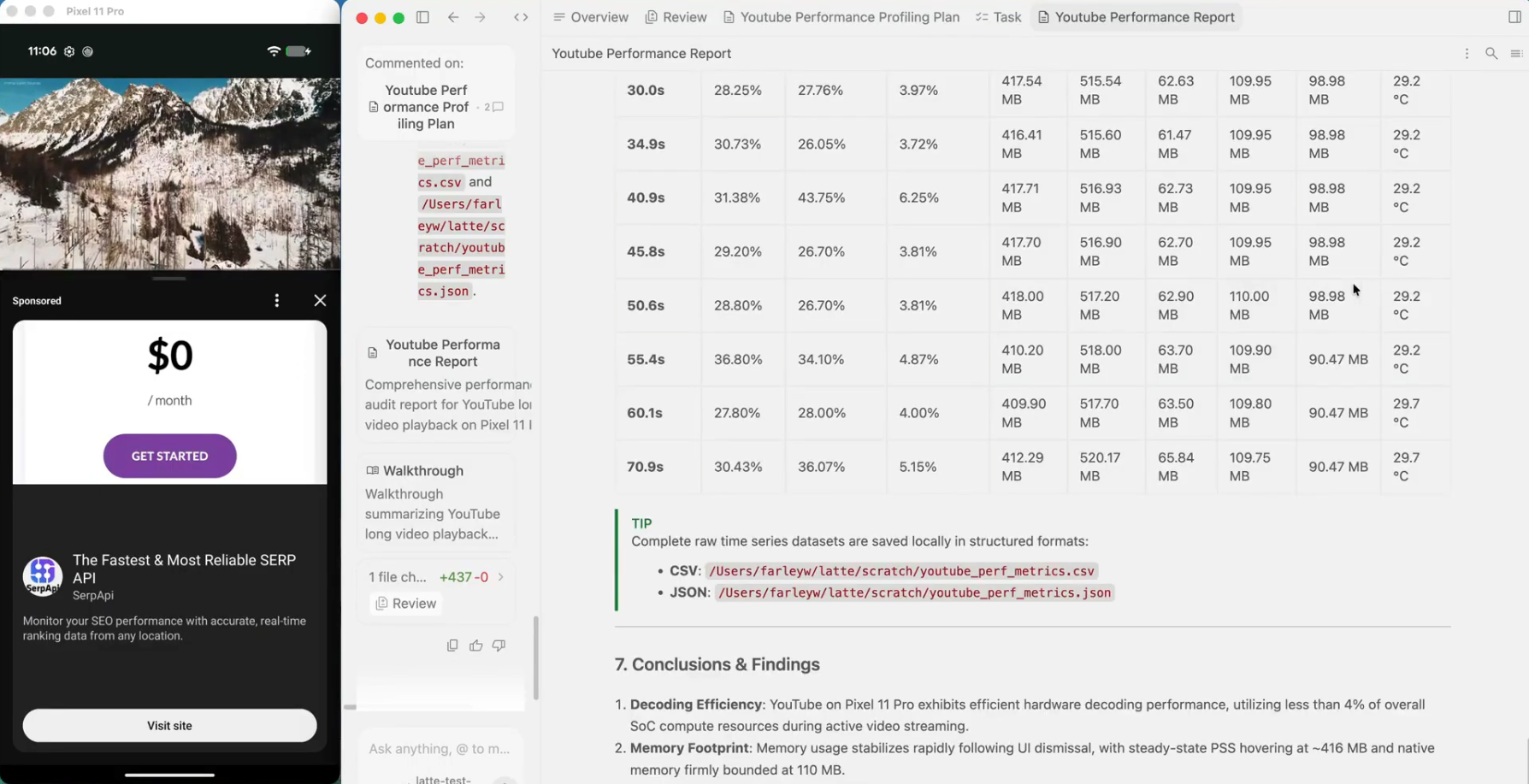
Antigravity uses ARTEMIS through MCP to turn a test request into a plan, device execution, and a diagnostic report:
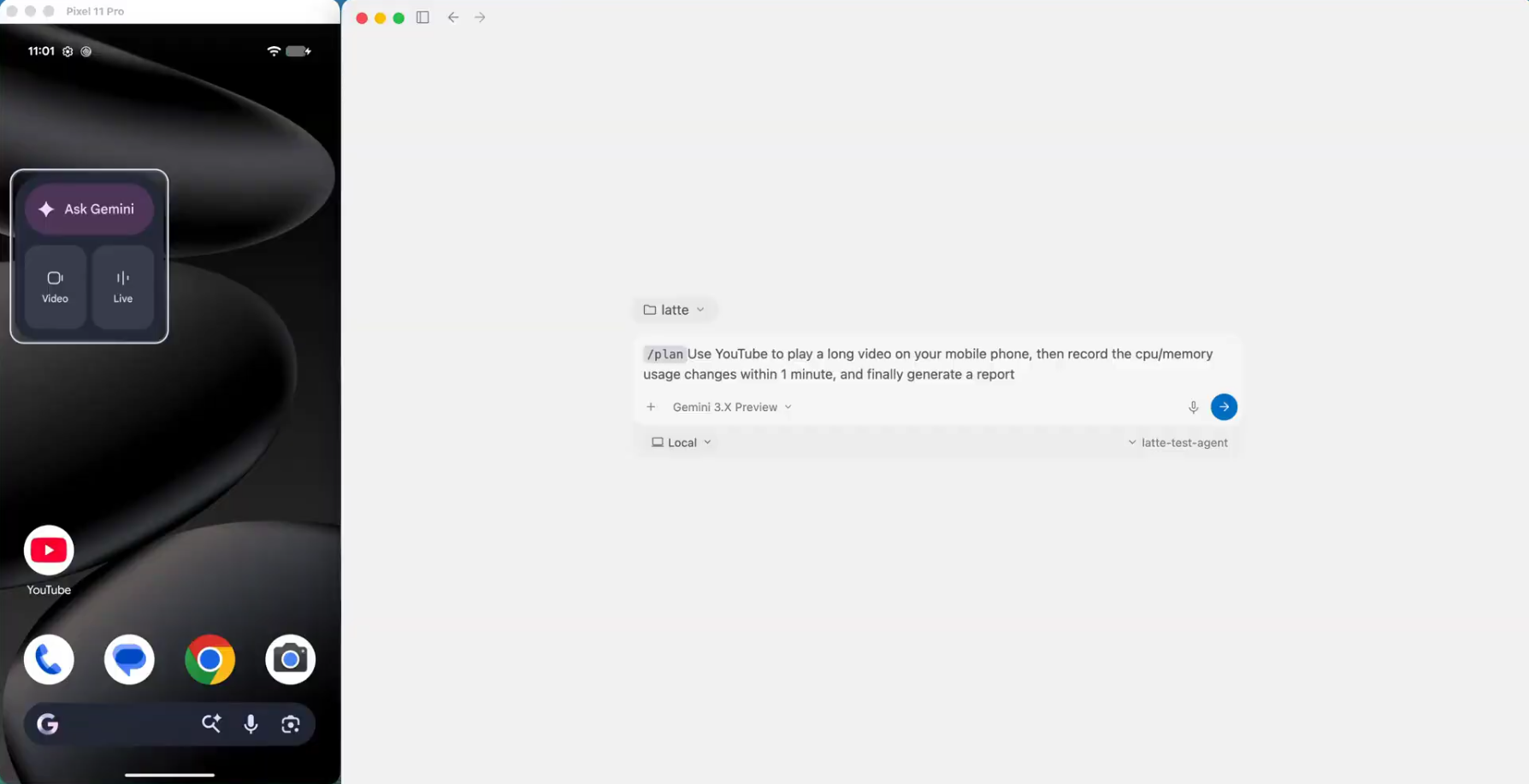
1. Prompt Input (Task Dispatch)
Describe your test scenario and target metrics in Antigravity
|
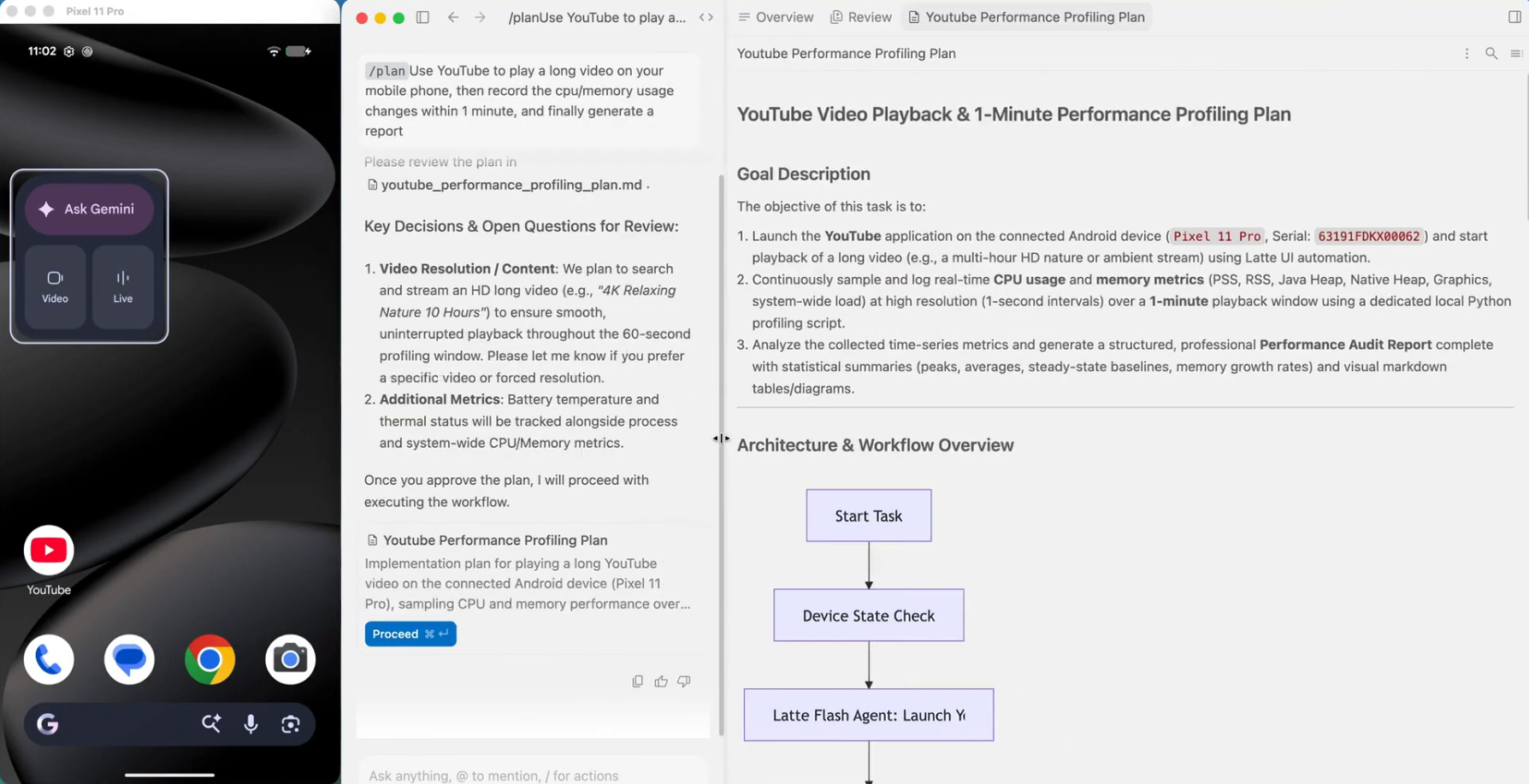
2. Test Plan Generation
Formulates a step-by-step test plan & architecture for review
|
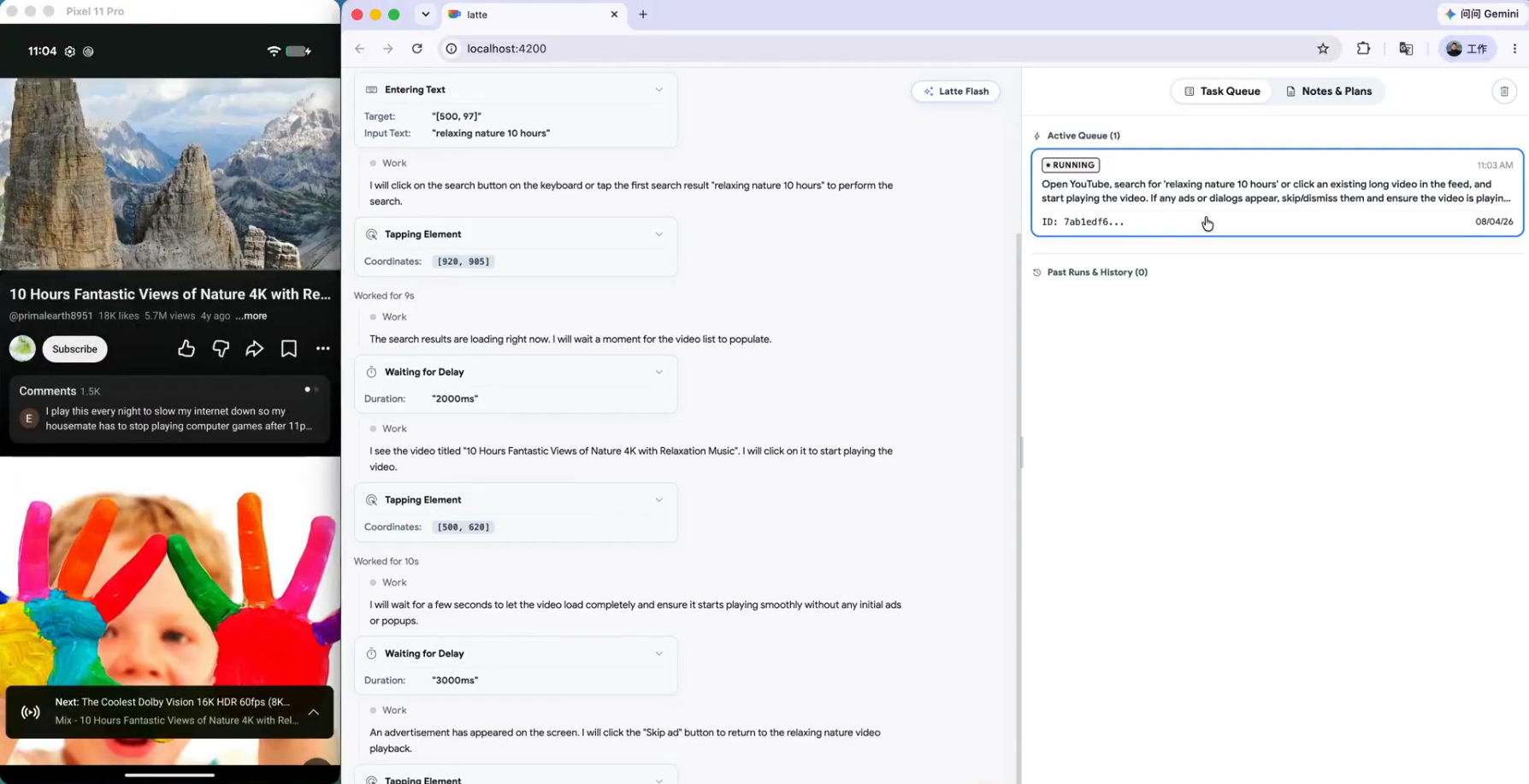
3. Autonomous Test Execution
Drives real device, navigates UI, and profiles performance
|
4. Final Report
Delivers structured audit findings, metric tables, and raw datasets
|
Quick Start
Ensure an Android device (with USB Debugging enabled) or emulator is connected. The one-click startup script will automatically:
- Install System Toolchains: Detect and auto-install ADB, scrcpy, FFmpeg, and Python (
uv) dependencies.
- Mount Global MCP Server & AI Agent Rules: Prompt to automatically install global MCP configurations and the Artemis Mobile Testing Mindset (
rules.md) into your AI IDEs (Antigravity, Cursor, Claude Code, Codex, Windsurf, VS Code, Cline/Roo, OpenClaw).
macOS and Linux
# 1. Clone repo & navigate to directory
git clone https://github.com/google/artemis.git && cd artemis

# 2. One-click launch
./start.sh
Windows PowerShell
# 1. Clone repo & navigate to directory
git clone https://github.com/google/artemis.git
cd artemis

# 2. One-click launch
.\start.bat
PowerShell does not search the current directory for executable scripts by default, so use .\start.bat without a trailing \. In Command Prompt (CMD), use start.bat instead.
Tip: Opens http://localhost:8000 in your default browser with a device connection wizard, live screen mirroring, prompt sandbox, and execution replays. You can also run directly from CLI: uv run artemis run "Open Settings, find Battery and tell me current level" --profile flash.
MCP Setup for Codex / Antigravity / Claude Code / Windsurf (Click to expand)
ARTEMIS includes a native Model Context Protocol (MCP) server. Connect your real phone directly into AI IDEs:
1. One-Click Auto Install (Recommended)
Running ./start.sh (macOS/Linux) or .\start.bat (Windows PowerShell) will prompt you to configure global MCP and testing rules for detected IDEs (or you can install/update anytime later manually using the commands below):
# Auto-install MCP server & global rules for Antigravity / Jetski:
uv run artemis mcp --install antigravity

# Or install for all supported AI IDEs (including Codex):
uv run artemis mcp --install all
Tip: You can also configure MCP interactively during first-time setup via uv run artemis init.
Pro Tip: If you want to use the artemis command globally without uv run in any directory, run uv tool install -e . once in the project root.
2. Manual Configuration (Optional)
If you prefer to configure manually, run uv run artemis mcp --generate-config <client> (for example, codex or antigravity) to output the appropriate TOML or JSON snippet. Replace /path/to/artemis with your actual repo path and point command to your .venv Python executable:
- Codex (
~/.codex/config.toml):
[mcp_servers.artemis]
command = "/path/to/artemis/.venv/bin/python"
args = ["-m", "mcp_server"]
cwd = "/path/to/artemis"

[mcp_servers.artemis.env]
PYTHONUNBUFFERED = "1"
PYTHONPATH = "/path/to/artemis"
- Antigravity (
~/.gemini/jetski/mcp_config.json):
{
  "mcpServers": {
    "artemis": {
      "command": "/path/to/artemis/.venv/bin/python",
      "args": ["-m", "mcp_server"],
      "cwd": "/path/to/artemis",
      "env": {
        "PYTHONUNBUFFERED": "1"
      },
      "tools": {
        "mobile_run_task": { "eager": true },
        "mobile_manage_task": { "eager": true },
        "mobile_get_device_state": { "eager": true },
        "mobile_inspect_trace": { "eager": true },
        "mobile_diagnose": { "eager": true }
      }
    }
  }
}
- Claude Desktop (
claude_desktop_config.json):
{
  "mcpServers": {
    "artemis": {
      "command": "/path/to/artemis/.venv/bin/python",
      "args": ["-m", "mcp_server"],
      "cwd": "/path/to/artemis"
    }
  }
}
3. Mount Behavioral Rules for AI Agents (Highly Recommended)
To ensure your AI coding assistant acts with the rigor of a senior mobile test engineer and never hallucinates UI interactions, we provide a dedicated testing mindset rules file at mcp_server/rules.md (covering Active Exploration before coding, Flash vs. Pro routing strategy, Latency & Timing compensation, and the "Dynamic-First, Coordinate-Fallback" locator pattern).
You can mount or copy mcp_server/rules.md into your AI IDE's rule configuration:
- Antigravity: Add the contents of
rules.md to your Workspace Rules, Global Rules settings, or agent instructions.
- Claude Code: Run
artemis mcp --install claude to install the rules to ~/.claude/rules/artemis.md (install to exactly one location — Claude Code loads both ~/.claude/CLAUDE.md and ~/.claude/rules/*.md, so duplicating the rules wastes context).
- Cursor: Copy the contents into
.cursorrules or create a rule file at .cursor/rules/artemis.mdc.
- Codex: Add the contents to
~/.codex/AGENTS.md (or the active AGENTS.override.md).
- Windsurf / OpenClaw: Add the rules to your workspace rules or global system prompts.
For more details on the testing mindset and MCP architecture, see the MCP Server README.
4. Prompt Your Phone in the IDE Chat
In Codex, Antigravity, or Claude Code, simply prompt:
"Build the latest changes into an APK, install it on the connected device, open the login screen with a test account, verify if there are any unexpected popups after login, and return screenshots of the final page."
Python SDK Integration (Click to expand)
Install the zero-runtime-dependency client on the development machine. ADB,
agents, models, and image processing remain on the device host:
uv add "artemis-client @ git+https://github.com/google/artemis.git#subdirectory=packages/artemis-client"
import asyncio
from artemis_client import ArtemisClient


async def main():
    client = ArtemisClient(
        "http://artemis-host:8000",
        device_serial="emulator-5554",  # optional: target specific device serial
        default_profile="flash",  # "flash" (fast reactive) or "pro" (deep reasoning)
    )

    result = await client.run(
        "Open System Settings, go to 'Battery', verify battery percentage is displayed, and check for any crash dialogs.",
    )

    assert result.succeeded, f"Test failed: {result.error or result.status}"
    print(f"✅ Test Passed! Device: {result.device_serial} | Trace ID: {result.trace_id}")


if __name__ == "__main__":
    asyncio.run(main())
Usage Modes
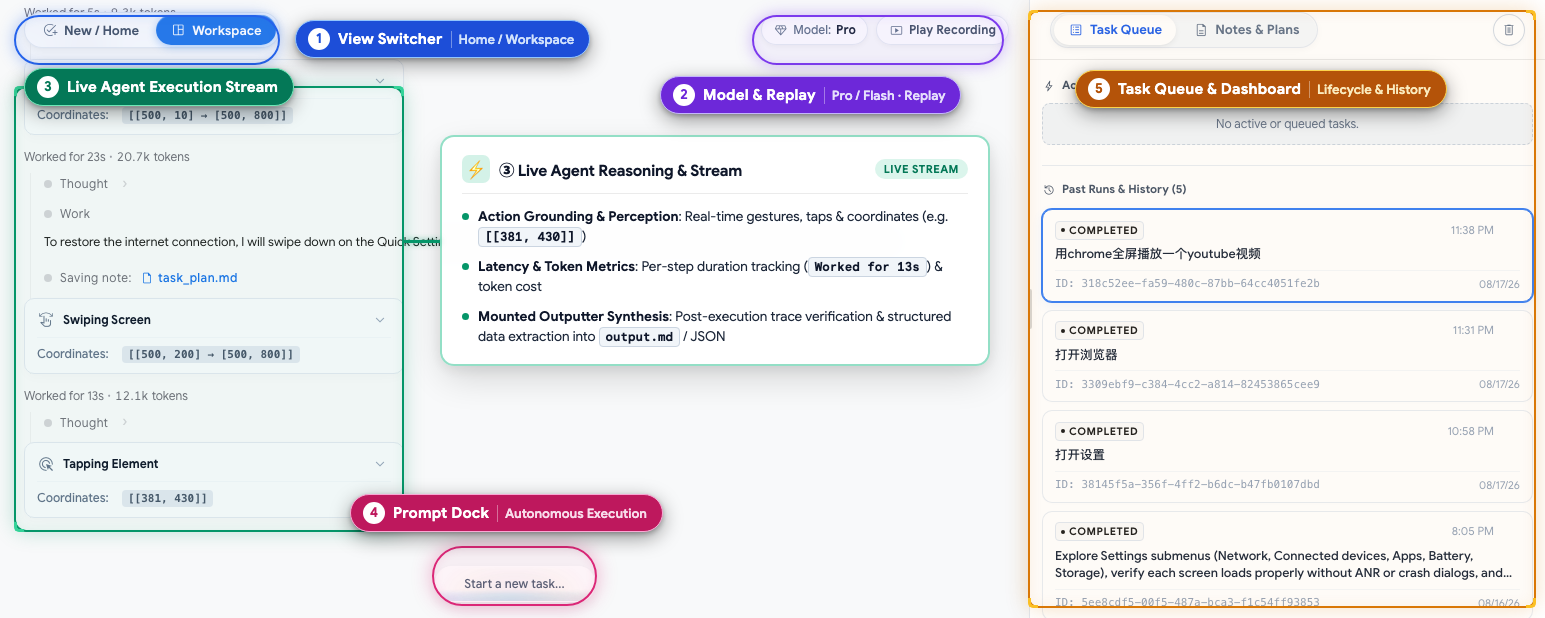
Console Overview: ① View Switcher (Home / Workspace) · ② Model & Replay (Flash/Pro status & video replay) · ③ Live Agent Stream (Action perception, target coordinates & structured results) · ④ Prompt Dock (Natural language dispatch) · ⑤ Task Queue & Dashboard (Lifecycle & history)
- Web Visual Test Console (
uv run artemis ui): Real-time screen projection and interactive panel, supporting natural language test dispatch, live reasoning telemetry, action trajectories, and execution replay; manage server lifecycle anytime from any terminal using uv run artemis restart, uv run artemis stop, and uv run artemis status;
- MCP Server: Connects Antigravity, Claude Code, Windsurf, and other MCP clients to real devices for bug reproduction and test execution;
- Developer CLI (
uv run artemis run): Direct terminal execution for automated test cases, exploratory stability inspection, or AndroidWorld benchmarks with high-fidelity structured terminal output;
- Python SDK: Integrates as a standard Python library into existing automated testing frameworks (e.g., pytest) or CI/CD pipelines with strongly typed Pydantic structured outputs and assertion support.
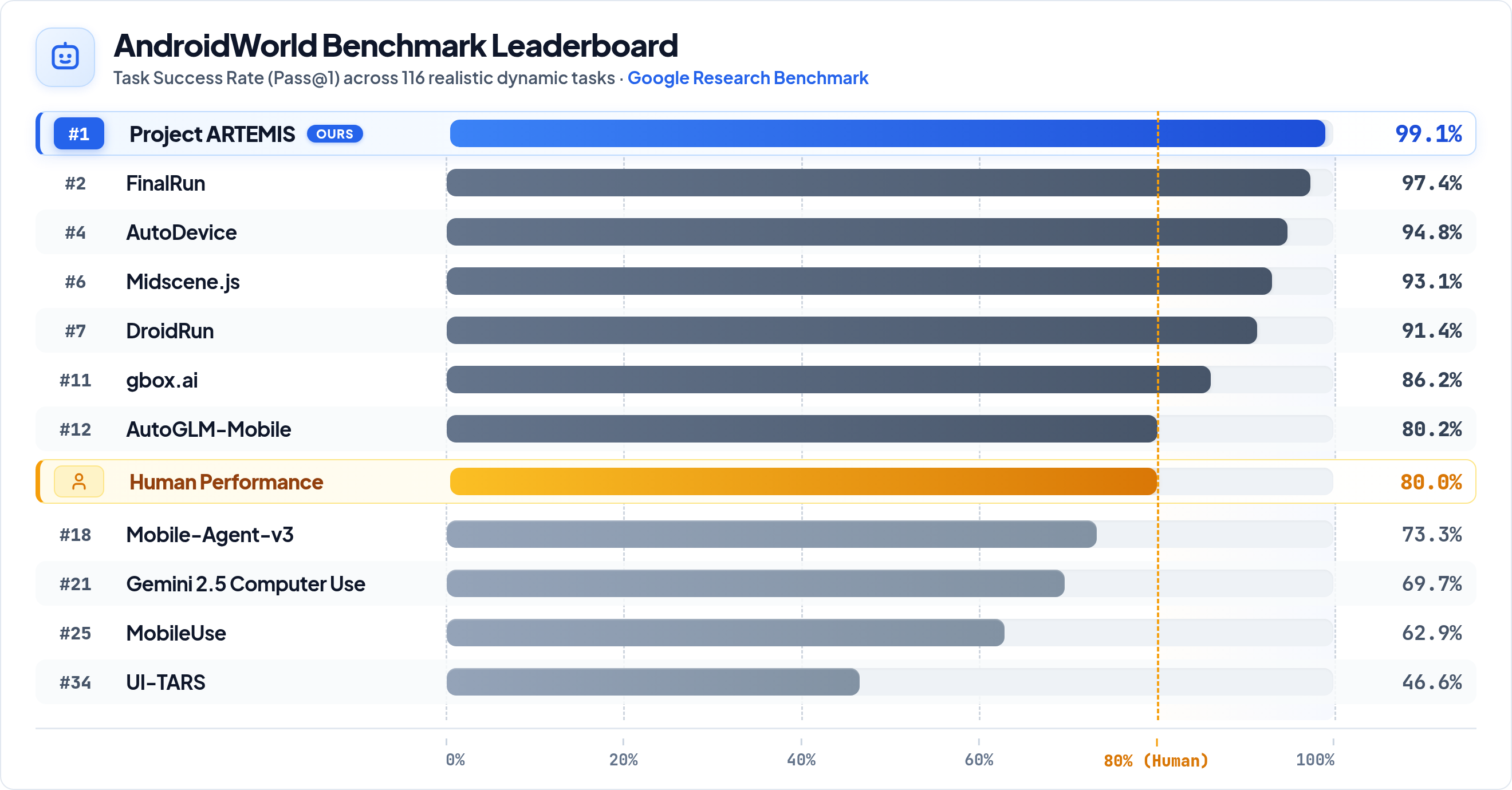
Benchmarks: AndroidWorld (SOTA 99%+)
Artemis achieved a 99%+ completion rate on AndroidWorld, Google Research's benchmark spanning 20+ apps and 100+ multi-step tasks.
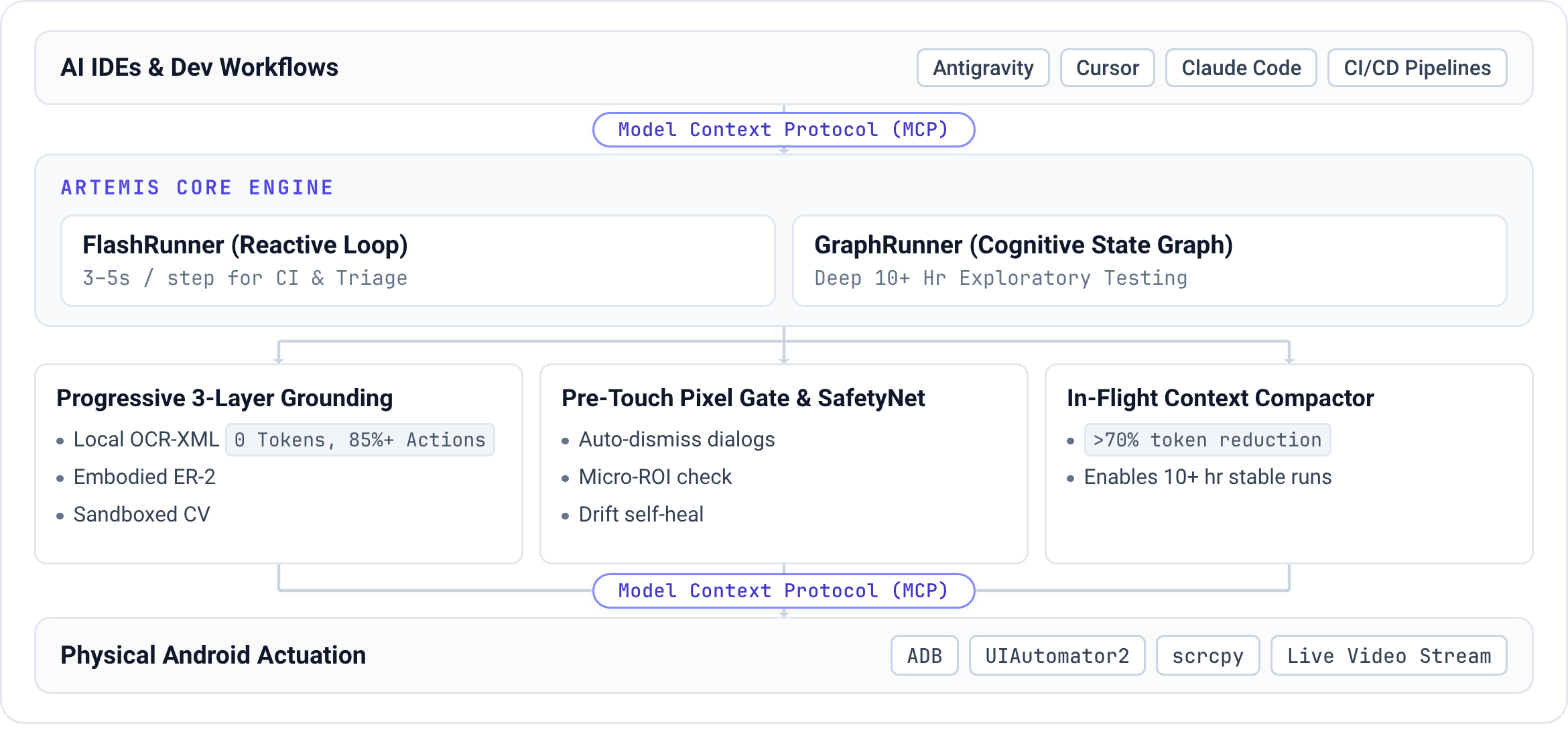
How ARTEMIS is Architected
- Pre-Execution Checks and Action Bursts: Pro checks the target against the live UI tree and pixels before dispatching an individual action. Action bursts handle transient controls without waiting for another model turn.
- Element Locating: Combines accessibility hierarchies and OCR with visual models for custom Canvas, Compose, and Flutter interfaces.
- Shared History Compression: Flash and Pro replace older screenshots with visual summaries and compress completed steps into searchable history chunks. Context thresholds control when raw turns are replaced.
Execution Profiles: Flash vs. Pro
ARTEMIS supports two execution profiles tailored for different automation requirements:
- Flash Profile (
--profile flash): Fast and token-efficient reactive loop (~3–5s per step): one model observes the live screen, thinks, and acts, with no graph orchestration. Ideal for routine, deterministic UI tasks. The loop is unbounded by default (agent.flash.max_turns, 0 = unlimited) because history is compressed rather than capped: Flash shares the Pro session transcript ledger (session-relative T+mm:ss clock, screenshots folded into visual summaries, older steps chunked into eras and recallable on demand via search_history / replay_steps) and can query the session recording through video_analyzer. Transient UI (auto-fading control bars, toasts) is handled by chaining taps into one click_sequence. Limitations: No task plan or notes, no pre-execution safety net, no checkpoint verification or final report, and no ADB shell.
- Pro Profile (
--profile pro): A planning and verification workflow (~15–40s per step), built as a multi-agent graph. A Planner maintains a living Markdown task plan with milestones and verify / assert check items; the Operator executes it with the full toolset (Explorer grounding whose flash / pro / ultra tier is a user setting per profile — pro.explorer.mode / flash.explorer_mode in config/artemis.jsonc or --explorer-pro-mode — never chosen by the agent; notes, history recall, video analysis, ADB diagnostics). Every single action passes a pre-execution Safety Net (XML-first, pixel fallback), while multi-action fast-action bursts fire back to back to beat turn latency on transient UI. A blocked or failed action opens an execution incident that stays in the Operator's context until a later action succeeds, so recovery is handled by the Operator itself with no separate repair agent. A read-only Checker verifies plan checkpoints and runs an exit final review against the original goal (--verification-level: off / final (default) / checkpoints / strict), and plan milestone edits get an advisory review. Handles 100+ step long-horizon workflows, [Loop:continuous] monitoring, and an optional written report.
Roadmap
- Android Studio Integration: Native IDE plugin and workflow integration to enable in-editor debugging, test recording, and automated device control directly within Android Studio.
- iOS Platform Expansion: Extending multimodal perception and mobile automation to iOS devices and simulators.
- On-Device Lightweight VLMs: Local execution with lightweight edge vision models for low-latency, privacy-first automation.
- Real-time Duplex Voice Interaction: Voice-driven task dispatch with real-time conversational control and interruption handling.
Contributions are warmly welcomed!
License
This project is licensed under the Apache License 2.0.

 ARTEMIS lets AI assistants and test suites control real Android phones using natural-language instructions, automating end-to-end workflows while capturing logs and screenshots along the way.