The world's first full-featured open-source AI Office suite.
Word, Excel, PowerPoint and PDF files, edited by you and your AI, saved back in the real formats.
GenOffice is a free, open-source alternative to Microsoft Office for macOS,
Windows and Linux. It opens and saves native .docx, .xlsx and .pptx
files, edits PDF, Markdown and HTML, and puts an AI agent next to every
document — not a chat box bolted on the side, but an editor that reads the
file, makes the change, and shows you exactly what it touched.
Real formats, byte-preserving. Only what you edit is rewritten. Everything
else in the file survives byte-for-byte, so documents keep working in Word,
Excel and PowerPoint.
AI you can review. Edits land as tracked changes and diffs with one-click
rollback. Spreadsheets get live formulas, not pasted numbers. Decks and pages
are generated onto the canvas and stay fully editable.
Local by design. Files open, edit, save and convert on your machine.
PDF → Word / Excel / PowerPoint, Markdown → Word and HTML → Word all run
on-device. Only the AI calls leave the machine, to the provider you choose.
Your keys or none. Sign in with Genspark and skip keys, or bring your own
key for Claude, OpenAI, Gemini, DeepSeek, Kimi, GLM, Qwen, Doubao, MiniMax,
Grok, Mistral, OpenRouter, or any OpenAI-compatible endpoint, local servers
included.
Get it:macOS (Apple Silicon and Intel) ·
Windows (x64 and Arm) ·
Linux (deb, rpm, AppImage) —
details and requirements in Download.
Demo
Six apps, one AI panel. Every screenshot is the real app on macOS, with the
AI driven from the prompt you can read in the panel.
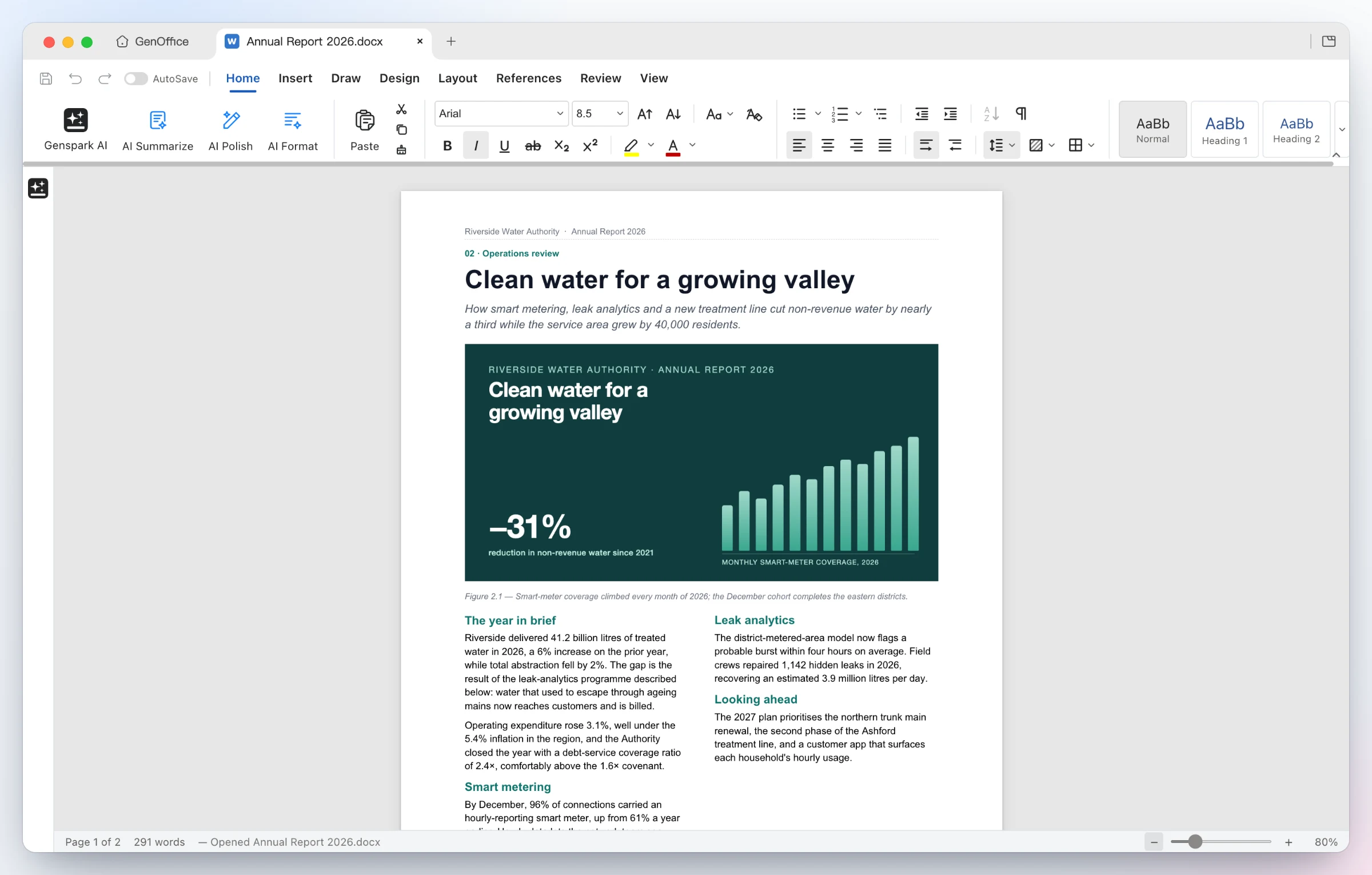
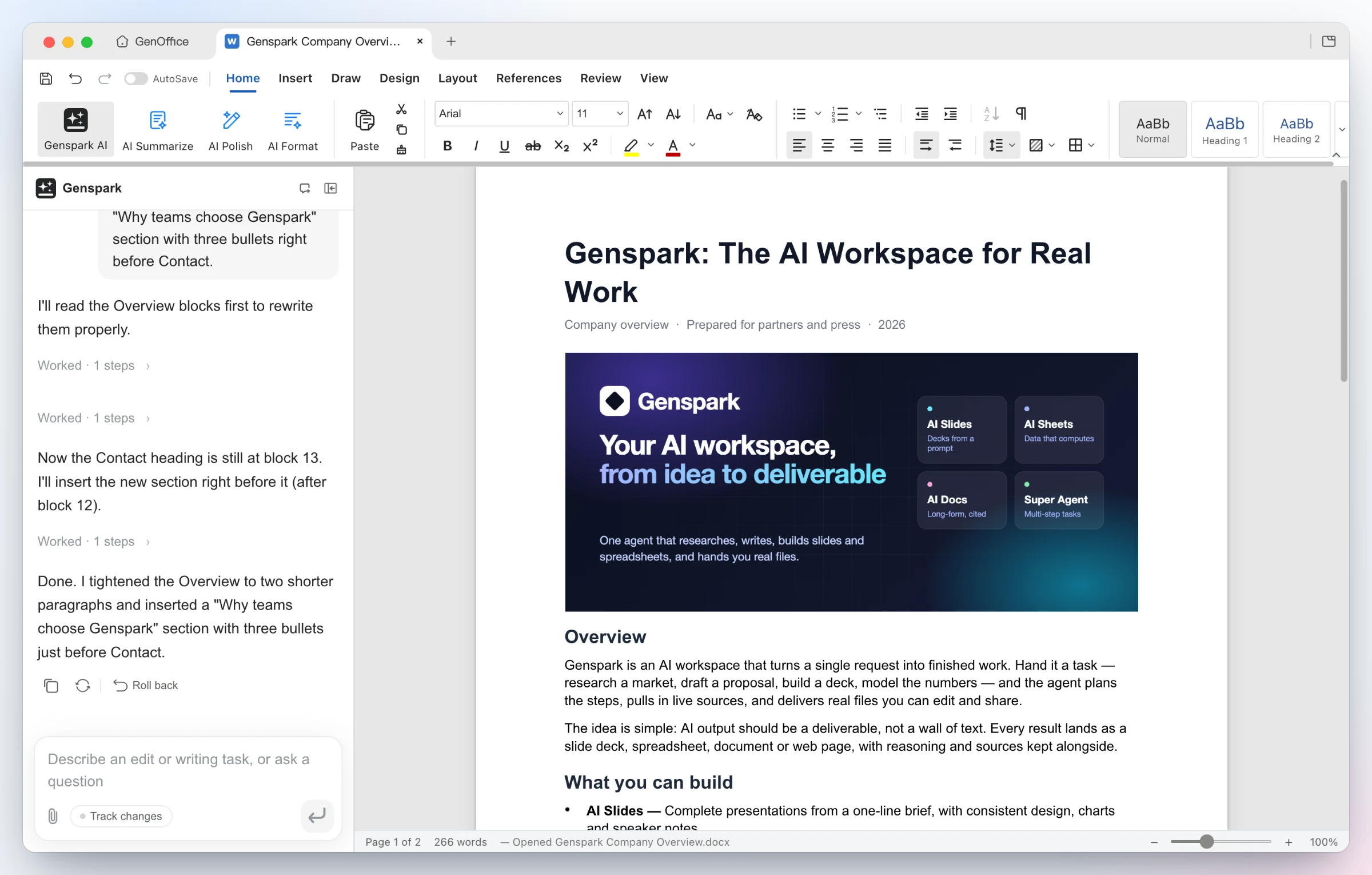
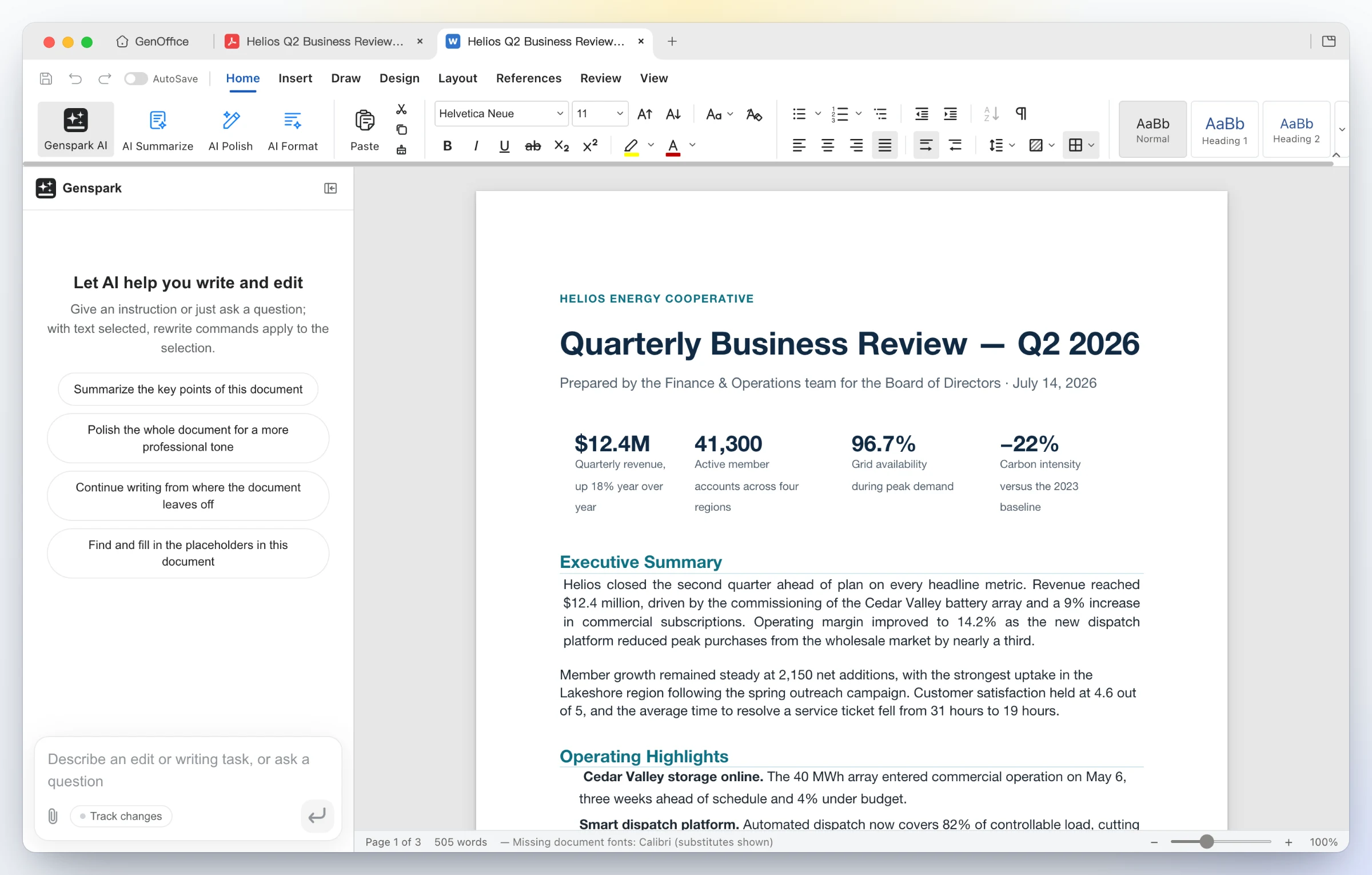
1 · Docs — open and edit .docx with an AI you can review
Opens the file as Word lays it out — two-column sections, full-bleed images, shaded tables, headers and footers, pagination on Word's line metrics. Styles, comments, tracked changes, equations and ink round-trip untouched.
Ask for the edit — the AI reads the blocks it needs, rewrites the Overview and inserts a new bulleted section. Every AI turn is a snapshot you can roll back; with Track changes on, edits arrive as Word-style revisions.
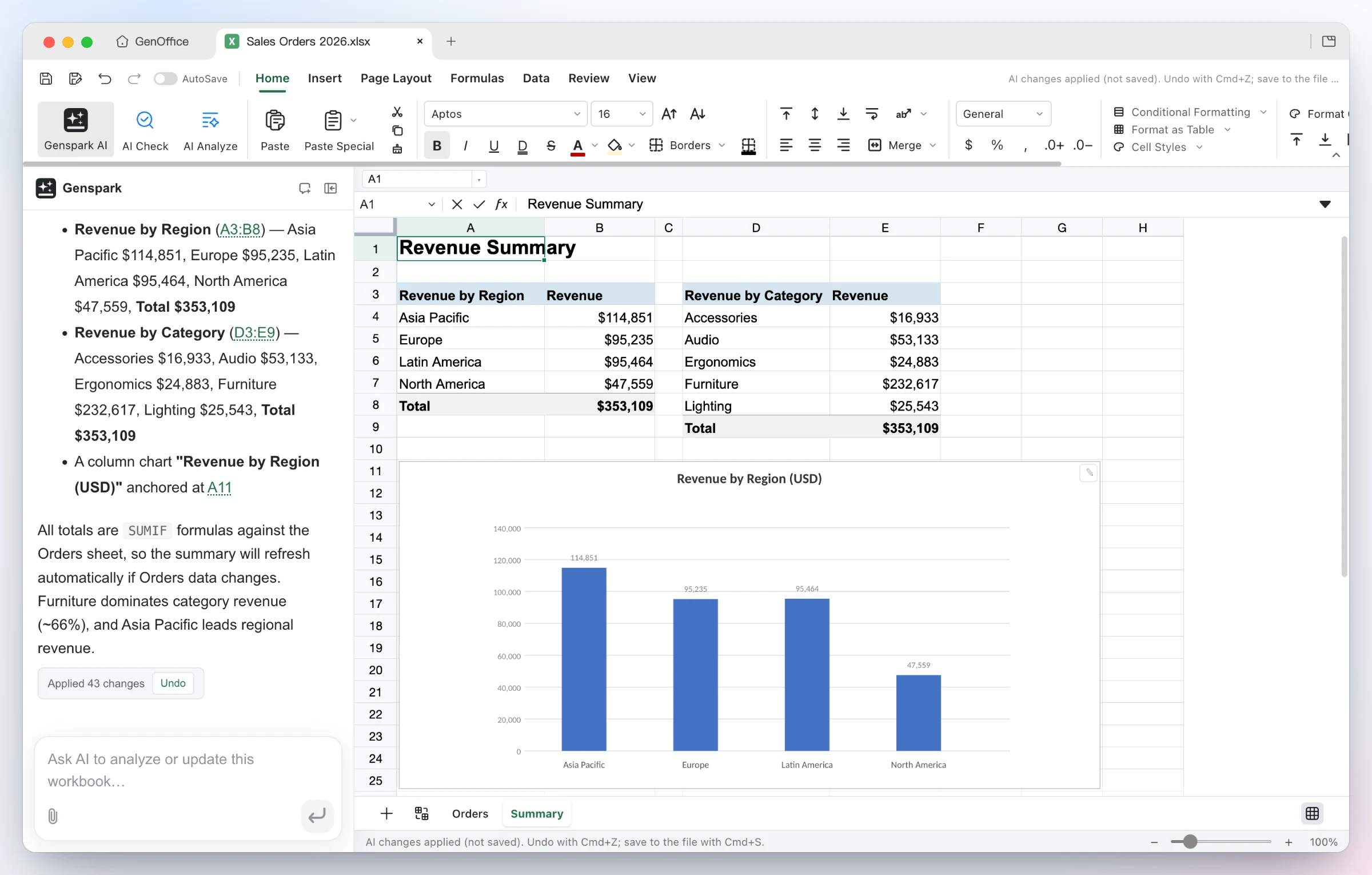
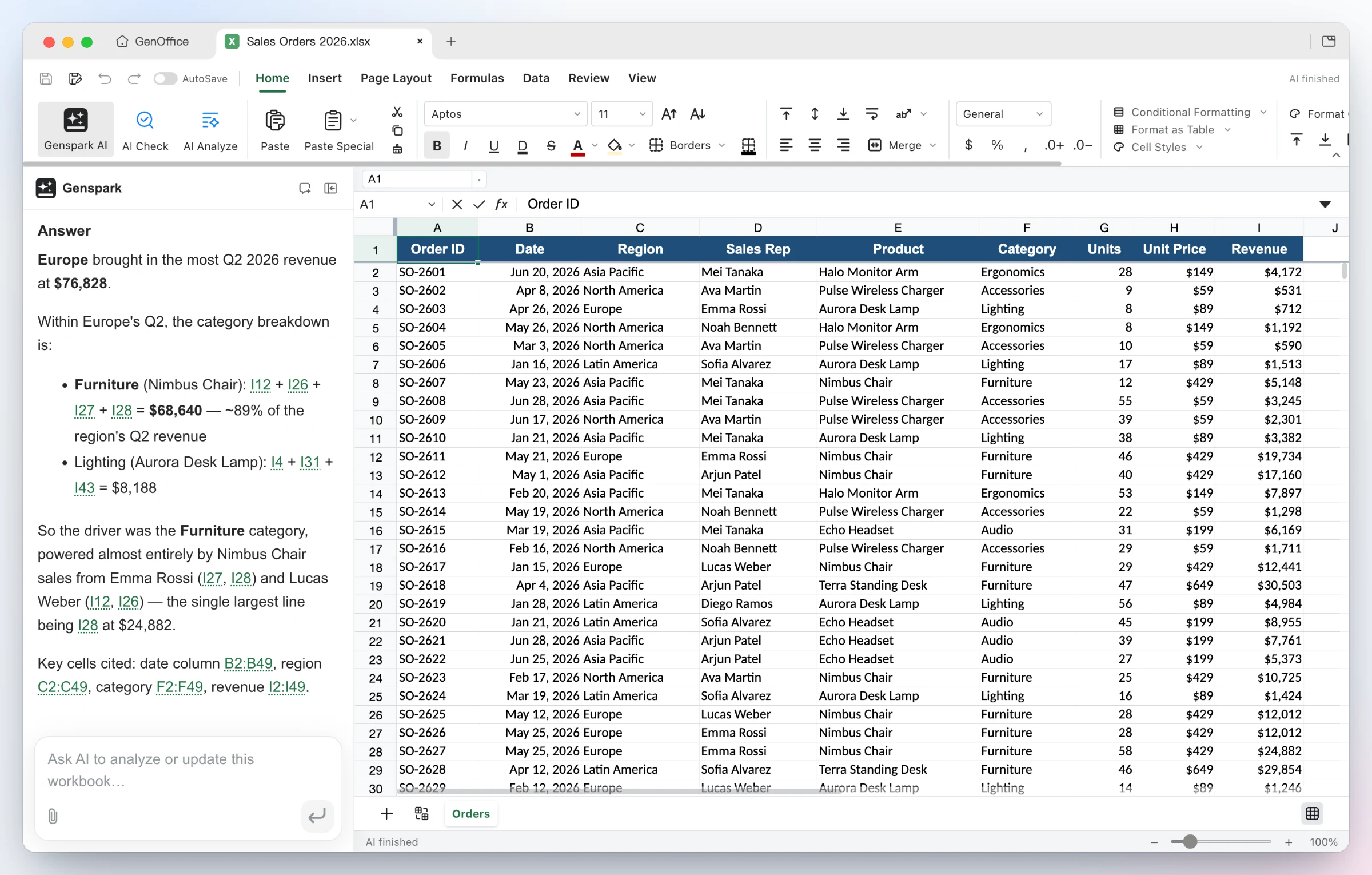
2 · Sheets — .xlsx with live formulas and charts, not pasted numbers
Build it — from one sentence the agent adds a Summary sheet with real SUMIFs by region and category, inserts a column chart, and applies the 43 changes as a single undoable batch.
Ask it — questions about the workbook come back with the reasoning and the exact cells used as clickable citations. Under the hood: an in-house Rust .xlsx engine, pivot tables, slicers, conditional formatting and formula tracing.

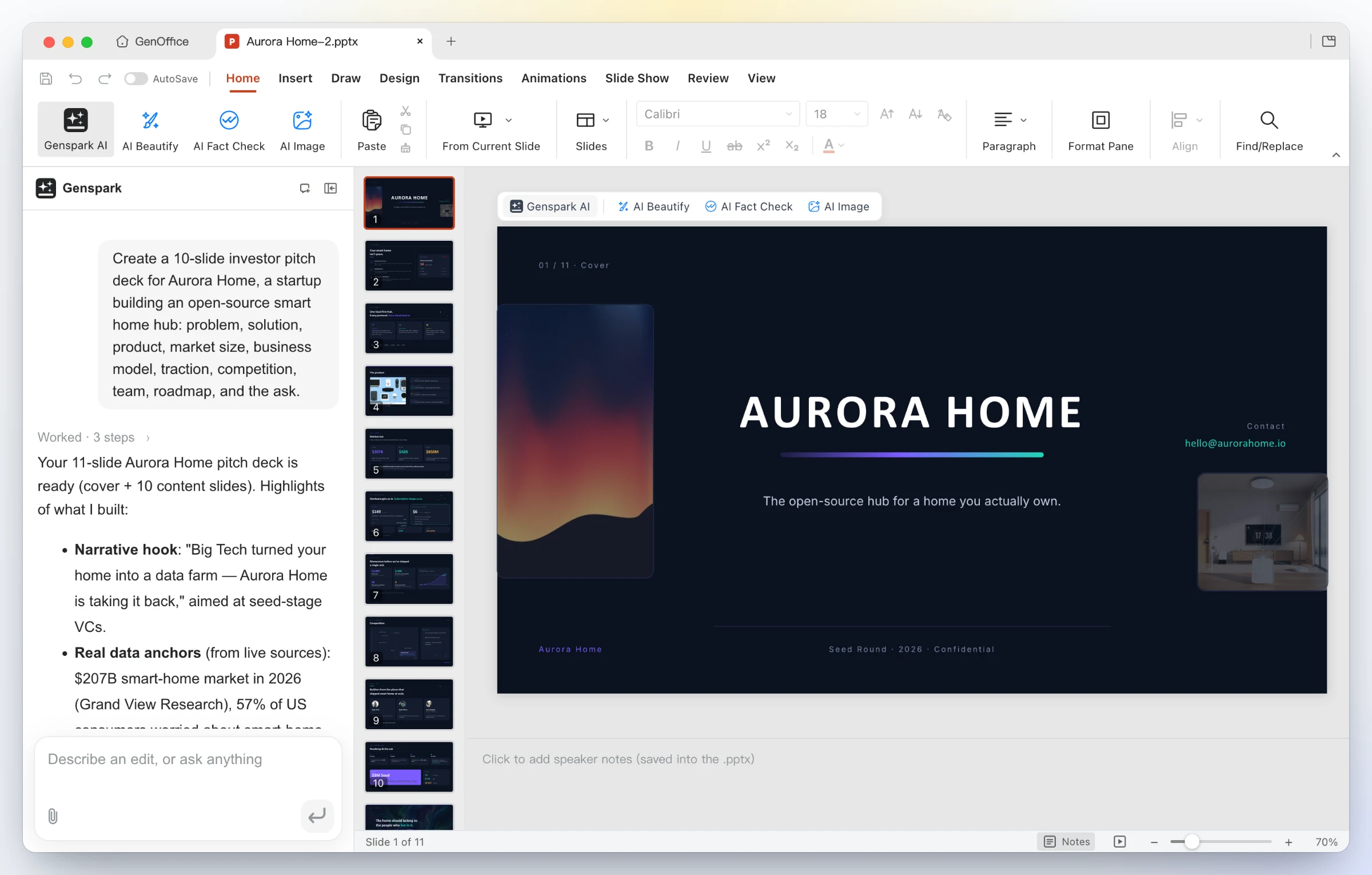
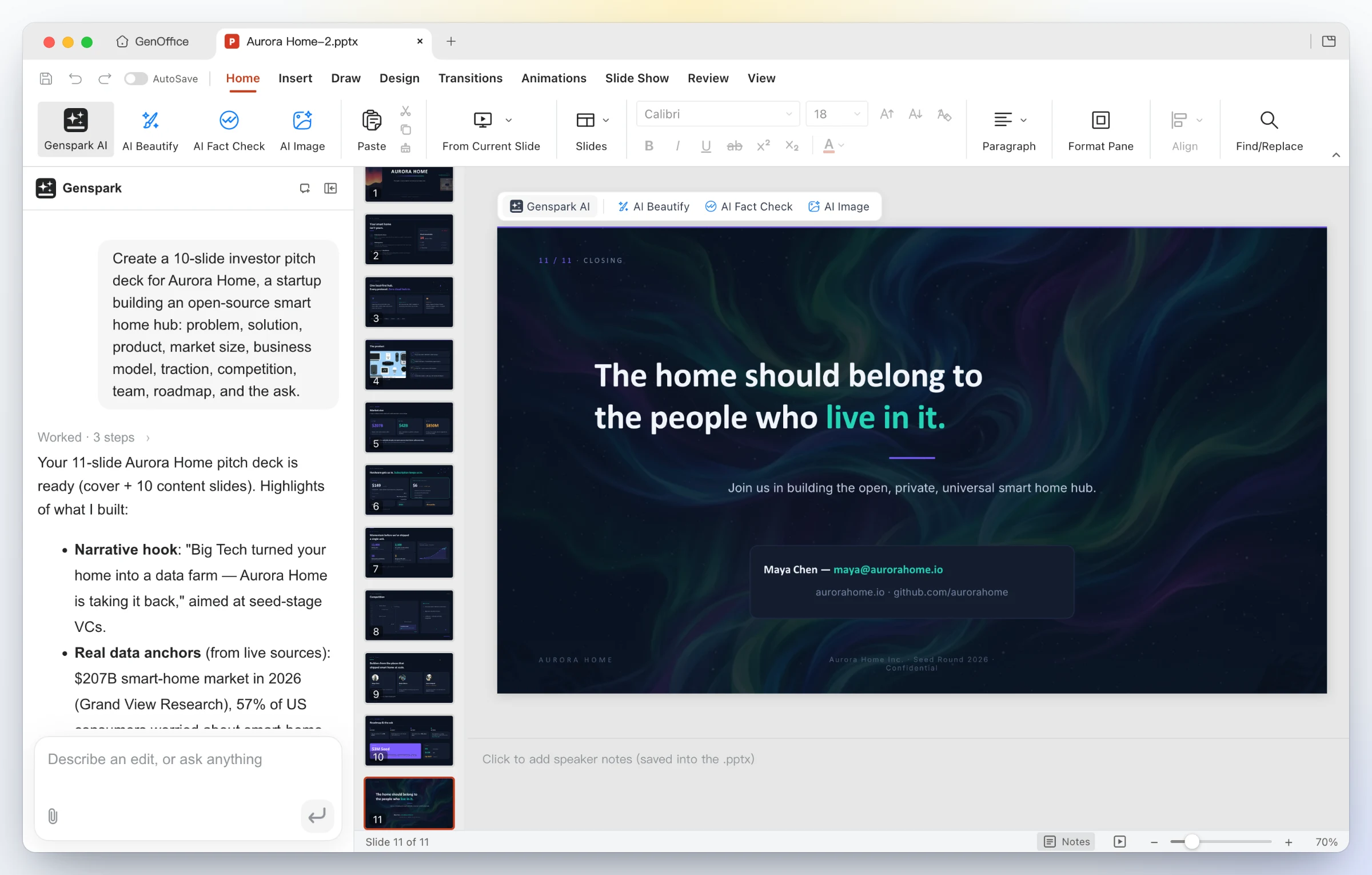
3 · Slides — from a prompt to a .pptx deck
One line in — "Create a 10-slide investor pitch deck for Aurora Home…". GenOffice plans the storyline, researches the numbers, and drafts every slide onto the canvas as a real .pptx.
A finished deck out — eleven designed slides with consistent typography, imagery and a closing call to action; keep editing with masters, layouts, smart guides and non-destructive cropping, or ask the panel to restyle, rewrite and reorder.
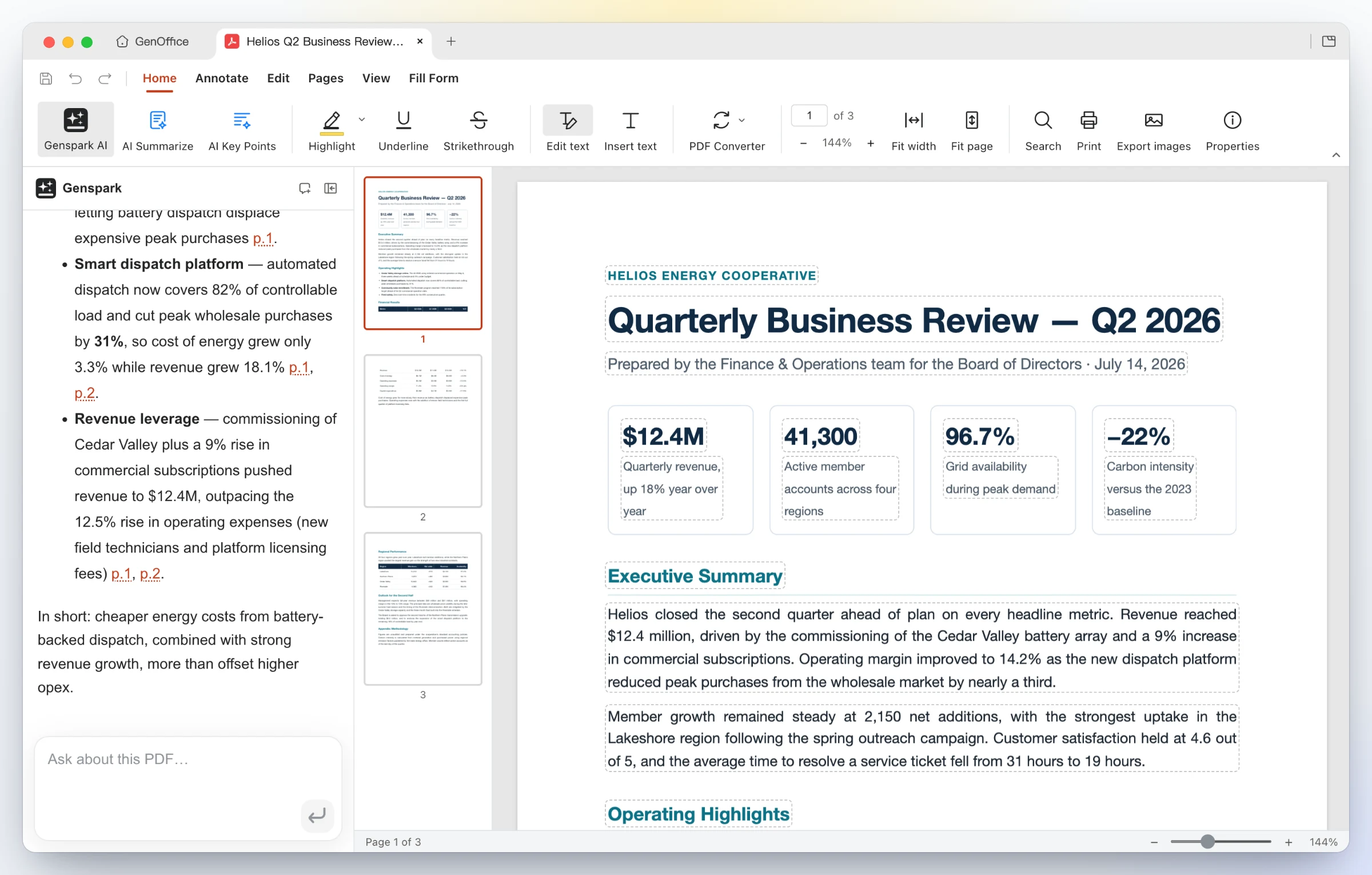
4 · PDF — edit PDF text in place, convert PDF to Word on-device
Edit inside the page — Edit text mode outlines every text block for in-place retyping; the content stream is rewritten through PDFium with the original fonts, not a cover-up annotation. Ask the AI about a long report and get answers with page citations.
Convert on-device — PDF Converter → PDF to Word produces an editable .docx that opens in Docs next to the source, headings, stat rows and paragraphs intact. Excel and PowerPoint targets work the same way; scanned pages go through the system OCR.

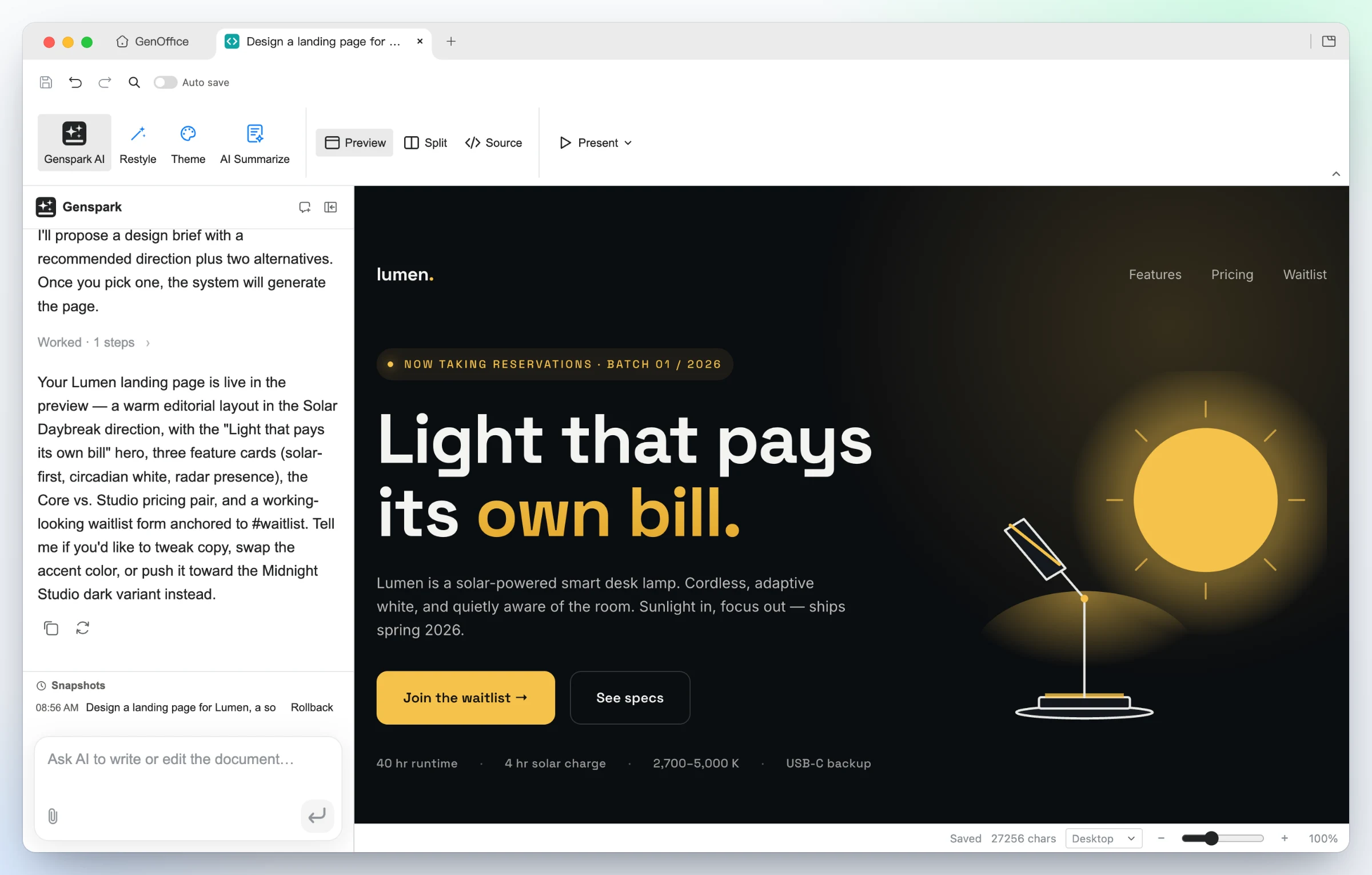
5 · HTML — an AI page and UI builder, design brief first
Say what the page is for and who it is for. The AI proposes a design brief
first — hook, palette, typography and style directions — then builds a single
self-contained .html file against those tokens.
Generated from one prompt — a bold hero, feature cards, pricing and a waitlist form for Lumen, built in the Midnight Studio direction. Click any element to restyle it, double-click to edit text, or switch to the CodeMirror source view.
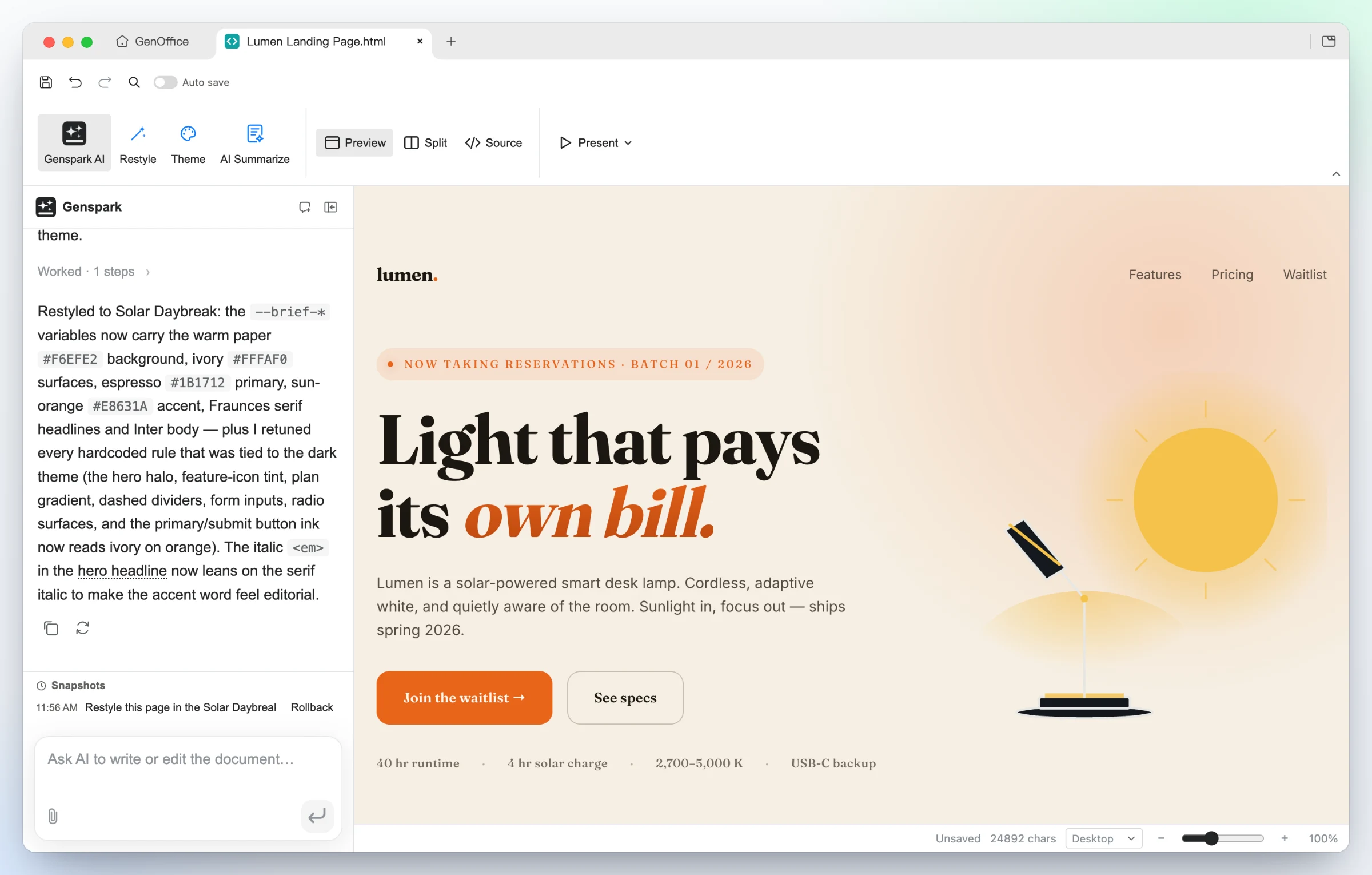
Same design, new direction — one Restyle request swaps the brief's tokens and the page follows: warm paper, editorial serif, sun-orange accent, nothing rewritten. Present fullscreen, or export as PDF or a native editable Word document.
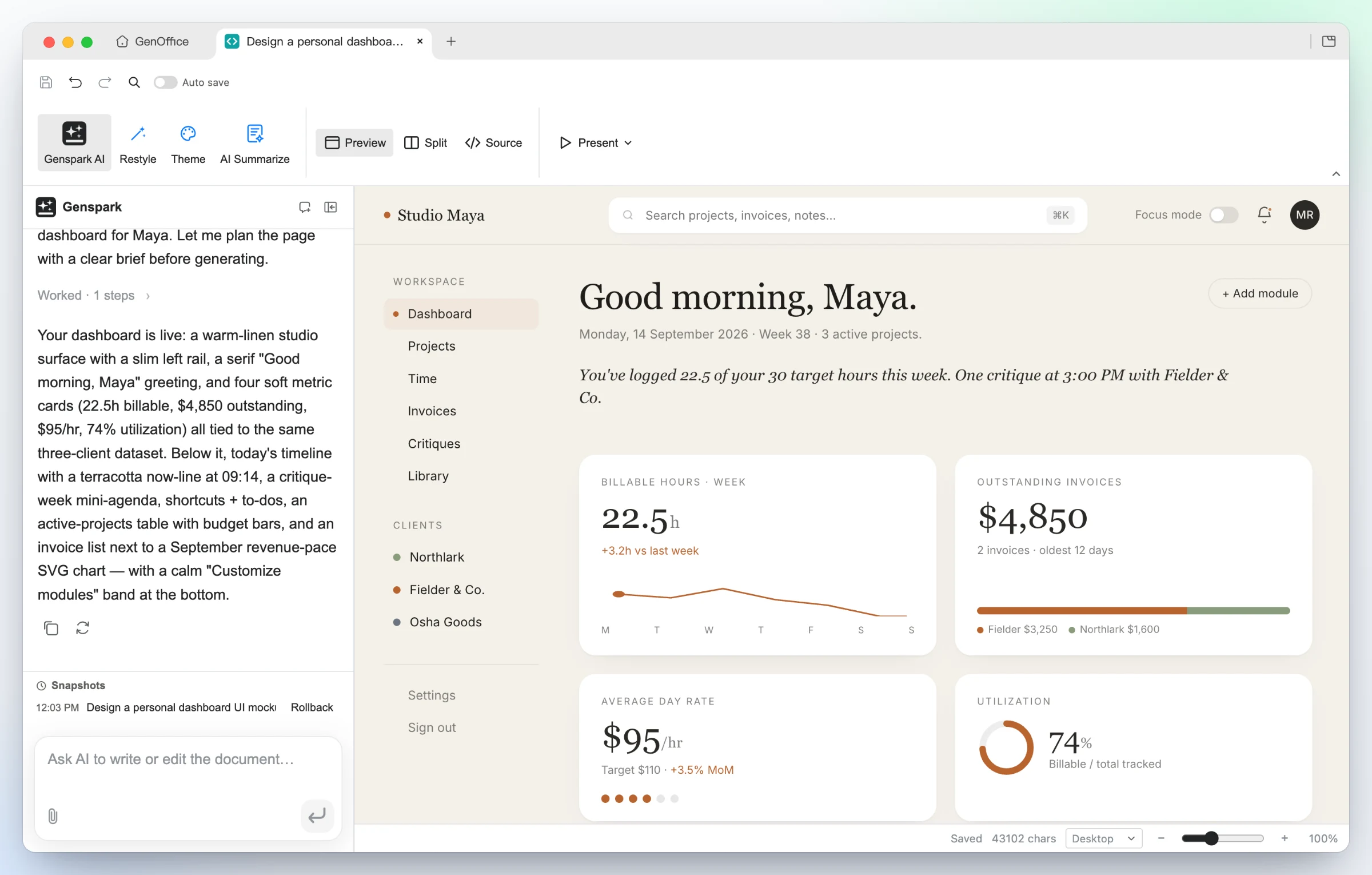
UI mockups — the "personal dashboard" starter turns a persona into a working layout: left rail, greeting, billable-hours sparkline, invoice and utilization cards, all real HTML you can hand to a developer.
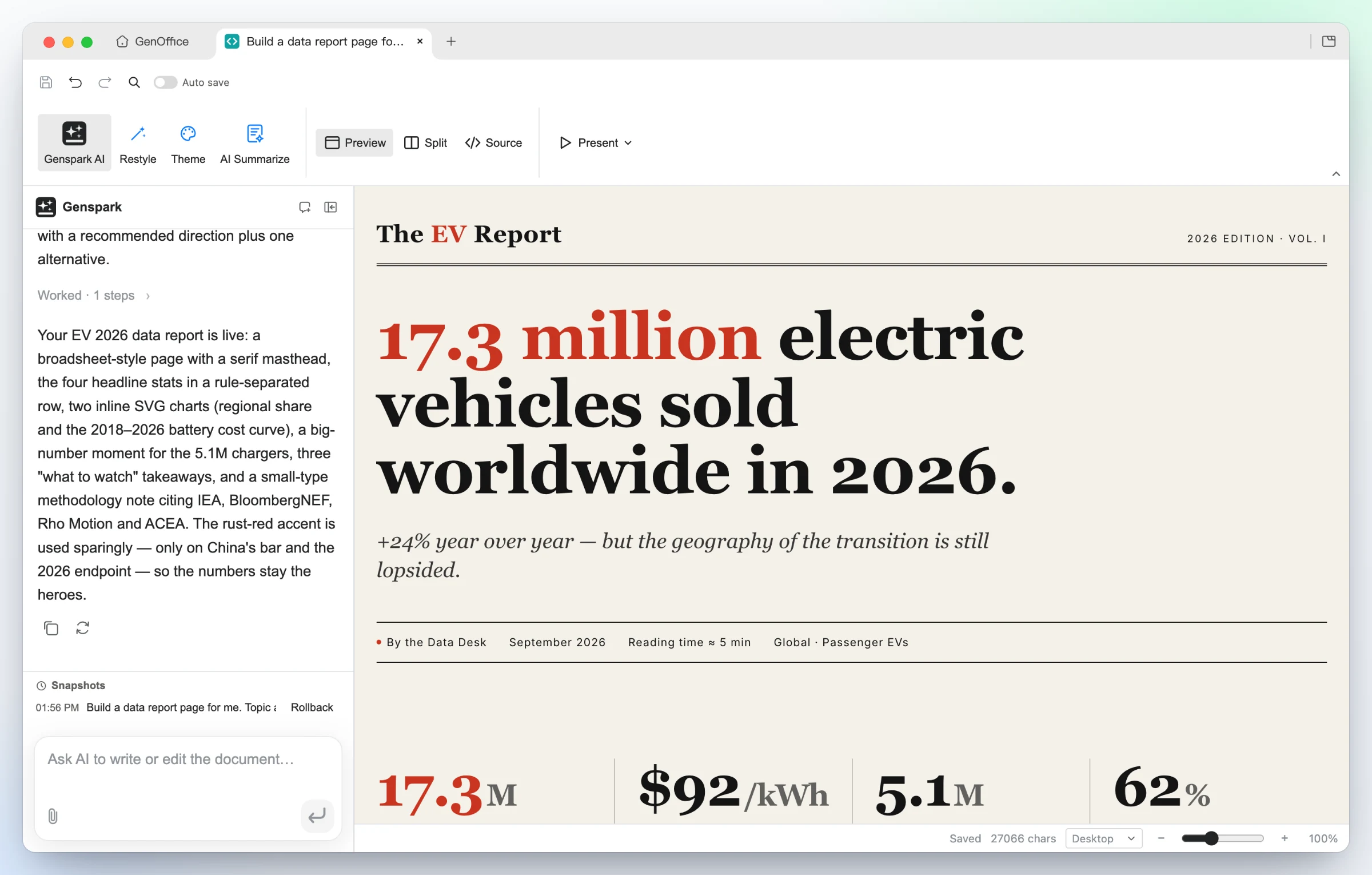
Data stories — the "data report" starter builds an editorial broadsheet: serif masthead, one headline number, a rule-separated stat row, inline SVG charts and a methodology note.
6 · Markdown — a block editor over plain .md, with Ask AI
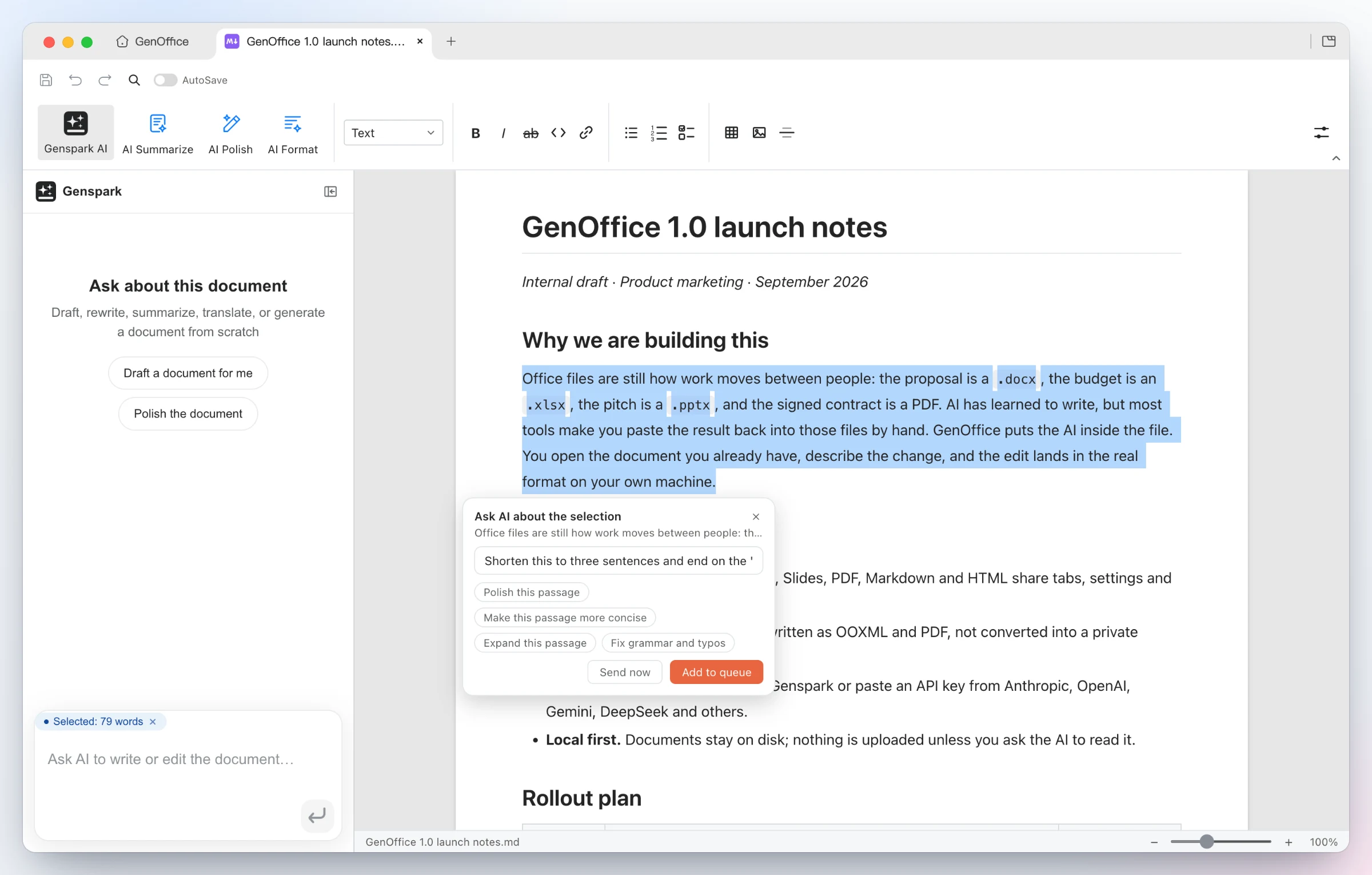
Ask AI about a selection — select any passage and an Ask AI chip appears: type an instruction or pick a suggestion, send it now, or queue several anchored edits and run them in one pass. The same entry exists in every app.
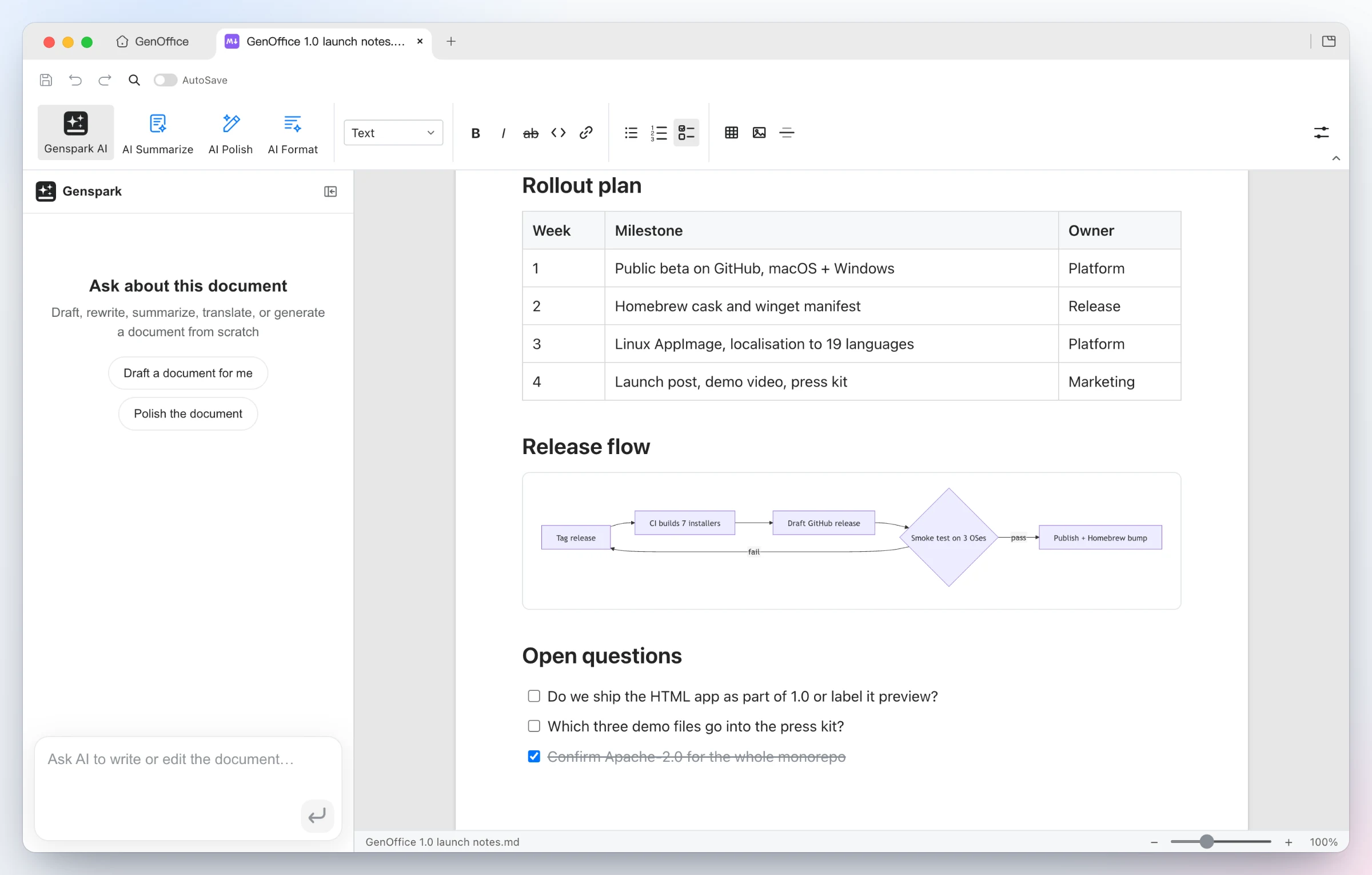
Rendered, saved as plain Markdown — headings, lists, tables, images, code blocks and Mermaid diagrams in a Tiptap block editor, written back as plain .md, with a fully local Markdown → Word export.
Why GenOffice
Open source, Apache-2.0, built in the open on GitHub.
Yours to run. Native apps for macOS, Windows and Linux; files stay on your
disk and every edit, save and conversion happens on your machine.
Real Office files. Native .docx, .xlsx and .pptx, byte-preserving:
the parts of a file you did not touch are copied exactly as they were.
An AI that edits the document itself. Tracked changes in Docs, live
formulas and charts in Sheets, slides drawn onto the canvas, every AI turn a
snapshot you can roll back.
Your model, your key. Sign in with Genspark, or bring a key for Claude,
OpenAI, Gemini, DeepSeek and more, local servers and any OpenAI-compatible
endpoint included.
PDF done properly. Edit text inside the page, and convert PDF to Word,
Excel or PowerPoint on-device, with system OCR for scans.
Markdown and HTML too, with the same AI panel and local export to Word.
Free, for individuals and teams alike.
AI backends
Sign in with Genspark and there is nothing to configure: model calls route
through the Genspark proxy (Claude, GPT and Gemini families) and the agents get
web and image search, image generation, and image/audio/video analysis.
Or bring your own key. Settings → AI lists Claude, OpenAI, Gemini,
DeepSeek, Kimi, GLM, Qwen, Doubao, MiniMax, Grok, Mistral, OpenRouter and
OpenCode Zen/Go, plus a custom slot for any OpenAI-compatible endpoint (base
URL + key), including local model servers. Search and media have their own
per-capability providers under AI Media & Search: Serper or Tavily for web
search, and OpenAI, Gemini, Doubao/Seedream, GLM, Grok, Qwen, MiniMax or any
OpenAI-compatible images endpoint for image generation and image/video
analysis.
The whole suite ships light, dark and system themes. Themes only change what
is on screen: exports, prints and saved files always keep the document's own
colors.
The AppImage runs in place: install the FUSE 2 runtime
(sudo apt install libfuse2; on Ubuntu 24.04 the package is libfuse2t64),
make the file executable, then run it:
Seven Electron apps — Docs, Sheets, Slides, PDF, Markdown, HTML and the
tabbed shell — share one engine layer of pure TypeScript packages plus a Rust
sidecar for .xlsx. The original file is always the source of truth: edits
are applied as narrow patches, and everything the editor did not touch
survives the round trip untouched.
open docx ─► archive original by hash (never touched)
          ─► parse word/document.xml into a block tree, each block anchored to its original XML
          ─► Tiptap editor (manual + AI editing, dirty tracking)
save      ─► dirty blocks → OOXML fragments (referencing existing styles only)
          ─► splice into the original document.xml; untouched blocks keep their bytes
          ─► repack the zip; every other entry is copied byte-for-byte
The package-by-package tour (docx/pptx engines, pdf2docx, html2docx, the
agent core and providers) lives in CONTRIBUTING.md.
Development
npm install
npm run fixtures     # generate test .docx fixtures
npm test             # engine + app unit tests (docs/sheets/slides need no display)
npm run typecheck    # tsc --noEmit across every workspace
npm run dev          # all six editors + shell against Vite dev servers
npm run dev:docs     # a single app (same pattern works per workspace)
npm run dist:mac     # package macOS dmg (regenerates third-party notices)
npm run dist:win     # package Windows nsis installer
npm run dist:linux   # package Linux AppImage + deb + rpm
The sheets app additionally needs a Rust toolchain for its xlsx sidecar
(cargo on PATH); npm run build -w @genoffice/sheets compiles it
automatically. See CONTRIBUTING.md for the checks every
change must pass and how pull requests land.
Community
GenOffice is in active development and your feedback shapes it.
Join the GenOffice group chat on
GenTeam to talk to the team and other users.
Star the repo if GenOffice is useful to you — it is the best way to
support the project.
FAQ
Is GenOffice free?
Yes. GenOffice is free and open-source under the Apache-2.0 license — no
trial, no paid tier for the apps themselves.
Can GenOffice open Microsoft Word, Excel and PowerPoint files?
Yes. GenOffice opens and saves native .docx, .xlsx and .pptx files.
Saving is byte-preserving: parts of the file you didn't touch are written
back byte-for-byte, so documents keep working in Microsoft Office.
Does GenOffice work offline?
Document editing is fully local — files never leave your machine to be
opened, edited, saved
What is this?GenOffice is a free, open-source AI-powered office suite for editing real .docx, .xlsx, .pptx, PDF, Markdown and HTML files, with a built-in AI agent that reads and edits the document for you on macOS, Windows and Linux.
Is this a desktop app or something I use in the browser?It is a native desktop application built on Electron: seven apps (Docs, Sheets, Slides, PDF, Markdown, HTML, plus a tabbed shell) that share one TypeScript engine layer and a Rust sidecar for the .xlsx engine.
Do I need my own AI API key?No, it's optional: sign in with Genspark to skip keys entirely (calls route through their proxy), or bring your own key for Claude, OpenAI, Gemini, DeepSeek, Kimi, GLM, Qwen, Doubao, MiniMax, Grok, Mistral, OpenRouter, or any OpenAI-compatible endpoint, including local model servers.
Does the AI rewrite my whole document when it edits it?No — edits are byte-preserving: only what you change is rewritten, everything else (styles, comments, tracked changes, equations) survives byte-for-byte so the file keeps working in Word, Excel and PowerPoint.
Can I keep using it without internet access?Document editing, saving and format conversion are fully local and work without a connection; only the AI assistant features need network access to reach your chosen model provider.
Does my document data leave my machine?No — opening, editing, saving and converting files all run locally on your disk; the only thing that leaves the machine is the AI prompt itself, sent to whichever provider you've chosen.
Can I drive GenOffice from Claude Code, Codex or Cursor?Yes, it ships a `genoffice` CLI and an agent skill so coding agents like Claude Code, Codex and Cursor can create and edit real .docx/.xlsx/.pptx files locally.
Can it turn a PDF into an editable Word or Excel file?Yes, the PDF Converter produces an editable .docx, .xlsx or .pptx on-device, and scanned pages go through system OCR.
What makes the Sheets app more than a spreadsheet viewer?It runs on an in-house Rust .xlsx engine with live formulas like SUMIF, pivot tables, slicers, conditional formatting, charts and formula tracing — not pasted numbers.
Is GenOffice really free to use?Yes, it's free and open-source under Apache-2.0 with no trial and no paid tier for the apps themselves.






 GenOffice is a free, open-source AI-powered office suite for editing real .docx, .xlsx, .pptx, PDF, Markdown and HTML files, with a built-in AI agent that reads and edits the document for you on macOS, Windows and Linux.