# RecompLauncher (elripalda/RecompLauncher)
> A launcher for PC recomps, which are native PC versions of console games made by their developers from the original game. It finds, installs, updates and plays them from one place, and you supply your own copy of the game.
- GitHub: https://github.com/elripalda/RecompLauncher
- GitHub.Locker page: https://github.locker/elripalda/RecompLauncher
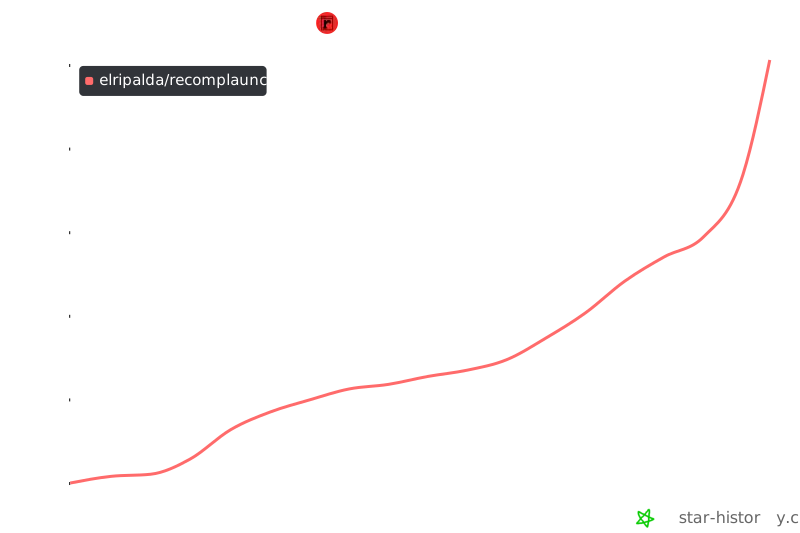
- Stars: 1.4K
- Language: Rust
- License: GPL-3.0
- Last push: 2026-11-17
## Questions and answers
Written by GitHub.Locker from the README and the repository; check the README below for details.
**Is a recomp the same as an emulator?**
No. A recomp is a native PC port built by the developers themselves from the original game, not a console emulator running the game's code.
**How do I get it running?**
On Windows 10 or 11 (64-bit), download the setup file from the Releases page and run it. During the beta Windows may show a 'Windows protected your PC' warning: click More info, then Run anyway.
**Do I need my own copy of the game?**
Yes. The launcher has no game files and never downloads any. Each recomp comes from its developer's GitHub, and you set it up with your own copy of the game, for example by pointing Easy Setup at your disc image or game folder.
**Are there catches with the macOS builds?**
Yes. They are test builds and not Apple-notarized, so macOS may block the first launch. They support native Mac games packaged as ZIP, DMG, RAR or 7z.
**Which platforms does it support?**
Windows 10 or 11 (64-bit) is the main target. macOS support starts with test builds for Apple Silicon, and Arch Linux has a native .pkg.tar.zst package.
**Can I back up or sync my game saves?**
Saves are backed up before every update, and cloud saves are available with a free account.
**What is Big Picture mode?**
A full-screen interface meant for a controller and a TV. The option to keep the launcher running in the background is also available inside it.
**What happens when I close the window?**
For new installs the launcher exits, because 'Run in background' is off by default. Turn it on under Settings > General to keep it in the system tray. Games already running keep playing.
**Can I add my own recomp to the launcher?**
Yes. Add a recomplauncher.json to your release to get one-click setup, in-launcher settings and Big Picture support. The guide is in docs/DEVELOPERS.md.
---
## README (checked against GitHub 2026-11-18)
Source: https://github.com/elripalda/RecompLauncher/blob/main/README.md

Download the beta ·
recomplauncher.com ·
Discord


---
RecompLauncher finds, installs, updates and plays PC recomps: native PC versions of console
games, made by their developers from the original game. You bring your own copy of the game and
the launcher sets it up.
## What's in it
- **Discover:** every recomp on recomplauncher.com, with screenshots, what it needs and how it
runs for other players.
- **Coming Soon:** the recomps on the way, with Notify Me for an email when each comes out, and
Request a Recomp to ask for a project on GitHub or GitLab.
- **Install and update in one click,** straight from the developer's own GitHub release. Every
download is checked against GitHub's checksum.
- **Easy Setup:** point it at your disc image or game folder and it does the rest, for the recomps
that support it.
- **Versions:** games with more than one recomp show once, and you can switch between versions or
keep a few side by side.
- **Saves:** backups before every update, and cloud saves with a free account.
- **Big Picture mode:** a full-screen view for a controller and a TV.
- **Looks:** CRT and other screen effects, per game.
- **Player reports:** see how a recomp runs for people before you install it, and add your own.
- **Verified developers:** follow the people making the recomps you like and hear when they put
out something new.
## A look around

 Discover |
 A game's page |
 Big Picture mode |
 Saves |
## Get it
Windows 10 or 11, 64-bit. Initial macOS support targets Apple Silicon: see the
[Mac build and test-artifact instructions](docs/BUILDING.md#macos-initial-apple-silicon-support).
Mac test builds support native Mac games packaged as ZIP, DMG, RAR or 7z and are not Apple-notarized releases. If macOS blocks the first launch because it cannot verify the developer, follow the [Mac first-launch steps](docs/TROUBLESHOOTING.md#macos-cannot-verify-the-developer).
Arch Linux x86_64 has a native `.pkg.tar.zst` build: see the
[Arch package instructions](packaging/arch/README.md) for building and installing it with pacman.
NixOS and Nix (x86_64): `nix run github:elripalda/RecompLauncher`, or see the
[Nix instructions](packaging/nix/README.md) to install it with your system.
Download the setup file from [Releases](https://github.com/elripalda/RecompLauncher/releases/latest)
and run it. While the beta is new, Windows may say "Windows protected your PC". Click
**More info**, then **Run anyway**. Each release lists its file's SHA-256 so you can check you
have the real one.
In **Settings > General > When you close the window**, **Run in background** controls whether
closing the window keeps RecompLauncher in the system tray. Turn it off to exit the launcher
and its background work when you close the window. **Quit RecompLauncher** always exits.
The setting is also available in Big Picture mode. It is off by default for new installations;
existing saved choices are kept. Games already running keep playing.
## No game files
RecompLauncher has no game files and never downloads any. Every recomp comes from its developer's
GitHub, and you set it up with your own copy of the game.
## Found a bug? Have an idea?
The quickest way is **Settings > Beta** in the launcher. It goes straight to the developer and can
include your PC's details. You can also post in the [Discord](https://discord.gg/FUzqGM2cvf) or
[open an issue](https://github.com/elripalda/RecompLauncher/issues/new/choose) here.
If a game crashes, send the log from the crash screen. Every one helps.
## Making a recomp?
Add a `recomplauncher.json` to your release and players get one-click setup, your settings inside
the launcher, and Big Picture mode support. The guide is in [docs/DEVELOPERS.md](docs/DEVELOPERS.md),
with examples in [docs/examples](docs/examples).
## Source code
The full source of the launcher is here: the Rust core in `src-tauri/` and the window in `ui/`. You
can read exactly what it does, or build it yourself with the steps in
[docs/BUILDING.md](docs/BUILDING.md). It's licensed under the GPL v3 ([LICENSE](LICENSE)).
## Stars over time
 ## About
Made by [Ripalda](https://github.com/elripalda). If you'd like to support it: [Ko-fi](https://ko-fi.com/recomp).
RecompLauncher is free to download and use. It isn't affiliated with or endorsed by any game's
makers or platform holders.