hyalite
Real refraction “liquid glass” for the web. One file, no WebGL, no build step.
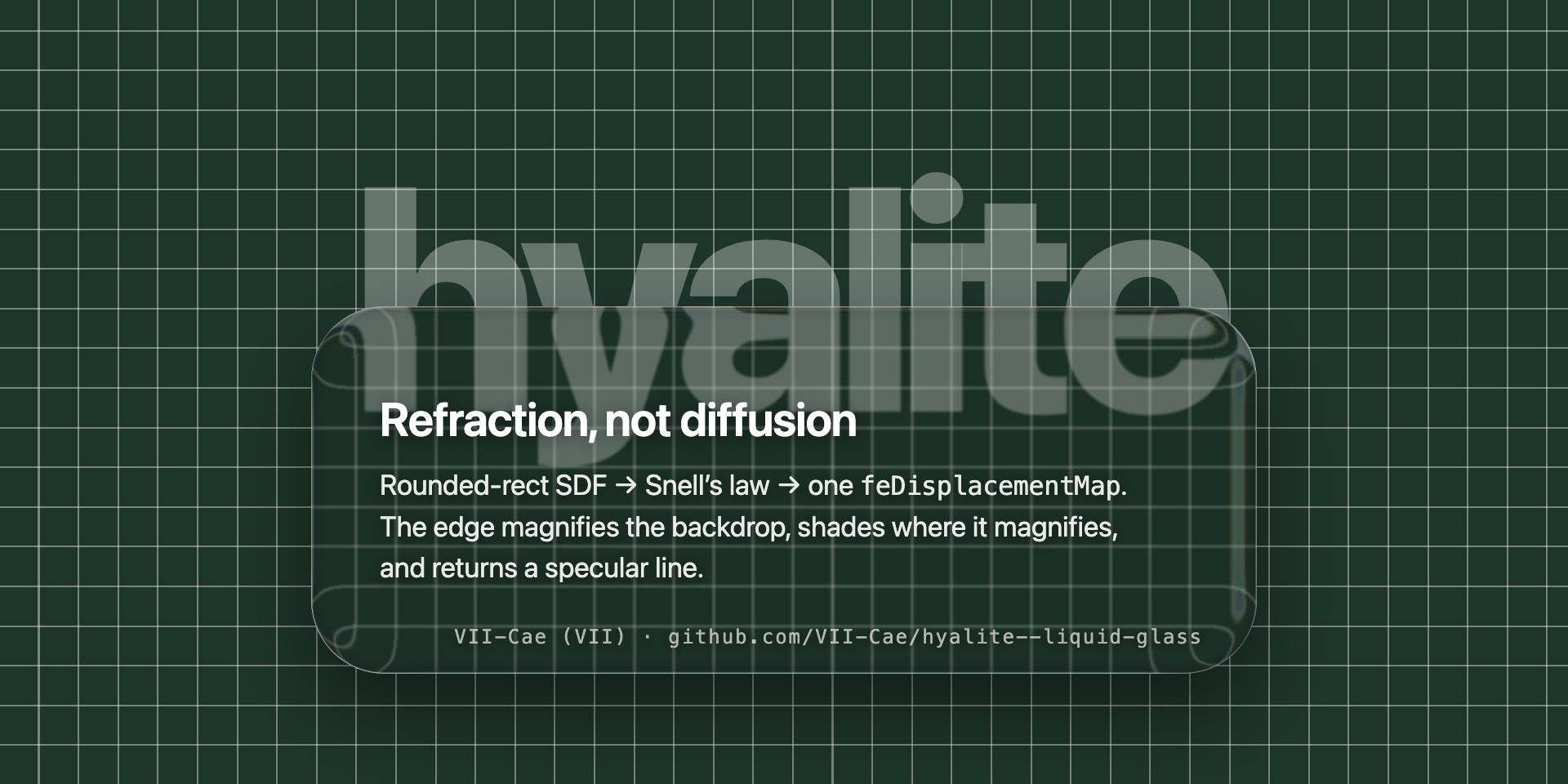
Hyalite treats an element as a slab of glass with a bevelled edge. For the element’s exact size and corner radii it computes a lens map, feeds it to an SVG filter, and lets the browser bend whatever is behind the element through backdrop-filter: url(#…). The centre stays clear; the edge pulls the world inward the way a thick piece of glass does, darkens where it magnifies, and catches a line of light along the rim. Straight lines curve, not smear.
Named after hyalite, the water-clear glassy opal. It also sounds like highlight, which is what the edge is about.
Three pages, live on GitHub Pages — open them in a Chromium browser, everything else falls back to a plain blur:
demo/index.html — all four engines at once, each on the defaults it shipped with: 0.1.0 bends, 0.2.0 does it cheaply, 0.3.1 loses the staircase, 0.4.0 shades the edge and stops being shy about it. That is the material each version actually came with, which is the honest comparison — the first three are a 16px bevel over 10px of glass with a 3px frost; the current one is 37 over 59 and clear in the middle. The sliders drive the 0.4.0 card only. (demo/legacy/ holds verbatim copies of the older engines — each on its own global, custom property and filter-id prefix so four can render on one page. Frozen for the comparison, not supported builds.)demo/edge-lab.html — the three bevel profiles side by side on one set of parameters, with an oscilloscope for the edge: displacement, the brightness the caustic implies, and the signed profile that comes out of them.demo/cases.html — self-checking page: asymmetric, elliptical and overlap-rule radii, twins sharing a filter, size buckets, quarter-symmetry read back out of the map, a seam-free direction field on a circle, a dispersion that does not scale with the lens, the shade read out of the map's blue channel, the folding default staying one pass, a streaming bubble, clamps read back rather than assumed.demo/run-cases.mjs — not a page to open: a command-line script that runs cases.html in a real headless Chromium and prints red/green with an exit code. npm test, or node demo/run-cases.mjs (Node 22+, no dependencies). Real time on purpose — --virtual-time-budget fast-forwards timers without promising frames, and two cases wait on a requestAnimationFrame ramp and a ResizeObserver, so under virtual time they report false failures.
Use
<script src="hyalite.js"></script>
.glass {
  /* Hyalite writes --hyalite on each attached element; every other browser keeps the fallback */
  backdrop-filter: var(--hyalite, blur(6px));
  -webkit-backdrop-filter: var(--hyalite, blur(6px));
  /* and --hyalite-edge: the sharp rim, as inset shadows. This one works everywhere */
  box-shadow: var(--hyalite-edge, none);
  /* colour the glass *above* the refraction, never inside it */
  background: rgba(0, 0, 0, .13);
  border-radius: 24px;
}
// every .glass inside #app, now and later; resized ones are rebuilt; several watchers can coexist
const chat = Hyalite.watch(document.getElementById('app'), '.glass');   // the defaults
chat.stop();

// or one element at a time, tuned
Hyalite.attach(card, { bevel: 24, thickness: 40, slope: 0.9, materialize: 220 });
Hyalite.refresh(card);   // after a border-radius change that did not change the size
Hyalite.detach(card);
API
| call |
what it does |
Hyalite.watch(container, selector, opts) → { stop } |
attach every match now, when it is added, or when it gains the class; detach on removal. Several watchers can coexist |
Hyalite.unwatch() |
stop every watcher (manual attaches survive) |
Hyalite.attach(el, opts) / Hyalite.detach(el) |
manual control of one element |
Hyalite.refresh(el) |
force a rebuild for the current geometry |
Hyalite.setOpts(opts) |
retune every attached element, a few per frame; returns a Promise. A newer call supersedes an older one |
Hyalite.info() |
{ maxDisplacement, bevel, mapSize, radii, map } of the last map build |
Hyalite.supported() |
true only where SVG backdrop filters actually render (Chromium) |
Hyalite.force(true | false | null) |
override that verdict; null goes back to sniffing. Returns the new verdict |
Hyalite.DEFAULTS |
the option defaults |
Options
All numeric options are clamped to sane ranges.
| option |
default |
meaning |
bevel |
41 |
width of the bent zone along the edge, px. Clamped to half the short side — no longer to the corner radius, so a circle can bend all the way to its centre |
thickness |
96 |
glass thickness, px. Drives how far the edge pulls the backdrop inward |
slope |
2.7 |
cap on how fast the displacement decays, px/px. At 1 the sampling point stands still; above it the field folds — the same backdrop shows up twice, which is where the liquid swirls come from. Folding also rules out the two-pass anti-staircase (see smooth) |
shape |
squircle |
the bevel's cross-section: circle, squircle or lip. squircle meets the slab more gently than a quarter circle; lip is raised at the rim and dipped behind it, which reverses the tilt in the middle and adds a second pair of light/dark bands |
blur |
1 |
frost in the centre, px |
dispersion |
1.6 |
chromatic aberration in pixels of channel separation — a material constant of the glass, unrelated to how strong the lens is. 0 is a single pass and noticeably cheaper |
shade |
0.62 |
how much the edge darkens, 0–2. Two things at once in the ratio they were tuned: the caustic (the edge magnifies the backdrop, so its energy is spread thin) and the Fresnel transmission loss |
rim |
1.76 |
how much light the edge sends back, 0–4: a wide Fresnel sheen plus a tight specular line. This is inside the filter — for the pixel-sharp outer line see edge |
edgeW |
6.5 |
px — how far in the shading and the sheen reach. Absolute on purpose (see rule 3) |
edge |
0.32 |
strength of the CSS rim written to --hyalite-edge, 0–2. Inset shadows on the element itself, so they stay crisp where a filter-drawn line would not — and they show up in Safari and Firefox too. 0 writes none |
light |
−140 |
direction the light comes from, degrees. 0 is straight above, positive turns clockwise |
smooth |
1 |
px. Blur that hides Chromium's nearest-neighbour staircase along the rim (see No stairs). Applied between the two displacement passes and only inside the bevel ring. Ignored when the field folds (slope > 1), where no such split exists |
materialize |
0 |
ms. On attach, ramp displacement, shade and rim from zero. Apple's glass does not fade in; its lensing ramps up |
settle |
120 |
ms. While an element keeps resizing it shows a plain blur of the same radius; settle ms after the last change the map is rebuilt once and the refraction ramps back in. 0 = live mode |
self |
false |
the element filters itself (filter: var(--hyalite)) instead of its backdrop. Displacement only — see Gotchas |
onBuild(info) |
— |
called after every map build — a filter rebuilt from a cached map does not build one. info carries the geometry, both map URLs and the sampled edge profile |
The defaults are a set tuned by eye, not a neutral starting point: a narrow bevel over a very thick
slab with a folding slope. That keeps the centre clear while the edge concentrates the backdrop into
a coloured band, and confines the folding to a rim narrow enough that blur and dispersion cover
its staircase. For something calmer, drop slope below 1 — you lose the swirls and get the two-pass
anti-staircase back.
Caching, in two levels
A map depends only on geometry + bevel + thickness + light. A filter adds blur, dispersion, rim, smooth and self. A map build always produces both PNGs (outer and inner pass), so smooth can be toggled without a rebuild. So setOpts({ blur }) rebuilds a handful of DOM nodes and reuses every map that is already in memory.
Map sizes go into buckets (at most 2 % per side; elements up to 64px stay exact), so a column of chat bubbles a few pixels apart shares one map instead of one map each — which is the difference between one canvas and fifty. The radii are deliberately not rescaled to match the bucket: pre-scaling them would put the element’s own width back into the cache key and defeat the whole thing. feImage squeezes the bucketed map onto the real box instead, pulling the outline in by under half a pixel at ordinary radii. Maps whose last user went away stay warm for a while, then go oldest-first.
The materialize ramp runs on a private clone of the shared filter, so animating one element never touches another. Large elements get a downsampled map (the field is smooth; feImage stretches it back without visible loss). Sizes are read from the layout box, so transforms don’t break the map.
Corners
Per-corner circular radii are exact: each corner uses its own radius in the distance field. The bevel is no longer clamped to the corner radius, only to half the short side: Apple's glass is a lens across the whole element — a circular key bends all the way to its centre — and a bevel locked to the radius can never get there. Near a corner smaller than the bevel the depth field kinks on the medial axis, but the direction field is taken from a larger rectangle, so the kink is faint. Radii follow the CSS overlap rule: they are shrunk by one shared factor, and only when two radii sharing an edge do not fit on it — never clamped corner by corner. That distinction is visible: a 320×40 card with border-radius: 24px 24px 0 0 really gets 24px corners, and a per-corner clamp to half the short side would draw the refraction at 20 while the browser drew the glass at 24. A radius past half the short side is honoured near the edge, where the bevel lives; deeper in, the quadrant SDF is an approximation. Elliptical radii (40px / 16px) are approximated by their horizontal value; percentage radii resolve against the shorter side.
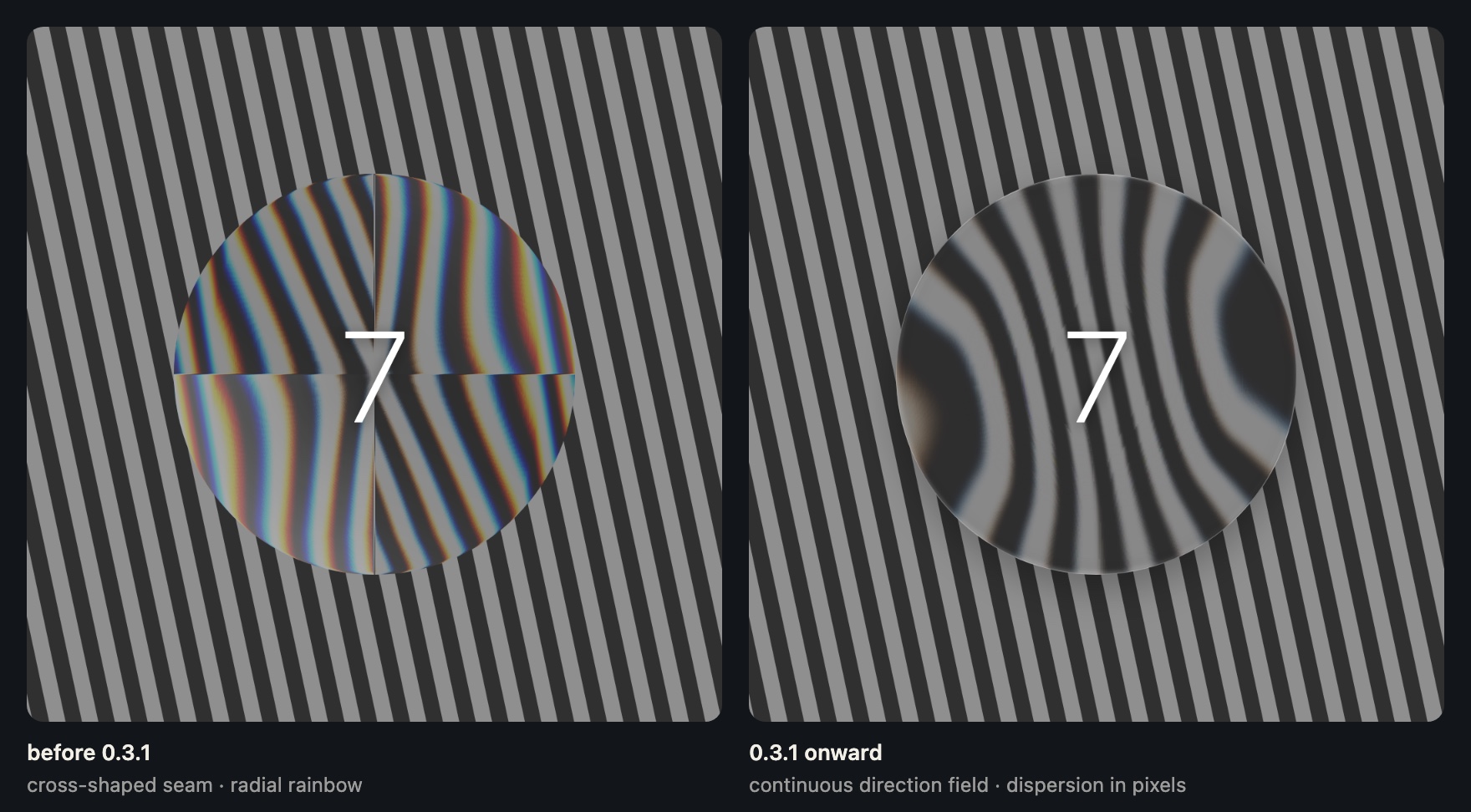
Rule 3 widens the radii to smooth the direction field, and that widened radius is capped at half the short side — past it the rounded-rect distance function stops holding (W/2 − R goes negative, both q terms are positive everywhere, and the field degenerates into a shifted circle), so the gradient flips sign across the axes. A circle sits exactly at the limit, so before 0.3.1 any bevel at all pushed it over and it came out with a cross-shaped seam. Circles and pills are fine now.
How it works
- Distance field. A signed distance function of the rounded rectangle (per-corner radii) gives, for every pixel, how deep inside the edge it sits.
- Snell’s law. The glass is a slab of
thickness with a quarter-circle bevel of width bevel. A view ray refracts toward the surface normal at the bevel (n = 1.5) and travels through the remaining glass to the backdrop. The lateral offset is the displacement; it is largest at the rim and decays to zero at the inner edge of the bevel.
- No folding. The decay slope is capped at 0.85 px/px. At 1 the sampling point stands still (infinite stretch); above 1 the image mirrors and you get doubled lines along the rim. This is a constraint on the mapping, not a taste parameter.
- No stairs. Chromium samples the bent picture nearest-neighbour — Skia’s displacement effect is pinned to
kNearest (skbug 40045448). A slope of 0.85 is a 6.7× stretch, so every source pixel at the rim becomes a 6.7px block and any hard edge behind the glass turns into a staircase. Nothing in the map can fix a sampler, so the field is split into two displacement passes of equal stretch (≈ 2.6× each) that compose exactly to the one-pass field (the inner table is the inverse of the outer one, not a halving). Between them a smooth-px blur, masked to the bevel ring, melts the inner pass’s staircase before the outer pass stretches it again. 6.7px stairs at full contrast become ≈ 2.6px at a fraction of it; the centre is untouched.
- Direction. Offsets point inward along the normal of a slightly larger rounded rect (radius + bevel), so the turn from “pull down” to “pull right” is spread along a longer arc. Taking the direction from the true radius makes every corner look like a ridge. The widened radius is capped at half the short side, where the rounded-rect distance function stops holding (see Corners).
- Encoding. Red = x offset, green = y offset, 128 = no move, blue = rim light (how much the bevel faces the light). The map is a PNG data URL.
- The filter.
feImage (the map) → feGaussianBlur (frost) → inner feDisplacementMap → ring-masked feGaussianBlur (smooth) → outer feDisplacementMap (one pass, or one per colour channel when dispersion > 0, summed with feComposite arithmetic) → the rim light composited over. filterUnits="userSpaceOnUse" with the element’s exact size, color-interpolation-filters="sRGB" so that 128 really means zero.
backdrop-filter: url(#id) does the rest, live, for whatever is behind the element.
Browser support
Tested September 2026.
| engine |
backdrop-filter: url(#svg) |
what you get |
| Chromium — Chrome, Edge, Arc, Brave, Electron |
renders |
refraction |
| WebKit — Safari |
accepts the property, drops the SVG part (bug 245510, an implementation is in review as of Sep 2026) |
your CSS fallback |
| Gecko — Firefox |
does not implement SVG filter graphs in backdrop-filter; since Firefox 106 the element renders unfiltered instead of disappearing (bug 1787623) |
your CSS fallback |
CSS.supports('backdrop-filter', 'url(#x)') is true on all three, which is why Hyalite.supported() also checks for a Chromium engine and writes nothing elsewhere. There is an open W3C issue about making backdrop displacement interoperable; when WebKit ships, the engine check is the one line to revisit — but you should not have to wait for us. That sniff is a snapshot of September 2026 and there is no way to read back what a backdrop filter actually painted, so it comes with an escape hatch: Hyalite.force(true), or <html data-hyalite="force">, turns the engine on without editing the file; force(false) / data-hyalite="off" turns it off; force(null) goes back to sniffing.
- Every element with a backdrop filter is its own render surface. A modest number of glass surfaces on screen is fine; hundreds are not.
dispersion: 0 drops two displacement passes and two composites per surface; smooth: 0 drops the inner pass and its ring blur (eight primitives) at the price of the rim staircase.
- Maps are built on the main thread (a per-pixel loop plus a PNG encode). With the default
settle, a continuously resizing element costs one build after it stops, not one per frame. Maps are capped at ≈ 320k pixels.
- Two things keep that loop off the critical path: with four equal corners only one quadrant is computed and the other three are mirrored (≈ 75 % less per-pixel work — the rim light is not mirror-symmetric, but recovering it from a mirrored normal costs one dot product), and near-identical sizes share one map, so a long chat list does not build one map per bubble.
- No numbers are claimed here on purpose; measure on your own targets.
Gotchas
- The hidden
<svg> that holds the filters must not be display:none (Blink ignores those filters). Hyalite uses a 0×0 box.
--hyalite is an inherited custom property. Consume it only on the attached element; a child that also reads it would apply a filter built for its parent.- The 3-pass dispersion sum is only valid for opaque sources. On a translucent layer alpha is summed three times and clamped, which darkens the colour — that is what
self: true avoids (displacement only).
- For a shape morph (a pill growing into a card): set
--hyalite: blur(<your blur>px) yourself while the shape moves, then attach with materialize once it lands. The map is built for a size; do not attach to an element that is still changing shape.
- The map is a
data: URL: a strict CSP needs img-src data:.
Credits and prior art
Apple’s Liquid Glass (WWDC25) for the idea that glass should bend light rather than scatter it. Rounded-rect SDF → refraction → displacement map → feDisplacementMap is a route several projects have taken; kube.io has the clearest physics write-up. Hyalite’s implementation-specific choices are the no-fold constraint, the larger-radius direction field, per-corner radii, maps built for the real element size, the settle/materialize behaviour, the private ramp clone, and a small watch/attach API that survives real pages.
Engineering by Claude Fable 5.1 (0.1.0, and 0.3.0: the two-pass split that hides Chromium’s nearest-neighbour staircase, smooth) and Claude Opus 5 (0.2.0: the two-level cache and size buckets, the CSS overlap rule for radii, quarter-symmetry, light, force, and a self-check page that reads values back instead of trusting that nothing threw; 0.3.1: the direction-field cap that unbroke circles; 0.4.0: the shaded edge — the signed profile in the map's blue channel and the multiply pass that applies it — the selectable bevel profiles, the optional fold, the CSS rim, and the split between what scales and what does not) — both Anthropic, both pair-programmed with VII-Cae, who set the direction, tested every build by eye and tuned every parameter.
MIT © 2026 VII-Cae

 Hyalite is a JavaScript library that gives HTML elements real refraction — a 'liquid glass' look computed from the element's exact size and corner radii, not a static blur.