Screenshots
|
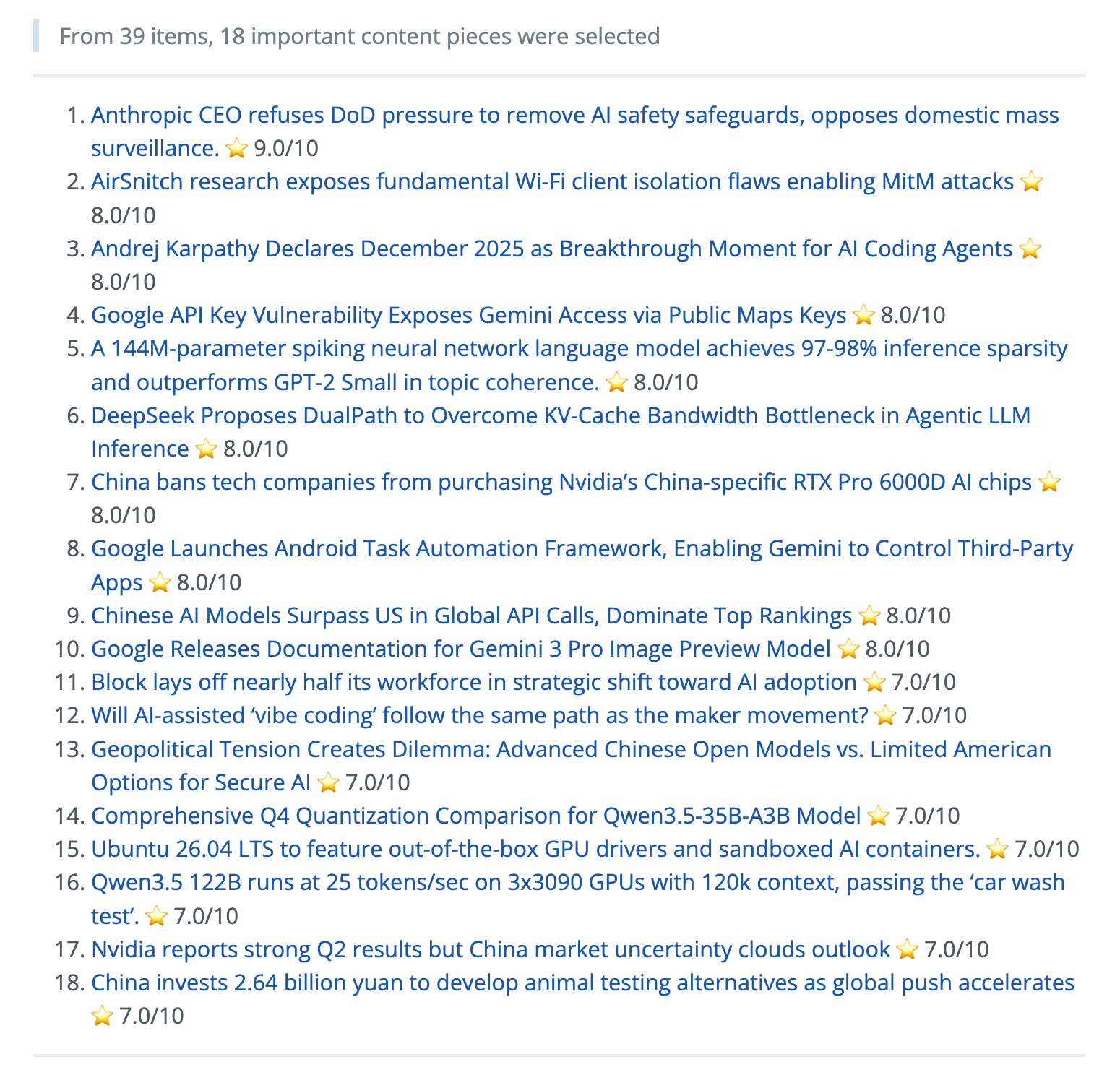
Ranked Daily Briefing
|
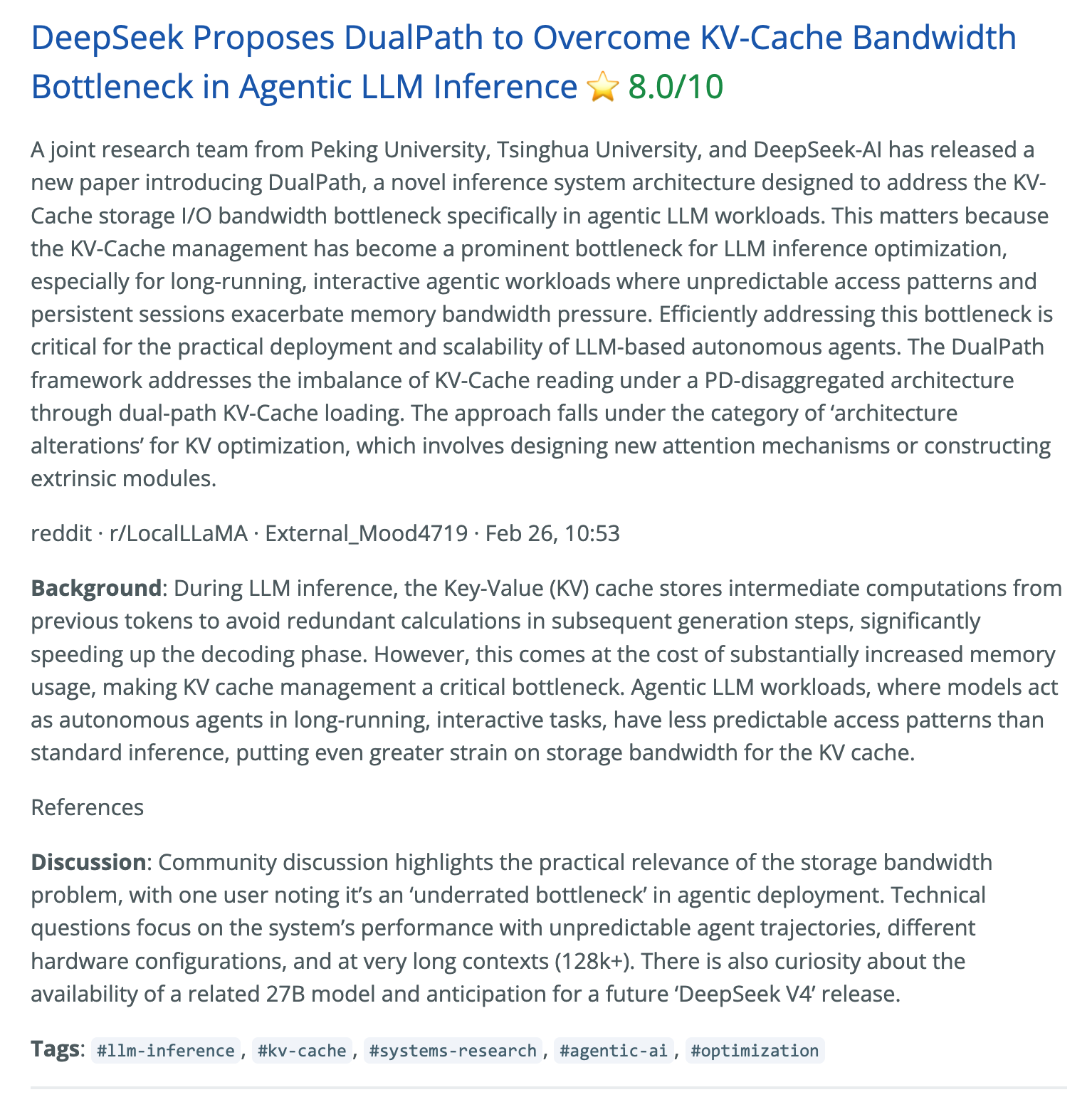
Context, Summary & Discussion
|
More Screenshots
|
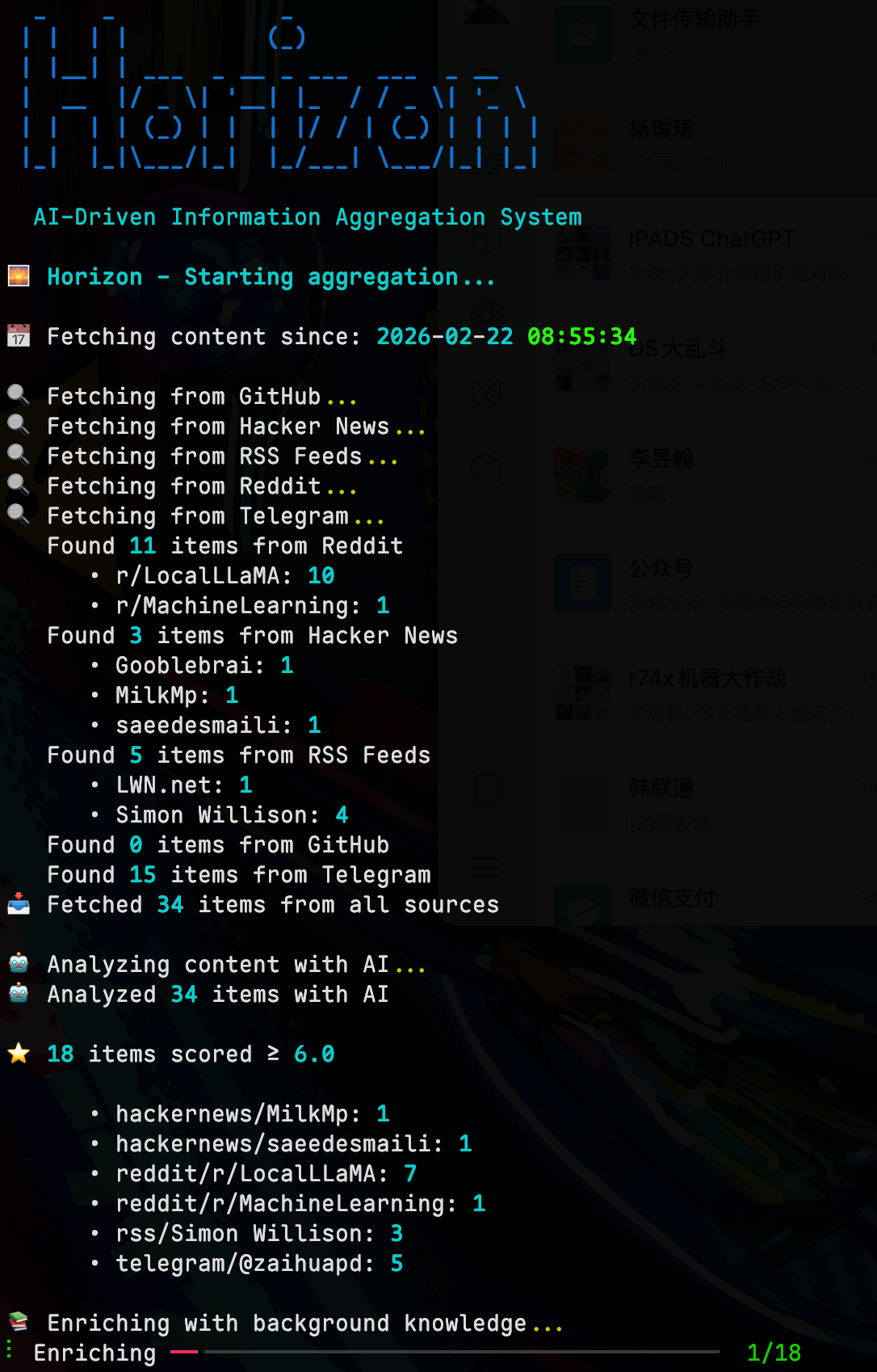
Terminal Output
|
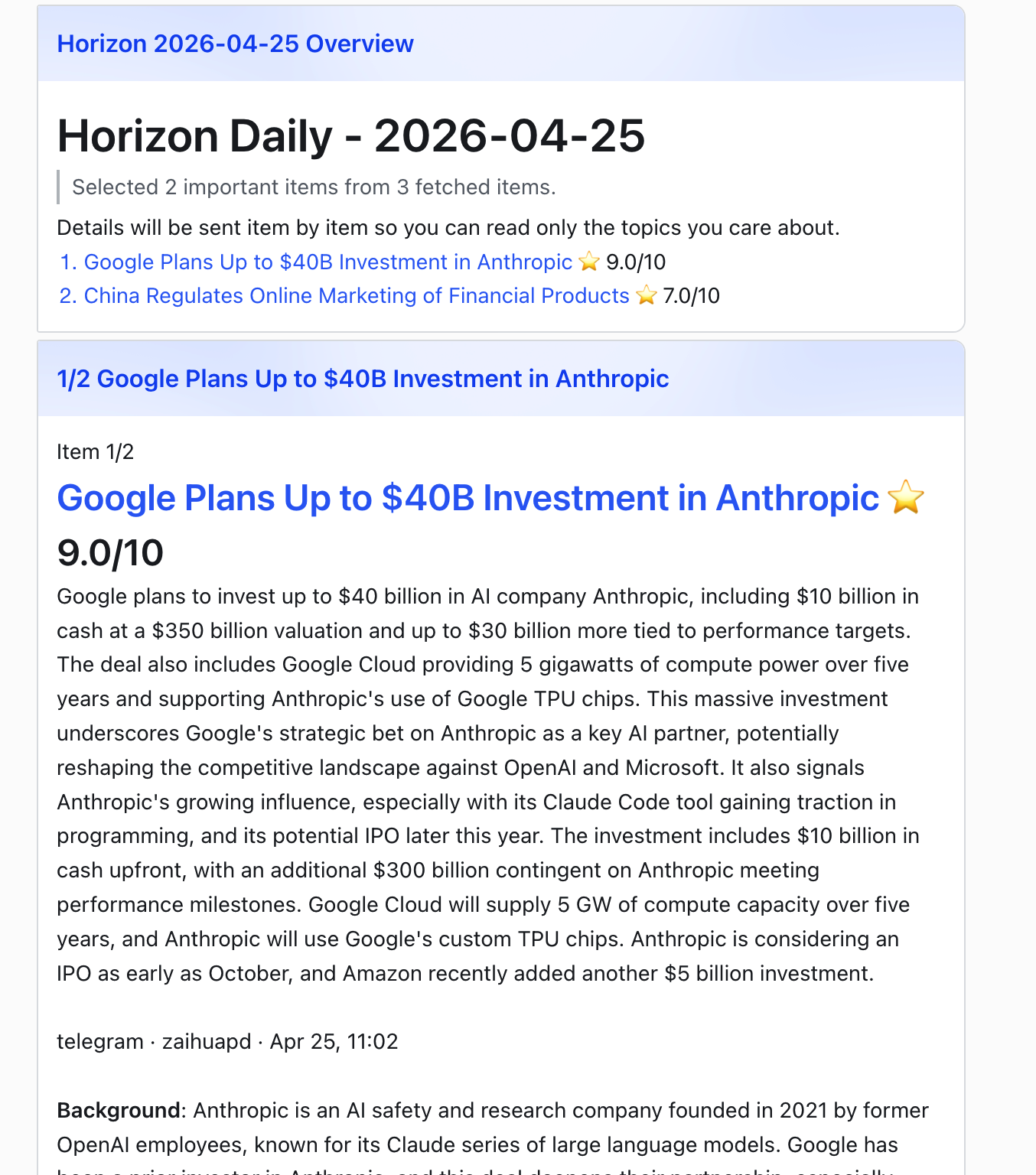
Feishu Notification
|
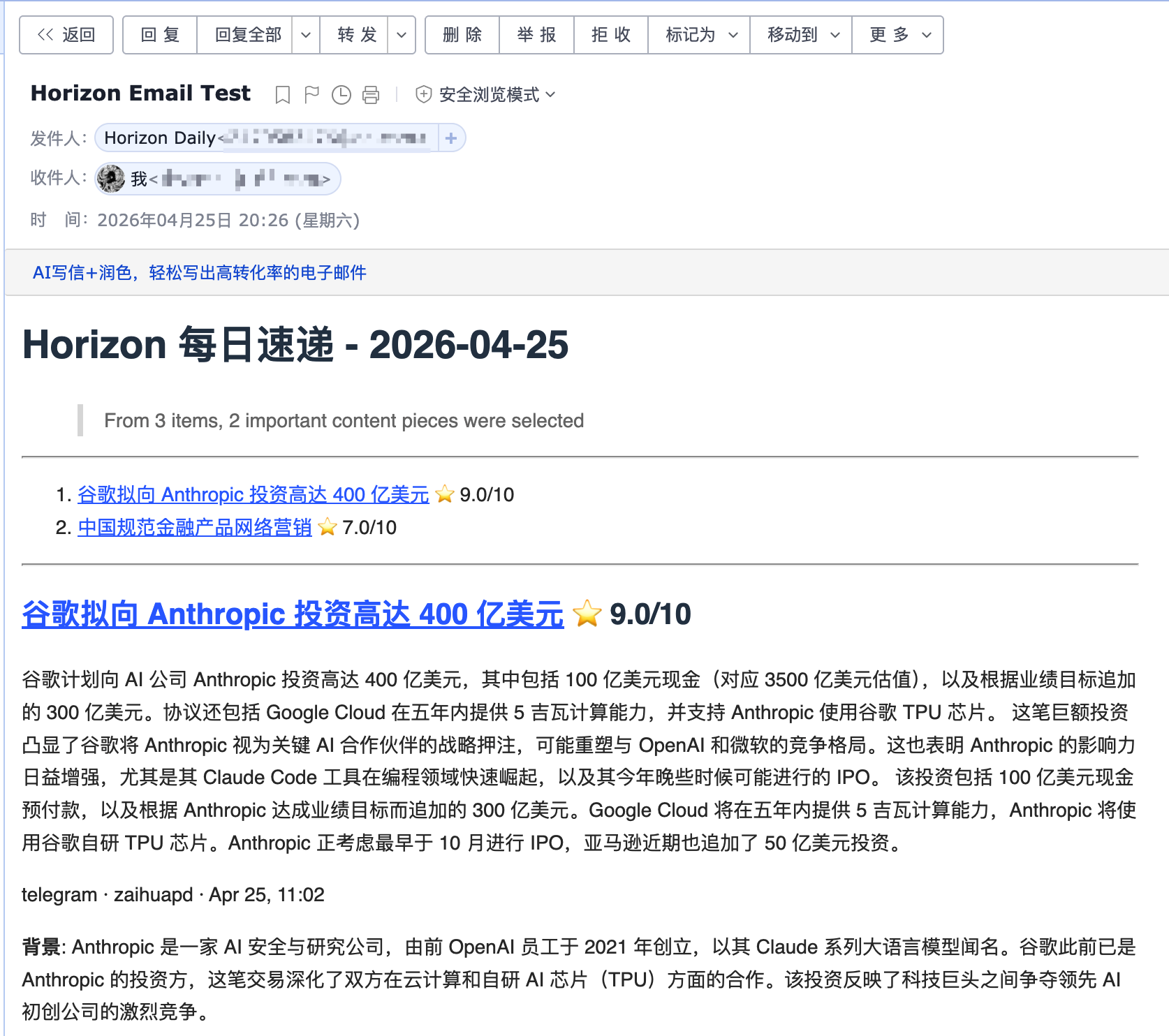
Email Delivery
|
Why Horizon?
Good news is scattered; bad news is endless. Horizon gives you a personal first pass over Hacker News, Reddit, Telegram, RSS, and GitHub: it fetches, deduplicates, scores, filters, and enriches stories with background context and community discussion.
But Horizon is not just another summarizer. AI is great at reducing noise, but news still needs human taste: the sources you trust, the comments that change how you read a story, and the hidden gems only people can share. Horizon keeps that human layer in the loop with customizable sources, processing profiles, models, languages, delivery channels, comment summaries, and a community source hub.
Features
- 📡 Watch Your Own Sources — Track Hacker News, RSS, Reddit, Telegram, Twitter/X, GitHub releases or user activity, and OpenBB financial news watchlists in one pipeline
- 🤖 Turn Noise Into a Reading List — Analyze each item with a stable processing profile and apply your own filter threshold
- 🔗 Merge Repeated Stories — Deduplicate the same story across platforms before it reaches your briefing
- 🔍 Understand the Background — Add web-researched context for unfamiliar concepts, companies, projects, and technical terms
- 💬 Read the Conversation — Collect and summarize community comments from Hacker News, Reddit, and other supported sources
- 🌐 Publish in Two Languages — Generate English and Chinese daily briefings from the same source set
- 📝 Ship a Daily Site — Publish generated Markdown as a GitHub Pages daily briefing site
- 📧 Deliver by Email — Run a self-hosted SMTP/IMAP newsletter with automatic subscribe and unsubscribe handling
- 🔔 Push to Chat or Automations — Send templated results to Feishu/Lark, DingTalk, Slack, Discord, or custom webhook endpoints
- 🧙 Start From Your Interests — Use the setup wizard to generate a personalized source configuration
- ⚙️ Tune the Radar — Customize sources, processing profiles, models, languages, and delivery channels
How It Works
%%{init: {
  "theme": "base",
  "themeVariables": {
    "fontFamily": "ui-sans-serif, system-ui, -apple-system, BlinkMacSystemFont, Segoe UI, sans-serif",
    "fontSize": "18px",
    "primaryTextColor": "#2d2a3e",
    "primaryBorderColor": "#e0dbd3",
    "lineColor": "#7c7891",
    "tertiaryColor": "#faf8f5",
    "clusterBkg": "#f3f0eb",
    "clusterBorder": "#e0dbd3"
  }
}}%%
flowchart LR
    classDef config fill:#fbbf24,stroke:#d4a017,color:#2d2a3e,stroke-width:1.5px;
    classDef source fill:#ede7fb,stroke:#6d4aaa,color:#2d2a3e,stroke-width:1.5px;
    classDef process fill:#ffe8db,stroke:#e0652e,color:#2d2a3e,stroke-width:1.5px;
    classDef output fill:#f9d7e5,stroke:#be185d,color:#2d2a3e,stroke-width:1.5px;

    config["⚙️ Config<br/>sources, profiles, models, outputs"]

    subgraph sources["Configured Sources"]
        rss["📡 RSS"]
        hn["📰 Hacker News"]
        reddit["💬 Reddit"]
        telegram["✈️ Telegram"]
        twitter["🐦 Twitter / X"]
        github["🐙 GitHub"]
        openbb["💹 OpenBB"]
    end

    fetch["📥 Fetch"]
    dedup["🧹 Deduplicate"]
    score["🤖 AI Score & Filter"]
    enrich["🔎 Enrich"]
    summary["📝 Summarize"]

    subgraph outputs["Outputs"]
        direction TB
        site["🌐 Pages"]
        email["📧 Email"]
        webhook["🔔 Webhooks"]
        mcp["🧩 MCP"]
    end

    config --> fetch
    rss --> fetch
    hn --> fetch
    reddit --> fetch
    telegram --> fetch
    twitter --> fetch
    github --> fetch
    openbb --> fetch

    fetch --> dedup --> score --> enrich --> summary
    config --> score
    config --> summary
    config --> outputs

    summary --> site
    summary --> email
    summary --> webhook
    summary --> mcp

    class config config
    class rss,hn,reddit,telegram,twitter,github,openbb source
    class fetch,dedup,score,enrich,summary process
    class site,email,webhook,mcp output
- Define — Configure sources, processing profiles, models, languages, and delivery.
- Fetch — Pull latest content from all configured sources concurrently.
- Deduplicate — Merge items pointing to the same story or URL across platforms.
- Analyze & Filter — Select a profile, analyze each item with its prompt, and apply the configured user threshold.
- Enrich — Generate the profile's configured content blocks, using only tools allowed for each block.
- Summarize — Render localized titles, leads, sections, and cited sources as a Markdown briefing.
- Deliver — Publish the result to GitHub Pages, email, webhooks such as Feishu, MCP, or local files.
Quick Start
1. Install
Option A: Local Installation
git clone https://github.com/Thysrael/Horizon.git
cd Horizon

# Install with uv (recommended)
uv sync

# Install test/development extras when needed
uv sync --extra dev

# Or with pip
pip install -e .
dev is currently defined as an optional extra in pyproject.toml, so use uv sync --extra dev for pytest and other development dependencies.
If you want the optional OpenBB financial-news source, install its extra too:
uv sync --extra openbb
If openbb pulls packages without wheels on your machine, install the SDK manually with binaries only:
uv pip install --only-binary=:all: openbb openbb-benzinga
Option B: Docker
git clone https://github.com/Thysrael/Horizon.git
cd Horizon

# Optional: build with comma-separated extras before the first run
docker compose build --build-arg EXTRAS=trafilatura horizon
Multiple extras may be supplied as EXTRAS=trafilatura,openbb. The twitter extra also requires a Playwright browser and system packages, which the current Dockerfile does not install.
Option A: Interactive wizard (recommended)
uv run horizon-wizard
The wizard asks about your interests (e.g. "LLM inference", "嵌入式", "web security") and auto-generates data/config.json. See Interactive Wizard for CLI options.
Option B: Manual configuration
cp .env.example .env          # Add your API keys
cp data/config.example.json data/config.json  # Customize your sources
Minimal manual configuration:
{
  "ai": {
    "provider": "openai",
    "model": "gpt-4",
    "api_key_env": "OPENAI_API_KEY"
  },
  "sources": {
    "rss": [
      {
        "name": "Simon Willison",
        "url": "https://simonwillison.net/atom/everything/",
        "profile": "tech-news"
      }
    ]
  },
  "processing": {
    "profiles_dir": "profiles",
    "default_profile": "tech-news",
    "profile_settings": {
      "tech-news": {
        "threshold": 7.0,
        "topic_dedup": true
      }
    }
  }
}
An explicit source profile uses that profile directly. Omit it or set it to
"auto" to let AI match the item against all available profiles. Set it to an
array such as ["tech-news", "finance-news"] to restrict AI matching to those
profiles. See
Processing Profiles for profile structure and behavior.
Per-profile user preferences such as score thresholds and topic deduplication
belong in processing.profile_settings, not in the profile files.
Balanced digest (optional)
Limit the final digest size and prevent one category from dominating the
results. Categories come from source configuration such as
sources.rss[].category.
{
  "digest": {
    "max_items": 20,
    "category_groups": {
      "ai": {
        "limit": 5,
        "categories": ["ai-news", "ai-tools", "machine-learning"]
      },
      "finance": {
        "limit": 5,
        "categories": ["finance", "business", "equities"]
      }
    },
    "default_group": "other",
    "default_group_limit": 3
  }
}
Group limits are applied after profile filtering and before enrichment. If
category_groups and max_items are omitted, no balanced digest limits apply.
api_key_env must be the name of an environment variable, not the API key
itself. Put the real secret in .env:
OPENAI_API_KEY=sk-your-key
For Gemini, use GOOGLE_API_KEY:
{
  "ai": {
    "provider": "gemini",
    "model": "gemini-2.0-flash",
    "api_key_env": "GOOGLE_API_KEY"
  }
}
Any string value in data/config.json can reference environment variables with ${VAR_NAME}. This is useful for values such as ai.base_url, private RSS feed URLs, webhook endpoints, or custom header templates.
For the full reference, see the Configuration Guide.
3. Run
A. Local installation
uv run horizon [OPTIONS]
B. Docker
docker compose run --rm horizon [OPTIONS]
| Option |
Default |
Description |
--hours N |
24 |
Fetch from last N hours |
-d, --data-dir PATH |
data |
Path to the data directory |
-c, --config PATH |
<data-dir>/config.json |
Path to config file |
-l, --log-level LEVEL |
WARNING |
Logging level (DEBUG/INFO/WARNING/ERROR/CRITICAL) |
--data-dir changes the state directory, including summaries, subscribers, and the default config location; --config changes only the config file. The generated report is saved to data/summaries/ (or <data-dir>/summaries/ if --data-dir is set). See Configuration Paths for combining both flags and initializing a custom config location.
4. Automate (Optional)
Horizon works great as a GitHub Actions cron job. See .github/workflows/daily-summary.yml for a ready-to-use workflow that generates and deploys your daily briefing to GitHub Pages automatically.
Supported Sources
| Source |
What it fetches |
Comments |
| Hacker News |
Top stories by score |
Yes (top N comments) |
| RSS / Atom |
Any RSS or Atom feed |
— |
| Reddit |
Subreddits + user posts |
Yes (top N comments) |
| Telegram |
Public channel messages |
— |
| Twitter / X |
Tweets from specific users |
Yes (top N replies) |
| GitHub |
User events & repo releases |
— |
| OpenBB |
Financial company news by watchlist/provider |
— |
Where Your Briefing Goes
Horizon can publish or deliver the generated briefing in several ways:
| Channel |
What it does |
| GitHub Pages Daily Site |
Copies generated Markdown into docs/ so GitHub Pages can publish a daily-updated briefing site |
| Email Subscription |
Sends the daily briefing to subscribers and handles subscribe/unsubscribe requests through SMTP/IMAP |
| Webhook Notification |
Pushes success or failure results to Feishu/Lark, DingTalk, Slack, Discord, or a |










 Horizon is a self-hosted AI news radar: it watches your sources daily and produces a briefing with summaries, background context and community discussion, in both English and Chinese.