641 ·GitHub
Run MoE models bigger than your RAM. Frontier-size MoE on a phone, laptop, edge. cpp.
The project's README from github.com/Helldez/BigMoeOnEdge. As one markdown file: README.md.

Big local AI agents, on every edge device.
An adaptive streaming optimizer for Mixture-of-Experts models.
Any hardware, any OS, any model, any quantization, behind a local OpenAI-compatible server.




▶ Watch the full two-minute demo
Real recordings on a 16 GB laptop and a 12 GB Android phone. Sped-up parts are marked.
A Mixture-of-Experts model uses only a few of its experts for each token. BigMoeOnEdge keeps in memory what every token needs and streams the rest from storage, exactly when it is needed. A model several times larger than RAM runs, and its output is identical to running it fully in memory.
Real runs, measured live. They are examples, not limits: the engine fits itself to whatever it runs on, and stronger hardware runs faster.
| Model | On disk | Device | × its RAM | Decode |
|---|---|---|---|---|
| DeepSeek V4 Flash 284B | 91 GB | 12 GB Android phone | 7.6× | 0.94 tok/s |
| Qwen3.8-Flash-Next 125B | 80 GB | 12 GB Android phone | 6.7× | 2.2-3.5 tok/s |
| gpt-oss-120b | 60 GB | 12 GB Android phone | 5× | 1.3 tok/s |
| Qwen3.6-35B-A3B | 21 GB | 12 GB Android phone | 1.9× | 4.8-5.0 tok/s |
| Qwen3-30B-A3B | 18.5 GB | 12 GB Android phone | 1.5× | 5.2 tok/s |
| Gemma-4-26B-A4B | 17 GB | 12 GB Android phone | 1.4× | 4.1 tok/s |
| Qwen3.8-Flash-Next 125B | 76 GB | 16 GB Apple-silicon laptop | 4.8× | 6.5-9 tok/s |
| Qwen3.6-35B-A3B | 21 GB | 16 GB Apple-silicon laptop | 1.3× | 18-24 tok/s |
| Qwen3-Coder-30B-A3B | 18.6 GB | 16 GB Apple-silicon laptop | 1.2× | 23 tok/s; 7-9 inside opencode |
| Qwen3.6-35B-A3B | 21 GB | 16 GB Windows laptop | 1.3× | 4.8 tok/s |
Every figure, the configuration behind it and the method: docs/benchmarks.md.
Got a machine that is not here? Run scripts/bench-report.sh /path/to/model.gguf and paste the
table into a benchmark report.
Phone (Android). Install the APK from the latest release, pick a model under Models, and chat. Settings → Serve on the network shares it with other devices, with a key.
Desktop (macOS, Windows, Linux). Download the bmoe-desktop archive from the same release and
run bmoe-server --open. The app opens at http://127.0.0.1:8765/.
Command line.
bmoe-cli -m model.gguf --auto -p "Explain MoE routing."   # measure, plan, run
bmoe-cli -m model.gguf --plan                              # show the plan and exit
The phone and the desktop show the same five screens: Chat, Models, Plan, Settings and Metrics.
Any OpenAI client works with the local address:
from openai import OpenAI

client = OpenAI(base_url="http://127.0.0.1:8765/v1", api_key="local")
reply = client.chat.completions.create(
    model="local",
    messages=[{"role": "user", "content": "Write a haiku about experts on flash."}],
)
print(reply.choices[0].message.content)
Streaming, tool calls and reasoning are supported. For opencode, add the server as an
OpenAI-compatible provider with baseURL set to http://127.0.0.1:8765/v1. To serve other machines,
start the server with --host and --api-key. The full API: docs/server-api.md.
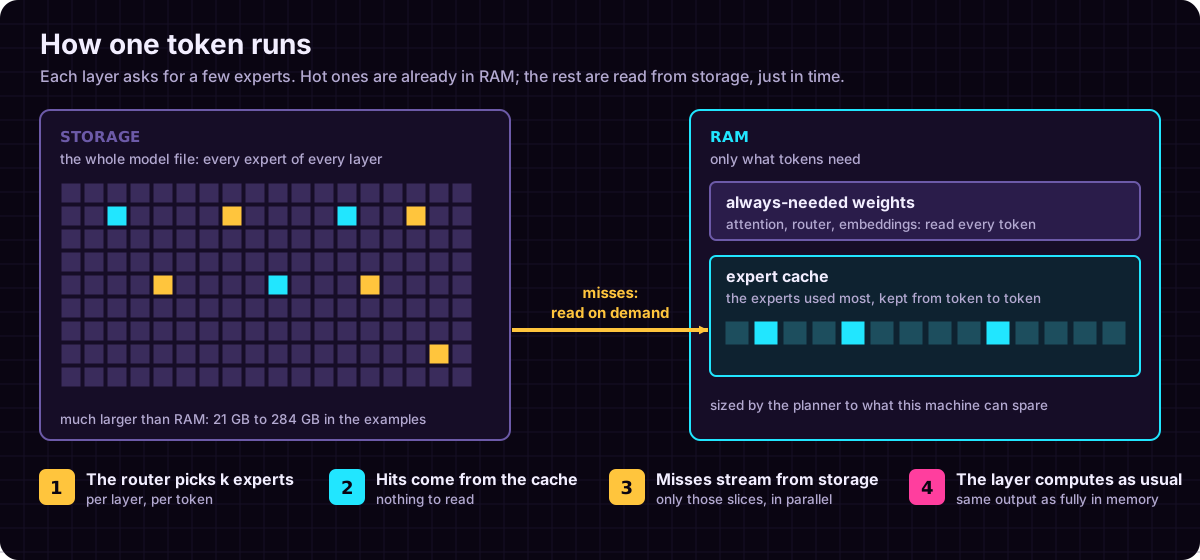
The engine is built on llama.cpp's public API, so every quantization, tokenizer and chat template llama.cpp supports works unchanged, and a new llama.cpp release is a submodule bump. Which tensors are the routed experts is read from the file itself, so new MoE architectures need no code here (docs/which-models-stream.md).
Correctness is a test, not a promise: ctest checks that streaming gives output identical to
running with every expert in memory, across the cache, evictions, overlap, sessions and split
models. docs/architecture.md.
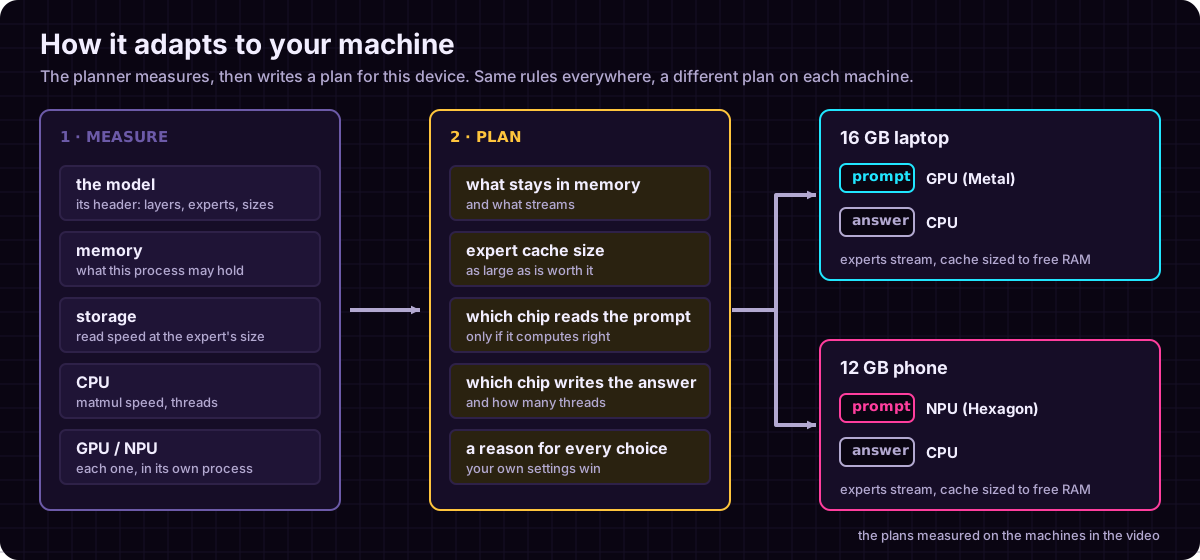
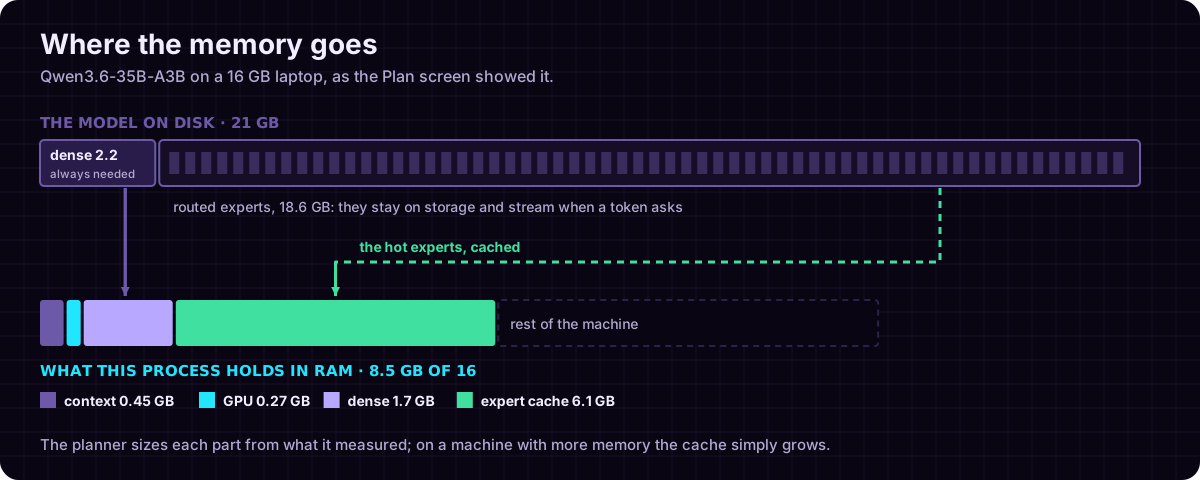
The planner reads the model's shape from its header and measures the machine it runs on. Its rules name no platform and no device, so a phone and a laptop get different plans from the same rules. A setting you pass by hand is never overruled. The Plan screen shows the result: a one-line summary, where the memory goes, what each device does, and every decision with its reason. docs/hardware-planning.md.
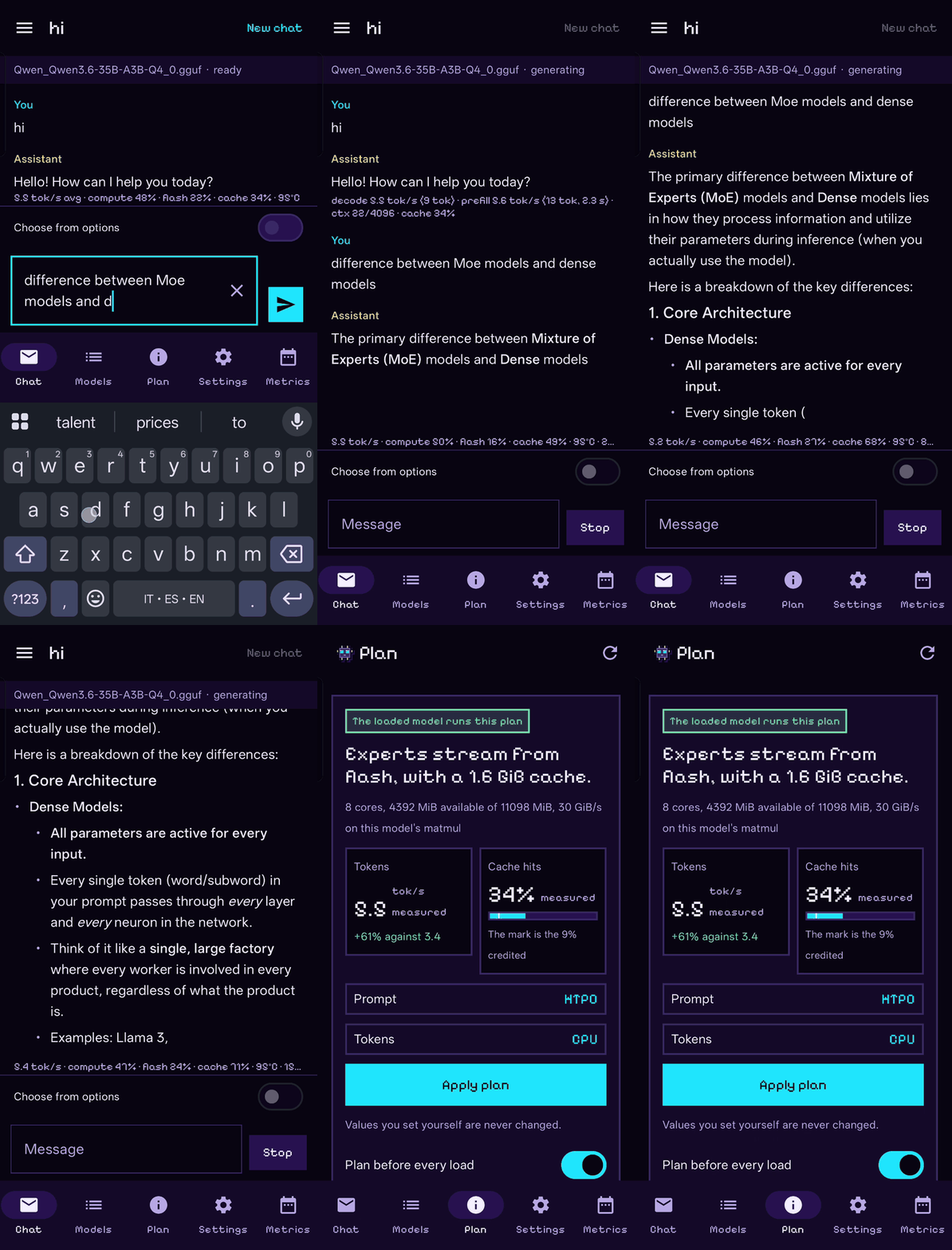
Qwen3.6-35B-A3B on a 12 GB Android phone, real time: the answer, then the plan it runs.
| Android | macOS | Windows | Linux | iOS | |
|---|---|---|---|---|---|
| Engine and CLI | ✓ arm64 | ✓ Apple silicon | ✓ x86_64 | ✓ x86_64, aarch64 | ✓ builds; runs in the simulator |
| App and OpenAI server | ✓ native app | ✓ web app | ✓ web app | ✓ web app | native app, in the simulator so far (#235) |
| Accelerators | NPU (Hexagon), Vulkan, OpenCL | Metal | Vulkan | Vulkan | Metal, built in; not yet run on a device |
Backends load as modules beside the engine, so a CUDA, HIP or SYCL module built with its own toolchain loads like the shipped ones. Details, and what was measured where: docs/platforms.md.
git clone --recursive https://github.com/Helldez/BigMoeOnEdge.git
cd BigMoeOnEdge
cd ui && npm ci && npm run build && cd ..
scripts/build-host.sh
build/bin/bmoe-server --open
Tests: cd build && ctest --output-on-failure (needs python3 with the gguf package). Android:
scripts/build-android.ps1, then the APK in examples/android.
CONTRIBUTING.md.
docs/, indexed by what you are trying to do. Start with hardware-planning.md, settings.md, server-api.md, platforms.md and limitations.md.
Ideas from AirLLM, Apple's LLM in a flash, FlexGen, PowerInfer and EdgeMoE, packaged on top of llama.cpp. The closest recent work is flash-moe, a Metal engine that streams a 397B MoE from SSD on Apple Silicon; BigMoeOnEdge takes llama.cpp's public API across architectures and platforms instead.
Apache-2.0. See LICENSE.
Run MoE models bigger than your RAM. Frontier-size MoE on a phone, laptop, edge. cpp.