




180 ·GitHub
What is this?
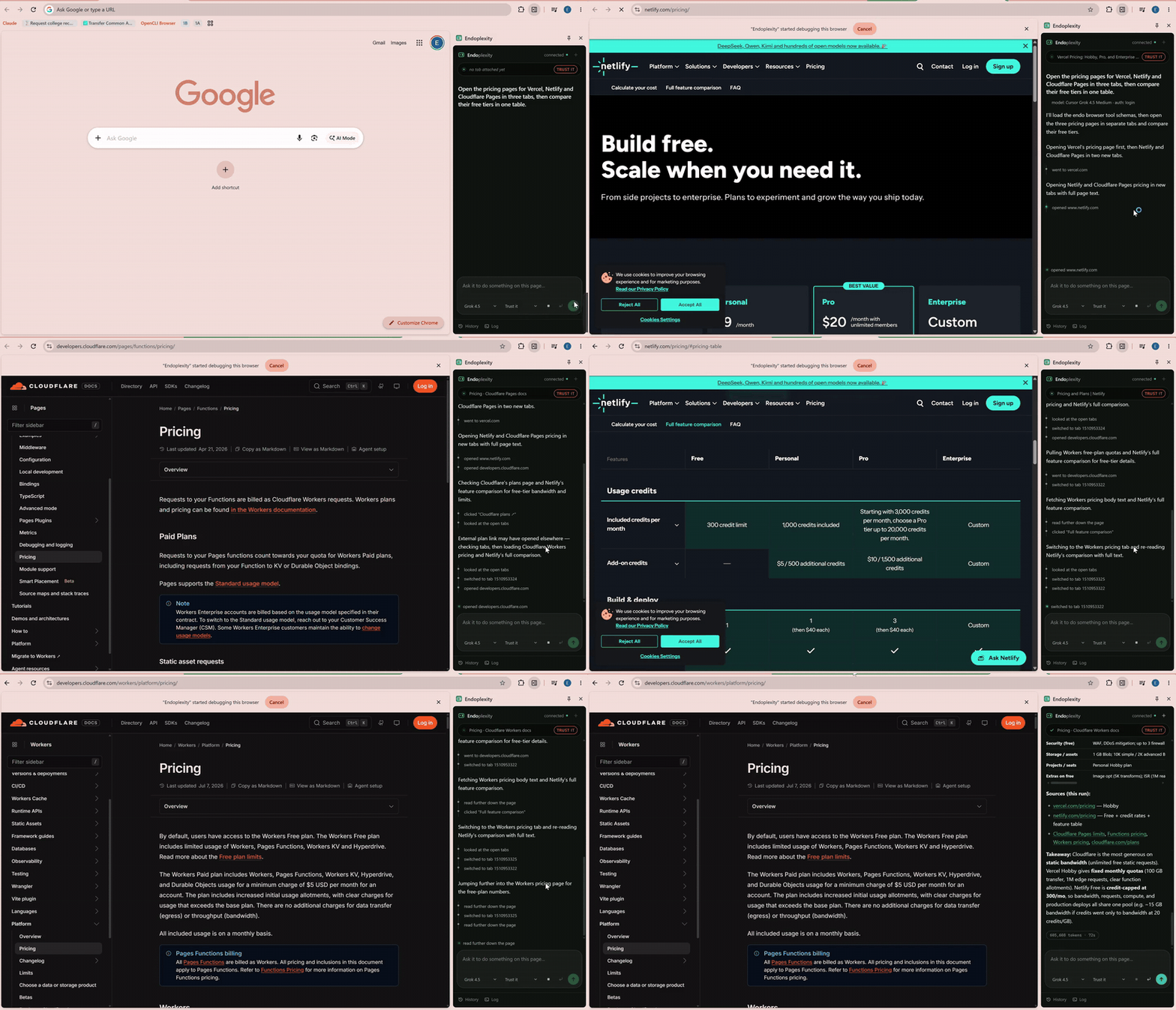
 Endoplexity is a Chrome side-panel extension that lets an existing Claude or Cursor subscription drive your real browser — clicking, typing, filling forms, switching tabs — through the claude or cursor-agent CLI you already have logged in, instead of a separate metered API key.
Endoplexity is a Chrome side-panel extension that lets an existing Claude or Cursor subscription drive your real browser — clicking, typing, filling forms, switching tabs — through the claude or cursor-agent CLI you already have logged in, instead of a separate metered API key.Is this a browser extension, an app, or something else?It is two pieces working together: a Chrome side-panel extension that reads and acts on the page you're looking at, and a local Node bridge/tool server that talks to your claude or cursor-agent CLI over MCP. There is no cloud service or separate backend.
It is two pieces working together: a Chrome side-panel extension that reads and acts on the page you're looking at, and a local Node bridge/tool server that talks to your claude or cursor-agent CLI over MCP. There is no cloud service or separate backend.How do I get it running?Clone the repo and run the setup script to start the bridge (it auto-launches on Windows login), then open chrome://extensions, enable Developer mode, and 'Load unpacked' pointing at the extension/ folder from the repo.
Clone the repo and run the setup script to start the bridge (it auto-launches on Windows login), then open chrome://extensions, enable Developer mode, and 'Load unpacked' pointing at the extension/ folder from the repo.Do I need an Anthropic API key to use it?No — it reuses the claude or cursor-agent CLI you already have logged into a real subscription (Claude Pro is enough). You just need Node 24+ and Chrome 114+ installed.
No — it reuses the claude or cursor-agent CLI you already have logged into a real subscription (Claude Pro is enough). You just need Node 24+ and Chrome 114+ installed.What are the known gaps right now?The project is v0.0.1 and Windows-first — macOS and Linux can run the bridge with npm start but don't have autostart yet. It also can't drive chrome:// pages or the Web Store, real ATS comboboxes need a click-then-click workaround instead of the select tool, and long navigation sessions can leave stray noise from dead iframe sessions.
The project is v0.0.1 and Windows-first — macOS and Linux can run the bridge with npm start but don't have autostart yet. It also can't drive chrome:// pages or the Web Store, real ATS comboboxes need a click-then-click workaround instead of the select tool, and long navigation sessions can leave stray noise from dead iframe sessions.Will this work the same on macOS or Linux, or is it really a Windows tool?The bridge itself is portable and runs anywhere with npm start, but the convenient one-command autostart installer currently only targets Windows's Startup folder.
The bridge itself is portable and runs anywhere with npm start, but the convenient one-command autostart installer currently only targets Windows's Startup folder.Does any of my browsing or files get sent off my machine?No — the bridge only binds to 127.0.0.1 (loopback), never a public interface, and attachments/session files are gitignored and kept locally; nothing leaves your machine by design.
No — the bridge only binds to 127.0.0.1 (loopback), never a public interface, and attachments/session files are gitignored and kept locally; nothing leaves your machine by design.How does the approval gate decide what to block?It matches the clicked element's visible label against a short list of English words like 'submit', 'pay', 'delete', and 'confirm' before letting irreversible actions through. It's a label heuristic, not real page understanding, so icon-only buttons or unusual wording (e.g. 'Finish') can slip past it — watch mode exists for exactly that case.
It matches the clicked element's visible label against a short list of English words like 'submit', 'pay', 'delete', and 'confirm' before letting irreversible actions through. It's a label heuristic, not real page understanding, so icon-only buttons or unusual wording (e.g. 'Finish') can slip past it — watch mode exists for exactly that case.What does running a task actually cost?A sample agent-driven job application came to $0.0959 in equivalent API spend across 112k tokens and 10 turns in 42 seconds — but since that's already covered by a Claude or Cursor subscription, there's nothing extra to pay.
A sample agent-driven job application came to $0.0959 in equivalent API spend across 112k tokens and 10 turns in 42 seconds — but since that's already covered by a Claude or Cursor subscription, there's nothing extra to pay.Can it read and fill in attached files?Yes, drag a file onto the composer and the agent can read it as text (PDF, DOCX, XLSX, PPTX, CSV, JSON, Markdown, etc.) via a readfile tool, or push it into a form field via upload; attachments are kept locally and survive restarts.
Yes, drag a file onto the composer and the agent can read it as text (PDF, DOCX, XLSX, PPTX, CSV, JSON, Markdown, etc.) via a readfile tool, or push it into a form field via upload; attachments are kept locally and survive restarts.Why build this instead of another browser-agent project?Most open-source browser agents require a separate metered API key and bill per click. Endoplexity instead reuses the tool-calling agent loop you're already paying for in Claude or Cursor, adding only the missing pieces: real CDP-based browser control and a panel to watch it work.
Most open-source browser agents require a separate metered API key and bill per click. Endoplexity instead reuses the tool-calling agent loop you're already paying for in Claude or Cursor, adding only the missing pieces: real CDP-based browser control and a panel to watch it work.What are similar projects?bb-browser, XActions, mcp-chrome, BrowserOS, browser-harness, evenfire, holaOS, headroom
bb-browser, XActions, mcp-chrome, BrowserOS, browser-harness, evenfire, holaOS, headroomWhich topics is it in?cdp, chrome, chrome-extension, browser-extension, browser-automation, model-context-protocol, cursor, mcp-server, claude, ai-agent, privacy, mcp
cdp, chrome, chrome-extension, browser-extension, browser-automation, model-context-protocol, cursor, mcp-server, claude, ai-agent, privacy, mcp