
The Declarative JSON Gantt Chart Engine
Where human intuition meets declarative AI planning.






Turn any declarative JSON document into a high-performance, interactive, draggable Gantt chart.
Zero runtime dependencies. 100% pure TypeScript.
Runs everywhere: Plain HTML, React, Next.js, Node.js CLI, and autonomous AI toolchains.
Designed from the ground up for:
- Autonomous AI Agents & LLMs — Declarative JSON schema contract eliminates UI hallucinations; models generate timeline data with 10x fewer tokens than fragile JSX code.
- Students, Hobbyists & Creators — Lightweight, beautiful Swiss Noir dark mode, intuitive drag-and-drop, touch gestures, and instant local storage persistence.
- Engineering Teams & Program Directors — Operations Research Critical Path solver, EVM (Earned Value Management), DCMA-14 schedule health audits, and multi-user CRDT collaboration with secure role-based permissions.
Live Playground • JSON Cheatsheet • Architecture • Schema Specification • API Docs • Roadmap • Changelog
Why Jantt? The Declarative Revolution
Traditional project management and timeline tools force an impossible choice:
- Enterprise Bloat: Commercial suites (DHTMLX, Bryntum) demand 200KB to 800KB runtime dependencies, complex imperative APIs (
gantt.init(), gantt.addTask()), and expensive recurring per-seat fees.
- Brittle AI Generations: Prompting LLMs (ChatGPT, Claude, Gemini) to generate React JSX or SVG coordinate math produces broken layouts, coordinate hallucinations, and wastes thousands of tokens on boilerplate UI code.
- Static Limitations: DSLs like Mermaid.js are read-only, non-interactive images. They cannot be dragged, edited, recalculated, or synchronized back to living project state.
The 4 Superpowers of Jantt
- Zero Runtime Dependencies: The core math and layout engine (
@jantt/core) is pure, zero-dependency TypeScript weighing under 14 KB gzipped.
- AI-Native & 10x Fewer Tokens: Declarative JSON schema contract eliminates UI hallucinations; models generate timeline data with 10x fewer tokens than fragile JSX code.
- Swiss Modernism 2.0 Aesthetics: Deep OLED Swiss Noir (
#080D18), 90-degree CAD orthogonal routing, glassmorphic HUD cards, and high-contrast typography.
- Defense-Grade Operations Research: Built-in topological DAG solver, Critical Path Method (CPM), Earned Value Management (EVM - ANSI/EIA-748), DCMA-14 schedule health audits, and multi-user CRDT cloud rooms.
Visual Showcase & Curated Themes
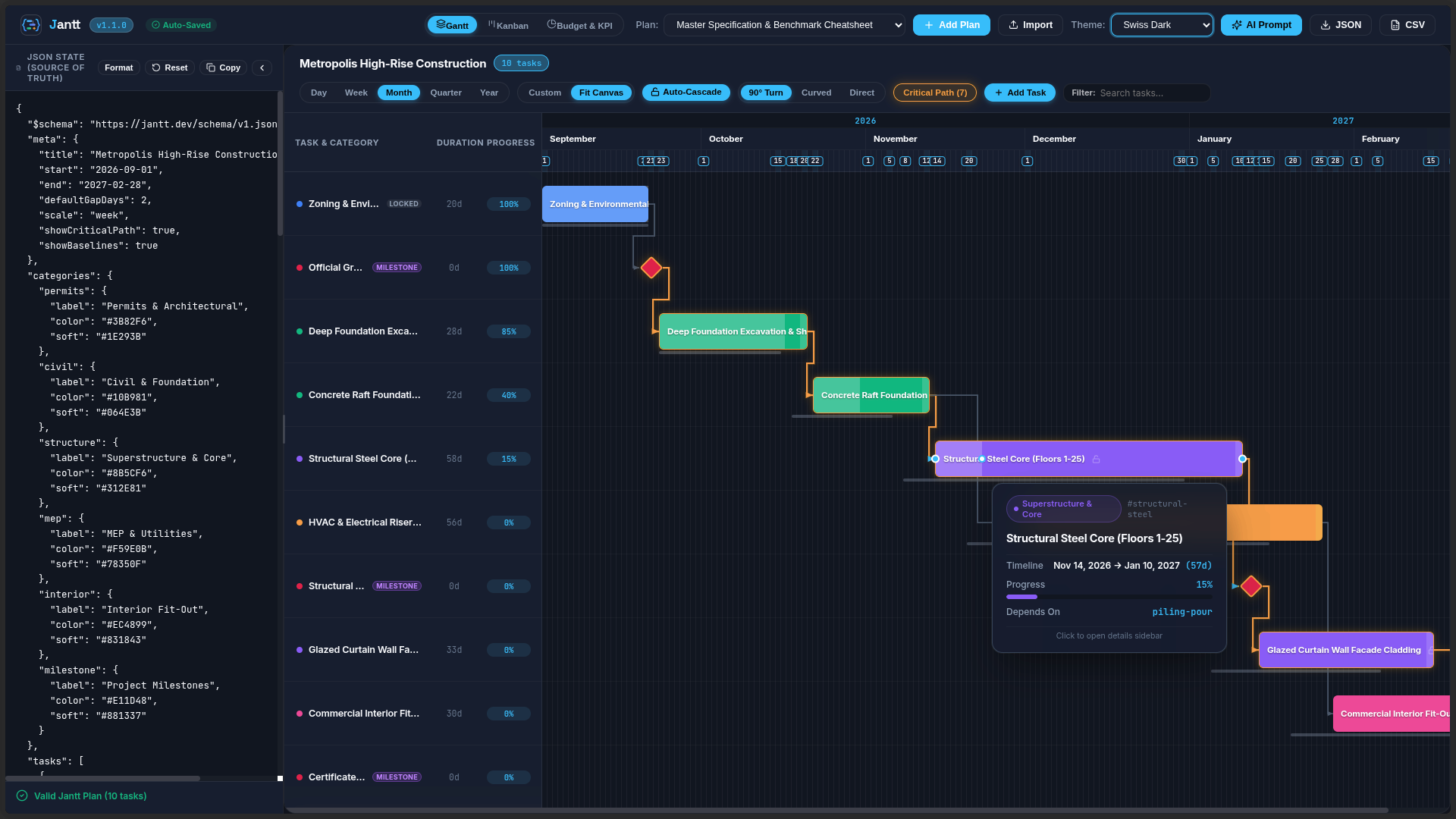
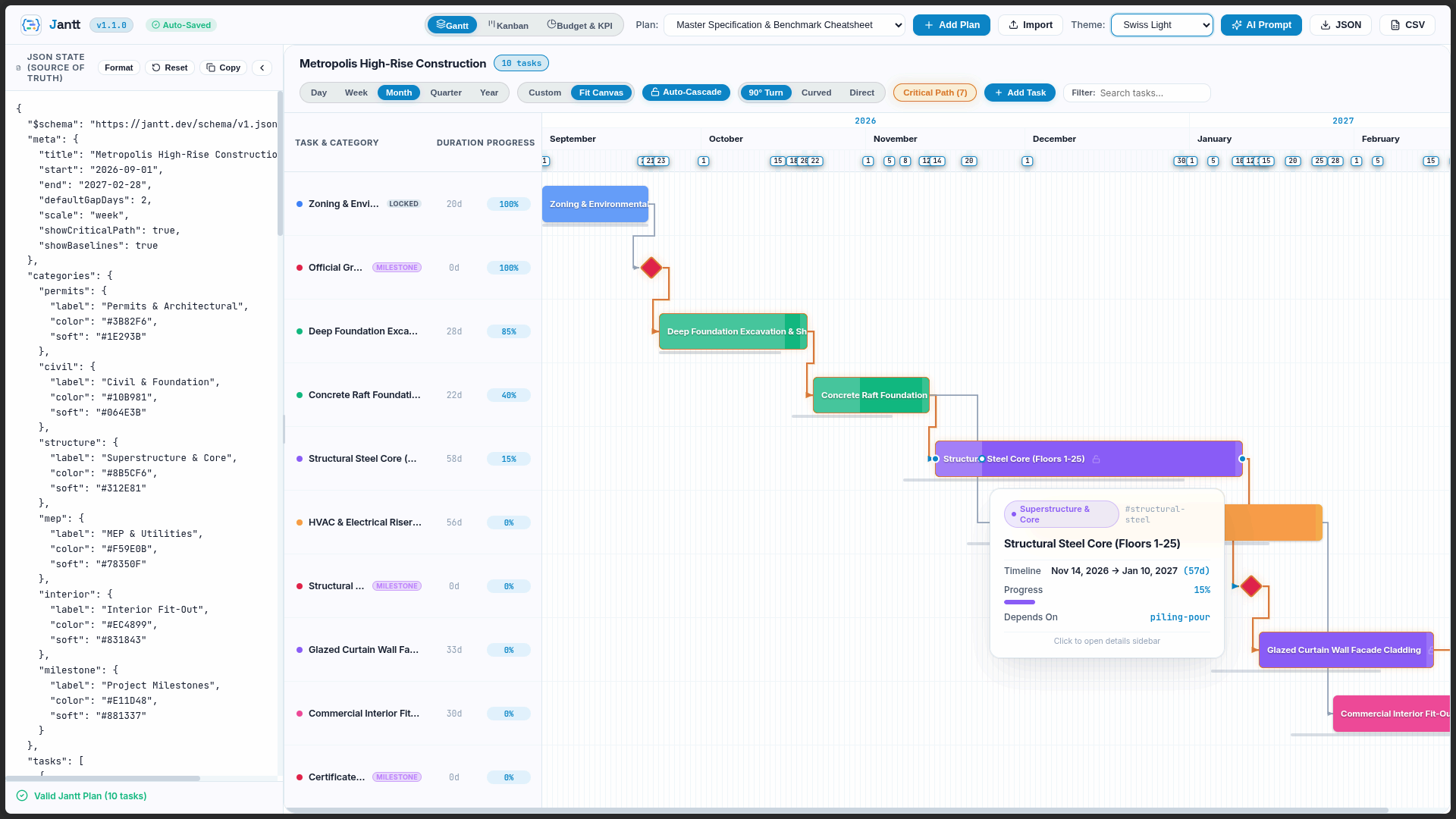
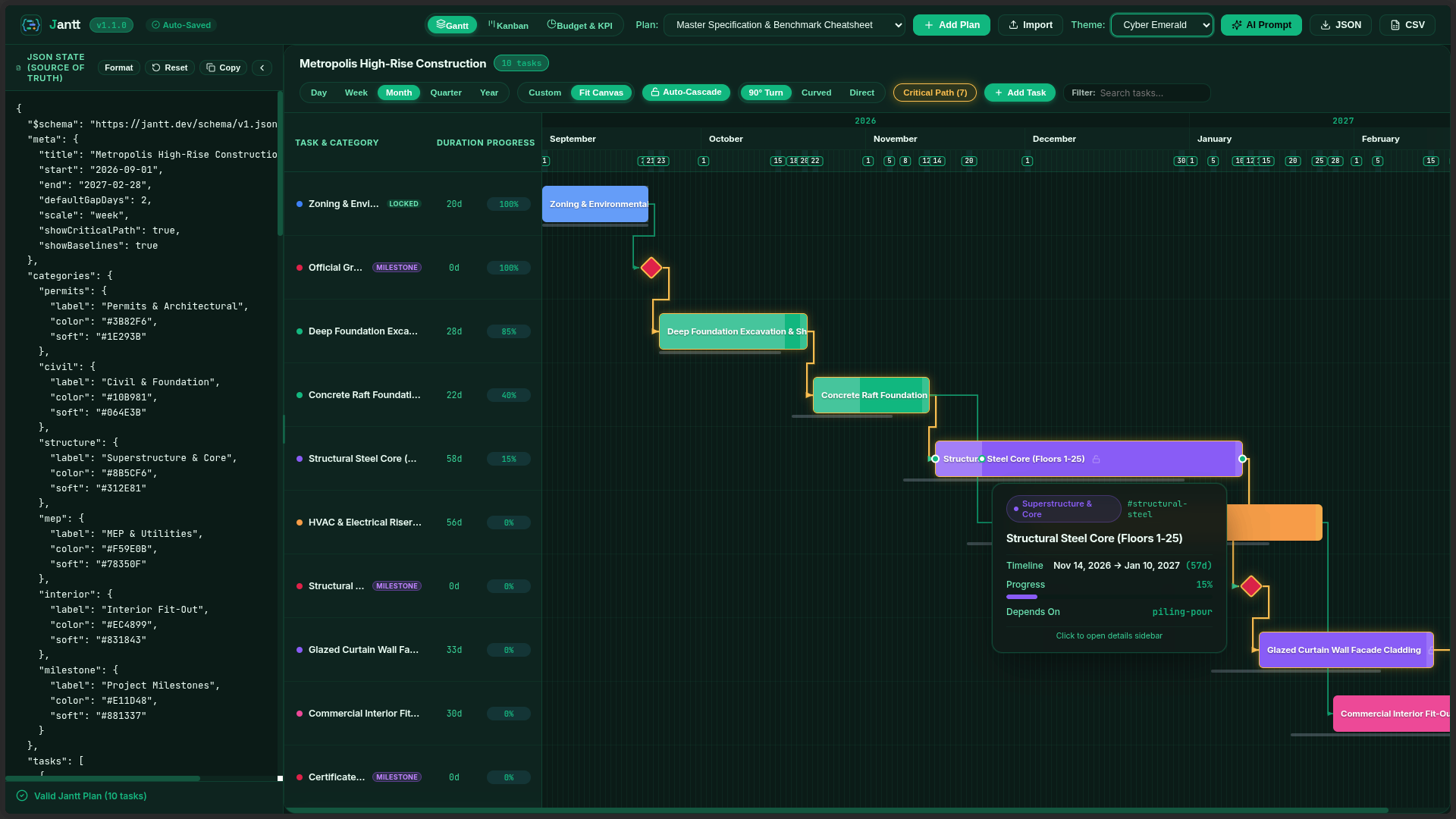
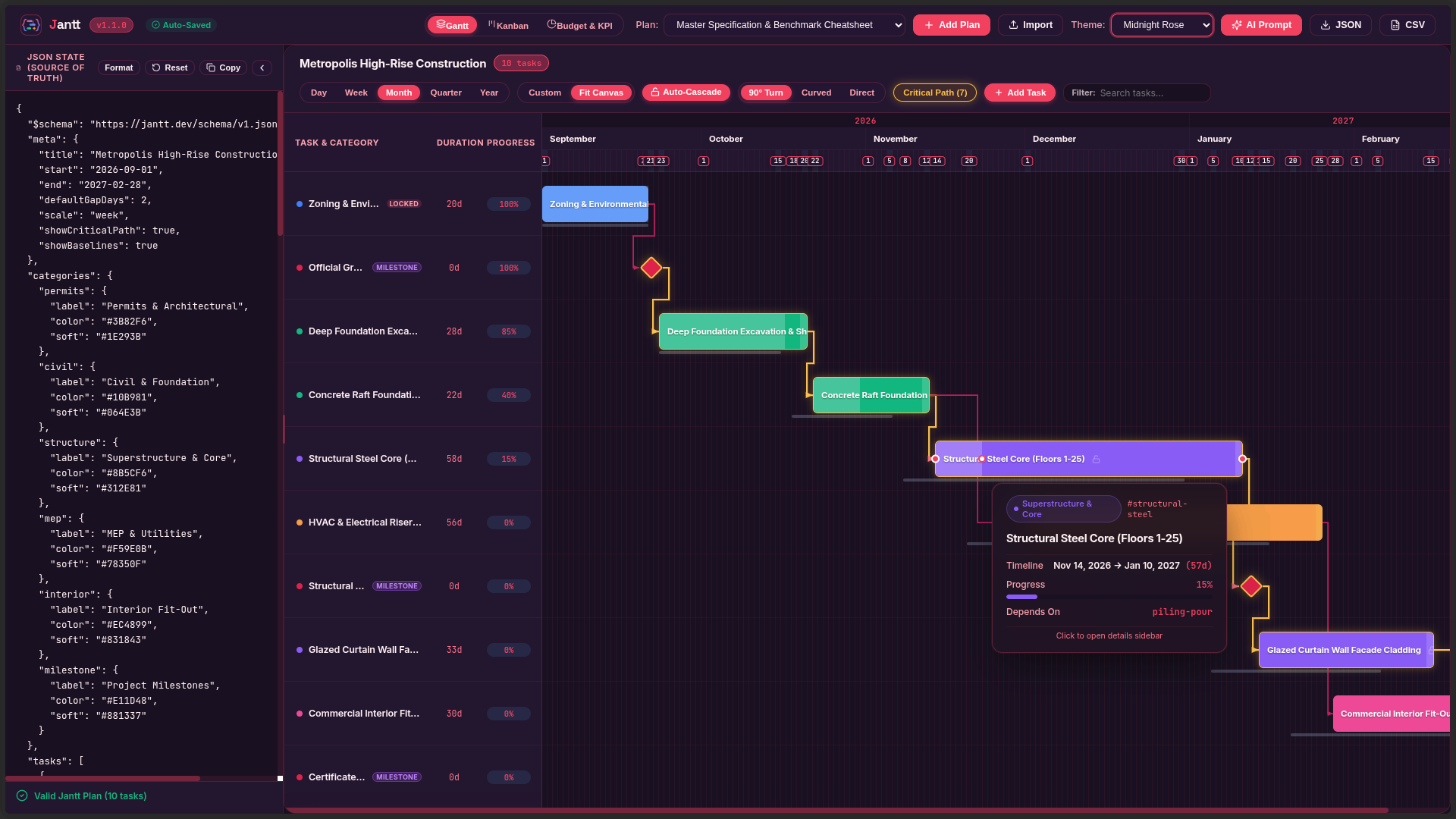
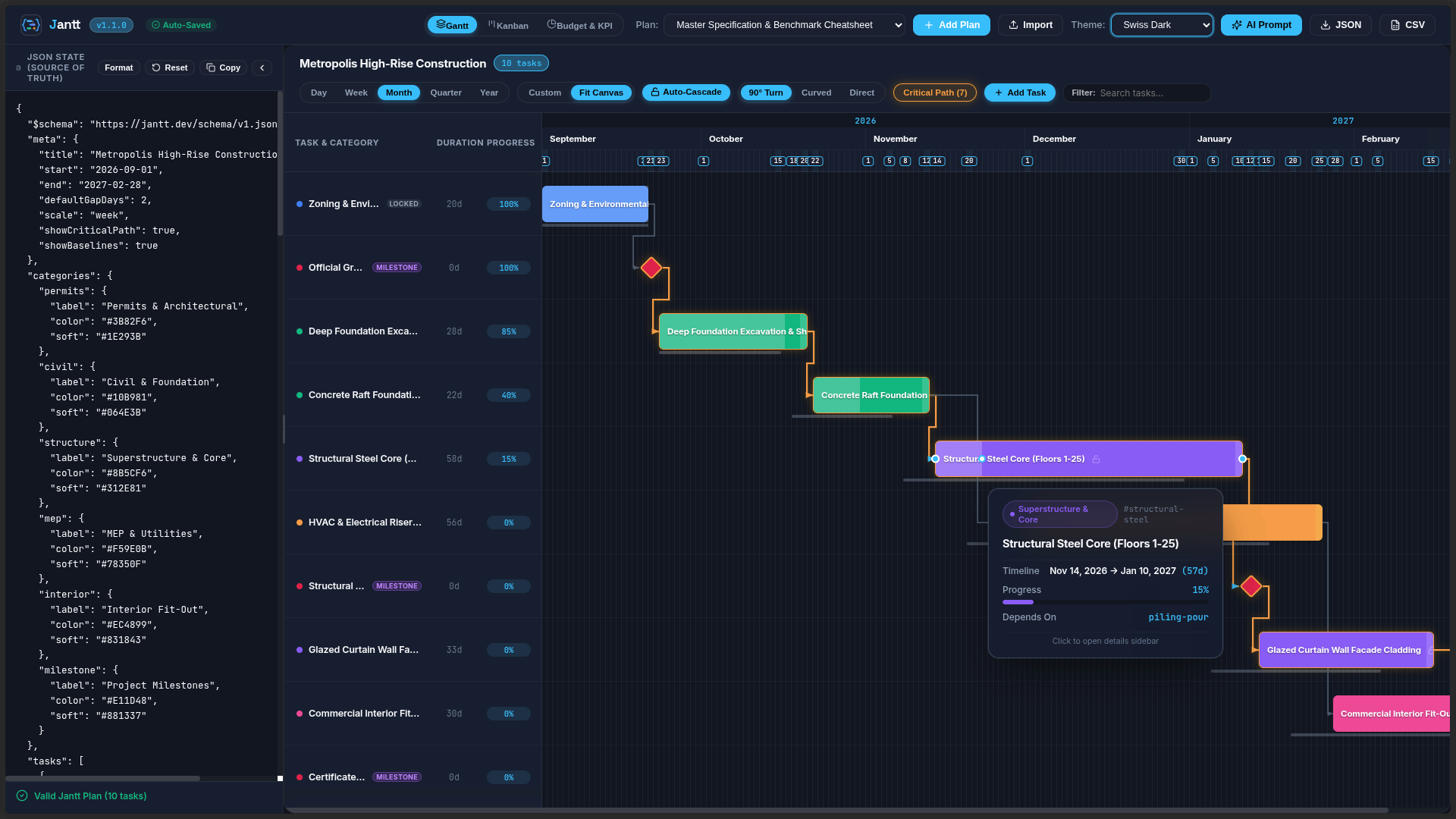
Jantt features a fully reactive, CSS variable-driven theming architecture with out-of-the-box support for light modes, sleek dark modes, and high-contrast vibrant styles:
Swiss Light Mode
Daylight clarity, high contrast typography, and subtle glassmorphic tooltips.
Swiss Dark Mode
Sleek obsidian palette with glowing critical path indicators and 90° right-angle routing.
Color Theme Gallery
Cyber Emerald
|
Midnight Rose
|
Sunset Crimson
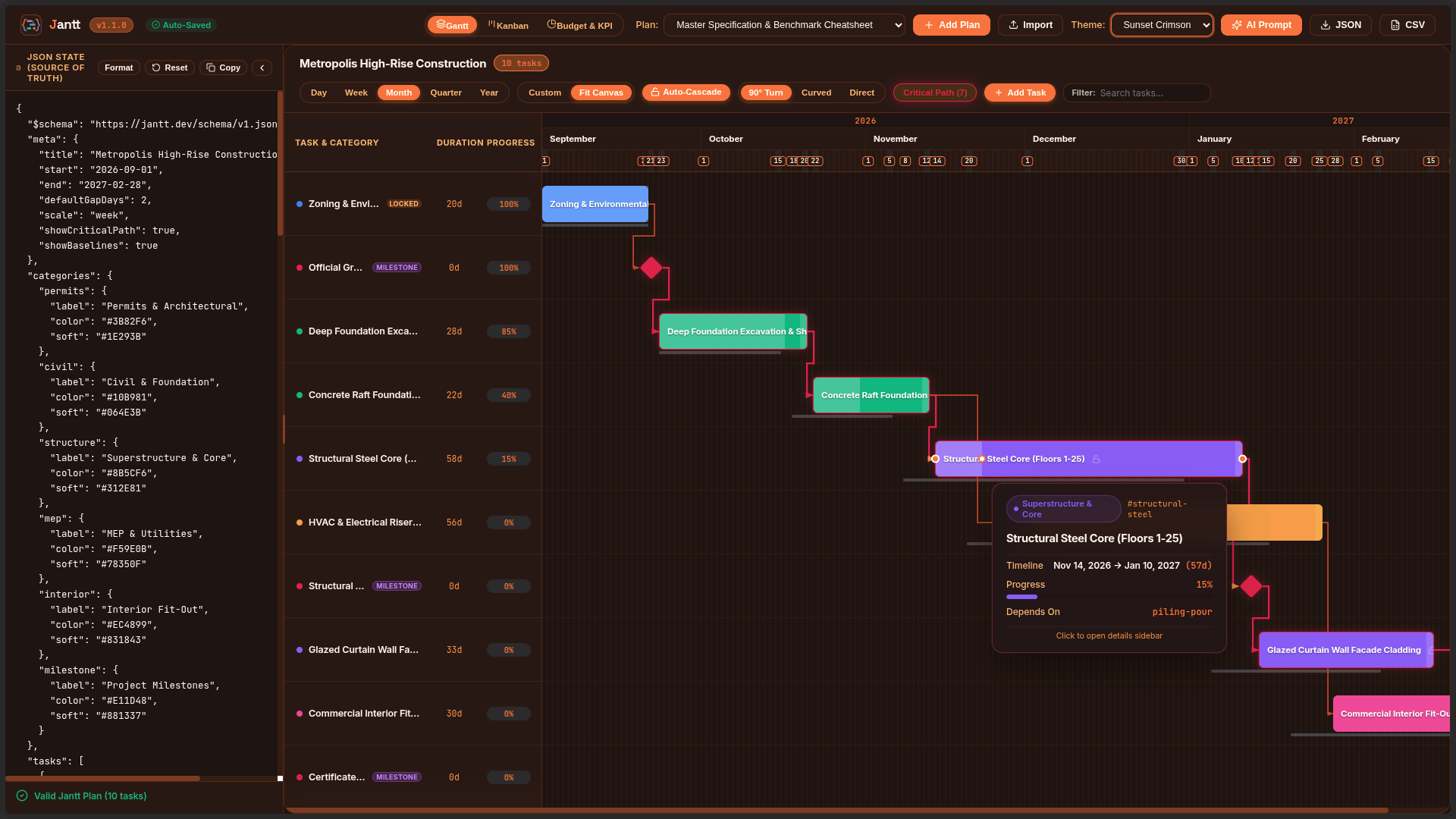
|
Master Specification Benchmark
|
Comparison Matrix
| Capability |
Jantt Engine (@jantt/core) |
DHTMLX Gantt |
Frappe Gantt |
Mermaid.js |
| Runtime Dependencies |
0 (Zero) |
Multiple |
Multiple |
Multiple |
| State Paradigm |
100% Declarative JSON |
Imperative JS API |
Imperative JS API |
Text-based DSL |
| Interactive Drag-to-Link |
90° Orthogonal Step |
Supported |
Not Supported |
Static only |
| Timeline Zoom Scales |
5 (Day to Year) |
Supported |
Limited |
Not Supported |
| Critical Path Analysis |
Built-in Solver |
Commercial tier |
Not Supported |
Not Supported |
| Milestones & Baselines |
Native in Schema |
Commercial tier |
Not Supported |
Milestones only |
| Inline Progress Dragging |
Interactive Handle |
Supported |
Read-only |
Not Supported |
| Bi-directional CLI Sync |
Built-in |
Not Supported |
Not Supported |
Not Supported |
| Bundle Size (gzip) |
< 14 KB |
~200 KB |
~35 KB |
~800 KB |
60-Second Quickstart
1. React Integration (@jantt/react)
npm install @jantt/react @jantt/core
import { Jantt } from "@jantt/react";
import "@jantt/react/dist/index.css";

const projectData = {
  tasks: [
    { id: "t1", label: "Architecture RFC", category: "core", start: "2026-09-01", end: "2026-09-14", progress: 1.0 },
    { id: "t2", label: "Core Implementation", category: "core", start: "2026-09-15", end: "2026-10-15", dependsOn: "t1" }
  ],
  categories: {
    core: { label: "Core Engineering", color: "#38BDF8" }
  }
};

export default function Timeline() {
  return <Jantt data={projectData} theme="swiss-dark" />;
}
2. Plain HTML / Script Tag (@jantt/standalone)
<script src="https://unpkg.com/@jantt/standalone"></script>
<link rel="stylesheet" href="https://unpkg.com/@jantt/standalone/dist/jantt.css" />

<div id="timeline" style="width: 100vw; height: 100vh;"></div>

<script>
  JanttStandalone.render("#timeline", projectData, { theme: "swiss-dark" });
</script>
AI Agent Workbench & Schema Cheatsheet
AI-Native Ideology: Stop Asking AI to Write Fragile Timeline Code
Having LLMs generate hundreds of lines of React JSX, SVG coordinate math, and canvas listeners produces brittle, hallucination-prone results. With Jantt, the AI outputs pure declarative JSON, and Jantt delivers deterministic, interactive execution.
flowchart LR
    A["<b>Step 1: Feed Cheatsheet to LLM</b><br/>Compact schema contract (WBS, dates, DAG, budget)"] --> B["<b>Step 2: AI Outputs Pure JSON</b><br/>10x fewer tokens, type-safe, 0 hallucinations"]
    B --> C["<b>Step 3: Instant Interactive Suite</b><br/>Deterministic DAG solver, Gantt, Kanban & Analytics"]
    C --> D["<b>Step 4: Bidirectional Loop</b><br/>Humans adjust visually, syncs clean JSON back to AI"]
    D --> B
- Step 1: Feed Cheatsheet to LLM — Give the AI the compact schema contract (WBS, dates, DAG dependencies, milestones, budget). See the full Jantt JSON Cheatsheet.
- Step 2: AI Outputs Pure JSON — Uses 10× fewer tokens than JSX. Machine-checkable, type-safe, and zero UI hallucinations.
- Step 3: Instant Interactive Suite — Jantt resolves topological DAG schedules, routes orthogonal wires, and renders Gantt, Kanban, Notes & Analytics.
- Step 4: Bidirectional Loop — Humans drag and adjust visually. Jantt syncs clean JSON back to localStorage/disk for the AI agent.
LLM System Prompt
Hand this prompt to ChatGPT, Claude, Gemini, Cursor, or your autonomous AI agent pipelines. The model will output 100% valid, constraint-checked Jantt JSON schedules without hallucinating UI code:
You are a precision project management schedule generator.
Output ONLY raw, valid JSON conforming strictly to the Jantt JSON Schema (https://raw.githubusercontent.com/AhmadHassan-BTed/Jantt/main/schema/jantt.schema.json).

# JANTT JSON SCHEMA BENCHMARK & SPECIFICATION CHEATSHEET (v1.4.0)

## 1. Top-Level Root Structure
{
  "$schema": "https://raw.githubusercontent.com/AhmadHassan-BTed/Jantt/main/schema/jantt.schema.json",
  "meta": {
    "title": "<Project Title>",
    "description": "<Project narrative and objectives>",
    "person": "<Lead Program Manager / Owner>",
    "organization": "<Enterprise / Organization Name>",
    "start": "YYYY-MM-DD",
    "end": "YYYY-MM-DD",
    "defaultGapDays": 2,
    "scale": "day" | "week" | "month" | "quarter" | "year",
    "linkRouting": "orthogonal" | "curved" | "direct",
    "showCriticalPath": true,
    "showBaselines": true,
    "autoCascade": true,
    "currency": "USD",
    "budget": 450000,
    "version": "1.4.0"
  },
  "categories": {
    "<category_id>": {
      "label": "<Category Display Name>",
      "color": "#HEX_COLOR",
      "soft": "#BG_TINT_HEX",
      "icon": "<lucide_icon_name>"
    }
  },
  "people": [
    {
      "id": "@alex",
      "name": "Alex Mercer",
      "username": "@alex",
      "role": "Lead Architect",
      "email": "[email protected]",
      "teamId": "core-team",
      "color": "#3B82F6"
    },
    {
      "id": "person-contractor",
      "name": "Sarah Miller",
      "role": "External Specialist",
      "teamId": "core-team",
      "color": "#10B981"
    }
  ],
  "teams": [
    {
      "id": "core-team",
      "name": "Core Platform Squad",
      "color": "#3B82F6",
      "description": "Backend services and architecture"
    }
  ],
  "notes": [
    {
      "id": "note-unique-id",
      "title": "Architecture RFC & Specs",
      "content": "Detailed markdown requirements, meeting minutes, and acceptance criteria.",
      "color": "#3B82F6",
      "pinned": true,
      "category": "Architecture",
      "tags": ["RFC", "Architecture"],
      "task_ids": ["task-1"],
      "updatedBy": "@alex",
      "createdAt": "YYYY-MM-DDTHH:mm:ssZ",
      "updatedAt": "YYYY-MM-DDTHH:mm:ssZ"
    }
  ],
  "documents": [
    {
      "id": "doc-unique-id",
      "label": "<Document or Deliverable Title>",
      "status": "have" | "pending" | "missing",
      "owner": "<Owner Name>",
      "url": "<Documentation Link>",
      "note": "<Review notes / status>"
    }
  ],
  "tasks": [
    {
      "id": "task-unique-id",
      "wbs": "1.1",
      "label": "Task Name / Title",
      "category": "<matching_category_id>",
      "start": "YYYY-MM-DD",
      "end": "YYYY-MM-DD",
      "assignee": "@alex",
      "phase": "Phase 1: Foundation",
      "priority": "low" | "medium" | "high" | "urgent",
      "estimatedCost": 28000,
      "actualCost": 15000,
      "dependsOn": "prereq-id" | ["prereq-1", "prereq-2"] | null,
      "gapDays": 2,
      "locked": false,
      "progress": 0.75,
      "milestone": false,
      "status": "not-started" | "in-progress" | "submitted" | "completed" | "blocked",
      "urgent": false,
      "color": "#EC4899",
      "baseline": {
        "start": "YYYY-MM-DD",
        "end": "YYYY-MM-DD"
      },
      "notes": "Detailed task description, acceptance criteria, and technical specs.",
      "fields": {
        "jira": "JANTT-101",
        "storyPoints": 13,
        "repo": "github.com/org/repo",
        "deliverable": "schemas/v1.json"
      }
    }
  ]
}

## 2. Critical Constraints & Validation Rules:
1. DATES: All dates must be ISO "YYYY-MM-DD" format. "end" must be >= "start".
2. CATEGORIES: Every task "category" must match an existing key in the "categories" dictionary.
3. DEPENDENCIES (DAG):
   - "dependsOn" can be a single task ID string, an array of strings ["t1", "t2"], or null.
   - All referenced dependency IDs must exist in the "tasks" list (no dangling references).
   - Strict Directed Acyclic Graph: NO circular dependency loops (e.g. A -> B -> C -> A).
   - Timing Sanity: A task's "start" must be on or after prerequisite "end" + gapDays.
4. MILESTONES: For zero-duration milestone gates, set "milestone": true and "start" equal to "end".
5. PROGRESS: Must be a decimal float from 0.0 (0%) to 1.0 (100%).
6. BASELINES: Optional planned timeframe object { "start": "YYYY-MM-DD", "end": "YYYY-MM-DD" } for baseline variance tracking.
7. LOCKED: Set "locked": true on fixed gates or hard-deadline milestones to prevent accidental drag shifts.
8. SINGLE SOURCE OF TRUTH & ZERO DATABASE IDS IN JSON:
   - Real registered teammates use canonical "@username" for both "id" and "username".
   - Non-account individuals are defined as offline personas (e.g. "id": "person-contractor", without "username").
   - Tasks assigned to real accounts reference the handle in "assignee": "@username".
   - NO INTERNAL DATABASE IDS OR UIDs IN JSON: Private database keys, Firebase UIDs, auth tokens, and secret keys are strictly stripped from JSON. The ONLY exception is public "@username" mentions.
Minimal JSON Template
Provide this minimal benchmark template directly to any code or LLM pipeline:
{
  "$schema": "https://raw.githubusercontent.com/AhmadHassan-BTed/Jantt/main/schema/jantt.schema.json",
  "meta": {
    "title": "Master Delivery Plan",
    "person": "@ahmadhassan",
    "start": "2026-09-01",
    "end": "2027-02-28",
    "scale": "week",
    "linkRouting": "orthogonal",
    "showCriticalPath": true,
    "currency": "USD",
    "budget": 250000
  },
  "categories": {
    "core": { "label": "Core Dev", "color": "#38BDF8" },
    "qa": { "label": "QA & Release", "color": "#10B981" }
  },
  "tasks": [
    {
      "id": "t1",
      "wbs": "1.0",
      "label": "Engine Architecture",
      "category": "core",
      "start": "2026-09-01",
      "end": "2026-09-20",
      "progress": 1.0,
      "status": "completed",
      "assignee": "@ahmadhassan"
    },
    {
      "id": "gate-1",
      "wbs": "1.1",
      "label": "Architecture Approved",
      "category": "core",
      "start": "2026-09-21",
      "end": "2026-09-21",
      "milestone": true,
      "dependsOn": "t1"
    },
    {
      "id": "t2",
      "wbs": "2.0",
      "label": "Core Implementation",
      "category": "core",
      "start": "2026-09-23",
      "end": "2026-10-30",
      "dependsOn": "gate-1",
      "gapDays": 2,
      "progress": 0.4,
      "status": "in-progress"
    }
  ]
}
System Architecture
Jantt operates on a strictly decoupled, unidirectional data flow. Raw JSON is validated, topologically solved, mapped into coordinate space, and presented via modular DOM and SVG layers.
flowchart TD
    classDef input fill:#0B111E,stroke:#38BDF8,stroke-width:2px,color:#F1F5F9;
    classDef core fill:#141D2F,stroke:#24324B,stroke-width:1px,color:#F1F5F9;
    classDef algo fill:#1E293B,stroke:#10B981,stroke-width:1px,color:#ECFDF5;
    classDef render fill:#1A263D,stroke:#F59E0B,stroke-width:1px,color:#FFFBEB;
    classDef target fill:#0F172A,stroke:#EC4899,stroke-width:1px,color:#FFF1F2;

    JSON["Declarative JSON Document<br/>(Jantt v1 Schema)"]:::input

    subgraph CoreEngine ["@jantt/core (Zero Runtime Dependencies)"]
        VAL["1. Schema & Graph Validator<br/>(Cycle & Integrity Diagnostics)"]:::core
        RES["2. Topological Schedule Resolver<br/>(Constraint Relaxation & Critical Path)"]:::algo
        LAY["3. Multi-Scale Layout Engine<br/>(90° Orthogonal Line Routing)"]:::algo

        subgraph Renderers ["Modular Presentation Layer"]
            REN_TBAR["Toolbar Subsystem"]:::render
            REN_GRID["Sticky Data Grid & Splitter"]:::render
            REN_HEAD["Multi-Tier Date Header"]:::render
            REN_BARS["Task Bars & Milestones"]:::render
            REN_SVG["SVG 90° Dependency Overlay"]:::render
            REN_TIP["Glassmorphic Tooltips"]:::render
        end

        CTRL["4. Interaction Controller<br/>(Pointer Event State Machine)"]:::core
    end

    JSON --> VAL
    VAL --> RES
    RES --> LAY
    LAY --> Renderers
    Renderers --> CTRL

    CTRL -- "Immutable Commit" --> JSON

    subgraph Targets ["Deployment Surfaces"]
        T_REACT["@jantt/react<br/>(<Jantt /> Component)"]:::target
        T_STAND["@jantt/standalone<br/>(UMD / IIFE Script Tag)"]:::target
        T_CLI["jantt CLI<br/>(Two-Way Live Sync)"]:::target
    end

    Renderers --> Targets
Interaction & Request Lifecycle
When dragging task bars, resizing durations, connecting dependency handles, or adjusting progress, the event cycle flows cleanly through the state machine:
sequenceDiagram
    autonumber
    actor User as User / Contributor
    participant DOM as DOM / SVG Canvas
    participant Controller as Interaction Controller
    participant Resolver as Topological Resolver
    participant AppState as JSON State
    participant Callback as onCommit / Disk

    User->>DOM: PointerDown on Drag Port / Task Bar
    DOM->>Controller: startDrag(mode: move | resize | progress | link | split)

    loop Live Interaction (PointerMove)
        User->>DOM: Drag pointer across timeline
        Controller->>DOM: Update temporary visual draft (90° preview wire / coordinate shift)
    end

    User->>DOM: PointerUp (Release)
    Controller->>Resolver: resolveSchedule(mutatedTasks, defaultGapDays)
    Resolver-->>Controller: Return schedule-consistent tasks
    Controller->>AppState: Generate new immutable JanttData state
    Controller->>DOM: Re-render layout with updated constraints
    Controller->>Callback: Emit onCommit(finalData) / Write to file on disk
Feature Matrix & Capabilities Guide
Jantt bridges the gap between declarative machine data and human project intuition with high-performance visualization across timelines, agile boards, and documentation.
Visual & Interactive Experience (Up Front)
| Surface |
Core Capabilities |
Highlights |
| Interactive Gantt Timeline |
90° CAD orthogonal dependency wiring, live drag-to-link anchor ports, baseline ghost bars, inline progress drag handle, split-pane resizer. |
60/120fps smooth canvas, 5-tier zoom (Day to Year) + continuous slider, fit-to-height mode. |
| Agile Kanban Board |
4-state workflow columns (pending, in-progress, completed, blocked), priority badges, category color dots, drag & drop status transitions. |
Multi-rule sorting (by Priority, Start Date, Assignee, WBS), live progress indicators. |
| Todo Checklist & Cards |
1-click [x] completion checkboxes, strikethrough styling, expandable task cards, category tags. |
Quick status switching, assignee avatars, team squad badges. |
| Shared Notes & Docs |
Markdown editor & preview, @person tagging, /task mentions, attached tasks lists, color palettes, pin to top. |
Real-time debounced auto-save into JSON, sectioned attached & mentioned task views. |
| Executive PM & KPIs |
Dual-mode dashboard: Essential (progress velocity, health readiness) vs Advanced (EVM, Critical Path, DCMA-14). |
Quick status filters (Ready, Blocked, Bottleneck), schedule buffer diagnostic cards. |
| Personalization & AI |
Features |
Highlights |
| Curated Theme Engine |
7 handcrafted themes: Swiss Noir (True OLED Black), Nordic Frost, Cyber Emerald, Midnight Rose, Sunset Crimson, Swiss Light, Beenie. |
Clean dark & light mode grouping, high-contrast typography, zero emojis. |
| Resources & Squads |
Automatic assignee discovery from tasks[].assignee, squad groupings (Engineering, Design, QA), workload counts. |
1-click "Save to JSON" sync directly into root people[] and teams[] arrays. |
| Time Blocking & Focus |
Universal 1-click filter bar: Today, This Week, Specific Date, Date Range. |
Dim Mode (fades non-matching tasks) vs Filter Mode (hides non-matching tasks). |
| AI Agent Toolchains |
JSON-as-Interface: $10\times$ token reduction vs JSX/HTML, zero graphical hallucinations. |
Copy-paste benchmark prompts for Claude 3.5 Sonnet, GPT-4o, and Gemini 1.5 Pro. |
Core Engine & Algorithmic Internals (Under the Hood)
| Algorithmic Engine |
Mathematics & Standards |
Description |
| Topological Solver |
Graph constraint resolution ($ES(T) = \max(EF(P) + \text{gap})$) |
Automatically paces successor chains when predecessors shift; respects locked: true milestones. |
| Critical Path & Float |
Dual-pass forward / backward scheduling |
Computes early/late start, early/late finish, and total slack/float ($TF = LS - ES$). Zero-float bottleneck glow. |
| PERT Estimation |
$\mu = \frac{O + 4M + P}{6}, \quad \sigma = \frac{P - O}{6}$ |
3-point probabilistic duration calculations using optimistic, most likely, and pessimistic bounds. |
| Earned Value (EVM) |
$CV = EV - AC, \quad SV = EV - PV, \quad CPI = \frac{EV}{AC}, \quad SPI = \frac{EV}{PV}$ |
ANSI/EIA-748 standard cost & schedule variance monitoring and forecasting ($EAC = \frac{BAC}{CPI}$). |
| DCMA-14 Schedule Audit |
Defense Contract Management 14-point audit metrics |
Flags missing logic, negative float, high float (>44 days), invalid leads, and relationship inconsistencies. |
| Enterprise & Developer Tooling |
Description |
| Client-Side Exporters |
1-click RFC-4180 CSV spreadsheet export, high-resolution vector SVG extraction, and raw JSON export. |
| Cloud Remote URL Sync |
Bidirectional synchronization with remote JSON endpoints, ETag caching, background polling, and conflict warnings. |
| Split Monaco Editor |
Built-in VS Code-grade Monaco code editor with real-time JSON schema validation and error diagnostic squiggles. |
Bidirectional CLI (jantt) |
CLI runner (npx jantt open <file.json>) providing live file-watching and bidirectional browser-to-disk synchronization. |
| Zero Runtime Dependencies |
@jantt/core is 100% pure TypeScript with zero external packages (<14 KB gzip). |
Monorepo Directory Structure
Jantt/
├── packages/
│   ├── core/                  # Pure TypeScript engine (ZERO runtime dependencies)
│   │   ├── src/
│   │   │   ├── date-math.ts   # Pure UTC date math & calendar functions
│   │   │   ├── validator.ts   # Schema, cycle, and integrity validator
│   │   │   ├── resolver.ts    # Topological solver & Critical Path analysis
│   │   │   ├── layout.ts      # Multi-scale coordinate engine & 90° line router
│   │   │   ├── controller.ts  # Pointer event interaction state machine
│   │   │   ├── detail-modal.ts# Accessible task detail modal subsystem
│   │   │   ├── exporter.ts    # Client-side CSV, SVG, and JSON exporters
│   │   │   ├── renderers/     # Modular DOM presentation subsystems
│   │   │   └── index.ts       # Public package exports
│   │   └── tests/             # Vitest test suites (339/339 tests passing across 22 suites)
│   ├── react/                 # Official React component (<Jantt />)
│   └── standalone/            # UMD & IIFE script-tag bundles for plain HTML
├── cli/                       # Standalone Node.js CLI runner (npx jantt open)
├── apps/
│   └── playground/            # Split-view interactive documentation sandbox
├── assets/                    # Official vector logos & curated screenshot gallery
├── schema/
│   └── jantt.schema.json      # Formal JSON Schema v1 specification
├── examples/                  # Validated JSON planning fixtures
└── docs/                      # Technical specifications & architectural guides
Quickstarts
1. React Application (@jantt/react)
npm install @jantt/react @jantt/core
import React, { useState } from "react";
import { Jantt } from "@jantt/react";
import "@jantt/core/dist/theme.css";

const initialPlan = {
  "$schema": "https://jantt.dev/schema/v1.json",
  "meta": {
    "title": "High-Rise Construction",
    "scale": "week",
    "showCriticalPath": true,
    "showBaselines": true
  },
  "categories": {
    "civil": { "label": "Civil Engineering", "color": "#10B981" },
    "structure": { "label": "Superstructure", "color": "#8B5CF6" }
  },
  "tasks": [
    { "id": "T1", "label": "Deep Foundation Excavation", "category": "civil", "start": "2026-09-01", "end": "2026-09-20", "progress": 1.0 },
    { "id": "T2", "label": "Structural Steel Erection", "category": "structure", "start": "2026-09-22", "end": "2026-10-30", "dependsOn": "T1", "progress": 0.35 }
  ]
};

export function RoadmapView() {
  const [plan, setPlan] = useState(initialPlan);

  return (
    <div style={{ width: "100%", height: "600px" }}>
      <Jantt
        data={plan}
        viewport={{ scale: "week", showCriticalPath: true }}
        onChange={(draft) => console.log("Draft state:", draft)}
        onCommit={(finalPlan) => {
          setPlan(finalPlan);
        }}
      />
    </div>
  );
}
2. Standalone Plain HTML (@jantt/standalone)
No bundler, Node.js, or build step required:
<!DOCTYPE html>
<html lang="en">
<head>
  <meta charset="UTF-8">
  <link rel="stylesheet" href="https://unpkg.com/@jantt/standalone/dist/style.css">
  <script src="https://unpkg.com/@jantt/standalone/dist/jantt.standalone.iife.js"></script>
</head>
<body>
  <div id="chart-mount" style="max-width: 1200px; margin: 40px auto;"></div>

  <script>
    fetch("./roadmap.json")
      .then(res => res.json())
      .then(data => {
        window.Jantt.mount(document.getElementById("chart-mount"), data, {
          onCommit: (updatedPlan) => console.log("Saved JSON:", updatedPlan)
        });
      });
  </script>
</body>
</html>
3. Local CLI with Live Two-Way Sync (jantt)
Open and edit any JSON file with automatic real-time saving back to disk:
# Open interactive browser chart with auto-save to file
npx jantt open ./examples/construction-enterprise.json

# Validate JSON file against schema from terminal
npx jantt validate ./examples/basic.json
4. Headless Core Engine (@jantt/core)
Execute topological constraints and schedule calculations headlessly in backend services:
import { resolveSchedule, calculateCriticalPath, validate, exportToCsv } from "@jantt/core";

// 1. Validate payload
const validation = validate(rawJson);
if (!validation.valid) {
  console.error("Schema errors:", validation.errors);
}

// 2. Cascade topological schedules
const resolvedTasks = resolveSchedule(rawJson.tasks, 2);

// 3. Compute critical path bottleneck sequence
const { criticalTaskIds } = calculateCriticalPath(resolvedTasks);

// 4. Export to CSV spreadsheet
const csvData = exportToCsv({ ...rawJson, tasks: resolvedTasks });
JSON Schema Contract
Every Jantt document conforms strictly to schema/jantt.schema.json:
{
  "$schema": "https://jantt.dev/schema/v1.json",
  "meta": {
    "title": "Metropolis High-Rise Construction",
    "start": "2026-09-01",
    "end": "2027-02-28",
    "defaultGapDays": 2,
    "scale": "week",
    "showCriticalPath": true,
    "showBaselines": true
  },
  "categories": {
    "civil": { "label": "Civil & Foundation", "color": "#10B981" },
    "milestone": { "label": "Project Milestones", "color": "#E11D48" }
  },
  "tasks": [
    {
      "id": "excavation",
      "label": "Deep Foundation Excavation",
      "category": "civil",
      "start": "2026-09-01",
      "end": "2026-09-20",
      "progress": 1.0,
      "baseline": { "start": "2026-09-01", "end": "2026-09-18" }
    },
    {
      "id": "foundation-pour",
      "label": "Foundation Pour Milestone",
      "category": "milestone",
      "start": "2026-09-22",
      "end": "2026-09-22",
      "milestone": true,
      "dependsOn": "excavation",
      "gapDays": 2,
      "progress": 0.0
    }
  ]
}
Real-Time Cloud Collaboration & Architecture
Jantt features a dedicated, enterprise-grade multi-user collaboration engine backed by Firebase Realtime Database and Cloudflare Workers:
1. GitHub-Only Authentication (Zero Google Auth)
- Strict Single Provider: Google login and generic password forms are completely removed. Authentication is restricted to GitHub OAuth 2.0 (
read:user, user:follow, public_repo).
- Zero Manual Username Typing: Jantt automatically claims the user's verified GitHub handle (
@username) directly into /usernames/{username} upon first sign-in.
- Creator Follow & Star Gate: Collaborators unlock free cloud collaboration rooms by supporting the project — following @AhmadHassan-BTed and starring developer repositories. Creator
@AhmadHassan-BTed is automatically verified across all checks.
2. Single Source of Truth & Zero Internal Database IDs in JSON
- No Database Leakage: Private database UIDs, owner UIDs, internal room secrets, and authentication tokens are strictly stripped and never exposed in JSON.
- Canonical Mentions: The only user identity representation in JSON is canonical user mentions (
@username).
- Plan Sanitizer Engine (
sanitizePlanForJson): Every plan document is recursively scrubbed before write or export.
3. Dual-Mode People & Assignee Management
- Search Real Accounts: Live search modal queries
/users by username prefix (searchUsersByUsername) with avatar, display name, and @username.
- Offline / Dummy Personas: Add contractors or external stakeholders without an account (
id: "person-xxx", without username).
- Coherent Task Assignments: Tasks assigned to real accounts reference
"assignee": "@username", keeping tasks, people, and mentions 100% synchronized.
4. Realtime Database Security Rules (database.rules.json)
The complete ruleset governs authorization across all paths:
/users: Indexed on username (.indexOn: ["username"]) for prefix searches; users can only write to their own record./usernames: Atomic handle registration preventing username collisions./user_rooms: Fast dashboard listings of owned and shared rooms./rooms: ACID transactions via runTransaction with 3-way CRDT reconciler, ensuring only room owners and editors can mutate plan data.
AI Prompting Specification
Use this system prompt with ChatGPT, Claude, Gemini, or local LLMs to generate valid Jantt timelines:
You are a project timeline generator. Output only raw, valid JSON conforming strictly to the Jantt Schema (https://jantt.dev/schema/v1.json).

Rules:
1. Root must contain: "tasks": [{ "id", "label", "category", "start", "end", "dependsOn", "progress", "milestone", "baseline" }]
2. All dates must be ISO "YYYY-MM-DD"
3. All task categories must match keys declared in "categories"
4. Put custom domain metadata inside the "fields" object
5. Output ONLY raw JSON without markdown explanations.
Theming & CSS Variables Reference
:root {
  --jantt-bg: #0B111E;              /* Chart background */
  --jantt-surface: #141D2F;         /* Toolbar & left table surface */
  --jantt-surface-hover: #1A263D;   /* Row hover state */
  --jantt-border: #24324B;          /* Border lines */
  --jantt-text: #F1F5F9;            /* Primary text */
  --jantt-text-muted: #94A3B8;      /* Secondary text */
  --jantt-accent: #38BDF8;          /* Active selection & ports */
  --jantt-today: #F43F5E;           /* Today indicator line */
  --jantt-critical: #F59E0B;        /* Critical path glowing line */
  --jantt-bar-radius: 6px;          /* Task bar corner radius */
}
Keyboard Accessibility
| Key |
Action |
| Tab / Shift+Tab |
Navigate focus across task bars |
| ArrowLeft / ArrowRight |
Move task start & end by 1 day (or defaultGapDays with Alt) |
| Shift+ArrowLeft / Right |
Resize task duration |
| Enter or Space |
Open task detail modal |
| Escape |
Close modal / cancel active drag |
Local Development & Contributing
New contributors are welcomed. Please review CONTRIBUTING.md and CODE_OF_CONDUCT.md.
# Clone the repository
git clone https://github.com/AhmadHassan-BTed/Jantt.git
cd Jantt

# Install dependencies
npm install

# Run verification test suite (339/339 passing across 22 test suites)
npm test

# Typecheck all packages
npm run typecheck

# Launch local interactive development playground
npm run dev
Author & Maintainer
Ahmad Hassan (B-Ted)
License
This project is licensed under the MIT License — see the LICENSE file for details.

 Jantt is an AI-native, dependency-free Gantt chart engine that turns a plain JSON document into an interactive, draggable timeline, usable via script tag, React, Next.js, Node CLI, or AI agent pipelines.