


What is this?
 Hermes Gadget SDK lets you build voice and text hardware devices (ESP32 boards, a Raspberry Pi Linux client, or a desktop simulator) that connect to your own Hermes Agent: hold a button, ask it something, and hear or see the reply.
Hermes Gadget SDK lets you build voice and text hardware devices (ESP32 boards, a Raspberry Pi Linux client, or a desktop simulator) that connect to your own Hermes Agent: hold a button, ask it something, and hear or see the reply.How do I get a gadget running?If you already own a board, flash it through the browser-based installer (Chrome or Edge) over USB and pair it with Wi-Fi; to try it without hardware, run the desktop simulator from a checkout with Python, CMake, and a C++ compiler.
If you already own a board, flash it through the browser-based installer (Chrome or Edge) over USB and pair it with Wi-Fi; to try it without hardware, run the desktop simulator from a checkout with Python, CMake, and a C++ compiler.What do I need on my machine to build or simulate it?For the simulator and SDK work you need Python 3.10+, CMake 3.16+, and a C++17 compiler; flashing a physical board only needs a Chromium-based browser, a USB data cable, and 2.4 GHz Wi-Fi.
For the simulator and SDK work you need Python 3.10+, CMake 3.16+, and a C++17 compiler; flashing a physical board only needs a Chromium-based browser, a USB data cable, and 2.4 GHz Wi-Fi.Does it talk to a real Hermes Agent out of the box?Not fully: real conversations need Hermes Agent plus the Gadget plugin, and voice needs speech recognition and text-to-speech configured; without that the demo server only gives scripted replies, and wake-word activation isn't included at all.
Not fully: real conversations need Hermes Agent plus the Gadget plugin, and voice needs speech recognition and text-to-speech configured; without that the demo server only gives scripted replies, and wake-word activation isn't included at all.Which boards and platforms are actually supported?Firmware targets several Waveshare ESP32-S3 boards, the Espressif ESP32-S3-BOX-3, and M5Stack CoreS3 (most still experimental), plus an experimental 64-bit Linux client for Raspberry Pi 4/5 running Raspberry Pi OS Lite; other boards need a new port.
Firmware targets several Waveshare ESP32-S3 boards, the Espressif ESP32-S3-BOX-3, and M5Stack CoreS3 (most still experimental), plus an experimental 64-bit Linux client for Raspberry Pi 4/5 running Raspberry Pi OS Lite; other boards need a new port.Is the MIT license enough to reuse everything here?The project's own code and docs are MIT, but third-party dependencies, adapted drivers, and artwork keep their own licenses, and MIT grants no rights to Nous Research's 'Hermes' name or mascot.
The project's own code and docs are MIT, but third-party dependencies, adapted drivers, and artwork keep their own licenses, and MIT grants no rights to Nous Research's 'Hermes' name or mascot.Can firmware be updated without re-flashing over USB?Yes, after the first USB flash you can run 'hermes gadget update' to push new firmware over the air, and a build that can't reach Hermes rolls itself back.
Yes, after the first USB flash you can run 'hermes gadget update' to push new firmware over the air, and a build that can't reach Hermes rolls itself back.Can a gadget control smart-home devices?The repo includes Home Assistant and MQTT examples that expose a configured lamp and temperature sensor through a Linux gadget, with pairing instructions and local integration tests.
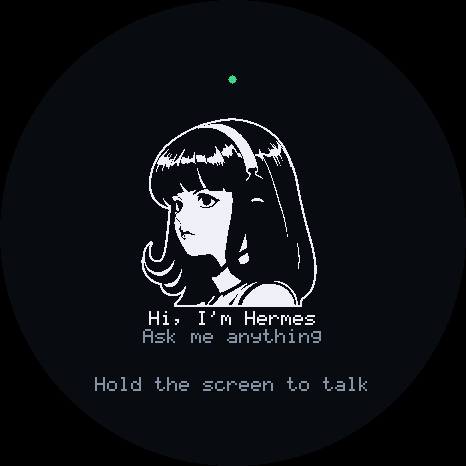
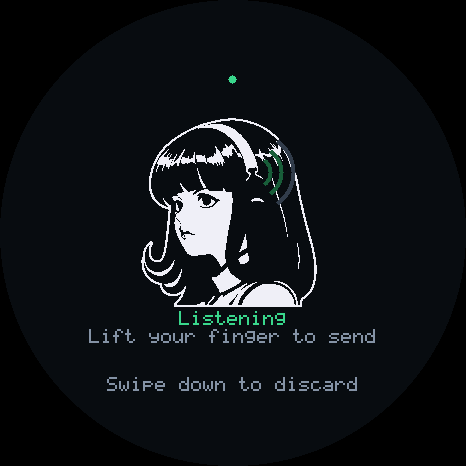
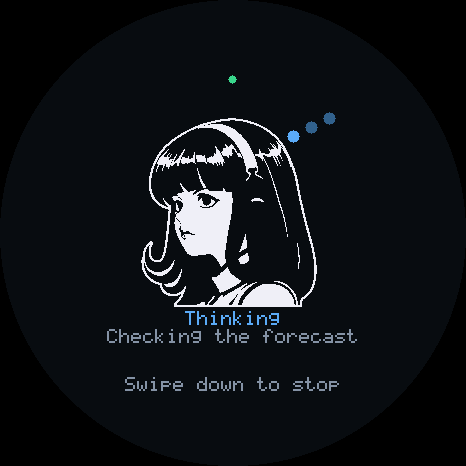
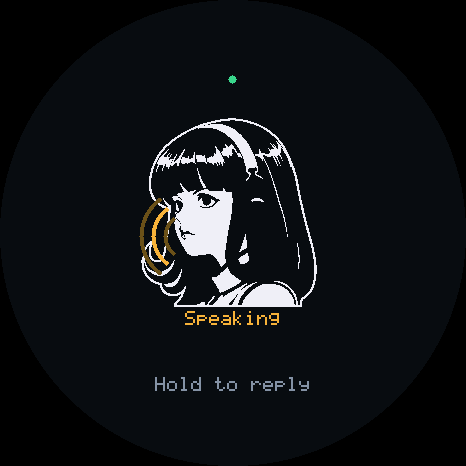
The repo includes Home Assistant and MQTT examples that expose a configured lamp and temperature sensor through a Linux gadget, with pairing instructions and local integration tests.What does the device screen actually show?The display cycles through Ready, Listening, Thinking, and Speaking states so you can see what the gadget is doing while it talks.
The display cycles through Ready, Listening, Thinking, and Speaking states so you can see what the gadget is doing while it talks.What are similar projects?arduino-esp32, muse-gadget-sdk, mongoose, ESP32Marauder, xiaozhi-esp32, esphome, WLED, awesome-esp32
arduino-esp32, muse-gadget-sdk, mongoose, ESP32Marauder, xiaozhi-esp32, esphome, WLED, awesome-esp32Which topics is it in?simulator, esp32-s3, cpp17, mqtt, home-assistant, microcontroller, esp32, voice-assistant, hermes-agent, firmware, iot, raspberry-pi
simulator, esp32-s3, cpp17, mqtt, home-assistant, microcontroller, esp32, voice-assistant, hermes-agent, firmware, iot, raspberry-pi